
Little File Explorer



Descriptions
A small, simple file explorer, designed with compatibility in mind.
Open-sourced and publicly-viewable code for anyone worrying about being locked in or privacy invasion.
It provides multiple functions, including copy and pasting files, multi-file share, etc. More information available in Features section below.
Supports Android 1.0+
Currently under 40 KB.
Previous known as Simple File Explorer (but from martinmimigames).
Location of website: https://martinmimigames.github.io/projects/little-file-explorer.
Installation



Get it from the official website
Screenshots
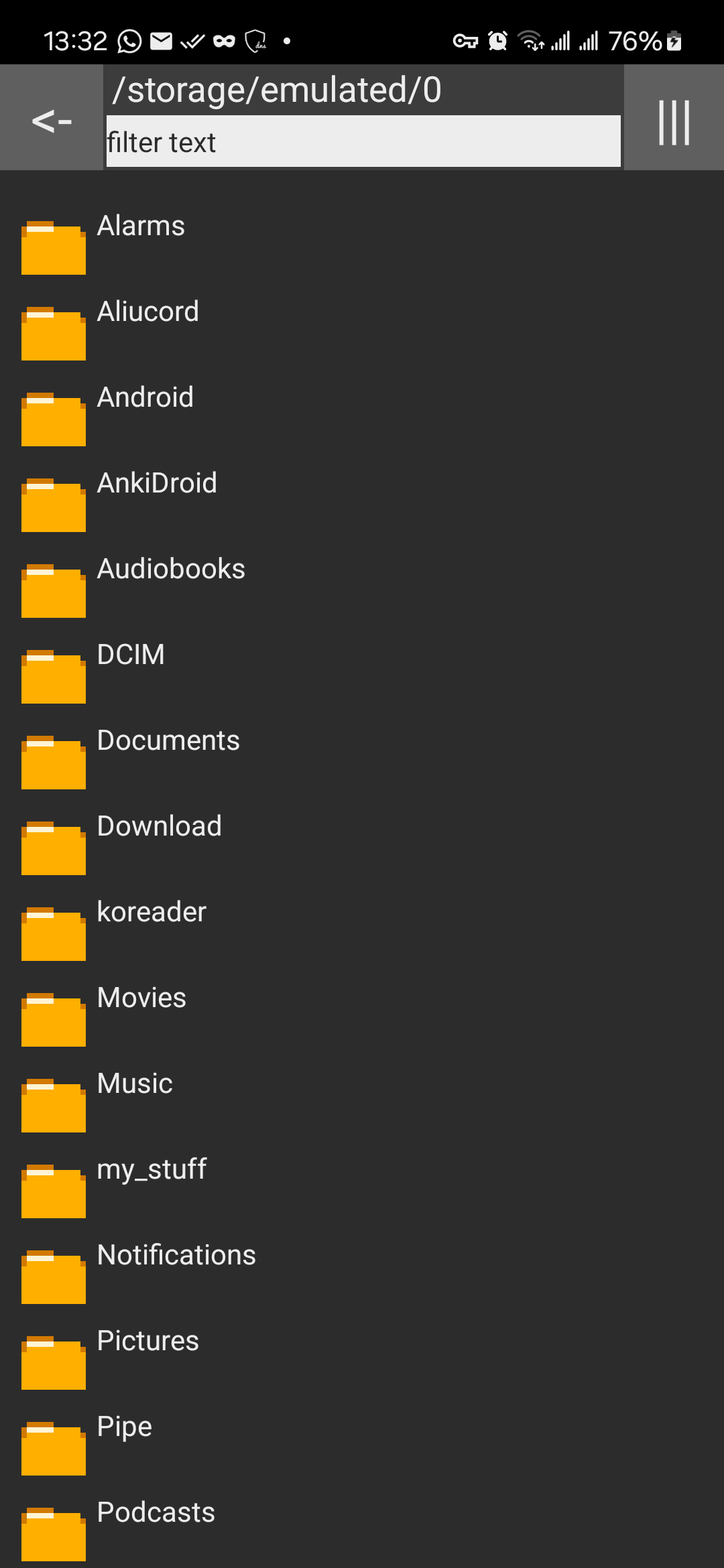
For more screenshots see Gallery.
Features
- FOSS software (Free and Open Source)
- Small (< 40 KB)
- Basic file operations (Cut, copy, paste, rename, delete)
- File name filter
- Name, Modified Time, File Size sort
- Hidden File toggle
- Drive menu to switch between internal and sdcard storage
- Multi-share function
- File/folder path copying
- Minimum permissions
- System/Light/Dark Theme toggle
- MD5 checksum generation and verification
Latest Versions
-
v4.18
- re-release only!! fix update metadata (version code broken since v4.16)
-
v4.17
- Fix file cannot open when external app checks Uri permissions
- Add toast notification for when file cannot be deleted
-
v4.16
- fix read / write grant issues on file:// uri
- lower android version to 4.4 for giving out content:// uri
- revert back button to ascii code for consistency
- switch to sparse array to reduce memory usage
-
v4.15
- Fixed copying pasting not working properly in some cases
- Fixed having grey area in cursors on some text inputs
- Shrunk size
- Reworded notification
-
v4.14
- Fixed filter bug causing crash on startup
- Fixed file not opening on some apps (missing metadata)
- Fixed file size calculation incorrect
- Now clear text input when create new folder
- More natural-looking back button
- Removed unused notification about invalid folder name
- Now uses Future for concurrency management (less race condition)
-
v4.13
- Fixed # in file name error
- Added follow system dark mode
- Fixed crash when open details of large files
- Fixed error when empty clipboard
- Now clear filter when entering/exiting folder
- Added invalid name warning when creating/renaming files
-
v4.12
- added md5 checksum calculation and verification (details page)
- theme is now toggle-based (burger menu)
- app now forget last path (feature reverted)
-
v4.11
- Fix crashing if last exited on a non-existing folder
- Fix unable to exit folders with access denied
- Added details page for files
- Added light mode (follows system settings)
- Added sorting by file size
- Moved storage info to the bottom
- Added slight padding to dialogs
-
v4.10
- Added "toggle hidden" option (available in menu button)
- Added File/Folder name filtering (available on top bar)
- Added display sorting (name, last modified time) (available in menu button)
- Added file path remembering on app exit
- Re-added share button in open list options
- Fixed delete confirmation screen being full screen
-
v4.9
- Fixed sticky selection state after leaving app
- Fixed concurrent directory list modification
- Removed share button from file option menu
- Added duplicate folder warning when creating new folder
- Changed rounding system for storage size display
- Always update storage list quick switch display
- Now use cache thread pool for reducing idle cpu usage and increase performance
-
v4.8
- Allow folder path to be copied to clipboard
- Fixed incorrect handling after path copying
- Fixed delete conformation button being pushed out by long list
- Fixed copying to incorrect directory when moved directory while in progress
-
v4.7
- Added multi-share option (sdk 4+)
- Added file path copy option
- Allow open file with default apps
- Reduced open list button size
- Capitalised buttons
- Changed opener text
-
v4.6
- Fixed not opening when no sdcard inserted
-
v4.5
- smaller apk
- fixed quick selection overlap with menu list
- opening file request by other app now have open prompt
- changed audio png
- back button now go back to parent folder if available
Branches
- main: latest source-code
Development
Project Requirements:
- openjdk-17
- android sdk
To clone project:
# clone the source code
git clone https://github.com/martinmimigames/little-file-explorer

cd little-file-explorer

# cloning the mg.util library (it is included as a git submodule)
git submodule update --init
To build apk, you need a keystore file and a keystore.properties file:
-
keystore.properties: Place on the root directory of the project. -
keystore file: To sign the apk when building.
Run ./gradlew assembleDebug to build a debug apk.
For complete steps if above is not enough, see Dockerfile.
Alternatively, a GitHub action have already been created that uses the above Dockerfile.
Issues
Issues and pull requests are always welcome!
You can submit issues the following ways:
- via Github Issues
- via email: [email protected]
Made by Martinmimigames
Official Website at https://martinmimigames.github.io
Last update of README
Date : 2025-04-17 yyyy-mm-dd
Important
Please read the license!