



Live Actions - GitHub Actions Monitoring 🚀
Real-time monitoring for GitHub Actions workflows and runners. A single self-contained binary.
Overview
Live Actions provides real-time monitoring and analytics for GitHub Actions workflows. It works with GitHub Enterprise Cloud and Server at Enterprise, Organization and Repository levels.
🎯 Core Features
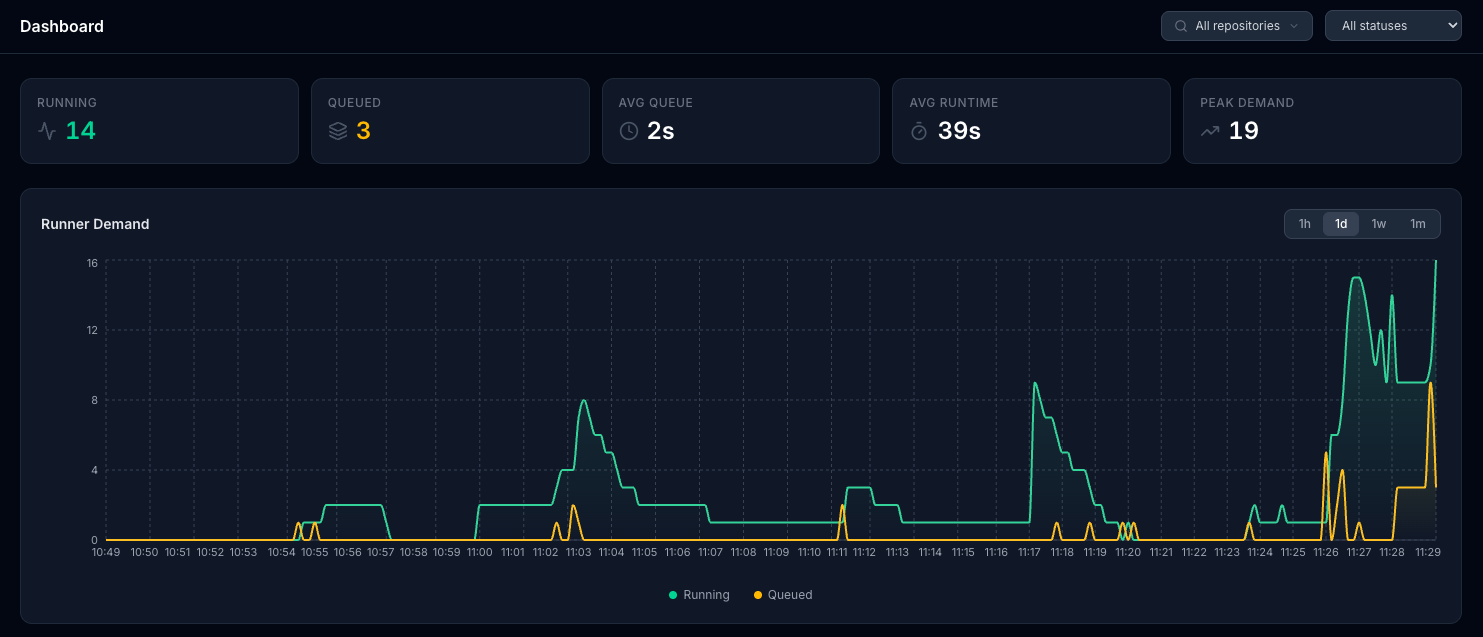
📊 Interactive Dashboard
- Live visualization of runner demand with historical charts
- Configurable tracking for GitHub-hosted vs self-hosted runners
- Visual status for queued, running, completed, and failed jobs
📋 Workflow Runs Management
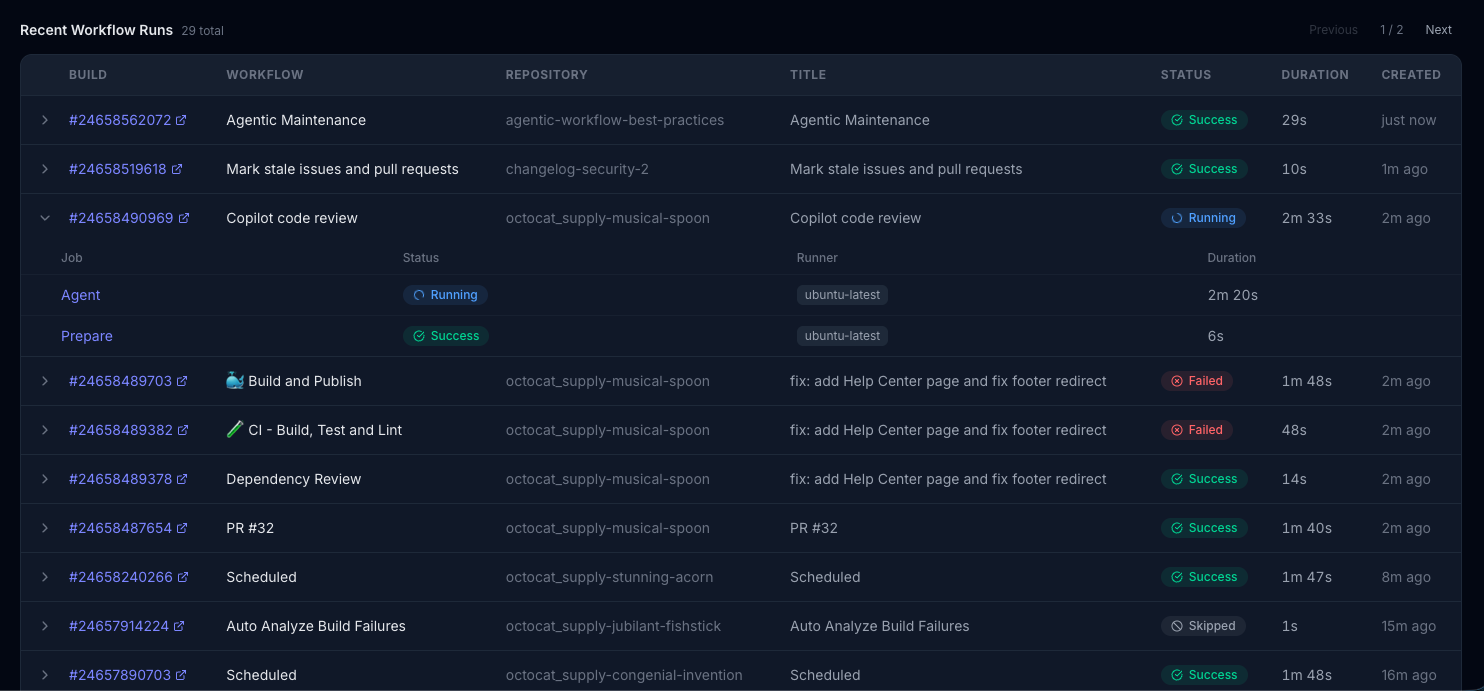
- Complete history of recent workflow executions with pagination
- Click to view individual job information for each workflow run
- Real-time status updates (queued, in_progress, completed, failed)
🔴 Failure Analytics
- Failure rate tracking with total failures, cancellations, and failure percentage
- Failure trend chart showing failures, successes, and cancellations over time
- Top failing jobs table ranked by failure count with direct links to GitHub
🏷️ Runner Labels
- Per-label demand breakdown showing which runner types (e.g.,
ubuntu-latest,self-hosted) have the most demand - Job volume chart by label over time to identify demand patterns
- Label summary table with total jobs, current running/queued counts, and average queue time
⚡ Runner Analytics
- Monitor workflow queue times and peak demand periods
📡 Prometheus Metrics
/metricsendpoint for integration with existing observability platforms- Job conclusions counter (
github_runners_job_conclusions_total) for failure rate alerting - Per-label demand gauges (
github_runners_jobs_by_label) for runner pool monitoring - Per-label queue duration histogram (
github_runners_queue_duration_seconds) for queue time alerting - Compatible with Datadog, New Relic, Splunk, and cloud monitoring services
Quick Start
Option 1: Download Binary
Download the latest release for your platform from the Releases page.
# Set your webhook secret and run
export WEBHOOK_SECRET=$(openssl rand -hex 32)
./live-actions
macOS users: If you see "live-actions-darwin-arm64" can't be opened, run:
xattr -d com.apple.quarantine ./live-actions-darwin-arm64
Open http://localhost:8080 in your browser to access the dashboard.
Option 2: Docker
docker run -p 8080:8080 \
  -e WEBHOOK_SECRET=your_secret_here \
  -v live-actions-data:/app/data \
  ghcr.io/gateixeira/live-actions:latest
Accessing the UI
Once the application is running, open http://localhost:8080 (or your configured port) in a browser. The UI has three tabs:
- Dashboard — Metrics cards (running, queued, avg queue time, peak demand), historical demand chart with period filters, and a paginated workflow runs table with expandable job details.
- Failure Analytics — Summary cards (total failures, failure rate, cancellations), failure trend chart over time, and a ranked table of top failing jobs with links to GitHub.
- Runner Labels — Current demand cards per active runner label, job volume chart by label over time, and a summary table with per-label totals and average queue times.
The UI updates in real time via Server-Sent Events — no manual refresh needed.
Configuration
| Variable | Default | Description |
|---|---|---|
WEBHOOK_SECRET |
(required) | Secret for GitHub webhook validation |
PORT |
8080 |
Server port |
DATABASE_PATH |
./data/live-actions.db |
SQLite database file path |
LOG_LEVEL |
info |
Log level (debug, info, warn, error) |
ENVIRONMENT |
development |
Environment (development or production) |
TLS_ENABLED |
false |
Enable HTTPS cookie flags |
DATA_RETENTION_DAYS |
30 |
How long to keep historical data |
CLEANUP_INTERVAL_HOURS |
24 |
How often to run data cleanup |
WEBHOOK_TRANSPORT |
http |
How webhooks reach the app: http (public endpoint) or websocket (relay, no public endpoint needed) |
GITHUB_TOKEN |
(required for websocket) |
Token with admin:repo_hook (per-repo) or admin:org_hook (per-org) scope. gh auth token works. |
GITHUB_REPO |
owner/repo to subscribe to. Mutually exclusive with GITHUB_ORG and GITHUB_ENTERPRISE. |
|
GITHUB_ORG |
Org login to subscribe to. Mutually exclusive with GITHUB_REPO and GITHUB_ENTERPRISE. |
|
GITHUB_ENTERPRISE |
Enterprise slug to subscribe to. Mutually exclusive with GITHUB_REPO and GITHUB_ORG. See enterprise caveat below. |
|
GITHUB_EVENTS |
workflow_run,workflow_job |
Comma-separated event types for the WebSocket subscription (use * for all). |
GITHUB_HOST |
github.com |
GitHub host. Use your <customer>.ghe.com subdomain for Enterprise Cloud with data residency, or your GHES hostname for GitHub Enterprise Server. |
GitHub Webhook Configuration
-
Generate a secure webhook secret:
openssl rand -hex 32 -
Set the secret in your environment:
export WEBHOOK_SECRET=your_generated_secret_here -
Configure the GitHub webhook:
- Payload URL:
https://your-domain.com/webhook - Secret: Use the secret from step 1
- Events: Select "Workflow jobs" and "Workflow runs" under "Individual events"
- Active: ✅ Enabled
- Payload URL:
Local Development with ngrok
For local development and testing:
# Start the app
make run

# In another terminal, expose via ngrok
ngrok http 8080
Update your GitHub webhook URL to the ngrok HTTPS URL (e.g., https://a1b2c3d4.ngrok.io/webhook).
WebSocket transport (no public endpoint)
If the app runs somewhere GitHub can't reach (behind NAT, on a laptop, in a
private VPC), set WEBHOOK_TRANSPORT=websocket and the app will subscribe
to GitHub's relay over an outbound WebSocket connection. This mirrors the
approach used by the gh webhook CLI:
on startup a temporary webhook is created on the target repo or org with
active=false, the relay is dialed over wss://, the hook is activated,
and deliveries arrive as JSON frames on the open connection. The HTTP
endpoint is not registered when this mode is enabled by the operator on the
GitHub side, but the app keeps POST /webhook available either way so you
can still send manual replays from curl.
Quick start (per-repo):
export WEBHOOK_TRANSPORT=websocket
export GITHUB_TOKEN=$(gh auth token)   # needs admin:repo_hook scope
export GITHUB_REPO=owner/repo
export GITHUB_EVENTS=workflow_run,workflow_job
make run
Per-org:
export WEBHOOK_TRANSPORT=websocket
export GITHUB_TOKEN=$(gh auth token)   # needs admin:org_hook scope
export GITHUB_ORG=my-org
make run
Per-enterprise:
export WEBHOOK_TRANSPORT=websocket
export GITHUB_TOKEN=$(gh auth token)   # needs manage_webhooks (or site_admin) scope
export GITHUB_ENTERPRISE=my-enterprise
make run
Note on enterprise mode: the upstream
gh webhookCLI only supports repo and org hooks; enterprise support here uses the same protocol againstPOST /enterprises/{slug}/hooksbut the relay (webhook.gh.io) is not known to be exercised at the enterprise level. It may or may not return a usablews_urldepending on whether your account has the feature enabled at that scope. Test in a non-critical environment first.
Caveats:
- The relay endpoint (
webhook.gh.io) is GitHub-managed and undocumented; the protocol can change without notice. - Each subscription is single-subscriber: only one process at a time can consume a given hook's WebSocket stream.
- Per-frame HMAC verification is skipped because the relay itself is
authenticated by
GITHUB_TOKENat connection time. - The temporary hook is best-effort deleted on graceful shutdown. A hard
kill (
SIGKILL, OOM) will leak the hook in the repo or org settings; delete it manually under Settings → Webhooks if that happens. - Deliveries arriving over WebSocket are not visible in GitHub's "Recent Deliveries" UI as redeliverable, since the hook stays inactive between reconnects.
API Endpoints
| Endpoint | Description |
|---|---|
GET / |
Dashboard UI |
GET /healthz |
Health check |
GET /metrics |
Prometheus metrics endpoint |
GET /events |
Server-Sent Events for real-time updates |
POST /webhook |
GitHub webhook receiver |
GET /api/analytics/failures?period= |
Failure analytics (hour, day, week, month) |
GET /api/analytics/labels?period= |
Per-label demand breakdown |
Architecture
Live Actions is a single Go binary with all assets embedded:
- Database: SQLite (stored at
DATABASE_PATH, default./data/live-actions.db) - Frontend: React + Tailwind (embedded via
go:embed) - Metrics:
/metricsendpoint for external Prometheus scraping; charts powered by internal SQLite snapshots
No external services required.
Development
make build    # Build frontend + Go binary
make run      # Run the application
make test     # Run tests
make lint     # Run linter
make clean    # Clean build files
🔥 Live Actions vs GitHub's Built-in Metrics
While GitHub offers Actions Usage Metrics, Live Actions provides real-time operational monitoring:
| Feature | GitHub's Metrics | Live Actions |
|---|---|---|
| Job Status Tracking | Completed job analysis | Live job status (queued → in_progress → completed) |
| Update Frequency | Periodic reporting | Instant updates as jobs change state |
| Queue Monitoring | Retrospective queue times | Real-time queue tracking and demand spikes |
| Failure Analytics | Basic counts | Failure rates, trends, and top failing jobs |
| Runner Label Demand | Not available | Per-label demand breakdown and queue times |
Limitations
- Metrics Reconciliation Delays: Slight delays possible due to webhook processing.
- GitHub Webhook Reliability: GitHub may occasionally fail to send events for completed workflow runs.
- Event Ordering: GitHub does not guarantee webhook event order; reordering is handled on a best-effort basis.