
LLM Hub 🤖
LLM Hub is an open-source mobile app for on-device LLM chat and image generation, available for both Android and iOS. It's optimized for mobile usage (CPU/GPU/NPU acceleration) and supports multiple model formats so you can run powerful models locally and privately.
Download

|

|
📸 Demo & Screenshots
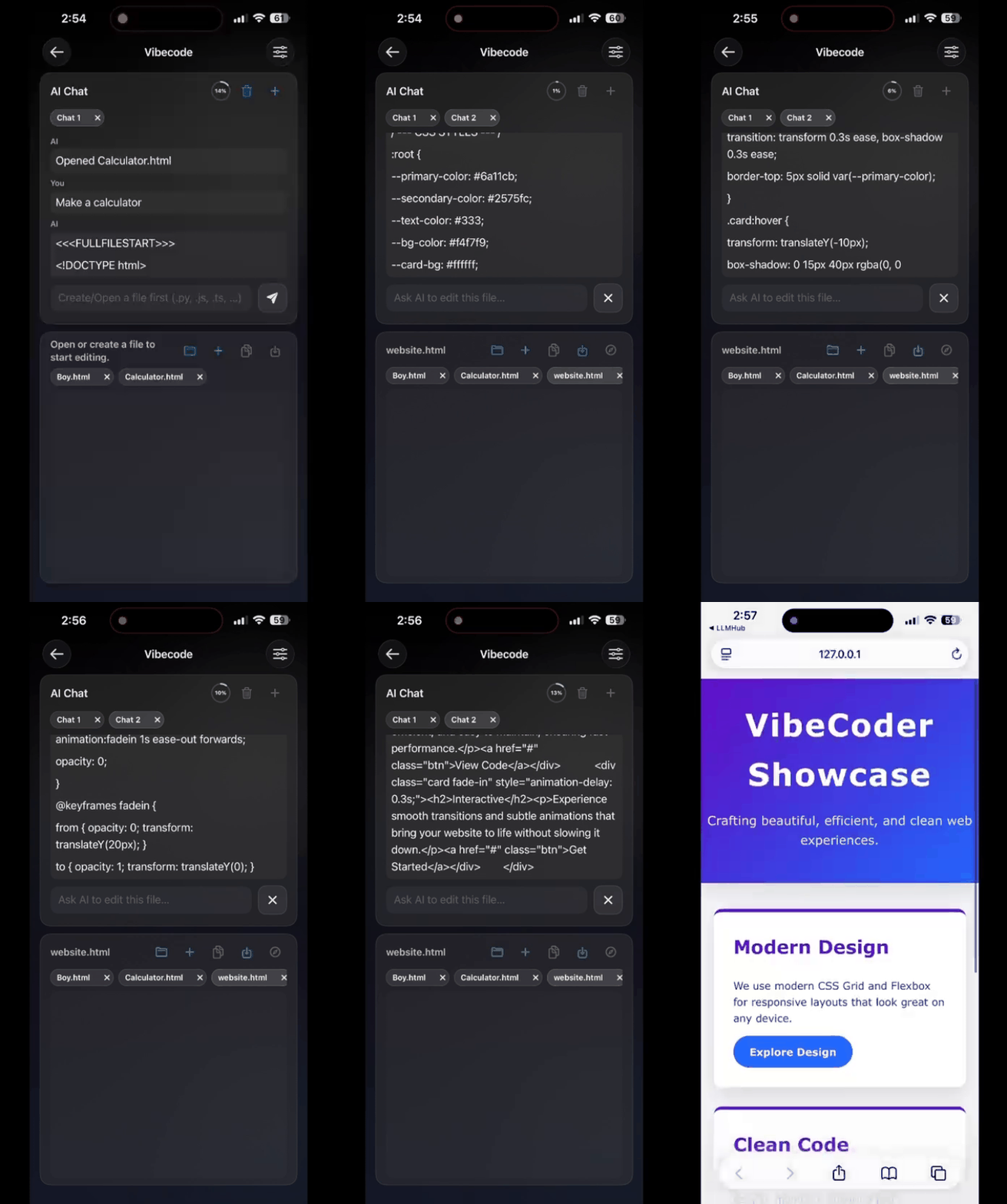
| Vibe Coder Demo on iOS | Image Generation on Android |
|---|---|
 |
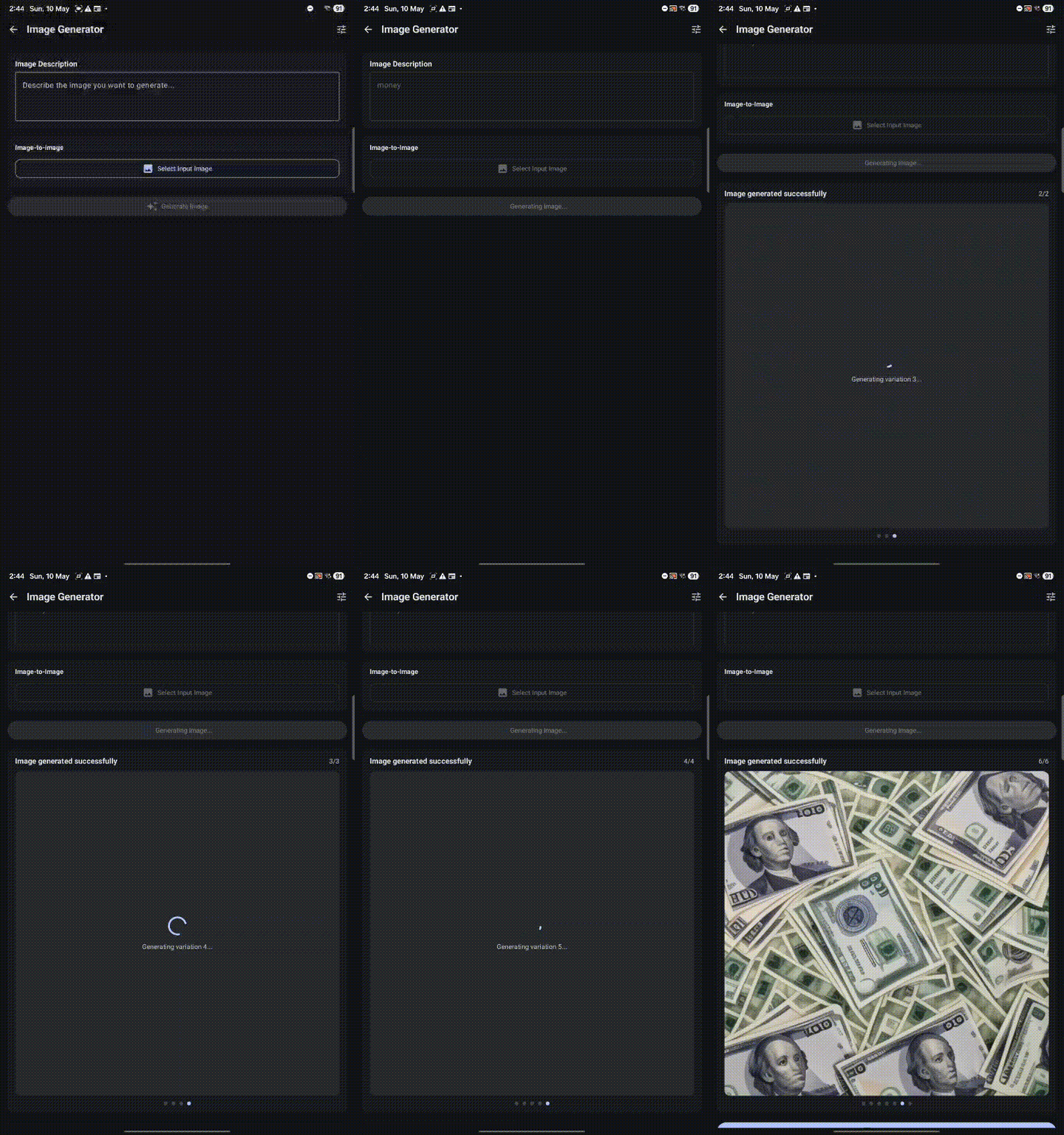 |
| Vibe Coder using Gemma 4 model on iPhone (HTML preview) | Stable Diffusion image generation on Android |
🚀 Features
🛠️ AI Tools Suite
| Tool | Description |
|---|---|
| 💬 Chat | Multi-turn conversations with RAG memory, web search, TTS auto-readout, and multimodal input |
| 🤖 creAItor | [NEW] Design custom AI personas with specialized system prompts (PCTF) in seconds |
| 💻 Vibe Coder | [NEW] Explain your app idea and watch it be built in real-time with live HTML/JS preview |
| ✍️ Writing Aid | Summarize, expand, rewrite, improve grammar, or generate code from descriptions |
| 🎨 Image Generator | Create images from text prompts using Stable Diffusion 1.5 with swipeable gallery |
| 🌍 Translator | Translate text, images (OCR), and audio across 50+ languages - offline |
| 🎙️ Transcriber | Convert speech to text with on-device processing |
| 🛡️ Scam Detector | Analyze messages and images for phishing with risk assessment |
| 🗣️ VibeVoice | [NEW] Hands-free AI voice chat |
🔐 Privacy First
- 100% on-device processing - no internet required for inference
- Zero data collection - conversations never leave your device
- No accounts, no tracking - completely private
- Open-source - fully transparent
⚡ Advanced Capabilities
- GPU/NPU acceleration for fast performance
- Text-to-Speech with auto-readout
- RAG with global memory for enhanced responses
- Import custom models (.task, .litertlm, qnn,.mnn, .gguf)
- Direct downloads from HuggingFace
- 16 language interfaces
Quick Start
- Download from Google Play or the App Store, or build from source
- Open Settings → Download Models → Download or Import a model
- Select a model and start chatting or generating images
Technology
- Android: Kotlin + Jetpack Compose (Material 3), Nexa SDK
- iOS: Swift + SwiftUI, Run Anywhere SDK, Apple Foundation Model
- LLM Runtime: MediaPipe, LiteRT, Llama.cpp (via Run Anywhere SDK)
- Image Gen: Qualcomm QNN
Acknowledgments
- Nexa SDK — GGUF model inference support (credit shown in-app About) ⚡
- Run Anywhere SDK — iOS model runtime and LLM execution framework 🚀
- Google, OpenAI, Meta, Microsoft, IBM, LiquidAI, Mistral, Primsm ML, HuggingFace — model and tooling contributions
Development Setup
Android local development (Android Studio + Gradle)
git clone https://github.com/timmyy123/LLM-Hub.git
cd LLM-Hub/android
./gradlew assembleDebug
./gradlew installDebug
Android-only local configuration
Setting up Hugging Face Token for Development
To use private or gated models, add your HuggingFace token to android/local.properties (do NOT commit this file):
HF_TOKEN=hf_xxxxxxxxxxxxxxxxxxxxxxxxxxxxxxxxxx
Save and sync Gradle in Android Studio; the app will read BuildConfig.HF_TOKEN at build time.
Dev Premium Flag
To skip ads and unlock all premium features locally without a real IAP purchase, add this to android/local.properties:
DEBUG_PREMIUM=true
Set it back to false before making a production build.
Model License Acceptance
Some models on HuggingFace (especially from Google and Meta) require explicit license acceptance before downloading. When building the app locally:
- Ensure you have a valid HuggingFace read token in
local.properties(see above) - For each model you want to download:
- Visit the model's HuggingFace page (e.g., https://huggingface.co/google/gemma-3n-E2B-it-litert-lm)
- Click the "Access repository" or license acceptance button
- Grant consent to the model's license terms
- Try downloading the model in the app again
Note: This is only required for local development builds. The Play Store version uses different authentication and does not require manual license acceptance for each model.
iOS local development (macOS + Xcode)
Prerequisites
- macOS with Xcode installed (use a version that matches your iOS device version)
- An Apple ID signed into Xcode (free Personal Team works for local device testing)
- iPhone with Developer Mode enabled if you run on real hardware
Build and run on iPhone
- Clone the repo and open the iOS project:
git clone https://github.com/timmyy123/LLM-Hub.git
cd LLM-Hub
open ios/LLMHub/LLMHub.xcodeproj
- In Xcode, select target LLMHub → Signing & Capabilities:
- Set your Team
- Set a unique Bundle Identifier (for example:
com.yourname.llmhub) - Keep Automatically manage signing enabled
- Select your iPhone as the run destination and press Run.
If you use Xcode beta
If your phone is on a newer iOS build and requires Xcode beta support, switch CLI tools:
sudo xcode-select -s /Applications/Xcode-beta.app/Contents/Developer
xcodebuild -version
Useful iOS dev troubleshooting
- If signing fails, re-check Team + Bundle Identifier in target settings.
- If build cache acts stale, clean DerivedData:
rm -rf ~/Library/Developer/Xcode/DerivedData/LLMHub-*
- Build logs: Report Navigator (
Cmd+9) - Runtime logs: Debug Console (
Cmd+Shift+Y)
Contributing
- Fork → branch → PR. See CONTRIBUTING.md (or open an issue/discussion if unsure).
License
- Source code is licensed under the PolyForm Noncommercial License 1.0.0.
- You are free to use, study, and build on this project for non-commercial purposes.
- Commercial use — including distributing the app, charging for it, or monetizing it with ads or IAP — is not permitted without explicit written permission from the author.
- Contact [email protected] for commercial licensing enquiries.
Support
- Email: [email protected]
- Issues & Discussions: GitHub
Notes
- This README is intentionally concise — consult
ModelData.ktfor exact model variants, sizes, and format details.