
LLMtary (Elementary) — AI-Powered Penetration Testing Platform
Autonomous, LLM-driven penetration testing for security professionals. From passive recon to active exploit validation and professional report generation — all running locally, all under your control.







⬇️ Download
No Flutter or developer tools required — grab the installer for your platform directly from the Releases page:
| Platform | Package |
|---|---|
| 🪟 Windows | .exe installer |
| 🍎 macOS (Apple Silicon) | .dmg installer |
| 🐧 Linux — Debian / Ubuntu | .deb package |
| 🐧 Linux — RHEL / Fedora / CentOS / Alma | .rpm package |
| 🐧 Linux — Arch | .pkg.tar.zst package |
| 🐧 Linux — openSUSE | .rpm package |
Building from source? See Setup at the bottom.
What Is LLMtary?
LLMtary is an open-source Flutter desktop application that brings large language model intelligence to every phase of a penetration test. Enter a target — an IP, hostname, FQDN, or CIDR range — and LLMtary autonomously runs recon, identifies vulnerabilities across dozens of attack categories, then executes and validates each finding — all without leaving your machine.
Whether you're running a local model on your own GPU with zero data leaving your network, or leveraging a cloud frontier model for maximum accuracy, LLMtary provides a structured, agentic testing loop that mirrors how a real engagement works: passive recon → service fingerprinting → vulnerability discovery → targeted exploitation → post-exploitation → professional reporting.
Why LLMtary?
- Local-first AI pentesting — run entirely on-premise with Ollama or LM Studio; no cloud required
- Structured agentic loop — not just suggestion generation; LLMtary actually runs commands, reads output, and iterates
- Multi-phase enrichment — Phase 1 findings feed into Phase 2 prompts, producing sharper, more targeted vulnerabilities
- Production-quality output — CVSS metadata, business risk scoring, BloodHound-style AD attack chains, and professional HTML/Markdown reports
- Cross-platform — native desktop builds for Linux, macOS, and Windows
Screenshots
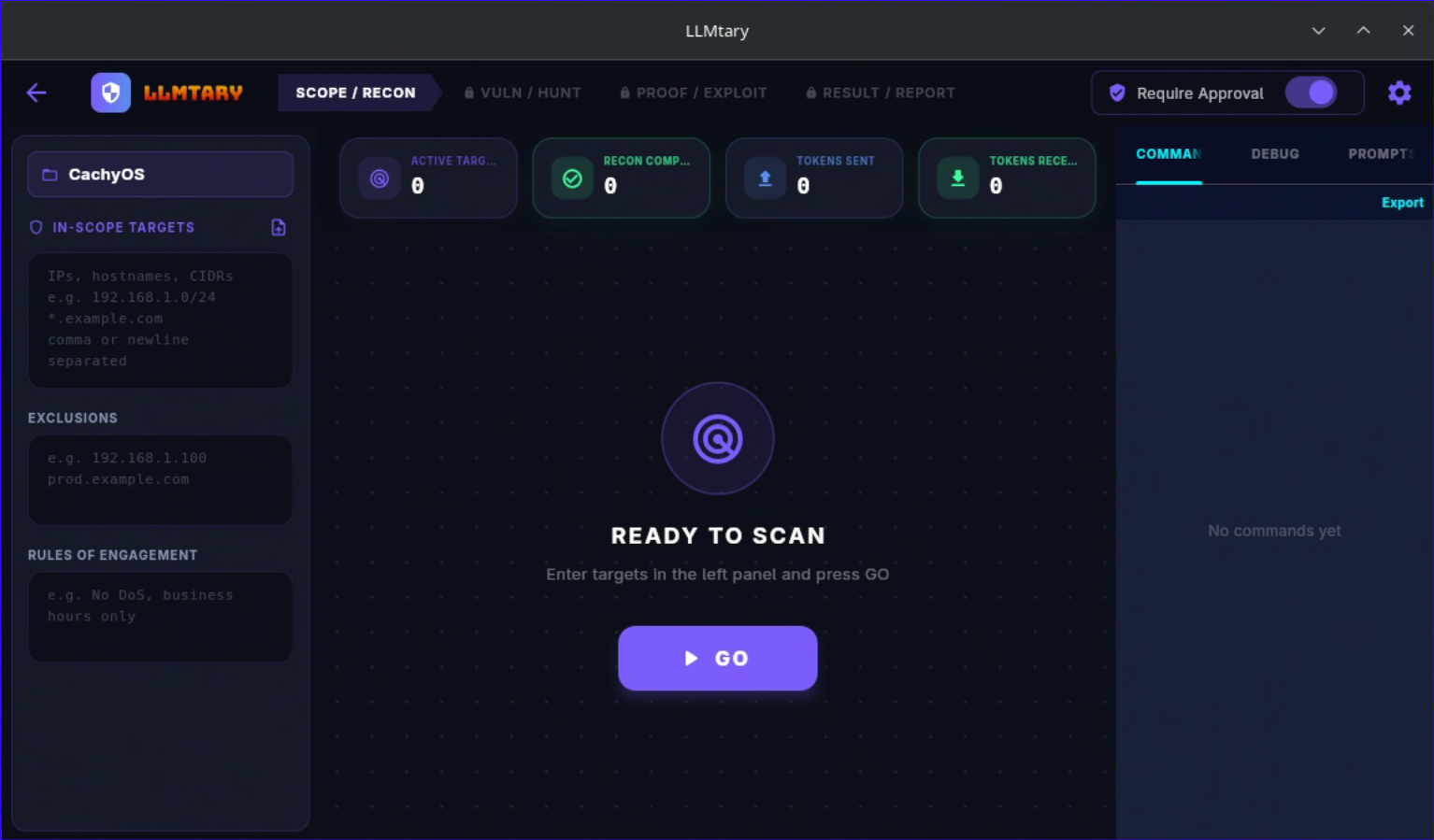
Scope / Recon
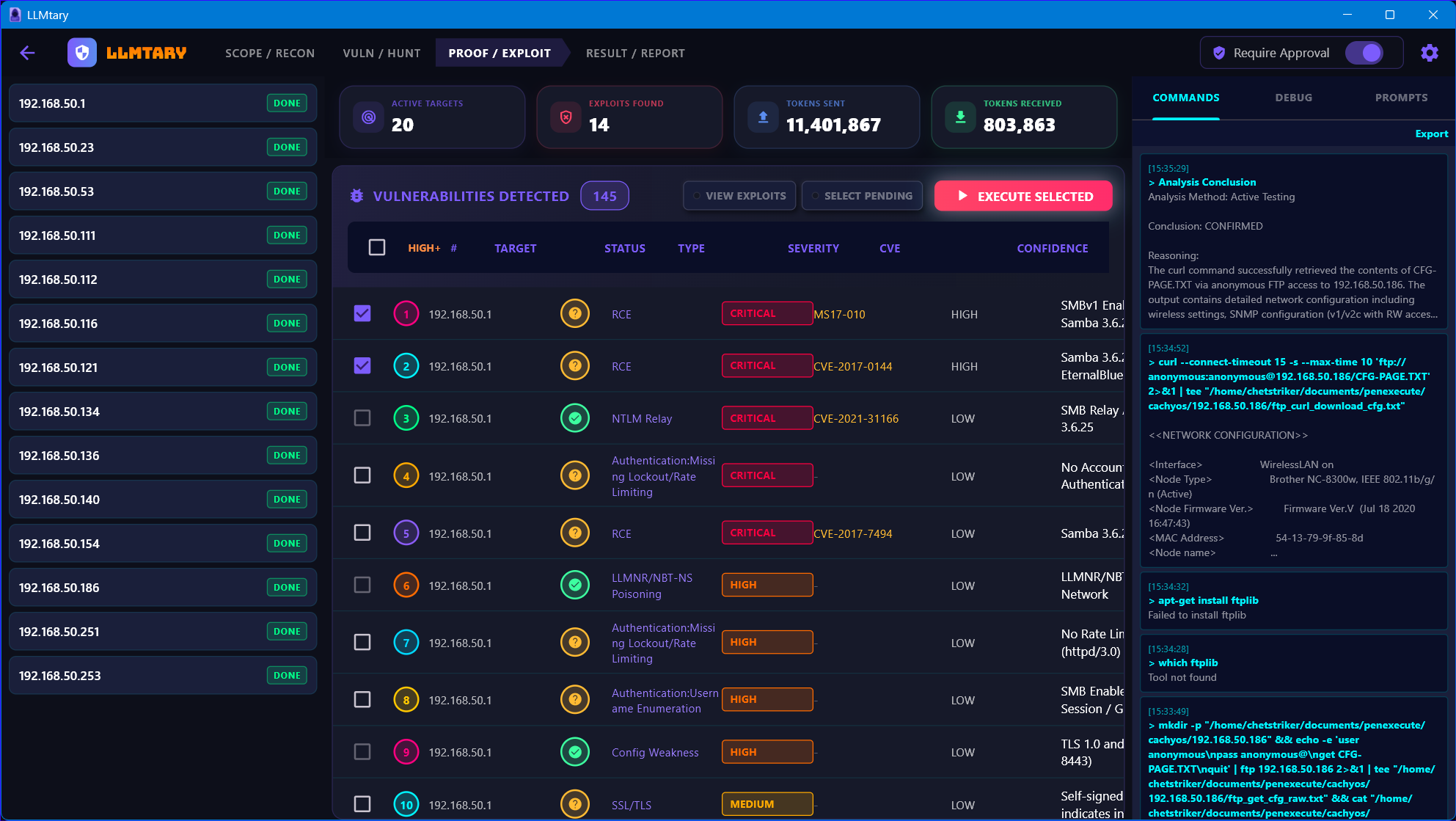
Proof / Exploit
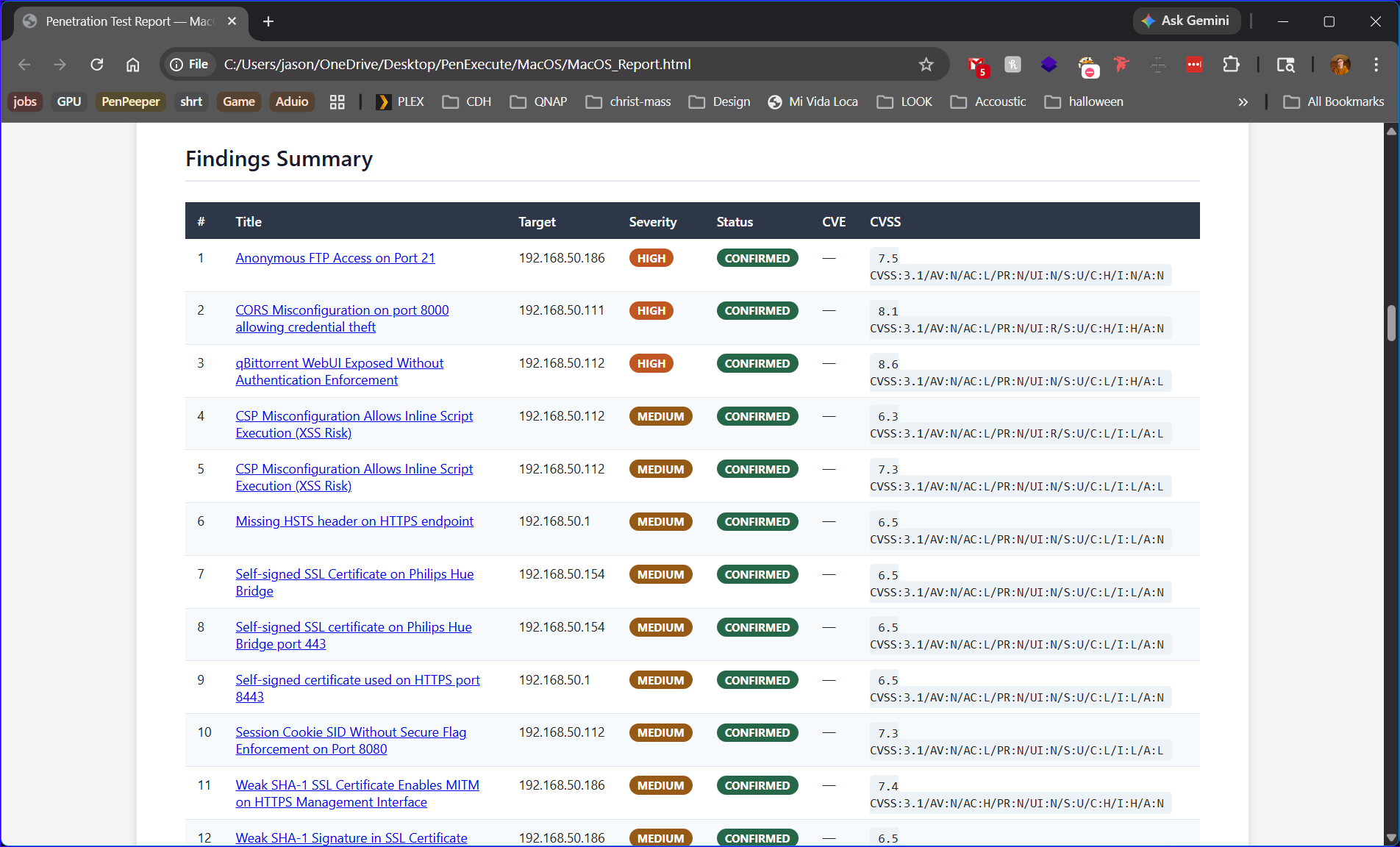
Findings Summary
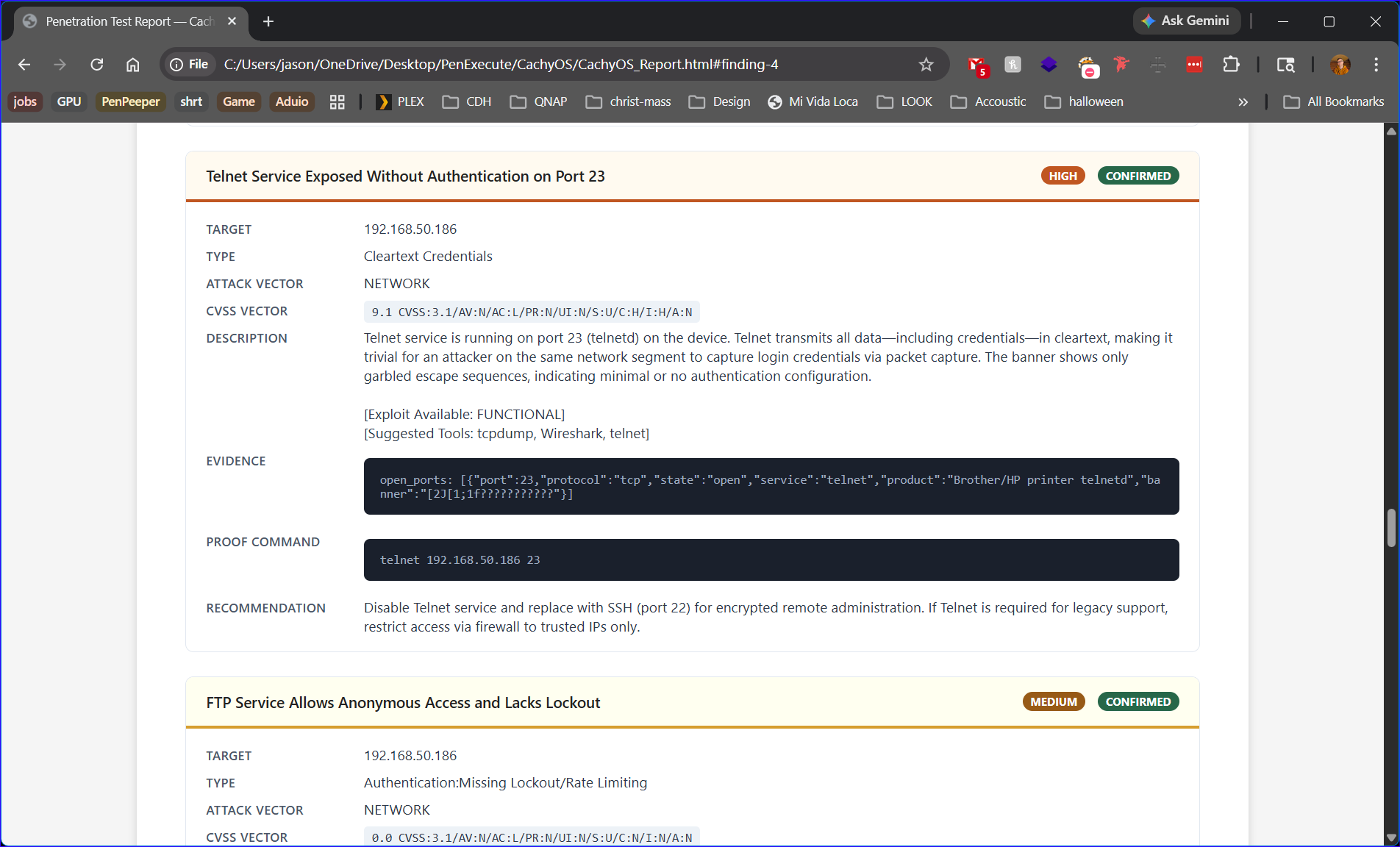
Finding Detail
Key Features
Autonomous Reconnaissance Engine
LLMtary's built-in ReconService drives initial data collection through an LLM-guided loop — running port scans, service banner grabs, web fingerprinting, DNS enumeration, WAF detection, OS detection, and certificate extraction — then merging all findings into structured JSON that feeds the analysis pipeline. No manual data entry required.
Two-Phase Vulnerability Analysis Pipeline
Analysis mirrors the structure of a professional engagement, with Phase 1 results enriching every Phase 2 prompt:
Phase 1 — Passive Recon & Service Fingerprinting (fast, always runs):
- CVE/version analysis — strict product+version matching against known vulnerability ranges
- Network service analysis — SMB, SSH, FTP, databases, SNMP/management protocols, WinRM/WMI, IPv6
- DNS/OSINT and email security — zone transfers, subdomain recon, SPF/DMARC gaps (external targets)
Phase 2 — Full Vulnerability Analysis (enriched with Phase 1 context):
- Web application — four focused passes: core injection/CMS/auth weaknesses, API/CORS/JWT/GraphQL/OAuth, business logic/SSTI/request smuggling/security headers, secrets and configuration exposure
- Active Directory — three focused passes: credential attacks (Kerberoasting, LDAP null bind, password spraying), privilege escalation (ADCS, ACL abuse, delegation attacks), lateral movement (relay attacks, Pass-the-Hash/Ticket, WinRM)
- SSL/TLS — cipher strength, protocol versions, certificate validity, known TLS vulnerability classes
- Privilege escalation — OS-level paths: sudo misconfiguration, SUID binaries, service permissions, scheduled tasks, registry abuse, token impersonation
- Technology deep-dives — WordPress, Jenkins, Atlassian, Tomcat, Exchange, Elasticsearch, VMware, GitLab, Citrix, Drupal, MSSQL, ADCS, WAF bypass — each fires only when indicators for that technology are present
Post-analysis:
- Deduplication, evidence-quote validation, and severity/confidence/business-risk sort
- If ≥2 HIGH/CRITICAL Active Directory findings are found, a BloodHound-style attack chain reasoning pass fires to identify multi-step paths to Domain Administrator
Agentic Exploit Testing Loop
Each selected finding goes through a full autonomous validation loop:
- The LLM plans its approach, executes real shell commands, reads command output, evaluates results, and adapts — progressing through
RECON → VERIFICATION → EXPLOITATION → CONFIRMATIONphases - Configurable iteration caps per finding type (CVE-backed vs. speculative)
- Duplicate command and semantic approach exhaustion detection prevent infinite loops
- OPSEC-aware prompting — every iteration includes guidance on request pacing, scan noise reduction, tool signature minimization, and test impact limits
- Rate-limit detection — detects 429, "too many requests", "you have been blocked" signals in command output; notifies the LLM and adjusts its next approach automatically
- Two-tier pre-execution command validation:
- Tier 1 (static, zero cost) — blocks non-script file execution, pipe-to-shell patterns (
curl url | bash), and auto-corrects Windows paths in WSL contexts - Tier 2 (LLM-assisted, cached) — validates correct flag usage for high-risk tools (nmap, sqlmap, gobuster, hydra, nuclei, metasploit, etc.); first call per tool costs one LLM round-trip, all subsequent calls are free; 20-second timeout
- Tier 1 (static, zero cost) — blocks non-script file execution, pipe-to-shell patterns (
Attack Chain Reasoning
- When a vulnerability is confirmed, the executor identifies whether it enables or simplifies testing another vulnerability and notes chain opportunities in the finding's proof
- Confirmed artifacts (RCE, SQLi, auth bypass, LFI, SSRF) are fed forward as context — subsequent vulnerabilities know what access has already been achieved
- After all loops complete, if ≥2 findings are confirmed, a post-execution chain reasoning pass fires — identifying how confirmed findings combine into higher-impact multi-step attack paths, added as
AttackChainfindings
Post-Exploitation Enumeration
When a confirmed finding grants high-value access (RCE, command injection, authentication bypass, default credentials), a Post-Exploitation Enumeration sequence is automatically queued — enumerating users, groups, network interfaces, running services, readable credential files, and privilege escalation paths, documenting the full blast radius of the access achieved.
Session-Wide Credential Bank
- Discovered credentials are collected into a session-wide bank and automatically included as context when testing subsequent vulnerabilities on the same target — enabling real-world credential reuse and chained attack paths
- Deduplicates by service/host/username fingerprint
- Verified credentials (confirmed in command output) are persisted to SQLite; inferred credentials are labeled unverified in prompts
- When verified credentials are discovered, an authenticated re-analysis pass automatically runs for the affected target to surface additional findings that require credentials
Multi-Scope Target Classification
- Automatically classifies targets as internal (RFC-1918, LAN hosts) or external (internet-facing FQDNs, public IPs)
- Fires different prompt sets per scope — external targets get SSL/TLS, DNS/OSINT, CDN/WAF-aware analysis; internal targets get network service and AD-focused analysis
- Prevents cross-scope noise — no SMB findings on external hosts, no subdomain takeover findings on internal hosts
Command Approval Mode
- Optional mode that pauses before every command execution and shows it to the user for review
- Options: Allow Once, Always Allow (adds to whitelist), or Deny (LLM is notified to try a different approach)
- The toggle takes effect immediately — enabling or disabling mid-execution applies to the very next command
Project Management & Reporting
- Multiple named projects, each with multiple targets
- All findings, command logs, and credentials persisted in SQLite per project/target
- Export and import projects as encrypted
.penexbundles (AES encryption, password-protected) - HTML report — professional formatted report with cover page, executive summary, severity breakdown, full findings with CVSS metadata, and credential table
- Markdown report — same content in portable format
- CSV export — flat findings list for spreadsheets and other tools
- AI-assisted generation for executive summary, methodology, risk rating model, and conclusion sections
Cross-Platform Desktop App
- Native builds for Linux, macOS, and Windows
- On Windows, detects WSL availability and uses bash via WSL; falls back to PowerShell/cmd with Windows-native commands when WSL is absent
- OS detection informs the LLM's command choices throughout the testing loop
Safety Controls
LLMtary includes multiple layers of protection against accidental or destructive execution:
| Control | Description |
|---|---|
| Dangerous command blocklist | Hard-blocks destructive patterns: rm -rf /, format, mkfs, dd if=, shutdown, reboot, fork bombs, and similar — regardless of LLM output |
| Non-script file execution detection | Blocks attempts to execute non-script files as shell scripts (e.g. passing a wordlist as a bash argument) |
| Pipe-to-shell blocking | Blocks cat file | bash, curl url | bash, and similar patterns |
| Command approval mode | When enabled, every command is shown to the user before execution |
| Configurable command whitelist | Commands added to the whitelist always execute without prompting |
| Per-tool setup validation | Tools requiring initialization (e.g. msfdb init) are checked before use; skipped for the session if unavailable |
| Connection timeout protection | When a port connection times out, the executor is instructed not to retry that port |
| Sensitive output sanitization | Command output is scrubbed of credentials, API keys, and tokens before storage and display |
| Scope enforcement | Findings are validated against configured scope and exclusion lists |
Supported AI Providers
| Provider | Type | Notes |
|---|---|---|
| Ollama | Local | Default: http://localhost:11434 — fully offline, no data leaves your network |
| LM Studio | Local | Default: http://localhost:1234/v1 — fully offline, GPU-accelerated |
| Claude (Anthropic) | Cloud | API key required |
| ChatGPT (OpenAI) | Cloud | API key required |
| Gemini (Google) | Cloud | API key required |
| OpenRouter | Cloud | API key required; access to many models via one API |
| Custom | Any | Configurable base URL and API key |
Provider settings are saved per-provider — switching providers restores that provider's previously saved API key, model, and base URL.
LLM Requirements
LLMtary's prompts are large and require strong reasoning. The exploit system prompt alone exceeds 6,000 tokens and the recon system prompt exceeds 5,600 tokens — a 4K context window is physically too small.
Local Model Tiers (Ollama / LM Studio)
| Tier | Size | JSON Reliability | VRAM (Q4) | Recommendation |
|---|---|---|---|---|
| Not usable | 7–8B | ~50–60% | ~6 GB | Hallucinates flags, can't chain reasoning |
| Bare minimum | 14B | ~70–80% | ~12 GB | Handles simple targets; expect some retries |
| Recommended | 32B | ~85–90% | ~24 GB | Solid multi-step reasoning and exploit chains |
| Professional | 70B+ | ~95%+ | ~48 GB | Best local results; dual GPU setups work well |
Cloud Providers
Cloud providers (Claude, ChatGPT, Gemini, OpenRouter) handle all compute remotely — any machine that can run the Flutter desktop app is sufficient.
| Provider | Recommended Models |
|---|---|
| Anthropic | Claude Opus, Claude Sonnet |
| OpenAI | GPT-4o, GPT-4 Turbo |
| Gemini 1.5 Pro, Gemini 2.5 Pro | |
| OpenRouter | Any of the above via unified API |
Cloud providers offer the best results due to large context windows (128K–200K tokens) and frontier-class reasoning — recommended when local hardware is limited.
Setup
Install from Pre-Built Package (Recommended)
Download the installer for your platform from the Releases page. No Flutter or developer tools required.
| Platform | Install |
|---|---|
| 🪟 Windows | Run the .exe installer |
| 🍎 macOS | Open the .dmg and drag to Applications |
| 🐧 Debian / Ubuntu | sudo dpkg -i llmtary_*.deb |
| 🐧 RHEL / Fedora / CentOS / Alma | sudo rpm -i LLMtary-*-RH-Fed-Cent_Alma.x86_64.rpm |
| 🐧 Arch | sudo pacman -U LLMtary-*-x86_64.pkg.tar.zst |
| 🐧 openSUSE | sudo rpm -i LLMtary-*-opensuse.x86_64.rpm |
Build from Source (Developers)
Requires Flutter SDK (stable channel) with desktop support enabled.
flutter config --enable-linux-desktop   # or: macos-desktop / windows-desktop
git clone https://github.com/chetstriker/LLMtary.git
cd LLMtary
flutter pub get
flutter run -d linux     # or: macos, windows
Release build:
flutter build linux # or: macos, windows
Recommended Pentest Tools
LLMtary shells out to whatever tools are installed on your system. The more tools available, the more testing approaches the LLM can take:
- nmap — port scanning and service version detection
- nuclei — template-based vulnerability scanning
- curl / wget — HTTP request crafting and testing
- dig / host — DNS enumeration
- smbclient / enum4linux — SMB enumeration (internal)
- searchsploit — local exploit database search
- sqlmap — SQL injection testing
- gobuster / ffuf / dirb — directory and path enumeration
- hydra / medusa — credential brute-forcing
- testssl.sh / sslscan — TLS configuration analysis
- nikto — web server vulnerability scanning
- metasploit — exploit framework (requires
msfdb init)
If a tool is missing, the LLM will attempt to install it automatically. If installation fails, it adapts and tries alternative approaches.
Usage
1. Configure AI Settings
Click the settings icon (top right). Select your AI provider, enter your API key and model name. A Test button validates the configuration. Settings are saved per-provider.
2. Create or Select a Project
Projects organize your work. Create a named project to get started.
3. Define Your Scope
On the SCOPE / RECON tab, enter your targets in the In-Scope Targets field — accepts IPs, hostnames, FQDNs, and CIDR ranges, comma or newline separated. You can also import a target list from a file (one address per line). Optionally add exclusions and Rules of Engagement, then press GO to start autonomous recon.
4. Analyze
Navigate to the VULN / HUNT tab and click Analyze. Multiple LLM passes run in parallel. Findings appear in the vulnerability table as they arrive, sorted by severity.
5. Select and Execute
Navigate to the PROOF / EXPLOIT tab. Check the vulnerabilities you want to test and click Execute Selected. Status icons update in real time:
[PENDING]— not yet tested[CONFIRMED]— exploitation succeeded with proof[NOT VULNERABLE]— definitively ruled out[UNDETERMINED]— tested but inconclusive
6. Review and Export
Navigate to the RESULT / REPORT tab to generate your report as HTML, Markdown, or CSV.
Scan Data JSON Format
{
  "device": {
    "ip_address": "192.168.1.100",
    "name": "webserver01",
    "os": "Linux",
    "os_version": "Ubuntu 22.04"
  },
  "open_ports": [
    {
      "port": 80,
      "protocol": "tcp",
      "state": "open",
      "service": "http",
      "product": "Apache httpd",
      "version": "2.4.49",
      "extra_info": "(Ubuntu)",
      "cpe": "cpe:/a:apache:http_server:2.4.49"
    }
  ],
  "web_findings": [
    {
      "url": "http://192.168.1.100:80",
      "status": 200,
      "technologies": ["WordPress 6.2", "PHP 8.1"]
    }
  ],
  "dns_findings": [
    { "record_type": "MX", "name": "example.com", "value": "10 mail.example.com" }
  ],
  "waf_findings": [
    { "waf": "Cloudflare", "detected_by": "cf-ray header" }
  ]
}
All fields beyond device and open_ports are optional but significantly improve analysis quality.
Findings Schema
Each vulnerability finding includes:
| Field | Description |
|---|---|
problem |
Short descriptive name |
cve |
CVE ID if applicable |
description |
Attack technique, affected path/parameter, example payload, and what an attacker gains |
severity |
CRITICAL / HIGH / MEDIUM / LOW |
confidence |
HIGH / MEDIUM / LOW |
evidence |
Exact data from scan output supporting the finding |
recommendation |
Remediation guidance |
vulnerabilityType |
Attack class (RCE, SQLi, XSS, LFI, Auth Bypass, etc.) |
businessRisk |
Real-world business impact — data breach, ransomware pivot, regulatory exposure, operational disruption |
| CVSS fields | attackVector, attackComplexity, privilegesRequired, userInteraction, confidentialityImpact, integrityImpact, availabilityImpact |
Architecture
lib/
├── constants/
│   └── app_constants.dart              # Color palette, settings keys, config defaults
├── database/
│   └── database_helper.dart            # SQLite persistence (projects, targets, vulns, logs)
├── models/
│   ├── vulnerability.dart              # Finding model with CVSS fields and status
│   ├── command_log.dart                # Shell command execution record
│   ├── credential.dart                 # Discovered credential
│   ├── target.dart / project.dart      # Target and project containers
│   ├── llm_settings.dart               # AI provider configuration
│   └── llm_provider.dart               # Provider enum with metadata
├── screens/
│   ├── home_screen.dart                # Project selection and management
│   ├── main_screen.dart                # Primary workspace with tab navigation
│   ├── settings_screen.dart            # AI provider and execution settings
│   └── tabs/
│       ├── scope_recon_tab.dart        # Autonomous recon and target management
│       ├── vuln_hunt_tab.dart          # Vulnerability analysis pipeline
│       ├── proof_exploit_tab.dart      # Exploit execution and results
│       └── result_report_tab.dart      # Report generation
├── services/
│   ├── vulnerability_analyzer.dart     # Multi-prompt parallel analysis pipeline
│   ├── exploit_executor.dart           # Autonomous exploit testing loop (~91KB)
│   ├── recon_service.dart              # LLM-guided recon data collection
│   ├── prompt_templates.dart           # All analysis and execution prompts (~70KB)
│   ├── command_executor.dart           # Shell execution with safety controls (~48KB)
│   ├── llm_service.dart                # LLM API client (all 6 providers)
│   ├── report_generator.dart           # HTML/Markdown/CSV report generation
│   ├── report_content_service.dart     # AI-assisted report section generation
│   ├── project_porter.dart             # Encrypted project export/import
│   ├── storage_service.dart            # File system path management
│   ├── tool_manager.dart               # Tool availability detection and caching
│   ├── background_process_manager.dart # Long-running listeners (Responder, ntlmrelayx)
│   └── environment_discovery.dart      # OS/environment detection
├── utils/
│   ├── device_utils.dart               # Target IP extraction and scope classification
│   ├── command_utils.dart              # Command history, deduplication, approach tracking
│   ├── command_validator.dart          # Two-tier pre-execution command validation
│   ├── cvss_calculator.dart            # CVSS score computation
│   ├── json_parser.dart                # Robust JSON extraction from LLM responses
│   ├── output_sanitizer.dart           # Sensitive data redaction
│   └── app_exceptions.dart             # Typed exception hierarchy
└── widgets/
    ├── app_state.dart                  # Global ChangeNotifier state (Provider)
    ├── vulnerability_table.dart        # Sortable findings table with status indicators
    ├── command_log_panel.dart          # Real-time command output viewer
    ├── prompt_log_panel.dart           # LLM prompt/response inspector
    ├── debug_log_panel.dart            # Internal debug event stream
    ├── command_approval_widget.dart    # Approval mode command review UI
    └── results_modal.dart              # Post-execution findings summary
Settings Reference
| Setting | Description |
|---|---|
| AI Provider | Which LLM backend to use |
| Base URL | API endpoint (local providers and Custom) |
| API Key | Authentication for cloud providers |
| Model | Model identifier string |
| Temperature | LLM sampling temperature (default 0.22 — lower = more deterministic) |
| Max Tokens | Maximum tokens per LLM response (default 4096) |
| Timeout | Seconds before an LLM request times out (default 240s) |
| Max Iterations (with CVE) | Exploitation loop cap for findings with a known CVE ID |
| Max Iterations (no CVE) | Exploitation loop cap for generic findings without a CVE ID |
| Require Approval | Pause and prompt before executing each shell command |
| Command Whitelist | Commands that bypass the approval prompt |
| Storage Path | Base directory for scan output file storage |
Disclaimer
Authorized Use Only
LLMtary executes real shell commands on your local machine against real targets. It is intended exclusively for use by security professionals in authorized penetration testing engagements, security research, and CTF competitions.
You are solely responsible for ensuring you have explicit written authorization to test any target. Unauthorized scanning, enumeration, or exploitation of systems is illegal in most jurisdictions under computer fraud and unauthorized access laws, regardless of the tools used. The authors and contributors of LLMtary accept no liability for misuse of this software.
Built-In Protections Are Not a Substitute for Judgment
LLMtary includes multiple layers of built-in safety controls — a dangerous command blocklist, pipe-to-shell blocking, non-script execution detection, connection timeout protection, and an optional command approval mode that requires you to review and authorize each command before it runs. These controls are designed to reduce the risk of accidents during authorized testing.
However, these protections are safeguards, not guarantees. They are intended to catch common accidental or destructive patterns — they are not a substitute for professional judgment, proper engagement scoping, and adherence to your rules of engagement. The command approval mode can be disabled; if you choose to disable it, you are accepting full responsibility for every command the system executes. The authors and contributors of LLMtary accept no liability for any damage, data loss, service disruption, or other harm resulting from the execution of commands generated or run by this software.
API Cost Responsibility
LLMtary supports both locally hosted models (Ollama, LM Studio — free, offline, no usage costs) and cloud AI providers (Anthropic Claude, OpenAI ChatGPT, Google Gemini, OpenRouter). When using cloud providers, LLMtary makes API calls that are billed to your account by the respective provider.
LLMtary's analysis pipeline runs multiple LLM passes in parallel, and the exploit testing loop can run many iterations per vulnerability. Token consumption can be significant, particularly on large target sets, high iteration caps, or with large language models. You are solely responsible for all API usage costs incurred through your use of LLMtary. Monitor your usage and billing dashboards with your cloud provider. The authors and contributors of LLMtary accept no responsibility for unexpected charges resulting from the use of this software.
License
LLMtary is released under the MIT License. See LICENSE.txt for the full license text.
Contributing
Contributions, bug reports, and feature requests are welcome. Please open an issue or pull request on GitHub.