
🤖 Pocket LLM for Android (Offline, Private & Fast)
An Android application that brings local LLM chat, voice input, image input, OCR, and camera-based prompting to your phone.
Pocket LLM runs fully on device after model download. It supports ONNX-based Qwen models, LiteRT-based Qwen 3 and Gemma 4 models, streaming responses, persistent local chat history, markdown-rendered replies, downloadable models, in-app model switching, editable model instructions, and multiple image input workflows.
The app ships as a small base APK. Users download only the models they want, switch between them inside the app, and delete unused models later to save device storage.

🆕 New in v1.5.0
Pocket LLM now supports richer local input workflows beyond text chat.
- 🎙️ Added voice input for faster prompting
- 🖼️ Added image input with OCR and Gemma direct image input
- 📷 Added camera capture with retake, crop, and photo review
- 🗂️ Added a side panel for quick access to previous chats
- 🗑️ Added easier chat deletion from the history panel
- 💾 Added downloaded model deletion to free device storage
- ⚙️ Added editable model instructions with presets and custom prompts
- 🎨 Added dark mode, light mode, accent colors, and chat font-size control
- 📋 Added copy button for assistant responses
➡️ See all releases
🔗 Also Check Out
local-document-intelligence
A privacy-first offline document intelligence system with persistent local RAG, hybrid retrieval, and source-grounded answers.
✨ Features
- 📱 Fully on-device LLM chat for private offline use
- 🎙️ Voice input for faster prompting
- 🖼️ Image input with OCR and Gemma native image support
- 📷 Camera capture with retake, crop, and photo review
- 💬 Persistent multi-turn chat with local history
- 📦 Download, switch, and delete models inside the app
- 🧠 Supports Qwen2.5, Qwen3, Qwen3 LiteRT, and Gemma 4 LiteRT models
- ⚡ ONNX and LiteRT backend support
- 🎛️ Editable model instructions with presets and custom prompts
- 🎨 Light mode, dark mode, accent colors, and adjustable chat font size
- 🔐 Offline after model download, with no telemetry
📸 Inference Preview
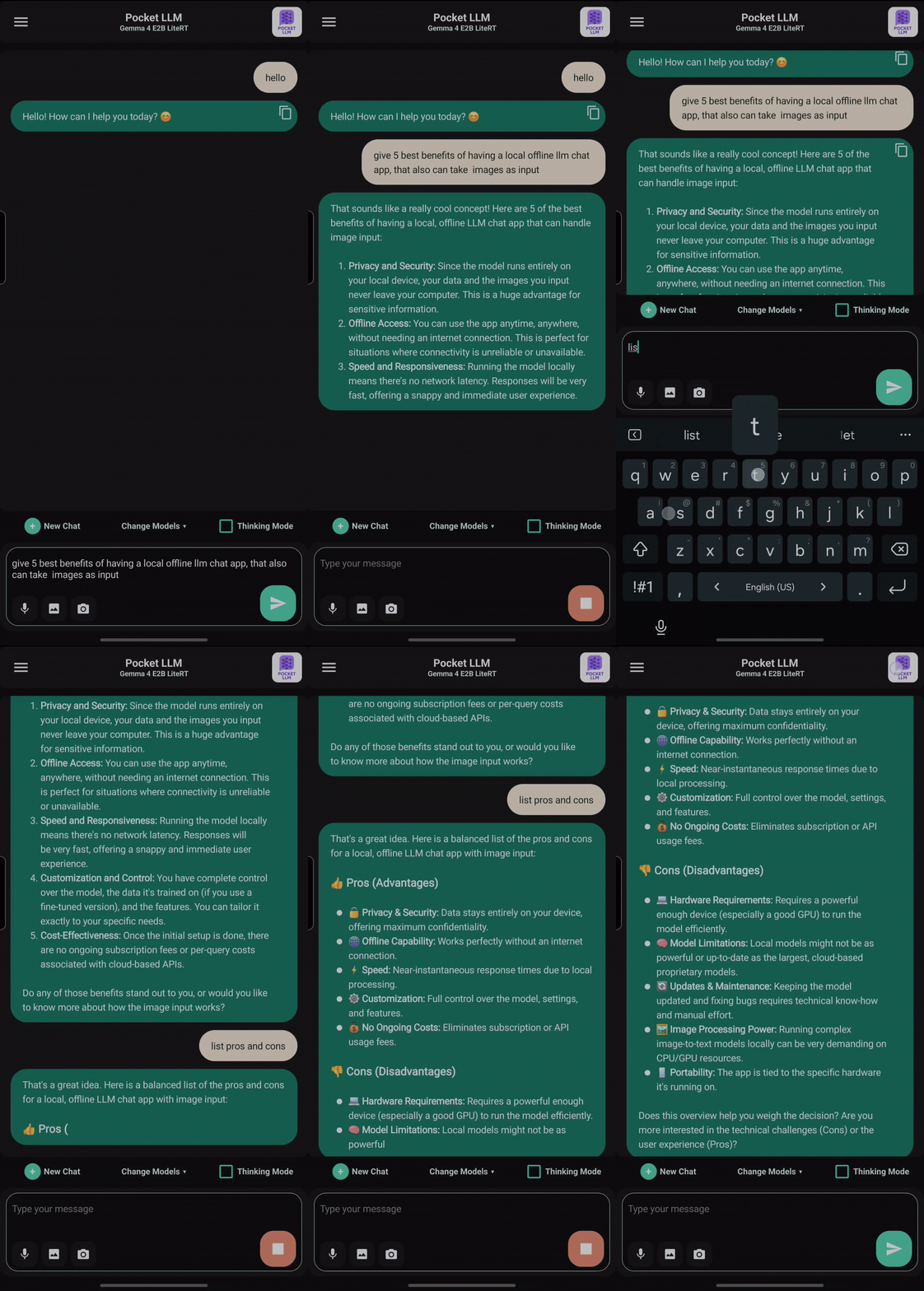 Chat Inference |
Image Support |
New UI |
Figure: Pocket LLM showing offline chat, image input, and the updated Android UI.
📦 Download APK - v1.5.0
The app ships as a single smaller base APK.
➡️ Download APK
Models are not bundled inside the APK. After installation, choose and download the models you want directly on device.
You can download multiple models, switch between them inside the app, and delete unused downloaded models later to free storage.
Available chat models
- Gemma 4 E4B LiteRT - Best for flagship mobiles
- Gemma 4 E2B LiteRT - Best for decent to mid-range mobiles
- Qwen3 0.6B LiteRT - Best for low-end mobiles
- Qwen3 0.6B Q4F16 ONNX - Good for low to mid-range mobiles
- Qwen2.5 0.5B ONNX - Best for mid to high-end mobiles, full precision
Image input support
- OCR mode - Extract text from images
- Gemma native image mode - Send images directly to supported Gemma models
- Camera capture - Take a photo, retake, crop, review, and send it as input
Note: internet is required only for downloading models. Chat, OCR, image input, camera workflows, and inference remain fully on-device after the required models are installed.
🧠 Backend Support
This app supports ONNX-based Qwen models and LiteRT-based Qwen 3 and Gemma 4 models.
Backend overview
- ONNX backend: supports Qwen2.5 and Qwen3
- LiteRT backend: supports Qwen3 and Gemma 4
Thinking Mode
- Qwen3 and Gemma 4 support Thinking Mode
- The toggle is shown only for models that support it
🚀 Why LiteRT
LiteRT is a strong fit for fast local Android chat because:
- It is designed for high-performance on-device LLM deployment
- It supports hardware acceleration, including GPU and NPU acceleration on supported devices
- It helps reduce startup and generation latency for local chat workloads
- It expands the range of practical Android model builds beyond a single backend path
- It fits well with a privacy-first app design focused on fully offline usage
Note: model capability and performance still depend on the specific model build and the hardware of the target Android device.
⚙️ Requirements
- Android Studio
- A physical Android device for deployment and testing
- 4 GB or more RAM for smaller models
- More RAM is recommended for larger models such as Gemma 4 E2B and Gemma 4 E4B
- A temporary internet connection for downloading models inside the app
- Real hardware is preferred; emulators are mainly useful for UI checks
🚀 How to Build & Run
-
Clone this repository.
-
Install the latest Android Studio.
-
Open the Android project folder in Android Studio:
pocket_llm_src/ -
Build and install the app on your Android device.
-
Launch the app.
-
On first launch, choose a model from the built-in model picker.
-
Download the selected model directly inside the app.
-
Start chatting locally on device
📄 License Notice
Gemma 4
Gemma 4 is provided by Google under the Apache License 2.0. Google's Gemma documentation also states that Gemma models are provided with open weights and support responsible commercial use.
- Gemma 4 license: https://ai.google.dev/gemma/apache_2
- Gemma 4 overview: https://ai.google.dev/gemma/docs/core
Qwen models
Qwen model files follow the upstream Qwen license terms.
Please review the original model license before redistribution or commercial use.