
MAC-VO: Metrics-aware Covariance for Learning-based Stereo Visual Odometry
🥇 ICRA 2025 Best Conference Paper Award
🥇 ICRA 2025 Best Paper Award on Robot Perception
🥇 ICRA 2025 Best Paper Award on Robot Perception


[!NOTE]
We plan to release TensorRT accelerated implementation and adapting more matching networks for MAC-VO. If you are interested, please star ⭐ this repo to stay tuned.
[!NOTE]
We provide documentation for extending MAC-VO for extending MAC-VO or using this repository as a boilerplate for your learning-based Visual Odometry.
🔥 Updates
-
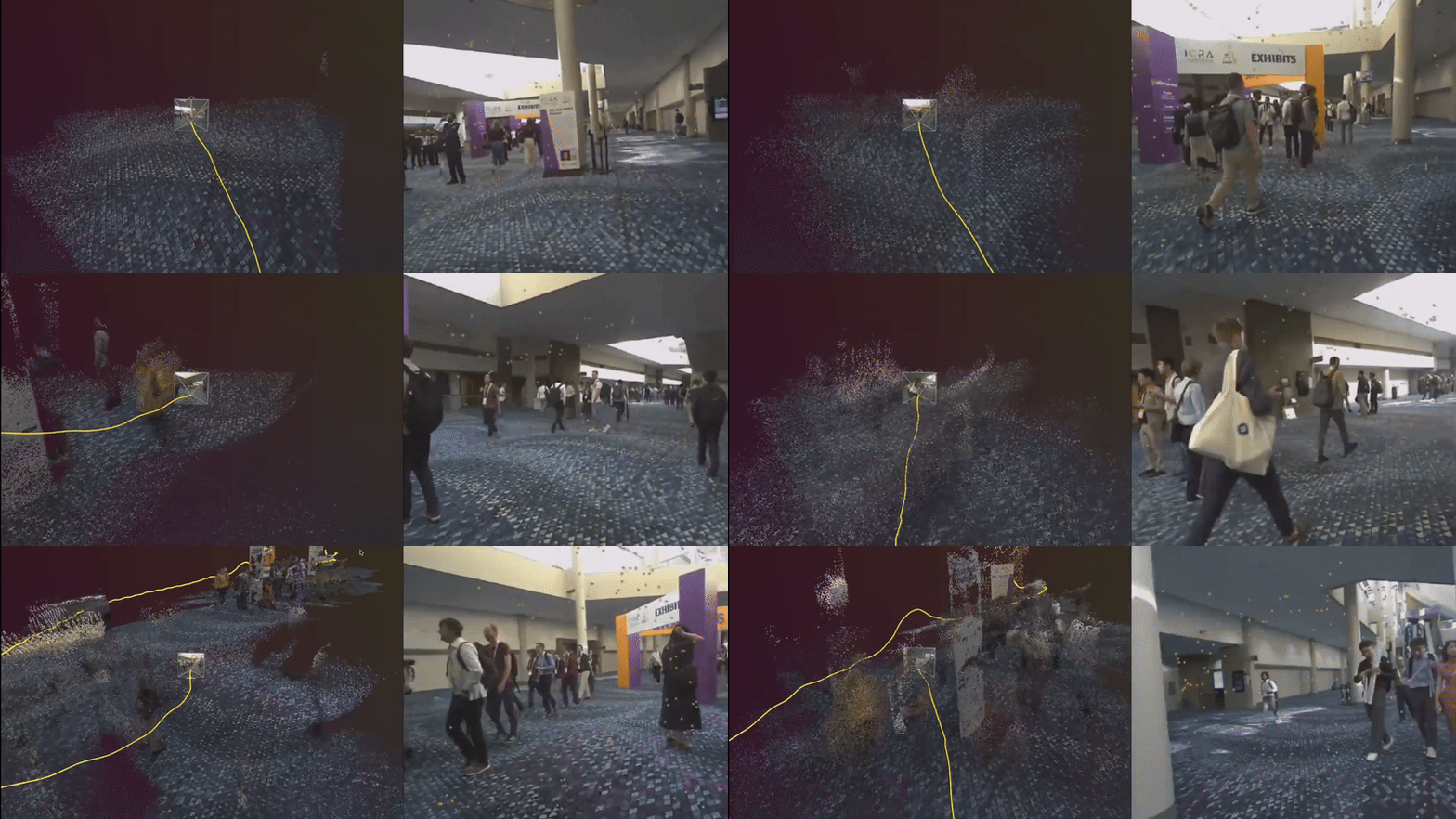
[Nov 2025] We release the trajectories we collected with ZedX Stereo camera on ICRA 2025 conference. See the Additional Trajectory Release in README for more details.
-
[Jun 2025] We release the MAC-VO Fast Mode - with faster pose graph optimization and mixed-precision inference, we achieve 2x speedup compared to previous version and reach speed of 12.5fps on 480x640 images.
See
Config/Experiment/MACVO/MACVO_Fast.yamlfor detail.Original example is also boosted from 5fps to 7fps and the config file is moved to
MACVO_Performant.yaml. -
[Apr 2025] Our work was nominated as the ICRA 2025 Best Paper Award Finalist (top 1%)! Keep an eye on our presentation on May 20, 16:35-16:40 Room 302. We also plan to provide a real-world demo at the conference.
-
[Mar 2025] We boost the performance of MAC-VO with a new backend optimizer, the MAC-VO now also supports dense mapping without any additional computation.
-
[Jan 2025] Our work is accepted by the IEEE International Conference on Robotics and Automation (ICRA) 2025. We will present our work at ICRA 2025 in Atlanta, Georgia, USA.
-
[Nov 2024] We released the ROS-2 integration at https://github.com/MAC-VO/MAC-VO-ROS2 along with the documentation at https://mac-vo.github.io/wiki/ROS/
Download the Repo
Clone the repository using the following command to include all submodules automatically.
git clone https://github.com/MAC-VO/MAC-VO.git --recursive
🔧 Minimum Requirements
| Component | Minimum Version | Notes |
|---|---|---|
| CUDA Runtime | ≥ 12.4 | Dockerfile installs correct version |
| Python | ≥ 3.10 | |
| VRAM | ≥ 6 GB | 640×480; fast mode (mixed precision) needs 2.7GB |
📦 Installation & Environment
Environment
-
Docker Image
$ docker build --network=host -t macvo:latest -f Docker/Dockerfile . -
Virtual Environment
You can setup the dependencies in your native system. MAC-VO codebase can only run on Python 3.10+. See
requirements.txtfor environment requirements.How to adapt MAC-VO codebase to Python < 3.10?
The Python version requirement we required is mostly due to the
matchsyntax used and the type annotations.The
matchsyntax can be easily replaced withif ... elif ... elsewhile the type annotations can be simply removed as it does not interfere runtime behavior.
Pretrained Models
All pretrained models for MAC-VO, stereo TartanVO and DPVO are in our release page. Please create a new folder Model in the root directory and put the pretrained models in the folder.
$ mkdir Model
$ wget -O Model/MACVO_FrontendCov.pth https://github.com/MAC-VO/MAC-VO/releases/download/model/MACVO_FrontendCov.pth
$ wget -O Model/MACVO_posenet.pkl https://github.com/MAC-VO/MAC-VO/releases/download/model/MACVO_posenet.pkl
🚀 Quick Start: Run MAC-VO on Demo Sequence
Test MAC-VO immediately using the provided demo sequence. The demo sequence is a selected from the TartanAir v2 dataset.
1/4 Download the Data
- Download a demo sequence through Google Drive.
- Download pre-trained model for frontend model and posenet.
2/4 Start the Docker
To run the Docker:
$ docker run --gpus all -it --rm -v [DATA_PATH]:/data -v [CODE_PATH]:/home/macvo/workspace macvo:latest
To run the Docker with visualization:
$ xhost +local:docker; docker run --gpus all -it --rm -e DISPLAY=$DISPLAY -v /tmp/.X11-unix:/tmp/.X11-unix -v [DATA_PATH]:/data -v [CODE_PATH]:/home/macvo/workspace macvo:latest
3/4 Run MAC-VO
We will use Config/Experiment/MACVO/MACVO_example.yaml as the configuration file for MAC-VO.
-
Change the
rootin the data config file 'Config/Sequence/TartanAir_example.yaml' to reflect the actual path to the demo sequence downloaded. -
Run with one of the following command:
Performant Mode - best performance with moderate speed (7.5fps on 480x640 image)
$ cd workspace
$ python3 MACVO.py --odom Config/Experiment/MACVO/MACVO_Performant.yaml --data Config/Sequence/TartanAir_example.yaml
Fast Mode - slightly degraded performance (<5% increase in RTE and ROE) with most speed (12.5fps on 480x640 image)
$ cd workspace
$ python3 MACVO.py --odom Config/Experiment/MACVO/MACVO_Fast.yaml --data Config/Sequence/TartanAir_example.yaml
[!NOTE]
See
python MACVO.py --helpfor more flags and configurations.The demo sequence is RGB‑only. If your dataset includes depth.npy and/or flow.npy, set both flags to true.
4/4 Visualize and Evaluate Result
Every run will produce a Sandbox (or Space). A Sandbox is a storage unit that contains all the results and meta-information of an experiment. The evaluation and plotting script usually requires one or more paths of sandbox(es).
Evaluate Trajectory
Calculate the absolute translate error (ATE, m); relative translation error (RTE, m/frame); relative orientation error (ROE, deg/frame); relative pose error (per frame on se(3)).
$ python -m Evaluation.EvalSeq --spaces SPACE_0, [SPACE, ...]
Plot Trajectory
Plot sequences, translation, translation error, rotation and rotation error.
$ python -m Evaluation.PlotSeq --spaces SPACE_0, [SPACE, ...]
🛠️ Additional Commands and Utility
-
Run MAC-VO (Ours method) on a Single Sequence
$ python MACVO.py --odom ./Config/Experiment/MACVO/MACVO.yaml --data ./Config/Sequence/TartanAir_abandonfac_001.yaml -
Run MAC-VO for Ablation Studies
$ python MACVO.py --odom ./Config/Experiment/MACVO/Ablation_Study/[CHOOSE_ONE_CFG].yaml --data ./Config/Sequence/TartanAir_abandonfac_001.yaml -
Run MAC-VO on Test Dataset
$ python -m Scripts.Experiment.Experiment_MACVO --odom [PATH_TO_ODOM_CONFIG] -
Run MAC-VO Mapping Mode
$ python MACVO.py --odom ./Config/Experiment/MACVO/MACVO_MappingMode.yaml --data ./Config/Sequence/TartanAir_abandonfac_001.yaml
📊 Plotting and Visualization
We used the Rerun visualizer to visualize 3D space including camera pose, point cloud and trajectory.
-
On Machine with GUI
-
Run
MACVO.pywith the following command line$ python MACVO.py --useRR --odom [ODOM_CONFIG] --data [DATA_CONFIG]A rerun visualizer should pop up with the trajectory and per-frame point cloud & tracking features visualized.
-
To accumulate the point cloud for dense mapping visualization, please follow the instruction here: https://github.com/MAC-VO/MAC-VO/issues/4#issuecomment-2495620352
-
-
On Headless Machine
- Install the
rerun_sdkpython package on both your machine (with GUI) and remote headless environment. Also setup a port forwarding from remote port9877to your local machine port9877. - Start a rerun server by rerun --serve & on the headless machine
- On your machine (with GUI), run rerun ws://localhost:9877 to connect to the remote visualization server. You should see "2 sources connected" on the top right corner of visualizer if everything works smoothly.
- On the headless machine, run
$ python MACVO.py --useRR --odom [ODOM_CONFIG] --data [DATA_CONFIG] - To accumulate the point cloud for dense mapping visualization, please follow the instruction here: https://github.com/MAC-VO/MAC-VO/issues/4#issuecomment-2495620352
- Install the
📈 Baseline Methods
We also integrated two baseline methods (DPVO, TartanVO Stereo) into the codebase for evaluation, visualization and comparison.
Expand All (2 commands)
-
Run DPVO on Test Dataset
$ python -m Scripts.Experiment.Experiment_DPVO --odom ./Config/Experiment/Baseline/DPVO/DPVO.yaml -
Run TartanVO (Stereo) on Test Dataset
$ python -m Scripts.Experiment.Experiment_TartanVO --odom ./Config/Experiment/Baseline/TartanVO/TartanVOStereo.yaml
🤗 Customization, Extension and Future Developement
This codebase is designed with modularization in mind so it's easy to modify, replace, and re-configure modules of MAC-VO. One can easily use or replase the provided modules like flow estimator, depth estimator, keypoint selector, etc. to create a new visual odometry.
We welcome everyone to extend and redevelop the MAC-VO. For documentation please visit the Documentation Site
Custom Data Format
To test MAC-VO on your custom data format, you use GeneralStereo dataloader class in DataLoader/Dataset/GeneralStereo.py as a starting point.
This dataloader class corresponds to the Config/Sequence/Example_GeneralStereo.yaml configuration file, where you can manually set the camera intrinsic and stereo basline etc.
Coordinate System in this Project
PyTorch Tensor Data - All images are stored in BxCxHxW format following the convention. Batch dimension is always the first dimension of tensor.
Pixels on Camera Plane - All pixel coordinates are stored in uv format following the OpenCV convention, where the direction of uv are "east-down". Note that this requires us to access PyTorch tensor in data[..., v, u] indexing.
World Coordinate - NED convention, +x -> North, +y -> East, +z -> Down with the first frame being world origin having identity SE3 pose.
➕ Additional Trajectories Release
Upon request we released the Zed Stereo dataset we collected on the ICRA 2025 conference. You can now download them using the command:
pip install minio

python -m Scripts.AdHoc.Download_ICRA25_Zed_Data --dst [Download_Destination]
After download, unzip the trajectories and modify the path in Config/Sequence/ICRA25_Zed_0250.yaml. Run MAC-VO (fast mode) with:
python MACVO.py --data ./Config/Sequence/ICRA25_Zed_0250.yaml --odom ./Config/Experiment/MACVO/MACVO_Fast.yaml --useRR
⚠️ To reproduce the result we show on website and presentation, it is recommended to run the trajectory in its full resolution
980x980.
Citation / BibTex
If you find our work useful, please consider cite us with
@inproceedings{qiu2025mac,
 title={MAC-VO: Metrics-Aware Covariance for Learning-Based Stereo Visual Odometry mac-vo. github. io},
 author={Qiu, Yuheng and Chen, Yutian and Zhang, Zihao and Wang, Wenshan and Scherer, Sebastian},
 booktitle={2025 IEEE International Conference on Robotics and Automation (ICRA)},
 pages={3803--3814},
 year={2025},
 organization={IEEE}
}