
MacNTop
A macOS menu bar system monitor with retro CRT terminal aesthetics.


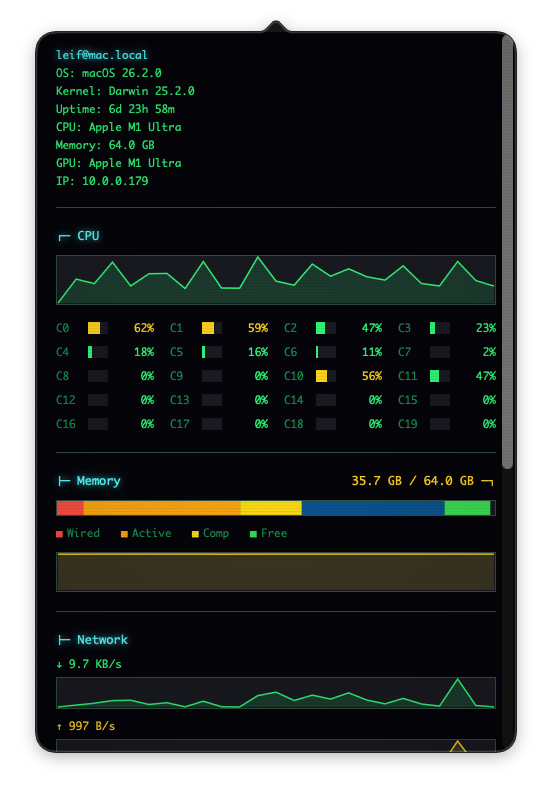 |
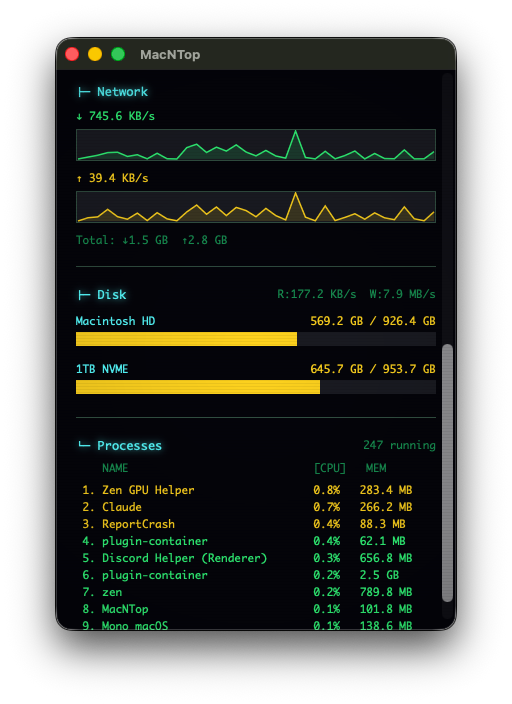 |
| Menu Bar Popover | Floating Window |
Features
Live Monitoring
- CPU Usage - Per-core usage with sparkline graphs
- Memory - Active, wired, compressed breakdown with segmented bar
- Network - Upload/download speeds with real-time sparklines
- Disk - Volume usage and I/O speeds
- Processes - Top 10 by CPU or memory usage
Retro CRT Aesthetics
- Phosphor glow effects on text
- Scanline overlay
- Vignette darkening at edges
- Multiple color themes
Themes
- Retro Green - Classic green phosphor CRT
- Amber CRT - Warm amber terminal
- Blue Ice - Cool blue tones
- Matrix - Bright green on black
- Dracula - Purple/pink dark theme
- Light - Light mode for daytime
Installation
Requirements
- macOS 14.0 (Sonoma) or later
- Swift 6.0+ / Xcode 16+ (for building)
Build from Source
git clone https://github.com/CorvidLabs/MacNTop.git
cd MacNTop
swift build -c release
The built app will be at .build/release/MacNTop.
Run
swift run
Or after building:
.build/release/MacNTop
Usage
Menu Bar
- Left-click - Toggle the dashboard popover
- Right-click - Open context menu
Context Menu Options
- Open in Window - Detach dashboard to a floating window
- Theme - Select from 6 color themes
- About MacNTop - Version info
- Quit MacNTop - Exit the app
Window Mode
The dashboard can be opened in a standalone floating window that stays on top:
- Right-click → "Open in Window"
- Window persists across spaces
- Receives live updates like the popover
- Right-click → "Close Window" to return to popover-only mode
Dashboard
- CPU/MEM toggle in process list - Click to sort by CPU or Memory
- Scroll to see all sections
Keyboard Shortcuts
- ⌘W - Toggle window mode (from context menu)
- ⌘Q - Quit (from context menu)
Architecture
MacNTop/
├── Sources/MacNTop/
│   ├── App/
│   │   ├── AppDelegate.swift          # Entry point
│   │   └── Application+State.swift    # AppState theme management
│   ├── MenuBar/
│   │   ├── StatusBarController.swift  # NSStatusItem + popover + window
│   │   └── StatusBarIconRenderer.swift
│   ├── Models/                        # Sendable data models
│   ├── Services/                      # Actor-based monitors
│   ├── Core/
│   │   └── MetricsCoordinator.swift   # Orchestrates collection
│   ├── Views/
│   │   ├── DashboardWindow.swift      # Standalone floating window
│   │   ├── DashboardView.swift        # Main dashboard layout
│   │   └── ...                        # Component views
│   └── Utilities/
│       └── ByteFormatter.swift
├── Tests/MacNTopTests/                # Unit tests
└── Package.swift
Key Technologies
- Swift Concurrency - Actors for thread-safe monitoring
- AppKit - Native macOS UI
- AppState - State management and persistence
- IOKit - Low-level system metrics
System APIs Used
| Metric | API |
|---|---|
| CPU | host_processor_info() |
| Memory | host_statistics64(HOST_VM_INFO64) |
| Network | getifaddrs() with if_data |
| Disk | statfs(), IOKit IOBlockStorageDriver |
| Processes | proc_listallpids(), proc_pidinfo() |
Dependencies
- AppState - Thread-safe state management
Configuration
Theme selection is persisted automatically via UserDefaults.
Development
Code Style
This project follows CorvidLabs Swift Conventions:
- Explicit access control on all declarations
- K&R brace style
- No force unwrapping
- async/await for concurrency
- Sendable conformance for cross-boundary types
Building Documentation
swift package generate-documentation
Running Tests
swift test
Privacy
MacNTop runs entirely locally. No data is collected or transmitted.
Known Limitations
- Requires distribution outside App Store (uses restricted APIs)
- Disk I/O monitoring requires IOKit access
- Process monitoring limited to current user's processes
Contributing
- Fork the repository
- Create a feature branch
- Follow CorvidLabs Swift conventions
- Submit a pull request
License
MIT License - see LICENSE for details.
Credits
Built by CorvidLabs
Inspired by: