
Map Tiles Downloader
A super easy to use GUI for downloading map tiles
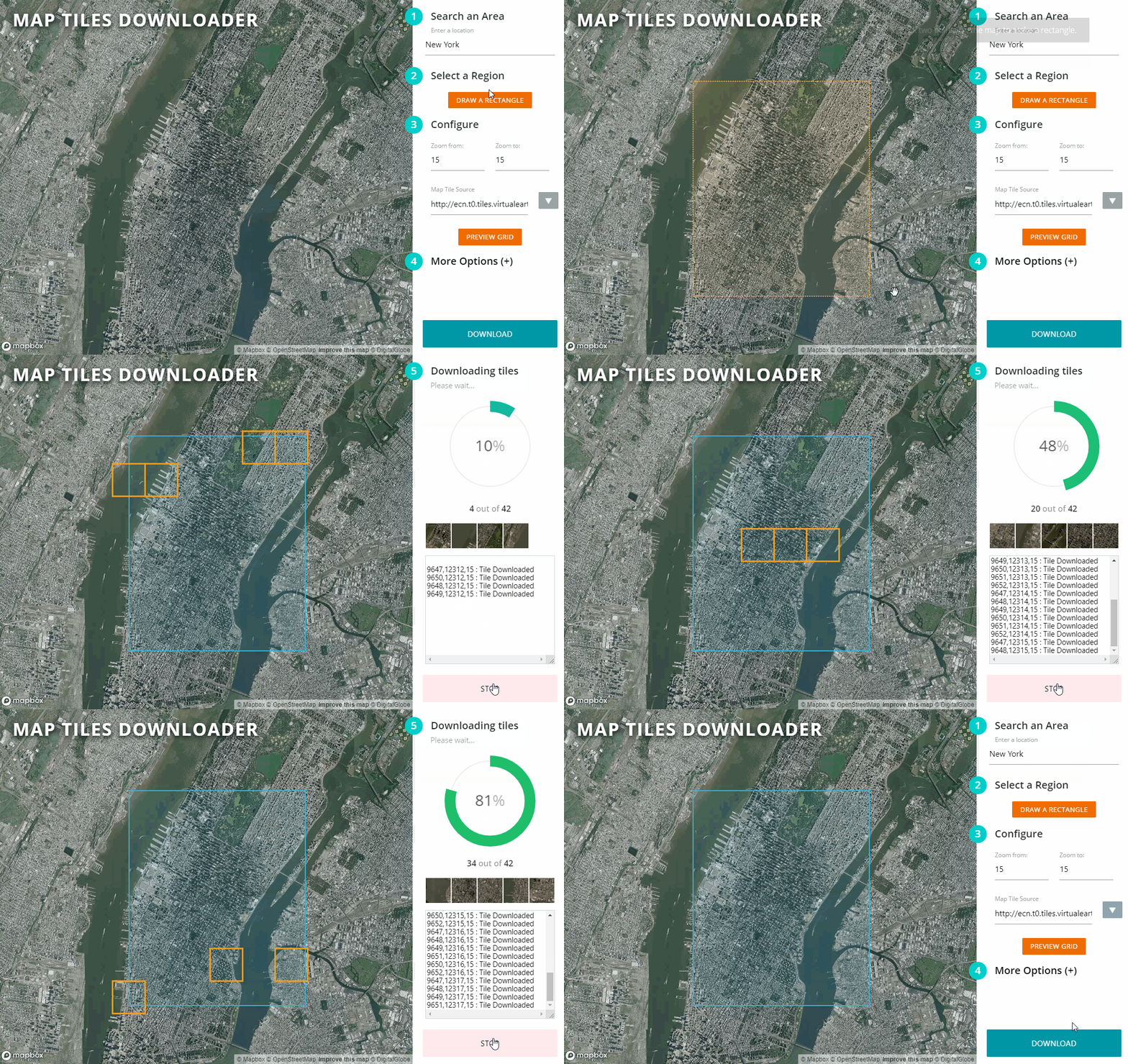
So what does it do?
This tiny python based script allows you to download map tiles from Google, Bing, Open Street Maps, ESRI, and other providers. This script comes with an easy to use web based map UI for selecting the area and previewing tiles.
Just run the script via command line
cd src
python server.py
Then open up your web browser and navigate to http://localhost:8080. The output map tiles will be in the src/output/{timestamp}/ directory by default.
Requirements
Needs Python 3.13+ and a modern web browser. Install dependencies with:
pip install -r requirements.txt
| Package | Purpose |
|---|---|
| Pillow | Tile scaling (2x/Hi-Res output) |
| pyvips | Tile stitching — memory-efficient image assembly |
On Windows, pyvips[binary] bundles the required libvips DLLs automatically. On Linux/macOS, install libvips via your package manager (apt install libvips / brew install vips) before running pip.
Note: The
cgimodule was removed in Python 3.13. This repo has been updated to use the
Via Docker
Docker is a pretty simple way to install and contain applications. Install Docker on your system, and paste this on your command line:
docker run -v $PWD/output:/app/output/ -p 8080:8080 -it aliashraf/map-tiles-downloader
Now open the browser and head over to http://localhost:8080. The downloaded maps will be stored in the output directory.
Purpose
I design map related things as a hobby, and often I have to work with offline maps that require tiles to be stored on my local system. Downloading tiles is a bit of a headache, and the current solutions have user experience issues. So I built this tiny script in a couple of hours to speed up my work.
Features
- Super easy to use map UI to select region and options
- Multi-threading to download tiles in parallel
- Cross platform, use any OS as long as it has Python and a browser
- Dockerfile available for easy setup
- Supports 2x/Hi-Res/Retina/512x512 tiles by merging multiple tiles
- Supports downloading to file as well as mbtile format
- Select multiple zoom levels in one go
- Ability to ignore tiles already downloaded
- Specify any custom file name format
- Supports ANY tile provider as long as the url has
x,y,z, orquadin it - Base map uses OpenStreetMap (no API key required)
- Built-in tile stitcher — assembles all downloaded tiles into a single GeoTIFF with one click, using libvips for memory-efficient processing of very large images
Tile Sources
The following providers are available from the dropdown and have been verified working:
| Provider | Type | Notes |
|---|---|---|
| Bing Maps | Road | |
| Bing Maps Satellite | Satellite | |
| Bing Maps Hybrid | Satellite + labels | |
| Google Maps | Road | Unofficial endpoint, may be rate-limited |
| Google Maps Satellite | Satellite | Unofficial endpoint, may be rate-limited |
| Google Maps Hybrid | Satellite + labels | Unofficial endpoint, may be rate-limited |
| Google Maps Terrain | Terrain | Unofficial endpoint, may be rate-limited |
| Open Street Maps | Road | |
| Open Cycle Maps | Cycling | |
| ESRI World Imagery | Satellite | Best quality, up to zoom 19-20, free, no key required |
| Carto Light | Road (minimal) |
For the highest quality satellite imagery, use ESRI World Imagery at zoom level 18 or 19.
Zoom Levels
Zoom level controls the detail and tile count. Each level up has 4× more tiles than the previous.
| Zoom | Detail level |
|---|---|
| 1–5 | Country / continent |
| 10–12 | City |
| 15–16 | Street (default) |
| 18–19 | Building / maximum detail |
Set Zoom from and Zoom to to the same value to download only that level. Set a range to download multiple levels at once (useful for maps that need to work at different scales).
Output
Tiles are saved to src/output/{timestamp}/ by default, in {z}/{x}/{y}.png folder structure. Both the output directory and file name format can be customised under More Options in the UI.
Stitching Tiles into a Single Image
The downloader includes a built-in stitcher powered by libvips. Unlike Photoshop or Pillow, libvips processes images in strips rather than loading everything into RAM, so it handles multi-gigapixel outputs without running out of memory.
To use:
- Check Stitch tiles into image after download (visible above the Download button — only enabled for Directory output type)
- Start the download as normal
- Once all tiles have downloaded, stitching begins automatically
- Progress is shown in the log panel; the button shows STITCHING... while it runs
- Output is saved alongside the tile folders as
stitched_z{zoom}.tif— one file per zoom level
The output is a tiled, deflate-compressed TIFF compatible with GIS tools (QGIS, GDAL, ArcGIS) and image editors. For zoom ranges, a separate TIFF is produced for each zoom level.
Note: Stitching is only available when Output type is set to Directory (the default). MBTiles and Repo formats store tiles internally and don't produce individual image files to stitch from.
Important Disclaimer
Downloading map tiles is subject to the terms and conditions of the tile provider. Some providers such as Google Maps have restrictions in place to avoid abuse, therefore before downloading any tiles make sure you understand their TOCs. I recommend not using Google, Bing, and ESRI tiles in any commercial application without their consent.
Stay In Touch
For latest releases and announcements, check out my site: aliashraf.net
License
This software is released under the MIT License. Please read LICENSE for information on the software availability and distribution.
Copyright (c) 2020 Ali Ashraf