

MicroAI Atom for the ESP32
Access the Table of Contents below to browse through instructions, information about our MicroAI libraries, and more. We hope you enjoy our product launch and are excited to see what you and your teams can create!
Table of Contents
About The Project
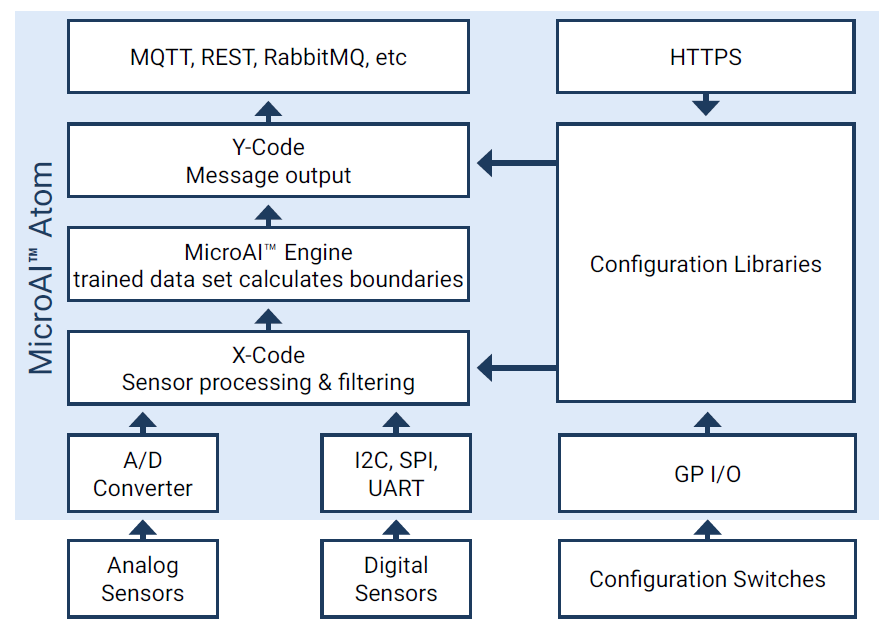
The ESP32 Project provides 2 sample implementations of the MicroAI Atom for this popular MCU platform.
-
APM - Asset Performance Management
-
Security - Security Monitoring
Built With
-
FreeRTOS
Getting Started
To get a local copy up and running follow these simple steps.
-
Clone this repository
-
Run "menuconfig" and provide WiFi connection parameters (required for the Security SDK, but optional for APM).
-
Build the project
-
Connect the development kit
-
Load the flash memory
-
Run the program
-
Monitor the output on the terminal screen
Prerequisites
The IDF (IoT Development Framework) must be loaded onto the computer used for development.
A step-by-step guide can be found on the ESP-IDF website.
Usage
APM
The APM SDK is capable of running as is (without live sensor inputs or output connections). The results are viewed in the ESP-IDF command window.
However, in order to enable sensor inputs as well as determine locations to send output messages, the user will modify the source code provided.
An APM SDK PDF file details the project contents and the code required to be modified to make changes and send output to an MQTT server.
Click on the image below to view a video tutorial for this project
Security
The Security SDK merely requires a valid WiFi connection. The results are viewed in the ESP-IDF command window.
A Security SDK PDF file details the project contents and the code required to be modified to make changes and send output to an MQTT server.
Click on the image below to view a video tutorial for this project
Roadmap
See the open issues for a list of proposed features (and known issues).
License
See Software Evaluation Licensing Agreement for more information.
Contact
Company: MicroAI
Website: www.micro.ai
Email: [email protected]