
Mimosa-AI 🌼🔬
English | 简体中文 | 繁體中文 | 日本語 | 한국어
Self-evolving AI-Framework for Autonomous Scientific Research
🧬 Self-evolving multi-agent workflows · 🔍 MCP-based tool auto-discovery · 🔁 Darwinian workflow optimization · 📦 Full audit trail & reproducibility ·





Demo: Autonomous Paper Reproduction
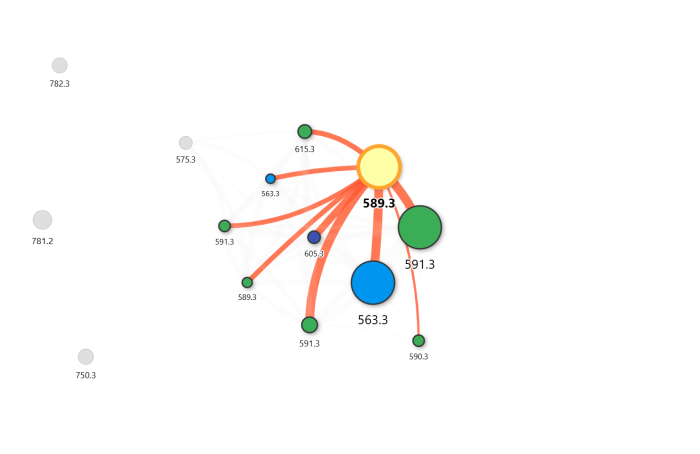
Mimosa-AI reproduced Nothias et al. (2018) end-to-end — from raw .mzML files to molecular network — autonomously, in a single command.
https://github.com/user-attachments/assets/dcd04ade-9c43-44a8-b3e3-a999d3dc895d
Result: The molecular network below was reproduced autonomously from raw .mzML files, matching the topology reported in Nothias et al. (2018) — including cluster separation and edge weights.
Benchmark Results
Evaluated on ScienceAgentBench (102 tasks, task mode):
| Mode | Success Rate | Code-BLEU Score | Cost/task |
|---|---|---|---|
| DeepSeek-V3.2 single-agent | 38.2% | 0.898 | $0.05 |
| DeepSeek-V3.2 one-shot multi-agent | 32.4% | 0.794 | $0.38 |
| DeepSeek-V3.2 iterative-learning | 43.1% | 0.921 | $1.7 |
Iterative learning improves GPT-4o but yields marginal degradation for Claude Haiku 4.5 — see the manuscript for model-dependent behavior analysis.
What is Mimosa-AI?
Mimosa-AI 🌼 — like the mimosa plant that senses, learns, and adapts — is an open-source framework for autonomous scientific research that automatically synthesizes task-specific multi-agent workflows and refines them through execution feedback. Built around MCP-based tool discovery, code-generating agents, and LLM-based evaluation, it offers academics a modular and auditable alternative to closed black-box systems.
What it does:
- Reproduces scientific studies with traceability and rigor — from raw data to publication-ready figures
- Automates computational pipelines across domains: bioinformatics, docking, metabolomics, ML, and more
- Self-evolves through Darwinian-inspired workflow mutation — each failure informs the next attempt
Architecture Overview
The framework is organized into five layers:
- Planning (optional) — decomposes a high-level scientific goal into discrete tasks
- Tool Discovery — auto-discovers MCP-based tools on the local network via Toolomics
- Meta-Orchestration — synthesizes a task-specific multi-agent workflow; assigns tools to specialized agents
- Agent Execution — code-generating agents run subtasks using discovered tools and scientific libraries
- Judge / Evaluation — LLM-based judge scores outputs; in learning mode, drives iterative workflow refinement
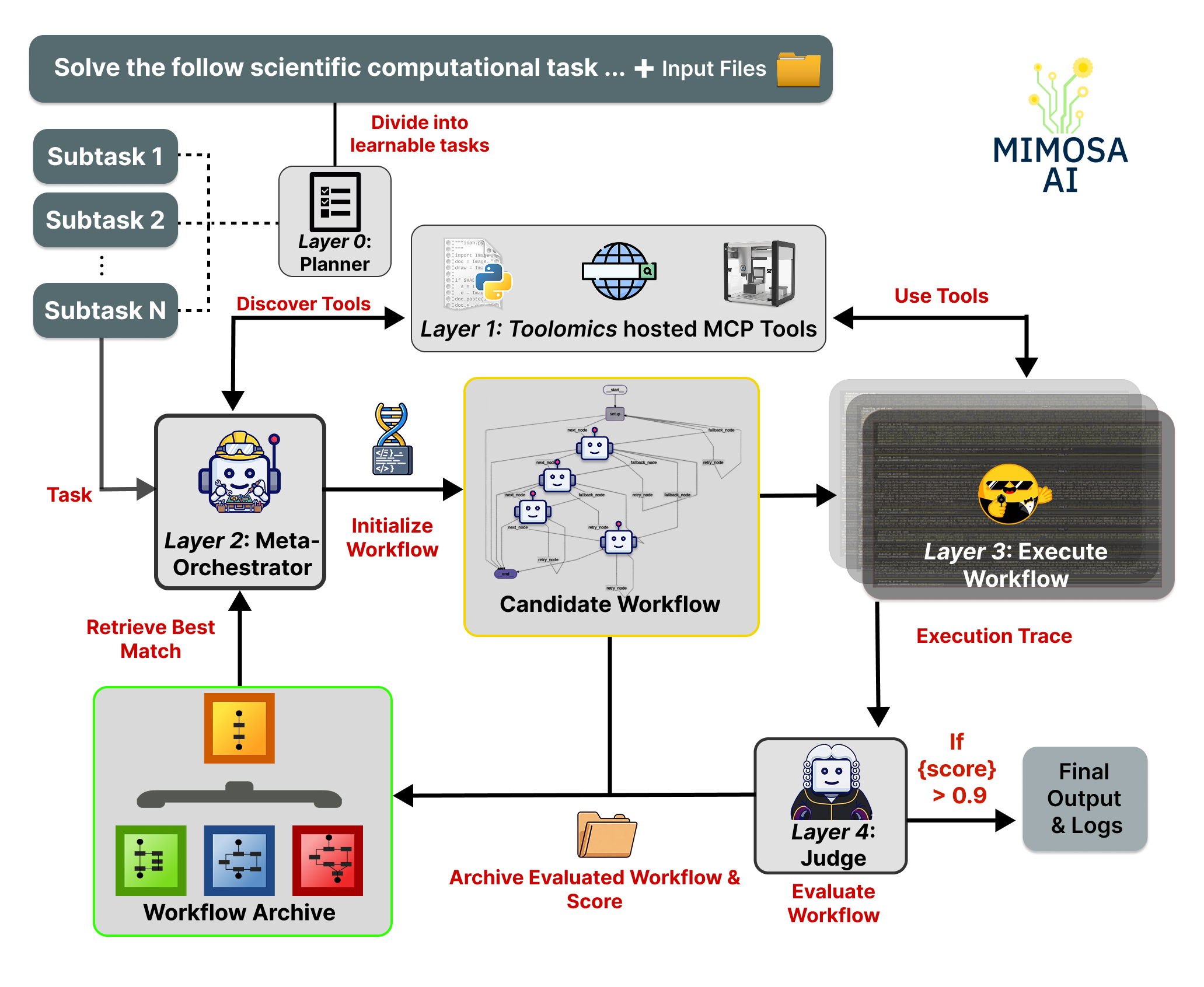
In benchmark task mode, the planning layer (1) is bypassed so workflow synthesis and refinement can be evaluated in isolation.
Table of Contents
- What is Toolomics and do I need it?
- Prerequisites
- Installation
- Configuration
- Running Mimosa
- Workspace and Audit Trail
- Learning through Evolution of Multi-Agent Workflows
- Transparency
- Command Line Arguments
- Evaluation
- Phone Notifications
- Telemetry Setup
- License
- Citation
What is Toolomics and do I need it?
Toolomics is Mimosa's companion platform for MCP server management. It exposes scientific tools (data-analysis utilities, web services, laboratory instruments) as discoverable MCP services, provides the shared workspace where Mimosa reads and writes task artifacts, and lets you register custom tools without touching Mimosa's core.
Do you need it? Yes — Toolomics must be running before you execute any Mimosa mode. The good news: setup takes only a few minutes.
- Both Mimosa and Toolomics are Apache 2.0 licensed and free to use.
- Toolomics runs locally on a configurable port range (default
5000–5100). - You can add your own MCP tools via the Toolomics docs.
Quick-start path: Clone Toolomics → start it on the default port range → then run Mimosa. No cloud accounts or paid services required beyond an LLM API key.
Prerequisites
- Python 3.10+
- uv (recommended) or pip
- A running Toolomics MCP server
Installation
1. Clone and create virtual environment
# Using uv (recommended)
pip install uv
uv venv .venv
source .venv/bin/activate   # Windows: .venv\Scripts\activate

# Or with pip
python3 -m venv .venv
source .venv/bin/activate
2. Install dependencies
cd mimosa
uv pip install -r requirements.txt
3. Set API keys
Create a .env file at the project root. Include only the keys for the LLM providers you plan to use:
ANTHROPIC_API_KEY=...       # Claude — recommended for workflow orchestration
OPENAI_API_KEY=...          # OpenAI models - Optional
MISTRAL_API_KEY=...         # Mistral models - Optional
DEEPSEEK_API_KEY=...        # Deepseek - Optional
HF_TOKEN=...                # HuggingFace provider, Optional
OPENROUTER_API_KEY=...      # Any model via OpenRouter

# Optional — observability via Langfuse
LANGFUSE_PUBLIC_KEY=...
LANGFUSE_PRIVATE_KEY=...
4. Start the MCP server
Follow the setup instructions at HolobiomicsLab/toolomics. Configure it to run on a port range (e.g., 5000–5100).
Custom MCP tools can be added via the Toolomics docs.
Running Mimosa
Interactive Onboarding (recommended for first-time setup)
If you are new to Mimosa, start here.
Running Mimosa with no arguments launches an interactive, step-by-step onboarding wizard that guides you through everything before the first execution:
uv run main.py
Once you complete setup once, subsequent runs remember your workspace path via config_default.json — no re-configuration needed.
Manual onboarding:
1. Start by editing the config:
cp config_default.json my_config.json
Edit my_config.json. Key parameters:
| Parameter | Description |
|---|---|
workspace_dir |
Path to the Toolomics workspace — all generated files appear here |
discovery_addresses |
IP + port ranges for MCP server discovery |
planner_llm_model |
LLM for task decomposition and planning |
prompts_llm_model |
LLM for workflow prompt generation |
workflow_llm_model |
LLM for multi-agent orchestration (recommended: anthropic/claude-opus-4-5 or z-ai/glm-5) |
smolagent_model_id |
Model for SmolAgents execution subtasks |
judge_model |
LLM for output self-evaluation and scoring |
learned_score_threshold |
Minimum score to accept a result and stop iterating |
max_learning_evolve_iterations |
Maximum self-improvement iterations before accepting the result |
2. Choose a mode task or goal depending on the complexity of your objective.
2.1 Goal mode — multi-step scientific objective
Use this when your objective requires planning across multiple distinct operations (e.g., reproducing a paper, building an ML pipeline).
uv run main.py --goal "Your scientific objective" --config my_config.json
Examples:
uv run main.py \
  --goal "Reproduce experiments from 'Dual Aggregation Transformer for Image Super-Resolution' (https://arxiv.org/pdf/2306.00306) and compare results." \
  --config my_config.json

uv run main.py \
  --goal "Develop a machine learning model to predict protein-ligand binding affinity." \
  --config my_config.json
2.2 Task mode — single granular operation
Use this for a focused, self-contained operation without long-term planning.
uv run main.py --task "Your task description" --config my_config.json
Examples:
uv run main.py \
  --task "Train a multitask model on the Clintox dataset to predict drug toxicity and FDA approval status." \
  --config my_config.json

uv run main.py --task "Conduct a literature review on graph neural networks for drug discovery." --config my_config.json
Benchmark note: The results reported in the manuscript are measured in
taskmode, with the planning layer disabled, to isolate workflow synthesis and iterative refinement.Note: Toolomics must be installed and the MCP server must be running before executing any mode.
Workspace and Audit Trail
During execution, Mimosa reads and writes files inside the Toolomics workspace configured by workspace_dir. When a run finishes, the workspace contents are copied into a timestamped folder under runs_capsule/ so the final state is preserved as an archive.
- Toolomics
workspace/— live working directory: intermediate files, scripts, downloads, generated outputs sources/workflows/<uuid>/— generated workflow and execution metadata:state_result.json,evaluation.txt,reward_progress.pngruns_capsule/<capsule_name>/— archived snapshot of the run for later inspection, comparison, or sharingmemory_explorer.py <uuid>— replay a workflow execution step-by-step to inspect agent traces, tool calls, and outputs
Together, these locations form Mimosa's full audit trail: what was planned, executed, evaluated, and produced.
Learning through Evolution of Multi-Agent Workflows
Mimosa-AI is a self-evolving multi-agent system that dynamically synthesizes specialized workflows for scientific tasks. Rather than forcing tasks through fixed pipelines, the system composes custom multi-agent architectures on-demand and learns from execution patterns to optimize future performance.
Mimosa evolves workflows through Darwinian-inspired single-incumbent local search: at each iteration, only the best-performing workflow generates a successor, and only improvements are kept. Over time, the system builds a library of proven workflows, so similar future tasks start from a strong baseline rather than from scratch.
For any new task, start with learn mode to let Mimosa build competence before full autonomy.
Start in Learning mode
uv run main.py --task "Train a multitask model on the Clintox dataset to predict drug toxicity and FDA approval status" --learn --config my_config.json
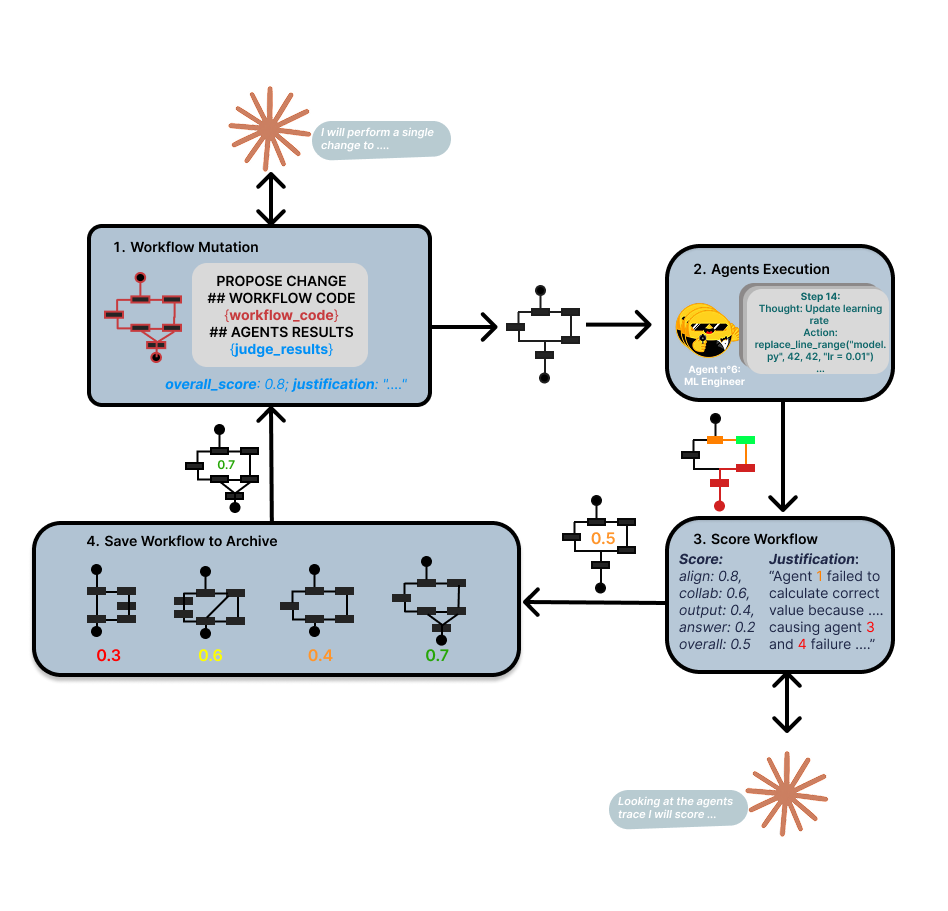
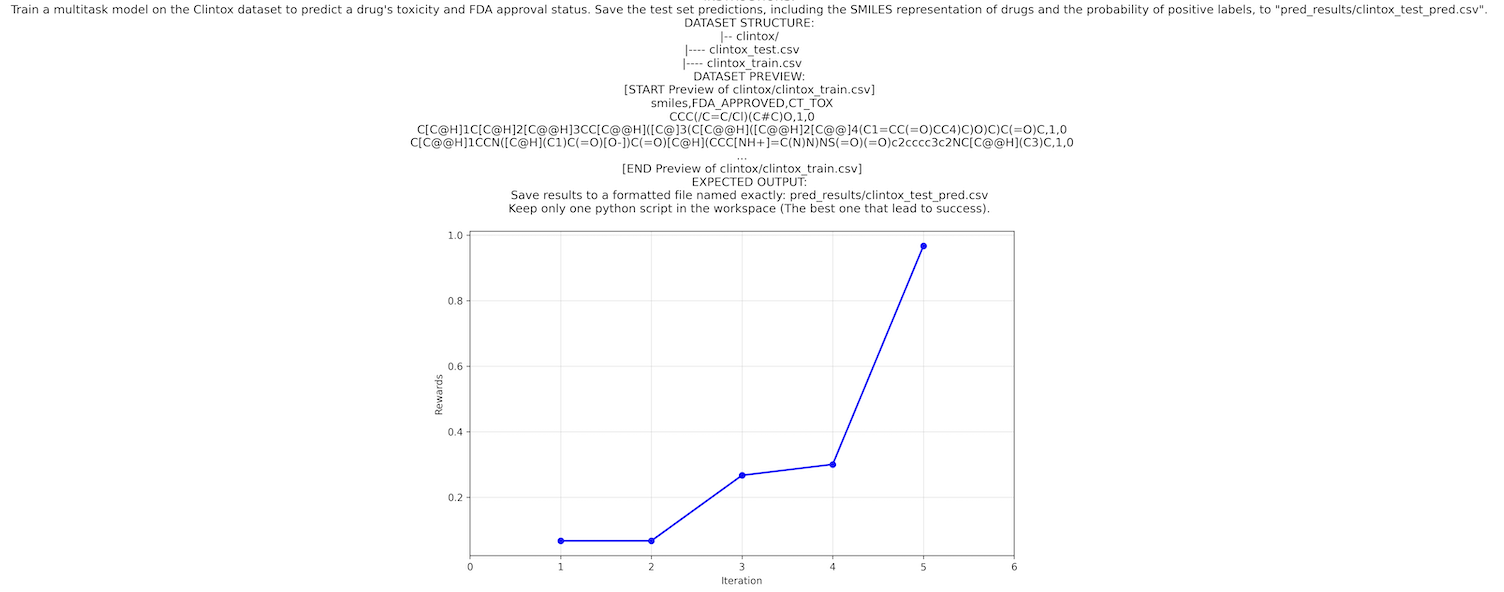
Progress visualization:
Once Mimosa-AI completes its learning phase, the reward progress plot (performance gains across attempts) is automatically saved to sources/workflows/<uuid>/reward_progress.png.
Transparency
We ship an interactive debugger, memory_explorer.py, that lets you step through any agent execution in granular detail.
python memory_explorer.py 20260115_113303_9bb63437
This replays the full execution trace — thoughts, tool calls, and outputs — so you can inspect exactly how every decision unfolded.
Command Line Arguments
Execution Modes
| Argument | Description |
|---|---|
--goal GOAL |
Specify a high-level research objective, paper reproduction, or scientific question (planner mode) |
--task TASK |
Execute a single task: literature review, dataset download, ML model implementation, … |
--manual |
Interactive CLI mode to debug MCPs and test Mimosa tools directly |
--papers <CSV path> |
Evaluation on a CSV dataset containing research papers and prompts |
--science_agent_bench |
Evaluation on ScienceAgentBench |
Other Parameters
| Argument | Description |
|---|---|
--learn |
Enable iterative learning to optimize task performance |
--max_evolve_iterations N |
Maximum learning iterations |
--csv_runs_limit N |
Limit number of CSV entries to evaluate |
--scenario <scenario file name> |
Use specific scenario-based assertions instead of LLM-as-a-judge for scoring |
--single_agent |
Single-agent mode — fast, but cannot improve through learning |
--debug |
Enable debug mode for more verbose logging |
Evaluation
Mimosa-AI can be evaluated on ScienceAgentBench or PaperBench.
⚠️ For unbiased evaluation, run ./cleanup.sh first to prevent Mimosa from using cached workflows.
ScienceAgentBench
- Download the full ScienceAgentBench dataset: dataset link
- Unzip with password:
scienceagentbench - Copy
benchmark/benchmark/datasets/→Mimosa-AI/datasets/scienceagentbench/datasets/
Full evaluation with learning:
uv run main.py --science_agent_bench --learn
Quick evaluation (10 tasks, 4 learning iterations):
uv run main.py --science_agent_bench --csv_runs_limit 10 --max_evolve_iterations 4
PaperBench
OpenAI PaperBench evaluates AI agents on AI research replication (PaperBench: Evaluating AI's Ability to Replicate AI Research).
uv run main.py --papers datasets/paper_bench.csv --csv_runs_limit 20 --learn
⚠️ Results are saved to runs_capsule/. Refer to the PaperBench documentation for complete evaluation instructions.
Custom benchmark:
uv run main.py --papers datasets/<your_benchmark_name>.csv --csv_runs_limit 20 --learn
Phone Notifications
Receive real-time status updates via Pushover notifications.
Setup
- Create a Pushover account and note your User Key
- Create an application named "Mimosa" — copy the API Token
- Export environment variables:
export PUSHOVER_USER="your_user_key" export PUSHOVER_TOKEN="your_api_token" - Install the Pushover mobile app and log in
Telemetry Setup
Monitor and debug AI agents with real-time observability dashboards using Langfuse.
Quick Start
-
Deploy Langfuse locally:
git clone https://github.com/langfuse/langfuse.git cd langfuse docker compose up -d -
Add to
.env:LANGFUSE_PUBLIC_KEY=your_public_key LANGFUSE_PRIVATE_KEY=your_private_key -
Access the dashboard at
http://localhost:3000while Mimosa is running.
The dashboard provides agent execution traces, performance metrics, error debugging, and token/API usage.
Note: Telemetry is optional but recommended for debugging and performance optimization.
License
This repository is publicly distributed under the Apache License 2.0. For contribution and licensing details, see:
NOTICEdocs/licensing-notes.mdCLA/INDIVIDUAL_CLA.mdCLA/EMPLOYER_AUTHORIZATION.md
Citation
Citation: Mimosa Framework: Toward Evolving Multi-Agent Systems for Scientific Research
M. Legrand, T. Jiang, M. Feraud, B. Navet, Y. Taghzouti, F. Gandon, E. Dumont, L.-F. Nothias — arXiv:2603.28986, 2026 — DOI
@article{legrand2026mimosa,
  title={Mimosa Framework: Toward Evolving Multi-Agent Systems for Scientific Research},
  author={Legrand, Martin and Jiang, Tao and Feraud, Matthieu and Navet, Benjamin and Taghzouti, Yousouf and Gandon, Fabien and Dumont, Elise and Nothias, Louis-F{\'e}lix},
  journal={arXiv preprint arXiv:2603.28986},
  year={2026}
}