
minimal-git-server


Originally inspired by https://github.com/jkarlosb/git-server-docker
This tool lets you run a minimal git server with a basic CLI to manage repositories, all in a container based on a single configuration file.
Features
- support multiple accounts (config.yml)
- basic CLI to manage repositories (list/create/rename/remove/...)
- easy to use in scripts
- tested on docker and podman
Versioning and packaging
This tool follows semantic versioning.
Pre-built images are available on github packages:
ghcr.io/mcarbonne/minimal-git-server:main(mainbranch)ghcr.io/mcarbonne/minimal-git-server:dev(devbranch)ghcr.io/mcarbonne/minimal-git-server:latest: latest tagged versionghcr.io/mcarbonne/minimal-git-server:x.x.xghcr.io/mcarbonne/minimal-git-server:x.xghcr.io/mcarbonne/minimal-git-server:x
For automatic updates (watchtower, podman-auto-update...), using the lastest major tag available (ghcr.io/mcarbonne/minimal-git-server:2) is recommanded to avoid breaking changes.
Minimal configuration
This container requires 3 volumes in order to work:
/srv/sshto persist generated server keys/srv/gitto store repositories/srv/config.ymlto set up accounts, allowed public keys...
docker run -v .../ssh:/srv/ssh -v .../git:/srv/git -v .../config.yml:/srv/config.yml:ro \
        --name minimal-git-server -d -p 20222:22 ghcr.io/mcarbonne/minimal-git-server:2
config.yml
external_hostname: localhost
external_port: 20222
accounts:
  - user: user_a
    uid: 12345
    keys:
      - "ssh-rsa XXXXXX [email protected]"
      - "ssh-rsa XXXXXX [email protected]"
  - user: user_b
[...]
Basic Usage
To manage your repositories, simply log in:
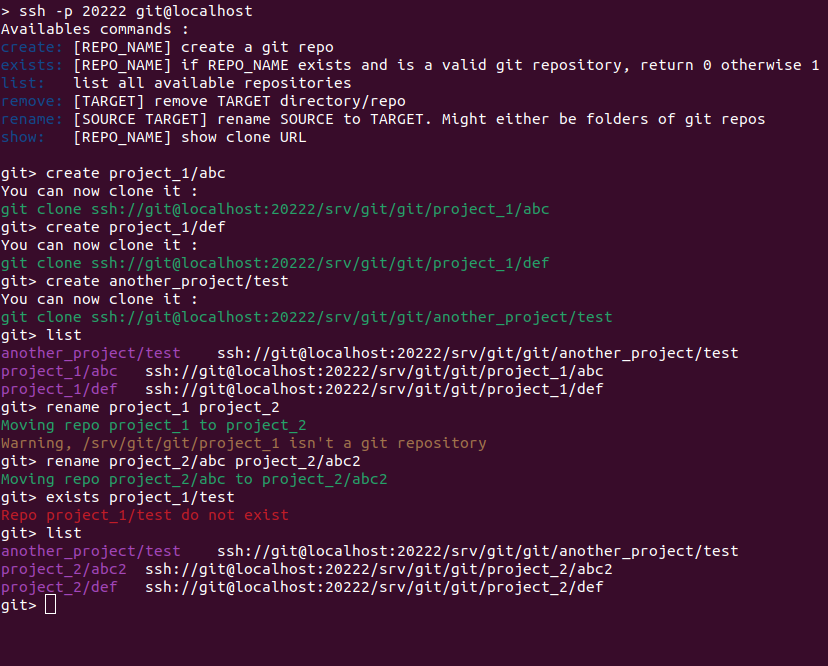
How to script ?
You can easily embed any supported command in your scripts:
$ ssh ACCOUNT@HOSTNAME -p PORT create project1/my_repo
Have a look at test.sh for more examples.