
Mortise
Self-hosted, Railway-style deploy platform for Kubernetes.




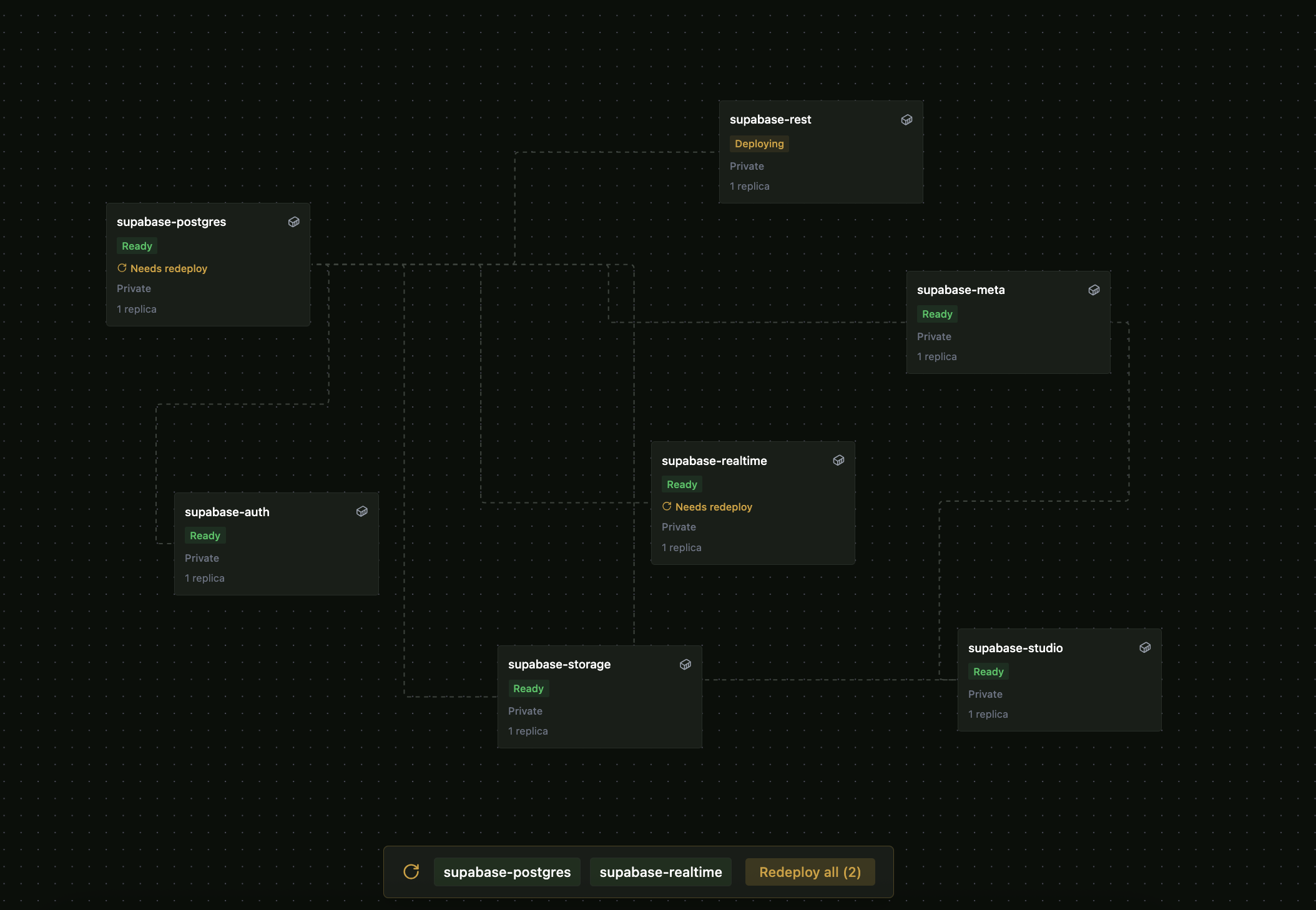
Connect a git repo or pick a pre-built image - Mortise handles builds, deploys, domains, TLS, environment variables, volumes, preview environments, and service bindings. Kubernetes stays out of your way, but remains fully extensible.
Install
Quick install (no cluster yet)
One command. Provisions k3s on Linux or k3d on macOS/Windows, helm-installs the full stack, and opens the UI on localhost:8090.
macOS (requires Docker Desktop)
curl -fsSL https://mortise.me/install | bash
Linux (requires sudo - installs k3s natively)
curl -fsSL https://mortise.me/install | bash
Windows 10+ (requires Docker Desktop)
iwr -useb https://mortise.me/install.ps1 | iex
See scripts/README.md for installer details and override variables.
Helm (existing cluster)
The mortise chart is batteries-included: operator + Traefik + cert-manager + BuildKit + OCI registry.
helm repo add mortise https://mortise-org.github.io/mortise
helm repo update

helm install mortise mortise/mortise \
  --namespace mortise-system \
  --create-namespace
Traefik is the default ingress controller but is not a hard requirement. To bring your own:
helm install mortise mortise/mortise \
  --namespace mortise-system --create-namespace \
  --set traefik.enabled=false \
  --set mortise-core.operator.ingressClassName=<your-class>
Full values reference, upgrade, and uninstall: docs/install.md
Operator-only (BYO ingress, cert-manager, registry, BuildKit)
Use mortise-core when you already have a stack and only want the Mortise operator:
helm install mortise mortise/mortise-core \
  --namespace mortise-system \
  --create-namespace
After installing, follow the Quickstart to create an admin account and deploy your first app.
What's Included
| Component | Purpose |
|---|---|
| Operator | Kubernetes controller that reconciles App, Project, GitProvider, PreviewEnvironment CRDs |
| REST API | Project, app, env var, deploy, rollback, and domain management |
| SvelteKit UI | Canvas-based dashboard, app drawer, env var editor, project settings - embedded in the operator binary |
| CLI | mortise login, mortise app create, mortise deploy, mortise env |
| Helm Charts | mortise (batteries-included) and mortise-core (operator-only) |
Features
- Git-source deploys - connect GitHub, GitLab, or Gitea; auto-build via Railpack or Dockerfile
- Image deploys - deploy any container image directly
- Docker Compose templates - one-click Supabase stack (6 services) or bring your own Compose file
- Environment variables - Secret-backed storage, masked values, source badges, multi-line paste, raw editor
- Project variables - project-level vars shared across all apps in a project
- Service bindings - bind apps to backing services, auto-inject
DATABASE_HOST,DATABASE_PORT,DATABASE_URL - Auto-domain routing - public apps get
{app}-{project}.{platformDomain}automatically with TLS (customizable viadomainTemplate) - Per-environment namespaces - production, staging, and preview environments each get an isolated k8s namespace
- Preview environments - PR-driven ephemeral deploys for git-source apps
- CrashLoop detection - surfaces pod crash reasons directly in the UI
- GitHub device flow - one-click git provider connection from the settings page
Architecture
One operator, one Helm chart. No addons, no plug-in protocol.
flowchart LR
    User["User\n(UI / CLI / API)"] --> Operator

    subgraph Operator["Mortise Operator"]
        direction TB
        Controllers["Controllers\n(Project, App, GitProvider,\nPreviewEnv)"]
        API["REST API"]
        UI["Embedded SvelteKit UI"]
    end

    Operator --> K8s["Kubernetes Primitives\nDeployment · Service · Ingress\nSecret · ConfigMap · PVC"]
    Operator --> Build["BuildKit\n(image builds)"]
    Operator --> Registry["OCI Registry\n(image storage)"]
External capabilities (OIDC, monitoring, backups, external secrets) plug in through standard Kubernetes primitives - Mortise coexists with Argo CD, Flux, ESO, and other operators.
See ARCHITECTURE.md for full system diagrams.
Docs
For users:
| Doc | Purpose |
|---|---|
| Quickstart | Zero to deployed app in 10 minutes |
| Install | Helm install, values reference, upgrade, uninstall |
| Cluster setup | Getting a cluster running (k3d, k3s, EKS, GKE, AKS) |
| Configuration | Domain, git providers, HTTPS, storage, environments |
| API quickstart | End-to-end API workflow with curl |
| OpenAPI spec | Full API reference - open in Swagger Editor or Stoplight |
| Systems overview | Runtime architecture, controllers, and reconciliation |
| Troubleshooting | Common issues and fixes |
Integration recipes:
| Recipe | |
|---|---|
| External CI | GitHub Actions / GitLab CI deploy via webhook |
| OIDC / SSO | Authentik, Keycloak, Okta, Google |
| Monitoring | Prometheus + Grafana |
| External Secrets | Vault, AWS SM, GCP SM via ESO |
| Backup | Velero backup and restore |
| Cloudflare Tunnel | Access without a public IP |
| Local-Only Deployment | Run without DNS, TLS, or ingress |
For contributors:
| Doc | Purpose |
|---|---|
| CONTRIBUTING.md | PR process, coding guidelines, commit conventions |
| DEVELOPMENT.md | Local dev loop, test layers, common tasks |
| ARCHITECTURE.md | System diagrams and interface contracts |
| SPEC.md | Full product and engineering spec |
| RELEASING.md | How to cut a release |
Development
make dev-up             # create k3d cluster, build image, install Mortise via Helm
make dev-reload         # rebuild image and redeploy into existing cluster (~45s)
make dev-down           # tear down the dev cluster

make test               # unit + envtest (<10s)
make test-charts        # helm lint + template tests (<30s)
make test-integration   # ephemeral k3d cluster: install, test, tear down (~3min)
make test-e2e           # Playwright E2E suite (requires make dev-up)
Full guide: DEVELOPMENT.md
Contributing
See CONTRIBUTING.md. Bug reports and feature requests go through GitHub Issues. Questions and discussion in GitHub Discussions.
Security issues: see SECURITY.md - do not open a public issue.