
Multi-UAV Assisted Wireless Powered Mobile Edge Computing: A Hybrid Optimization Approach
Objective
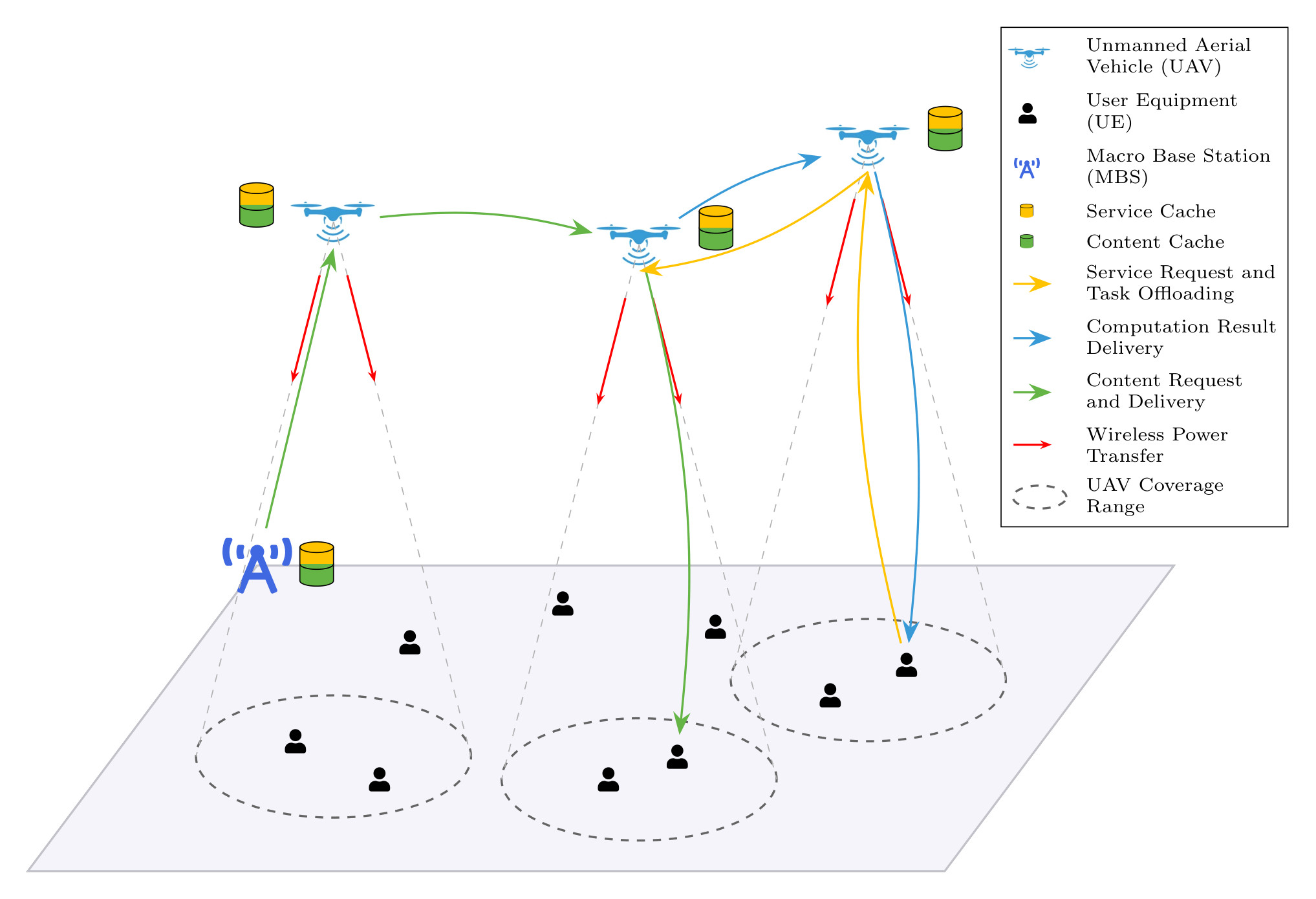
The primary objective of this research is to develop a framework for a multi-UAV-assisted collaborative Mobile Edge Computing (MEC) network. We aim to jointly optimize the interdependent components: task offloading decisions, service caching placement, content caching strategies, UAV trajectories and wireless power transfer. The goal is to minimize service latency, system-wide energy consumption, device offline rate while simultaneously maximizing user fairness.
We are aiming to implement a hybrid optimization approach that combines multi-agent deep reinforcement learning with collaborative and adaptive caching policies. We are trying to create a generic framework that can be used with different models for finding the best-suited one for our purpose. We are also exploring incorporating attention mechanisms within the multi-agent reinforcement learning models for scalability and improved performance.
Also trying to incorporate modern Python practices and type annotations (Python 3.12+).
🎯 What's Included?
MARL algorithms included:
- MADDPG
- MATD3
- MAPPO
- MASAC
- 4 Attention Variants of above algorithms
See marl_models/README.md for further details.
Advanced Features:
- ✅ Offline rate tracking - Monitors device battery health
- ✅ Wireless Power Transfer - UAVs charge devices under critical battery levels
- ✅ Smart caching - Adaptive content placement
- ✅ Multi-agent coordination - Through MARL algorithms enhanced with attention mechanisms
- ✅ 3-stage tuning - Optimize reward weights, agent params, architecture
📁 Project Structure
.
├── environment/                 # Simulation
│   ├── env.py                   # Main simulation loop
│   ├── uavs.py                  # UAV dynamics
│   ├── user_equipments.py       # Device battery & requests
│   └── comm_model.py            # Communication & WPT
│
├── marl_models/                 # RL algorithms (see marl_models/README.md for detailed structure)
│
├── utils/                       # Utilities
│   ├── logger.py                # Training logs & metrics
│   ├── plot_logs.py             # Single run visualization
│   ├── plot_snapshots.py        # Snapshots of environment and trajectories
│   └── comparative_plots.py     # Multi-algorithm comparison
│
├── config.py                   # All parameters
├── train.py                    # Training script
├── test.py                     # Testing script
├── tune.py                     # Hyperparameter tuning with Optuna
└── main.py                     # Legacy interface
⚡ Setup Instructions
To run this project, you need to install PyTorch specifically for your system's hardware first, followed by the rest of the dependencies.
For Windows users with NVIDIA GPUs (CUDA 12.4), use:
pip install torch --index-url https://download.pytorch.org/whl/cu124
# Clone repository
git clone <repo_url>
cd Multi-UAV-Mobile-Edge-Computing-Hybrid-Optimization

# Create virtual environment (Python 3.12+)
python -m venv .venv
.venv\Scripts\activate  # Windows
# or: source .venv/bin/activate  # Linux/Mac

# Install dependencies
pip install -r requirements.txt
🚀 How to Use
📋 Requirements
- Python (3.12.0+)
- PyTorch (version as per your GPU and OS, along with any other dependencies)
- NumPy, Matplotlib, Optuna (and Plotly, Kaleido, Scikit-Learn for Optuna visualisation)
Training
It can be used to start training from scratch or resume training from a previously saved checkpoint.
# Start training from scratch
python main.py train --num_episodes=<total_episodes>

# To resume training from a saved checkpoint, specify no. of additional episodes, path to the saved checkpoint, and path to the saved config file (to load and use the same settings).
python main.py train --num_episodes=<additional_episodes> --resume_path="<path_to_checkpoint_directory>" --config_path="<path_to_saved_config>"
Hyperparameter Tuning
Optimize reward weights and agent parameters with 3-stage tuning:
# Stage 1: Optimize reward weights (ALPHA_1, ALPHA_2, ALPHA_3, ALPHA_4): helps understand reward trade-offs
python tune.py --stage 1 --episodes 500 --trials 50

# Stage 2: Optimize learning rates, batch sizes, network architecture: find best agent hyperparameters
python tune.py --stage 2 --episodes 1000 --trials 50

# Stage 3: Optimize attention architecture (attention models only): tune ATTN_HIDDEN_DIM and ATTN_NUM_HEADS
python tune.py --stage 3 --episodes 500 --trials 30
Testing
It can be used to test a saved model for a specified number of episodes. To test a saved model, you must provide the path to the model's directory and its corresponding configuration file.
# Start testing, with saved model path and config file saved during that model's training run (to load and use the same settings).
python main.py test --num_episodes=<total_episodes> --model_path="<path_to_model_directory>" --config_path="<path_to_saved_config>"
Visualization
# Compare multiple algorithms
python utils/compare_algorithms.py \
    --logs train_logs/maddpg_run train_logs/matd3_run train_logs/mappo_run \
    --names MADDPG MATD3 MAPPO \
    --output comparison_plots \
    --smoothing 10
Refer Plotting Module for detailed plotting plan.
👨💻 Contributors
- Roopam Taneja
- Vraj Tamakuwala
PS: Currently under rapid development and may be subject to significant changes.