
multiregion-terraform
Example multi-region AWS Terraform application
TL;DR: launch ~56 EC2 instances in 18 regions with a single terraform command
Amazon has 18 data centers with ~56 availability zones spread around the world. This Terraform application launches EC2 instances in every possible zone, and ties them together into a single domain name that routes pings to the closest instance.
Features
- Single
main.tfwith a module instance for each Amazon's 14 regions - Creates an EC2 instance in every region and availability zone
- Creates two Route 53 records (A and AAAA) with latency based routing to all EC2 instances
- All instances allow ICMP Echo Request (ping) from
0.0.0.0/0 - Supports IPv4 and IPv6
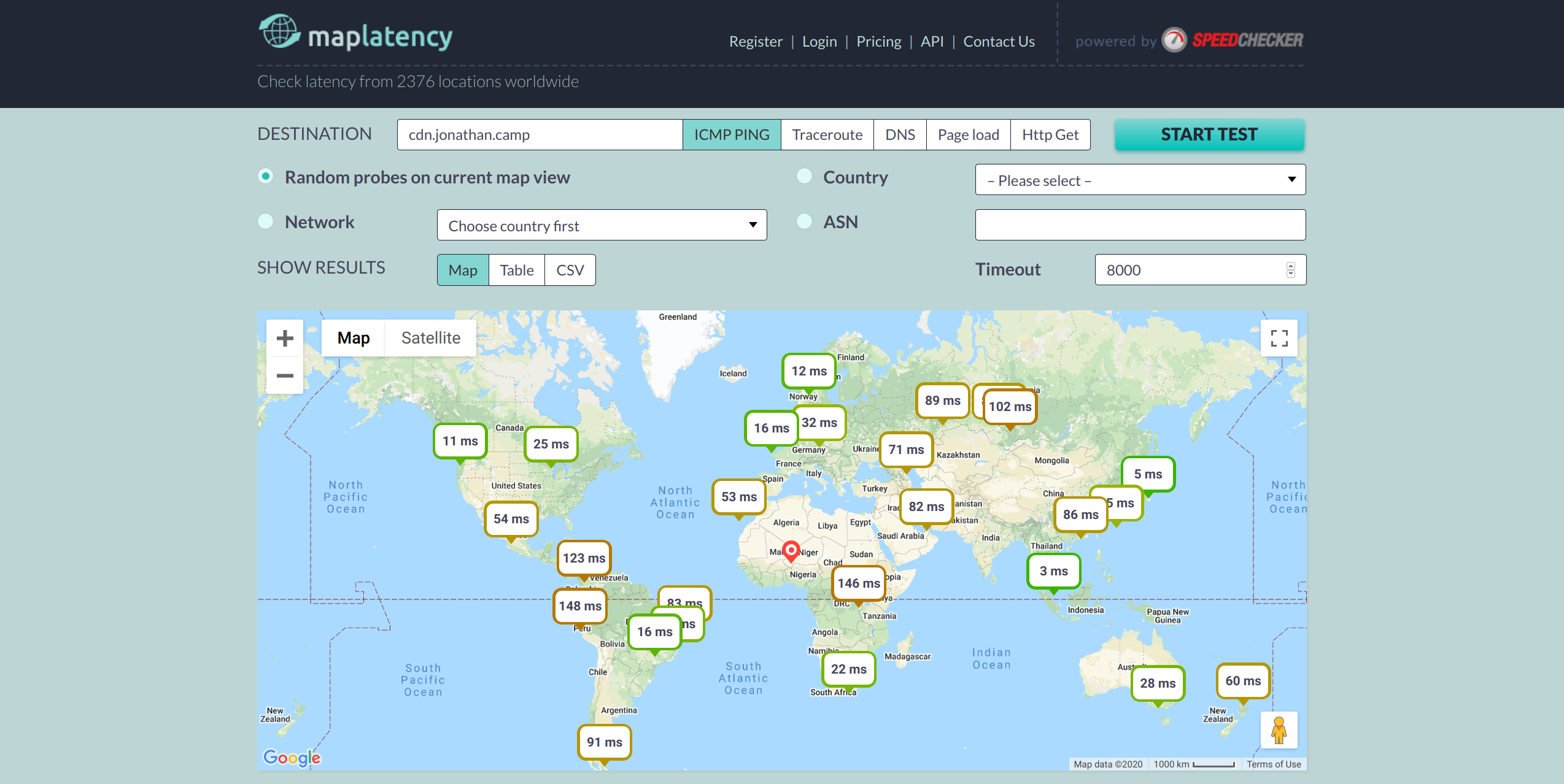
Latency Map
Note the lower latency when the ping source is near to one of Amazon's datacenters:
Terraform Dependency Graph

How-to
Notes:
- IMPORTANT: edit cdn/variables.tf and set
r53_zone_idandr53_domain_name - requires Terraform >= v0.12
- override the Amazon credential profile settings by setting
AWS_PROFILE=blah - optionaly update
blacklisted_azwith any availibility zones that might not support the instances types you want - comment out regions in main.tf to test a smaller deployment
- Terraform types used:
aws_ami,aws_vpc,aws_internet_gateway,aws_subnet,aws_route_table,aws_route_table_association,aws_security_group,aws_instance, andaws_route53_record
$ terraform init
...

# replace 'personal' with the name of your AWS profile in ~/.aws/crendentials or leave blank for 'default'
$ AWS_PROFILE=personal terraform plan
module.cdn-us-east-1.data.aws_ami.default: Refreshing state...
module.cdn-us-west-1.data.aws_ami.default: Refreshing state...
...
Plan: 32 to add, 0 to change, 0 to destroy.

$ AWS_PROFILE=personal terraform apply
module.cdn-us-west-1.data.aws_ami.default: Refreshing state...
module.cdn-us-east-1.data.aws_ami.default: Refreshing state...
...
Apply complete! Resources: 32 added, 0 changed, 0 destroyed.

$ dig +short @8.8.8.8 cdn.jonathan.camp
52.207.230.71
52.90.73.117
52.91.127.142
54.198.56.163

$ dig +short @8.8.8.8 cdn.jonathan.camp AAAA
2a05:d01c:f93:2701:c9ab:9b4d:c81:9f05
2a05:d01c:f93:2700:604a:53ae:33b8:24c0

# print all servers using jq (https://stedolan.github.io/jq/)
$ jq -r '[.resources[].instances[] | select(.attributes.public_ip != null) | .attributes.public_ip] | .[]' terraform.tfstate
18.230.154.45
54.233.83.81
18.231.187.164
15.206.28.49
15.206.88.49
3.7.58.137
...
]