

Agentic AI Instagram Scraper
Self hosted AI workflow for scraping Instagram Reels (audio and description). Extracting, summarising and categorising, then storing all relevant info for quick viewing later.By Peter Semrau-Boughton - Github
While planning an upcoming trip, I found myself endlessly watching Reels for recommendations: Where to eat, where to stay, travel tips, safety advice. But I was never revisiting them, so I decided to see if I could try build a self-hosted, agentic AI pipeline to organise that information automatically! Here’s how it works:
- Submit Reels to scrape as a link via Google Form.
- Scrape the description and transcribe the audio.
- Extract and categorise the information with a LLM.
- Save structured research data into an appropriate Google Sheet tabs.
Contents
- Agentic AI Instagram Scraper
Technologies:
The workflow was built with a tool called n8n, a low code/no code agentic workflow builder. It allows simple workflow building via a intuitive flow diagram based system of nodes. I had been wanting to try this tool out for a while and was looking for an opportunity to apply it, this seemed like a good demo application. I combined this with a python library called Instaloader to scrape the reel video and description, while the video transcription was done with OpenAI’s Whisper python library.
- n8n A low-code workflow orchestrator
- Instaloader Python library (served via Flask) for scraping Reels
- OpenAI Whisper Local audio-to-text transcription (served via Flask)
- LLMs GPT-4.1-mini (plus experiments with self-hosted Ollama models)
- Docker & Docker Compose Simple containerised deployment on my home server
- Google Sheets API Data storage and trigger source
- Nginx Proxy Manager as a reverse proxy for routing traffic
Workflow Walk-through
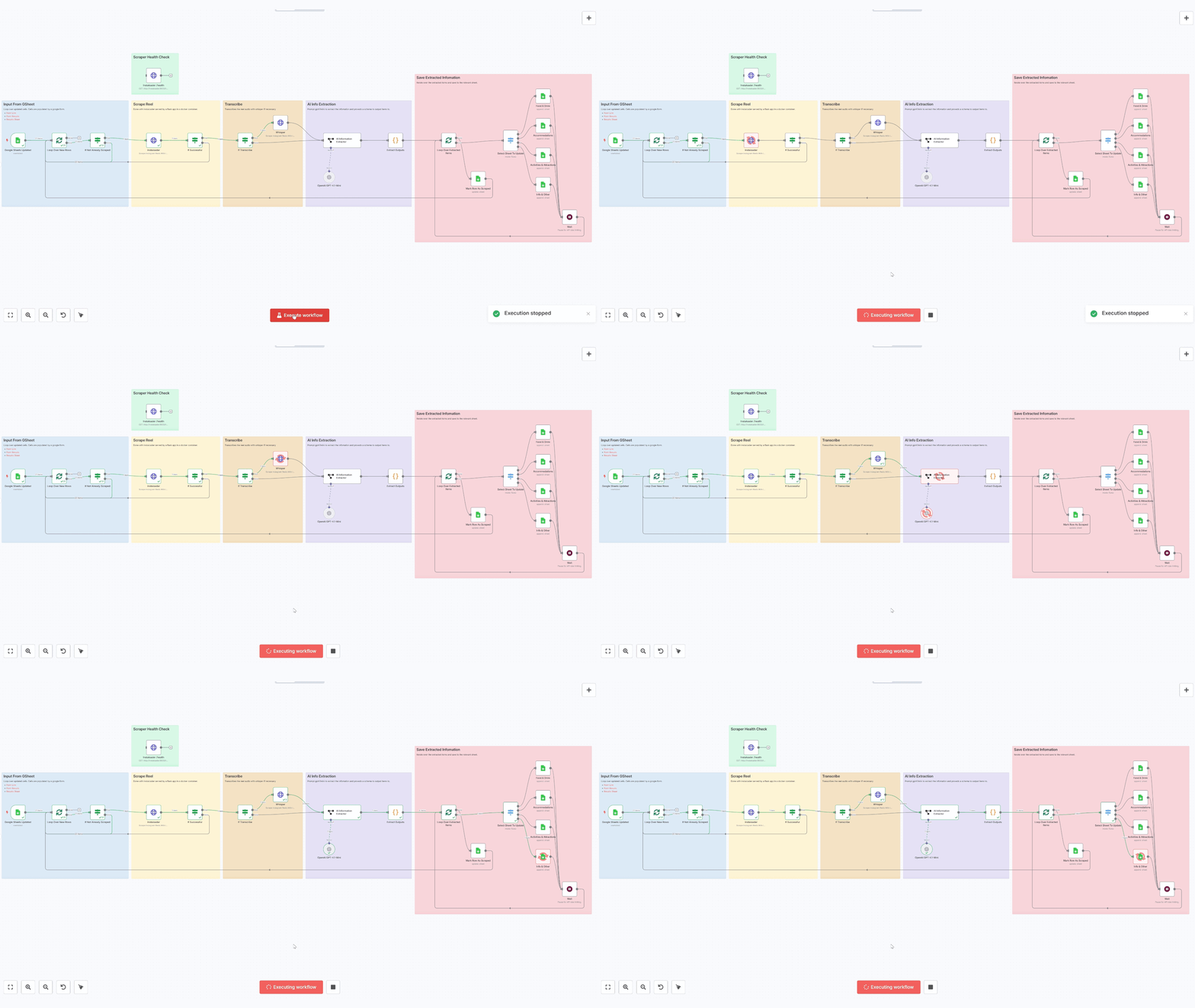
1. Submit Reel URL
A Google Form collects new Reel links, feeding into a “Form Responses” sheet. n8n polls this sheet every 5 minutes for new entries. A "Scraped" column in the table stops re-scrapping.
2. Scrape Reel
Next Instaloader downloads the video and description saving the video locally for later transcription. This service was containerised and served with Flask for modularity and reusability.
3. Optionally Transcribe Audio
If the user selected to “Scrape Audio?” in the form we transcribe the audio of the downloaded video. A library called fast-whisper based on OpenAIs Whisper was used, and I'm impressed with its speed and accuracy on my home server's cpu.
4. AI Information Extraction
Next we pass the scraped and transcribed data to an LLM with a prompt that:
- Identifies each actionable item.
- Assigns exactly one of:
- Food & Drink
- Accommodations
- Activities & Attractions
- Info & Other
- Returns valid JSON matching the target schema
System Prompt: ...
You are an expert at reading social-media content and extracting structured data. We are going on holiday and this is research.

• Identify every distinct piece of actionable information in the description and transcript (e.g., a hotel mention, a restaurant, a safety tip) and output each as a separate items[] entry.
• Assign each entry exactly one category: "Food & Drink", "Accommodations", "Activities & Attractions", or "Info & Other".
• These are the categories and their descriptions
- - Food & Drink are **ONLY specific locations to eat and drink** e.g "Sam's beach bar bali". The type is: "Restaurants", "Cafes" etc
- - Accommodations is places to stay: Hotels, Hostels, etc
- - Activities & Attractions are things to do: Bars, Beaches, Clubs, Snorkelling etc
- - Info & Other are pieces of information, often includes tips and tricks etc
• Take into context the rest description and transcript for categorising each item. E.g If the whole content is about "10 Safety Tips", all items will likely be "Info & Other" category
• For each category, include only the sheet-specific fields plus a notes field that may be as long as needed to capture all relevant details.
• Do not invent extra keys or categories.
• Return only valid JSON matching the schema.
5. Save to Google Sheets
Lastly n8n loops over each extracted JSON item and, via a Switch node, routes it to the appropriate Google Sheets tab. A brief Wait node handles API rate limits.
Results
Overall im quite impressed with the results. These are some of the results from about 20 scrape reels totalling about 2p in cost. I am impressed with the amount of information extracted for each reel, and the LLM was good at adding context from the rest of the reel. The outcome is only as good as the video it comes from but the AI was generally very good at separating and summarising the info. It struggled a bit sometimes with categorising, e.g food and drink hygiene tips being put in Food & Drink category which is more for actual locations to eat. However, I didn't spend long on prompt engineering and I'm sure I could have achieved better results here with some more experimentation here.
From the screenshots you can see some examples of poor quality data. Row 6 in the Scraped Info & Other, for example, seems to be a phone number advert. And some of the entries above aren't very descriptive in location or notes. However building up this database of info has allow me to see what trends pop up often, which could be especially useful for seeing popularity of place recommendations. Ultimately this data will be most useful put back into a more powerful LLM, such as GPT4o, to clean-up and further summaries.
Self-hosted VS Cloud LLMs
I tried a variety of models, both self-hosted and through APIs. I found ChatGPT-4.1-nano struggled with categorisation so switch to the mini model for a compromise of costs and accuracy. I tried self-hosted models such as TinyLLama which ran ok on my server's cpu but this wasn't very accurate. Llama 3.1 4B worked ok on my PC's gpu but was too slow on my servers cpu. I overall found this model still struggled with classification as well sticking to the json schema.
Challenges
Every project comes with its own hurdles, that's where the learning happens. While this went relatively smoothly, these were some of the challenges I faced:
Self-Hosting
Though n8n offers a cloud-hosted option, I opted for self-hosting primarily for three reasons:
- Cost Efficiency: I wanted to avoid ongoing subscription costs (even though it seems n8n has a generous free tier).
- Learning: Hosting it myself offered opportunities to deepen my understanding of networking and server management.
- Privacy: data privacy, not so much necessary for this project, but maybe for future other projects.
The initial setup of n8n was straightforward using Docker Compose, although configuring the network infrastructure to securely expose the services to the internet (necessary for connecting with Google Sheets APIs) was a bit fiddly. Ironically, Id say this project became as much a DevOps and networking project as it was an AI endeavour. Overall though I would definitely recommend self-hosting it as it was a lot of fun and a good learning exercise.
AI Limitations:
Occasionally even GPT-4.1-mini struggled with accurate categorisation, especially with foreign names and locations. It sometimes mistook adverts as relevant content. I think some more experimenting with prompts could have improved this.
Output Is Only As Good As Your Data
Once I paid closer attention picking reels to scraper, it did highlight how many reels were mostly just advertising or the same advice repeated. Finding good reels to scrape became more difficult than getting the information from them! (Which maybe should be considered a win!)
Thoughts On n8n
Pros:
- Nice visual interface for quickly seeing and understanding your workflows.
- Helpful visual debugging tools made testing very easy.
- Lots of prebuilt tools and integrations.
Cons:
- Node interface sometimes felt more tedious than hand-coding it would have.
- Large workflows quickly become cumbersome.
The primary goal of this project was to experiment with n8n and have a go with this fun visual tool. While I enjoyed building with it I admit I am not the target audience for this low code/no code tool and likely came into it with the mindset of a programmer. Im now looking further into other code solutions such as Langchain and Langgraph with future projects in mind.
Business Cases
By extending and scaling this tool beyond just holiday research you open the possibility to deliver value in a number of markets. From marketing teams, to research departments, to cyber intelligence units, this tool can streamline workflows saving time and money. This is especially valuable for smaller ventures where both are limited.
Digital Research Aid
Marketing research is big business and this automated tool could feed in reels on politics, tech, market trends, or even academic topics and instantly get a structured breakdown of everything in one place. Instead of manually going through countless short videos, you'd have a centralised database with categorised recommendations, quotes, sources, and summaries. By prompt engineering and even fine-tuning models a lot of customisability is achievable.
Sentiment Trend Analysis
By including user comments and engagement metrics, you can layer in sentiment analysis and keyword tracking on top of the basic scrape. Marketing teams can see what people are saying in real time about a product launch, a brand repositioning, or a digital campaign. With Instaloader you could even include competitor profiles, monitoring for spikes in either positive or negative sentiment so your team is always a step ahead.
Risk Detection & Cyber Intelligence
Threat intelligence is a booming industry and having eyes on the web for protecting both brand and personal is not possible at scale with human teams. While there will always be a place for human intelligence, leveraging tools like this with AI integration can scan for real time intelligence and at a fraction of the cost.
Monitoring Small Business
For small businesses this tool allows a cheap way to keep an eye on their digital footprint. Instead of hiring an agency they can automatically see what customers are saying, see and address recurring complaints, and even consider AI engagement with followers.