
Deploy n8n Workflow Automation on AWS EKS - Production Ready in Any Region


One-click deployment of n8n workflow automation platform on Amazon EKS with enterprise-grade security, multi-region support, and production-ready configuration. Perfect for DevOps teams looking to automate workflows at scale.
What's New in v2.0
Major Code Quality Improvements:
- All scripts now include comprehensive error handling and validation
- New shared functions library (
common.sh) for consistency - Prerequisites checking (aws, kubectl, eksctl) before operations
- AWS credentials and region validation
- Color-coded output for better visibility
- Help documentation for all scripts (
--helpflag) - Security improvements: credentials retrieved from Kubernetes secrets
Enhanced Scripts:
- Backup: Retention policy, automatic cleanup, backup validation
- Restore: Pre-restore safety backup, rollback on failure
- Monitor: Watch mode for continuous monitoring
- Logs: Follow mode, multi-service support, configurable output
- Cleanup: Namespace-only mode, orphaned resource detection
- Deploy: Full validation pipeline, manifest verification
- Cost-Optimized: Secure credential handling, auto-config generation
Architecture Overview
Deploying n8n on Amazon EKS provides scalability, automation, and high reliability for enterprise workflow operations.
Overall Architecture
Amazon EKS - Container orchestration platform that manages and scales n8n applications with high availability and security.
Amazon EC2 (Worker Nodes) - Runs n8n and PostgreSQL pods in isolated environments with dedicated compute resources.
PostgreSQL - Stores workflow data, credentials, and execution history with persistent storage and backup capabilities.
AWS Load Balancer Controller - Provides n8n access endpoints via Network Load Balancer for high performance and low latency.
Amazon CloudWatch - Collects logs and metrics for comprehensive monitoring, alerting, and performance optimization.
Amazon S3 (Optional) - Stores automated backups and workflow exports for disaster recovery and compliance.
Operational Flow
Internet → AWS NLB → EKS Service → n8n Pod → PostgreSQL Pod
                                      ↓
                              CloudWatch Logs/Metrics
                                      ↓
                              S3 Backup (Optional)
-
User Access - Users access n8n interface through Load Balancer URL or custom domain (HTTPS can be configured separately).
-
Request Processing - Requests are routed to n8n application pods within the dedicated n8n namespace.
-
Data Persistence - Workflow runtime interacts with PostgreSQL for data storage and retrieval operations.
-
Monitoring - All metrics and logs are exported to CloudWatch for real-time monitoring and optimization.
-
Backup Operations - Automated CronJob backups send data to S3 for disaster recovery (when configured).
Architecture Benefits
- Multi-Region Ready - Easy expansion across multiple AWS regions with consistent deployment patterns.
- Security by Design - NetworkPolicy isolation, HTTPS encryption, and separate IAM roles for enhanced security.
- Observability - Integrated metrics, logs, and events with CloudWatch for comprehensive monitoring.
- Scalability - Supports horizontal pod autoscaling based on CPU/memory load with automatic resource management.
- High Availability - Multi-AZ deployment with pod anti-affinity for fault tolerance and zero-downtime operations.
- Cost Optimization - Resource quotas and limits prevent over-provisioning while maintaining performance.
What is n8n?
n8n (pronounced "n-eight-n") is a powerful, open-source workflow automation tool that enables you to connect different services and automate repetitive tasks without writing code. It's designed for technical and non-technical users alike.
Key Features
- Visual Workflow Builder - Drag-and-drop interface for creating complex automation workflows
- 400+ Integrations - Pre-built nodes for popular services (Slack, Gmail, AWS, GitHub, etc.)
- Code Flexibility - Execute custom JavaScript, Python, or shell commands when needed
- Self-Hosted - Full control over your data and workflows
- API-First - RESTful API for programmatic workflow management
- Conditional Logic - Advanced branching, loops, and error handling
- Scheduling - Time-based triggers and cron job support
- Webhook Support - HTTP endpoints for external service integration
Use Cases
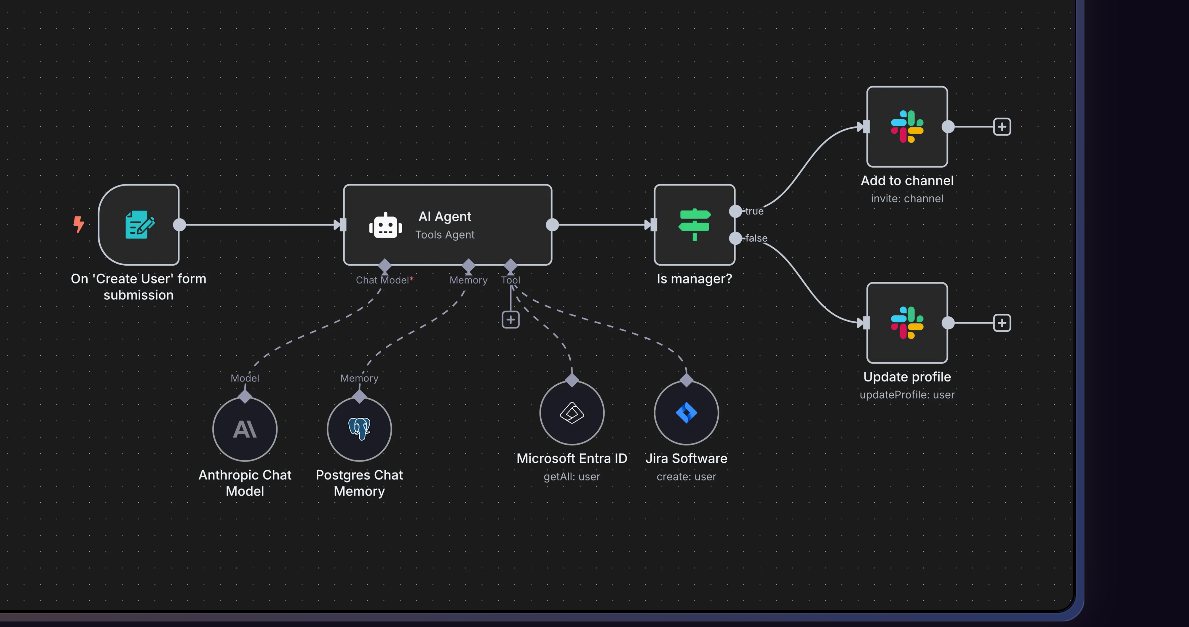
IT Ops can ⚡ On-board new employees
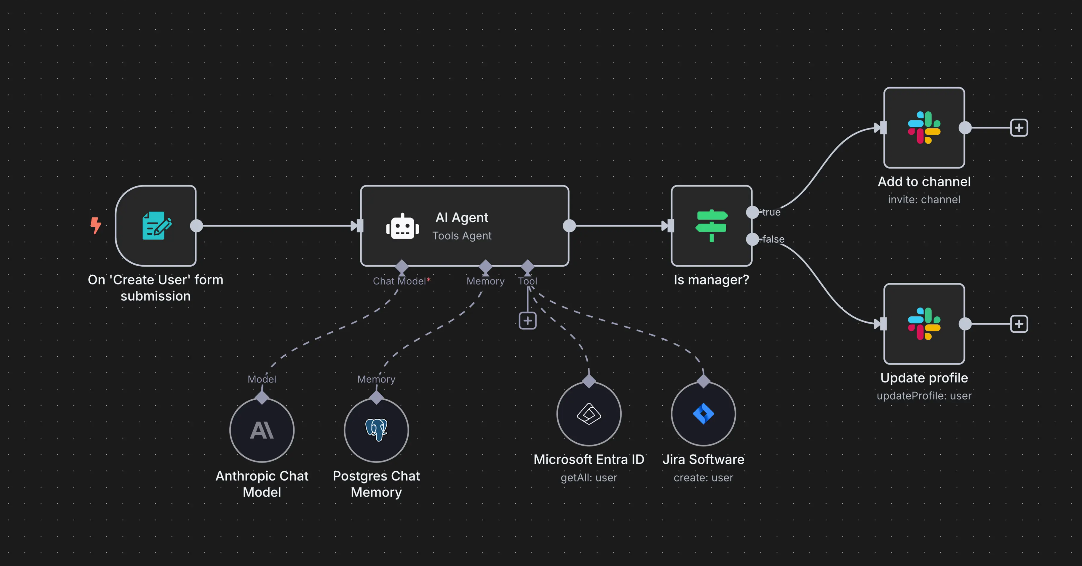
Sec Ops can ⚡ Enrich security incident tickets
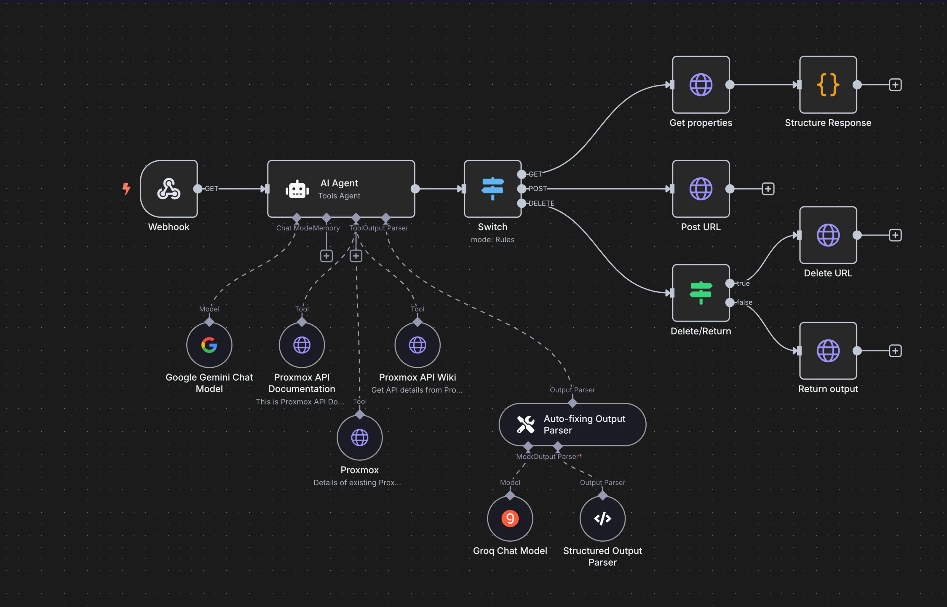
Dev Ops can ⚡ Convert natural language into API calls
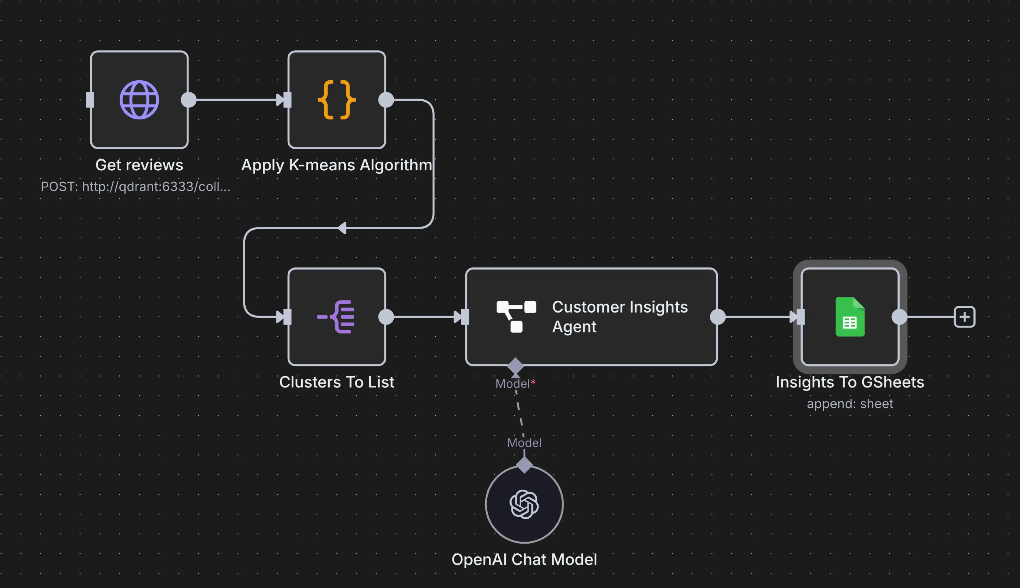
Sales can ⚡ Generate customer insights from reviews
Project Structure
n8n-on-aws-eks/
├── infrastructure/
│   ├── cluster-config.yaml              # EKS cluster configuration template
│   └── cost-optimized-cluster.yaml      # Cost-optimized cluster config (auto-generated)
├── manifests/                            # Kubernetes manifests
│   ├── 00-namespace.yaml                 # Namespace & resource quotas
│   ├── 01-postgres-secret.yaml           # Database credentials
│   ├── 02-persistent-volumes.yaml        # PVC definitions
│   ├── 03-postgres-deployment.yaml       # PostgreSQL deployment
│   ├── 04-postgres-service.yaml          # PostgreSQL service
│   ├── 05-network-policy.yaml            # Network security policies
│   ├── 06-n8n-deployment.yaml            # n8n application deployment
│   ├── 07-n8n-service.yaml               # n8n LoadBalancer service
│   ├── 08-hpa.yaml                       # Horizontal Pod Autoscaler
│   ├── 09-ingress.yaml                   # Ingress configuration
│   ├── 10-backup-cronjob.yaml            # Automated backup jobs
│   └── 11-restore-job.yaml               # Restore job template
├── scripts/
│   ├── common.sh                         # Shared functions library
│   ├── deploy.sh                         # Production deployment with validation
│   ├── deploy-cost-optimized.sh          # Cost-optimized deployment (spot instances)
│   ├── monitor.sh                        # Real-time monitoring dashboard
│   ├── backup.sh                         # Database backup with retention
│   ├── restore.sh                        # Database restore with pre-backup
│   ├── get-logs.sh                       # Log retrieval with follow mode
│   └── cleanup.sh                        # Resource cleanup (namespace/full)
├── backups/                              # Backup storage directory (auto-created)
├── images/                               # Documentation screenshots
│   ├── n8n-setup.png                     # Setup interface
│   ├── n8n-workflow.png                  # Workflow builder
│   ├── n8n-workflow-example.png          # Advanced workflow example
│   ├── it-ops-onboarding.png             # IT ops use case
│   ├── sec-ops-incident-enrichment.png   # Security ops use case
│   ├── dev-ops-natural-language-api.png  # DevOps use case
│   └── sales-customer-insights.png       # Sales use case
├── LICENSE                               # MIT License
└── README.md                             # This file
Scripts Overview
All scripts have been enhanced with enterprise-grade features including comprehensive validation, error handling, and help documentation.
Core Features (New in v2.0)
- Strict Mode: All scripts use
set -euo pipefailfor safer execution - Prerequisites Validation: Automatic checking for required commands (aws, kubectl, eksctl)
- AWS Validation: Credentials and region verification before operations
- Help Documentation: Every script supports
--helpflag with examples - Shared Library: Common functions in
scripts/common.shfor consistency - Color-Coded Output: Clear visual feedback (info, success, warning, error)
- Secure Credentials: Database credentials retrieved from Kubernetes secrets
Script Descriptions
| Script | Purpose | Key Features |
|---|---|---|
| deploy.sh | Production EKS deployment | Prerequisites check, region validation, manifest verification |
| deploy-cost-optimized.sh | Cost-optimized deployment | Spot instances, minimal resources, auto-config generation |
| monitor.sh | Status monitoring | Watch mode, real-time updates, resource usage tracking |
| backup.sh | Database backup | Retention policy, automatic cleanup, backup validation |
| restore.sh | Database restore | Pre-restore backup, safety checks, rollback on failure |
| get-logs.sh | Log retrieval | Follow mode, multi-service support, configurable output |
| cleanup.sh | Resource cleanup | Namespace-only mode, orphaned resource detection |
| common.sh | Shared library | Logging, validation, error handling functions |
Quick Help
All scripts support the --help flag for detailed usage information:
./scripts/deploy.sh --help
./scripts/backup.sh --help
./scripts/restore.sh --help
./scripts/get-logs.sh --help
./scripts/monitor.sh --help
./scripts/cleanup.sh --help
./scripts/deploy-cost-optimized.sh --help
Quick Start
Prerequisites
Before deploying n8n on EKS, ensure you have:
- AWS CLI configured with appropriate profile and permissions
- kubectl installed (v1.28+)
- eksctl installed (v0.150+)
- Minimum AWS Permissions:
- EKS cluster creation and management
- EC2 instance management
- VPC and networking resources
- IAM role creation
- CloudFormation stack management
1. Deploy to Any Region
All scripts now include comprehensive validation, error handling, and help messages.
# Clone this repository
git clone https://github.com/vanhoangkha/n8n-on-aws-eks.git
cd n8n-on-aws-eks

# View deployment options
./scripts/deploy.sh --help

# Deploy to default region (us-east-1) - with automatic validation
./scripts/deploy.sh

# Deploy to specific region
REGION=us-west-2 ./scripts/deploy.sh

# Deploy with custom cluster name and region
CLUSTER_NAME=my-n8n-cluster REGION=eu-west-1 ./scripts/deploy.sh

# Deploy with custom AWS profile
AWS_PROFILE=myprofile REGION=ap-southeast-1 ./scripts/deploy.sh

# All parameters together
CLUSTER_NAME=production-n8n REGION=us-west-2 AWS_PROFILE=devops ./scripts/deploy.sh
New in v2.0:
- Automatic prerequisite checking (aws, kubectl, eksctl)
- AWS credentials and region validation
- Cluster existence verification
- Manifest file validation before deployment
- Better error messages and logging
2. Monitor Deployment Status
# One-time status check
./scripts/monitor.sh

# Continuous monitoring (refreshes every 5 seconds)
./scripts/monitor.sh --watch

# Custom refresh interval (every 10 seconds)
./scripts/monitor.sh -w -i 10

# View help
./scripts/monitor.sh --help
Features:
- Real-time pod status and resource usage
- Service endpoints and LoadBalancer URLs
- Recent events and alerts
- Quick command reference
3. Access n8n
# Get LoadBalancer URL (shown in deployment output)
kubectl get service n8n-service-simple -n n8n

# Or use monitor script for full status
./scripts/monitor.sh
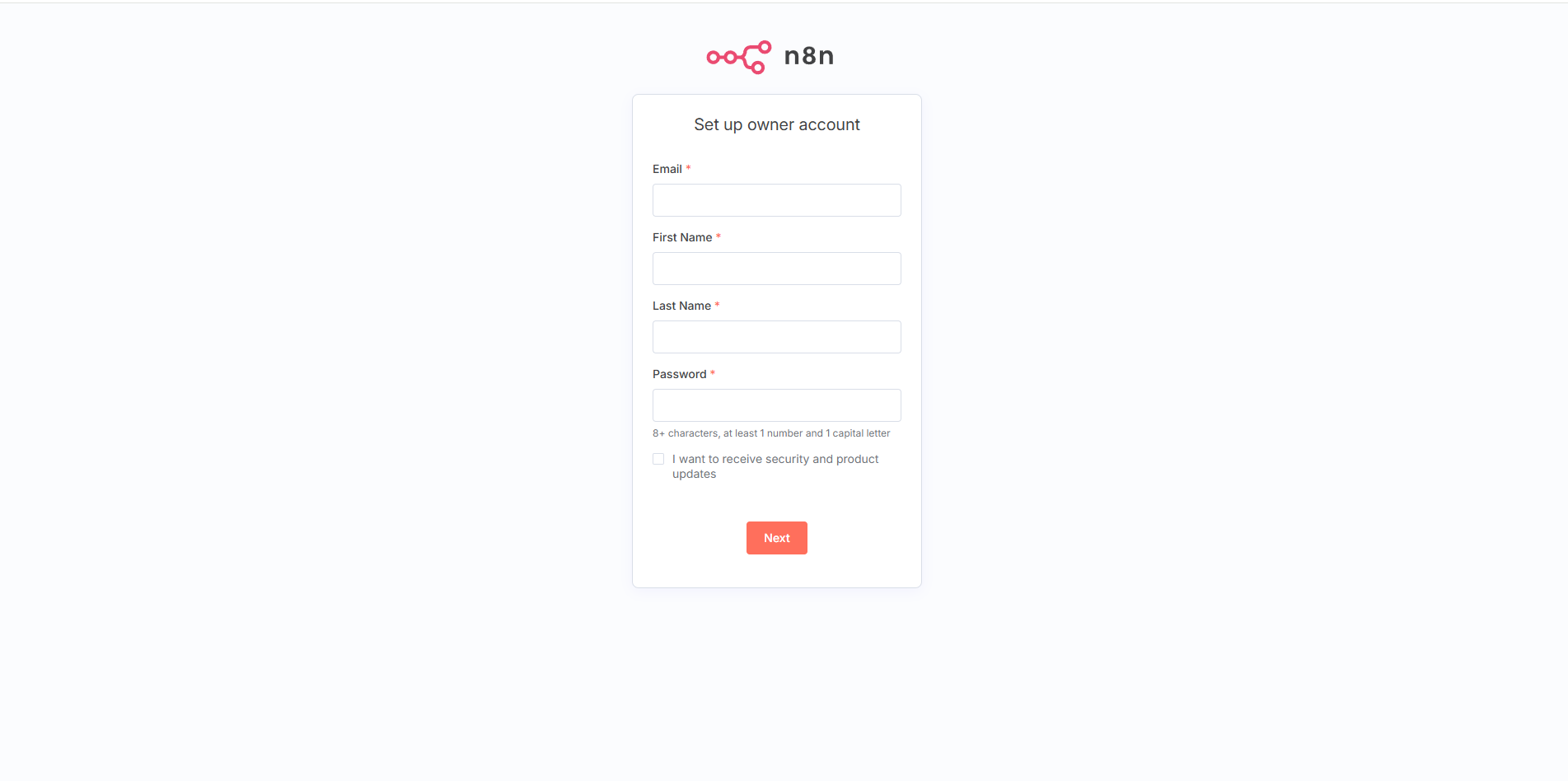
n8n owner account setup interface - Configure your admin credentials to get started
Regional Deployment Examples
North America
# US East (Virginia)
REGION=us-east-1 ./scripts/deploy.sh

# US West (Oregon)
REGION=us-west-2 ./scripts/deploy.sh

# Canada (Central)
REGION=ca-central-1 ./scripts/deploy.sh
Europe
# Europe (Ireland)
REGION=eu-west-1 ./scripts/deploy.sh

# Europe (Frankfurt)
REGION=eu-central-1 ./scripts/deploy.sh

# Europe (London)
REGION=eu-west-2 ./scripts/deploy.sh
Asia Pacific
# Asia Pacific (Tokyo)
REGION=ap-northeast-1 ./scripts/deploy.sh

# Asia Pacific (Singapore)
REGION=ap-southeast-1 ./scripts/deploy.sh

# Asia Pacific (Sydney)
REGION=ap-southeast-2 ./scripts/deploy.sh
Initial Setup & Configuration
Step 1: Owner Account Setup
When you first access n8n, you'll be prompted to create an owner account:
- Email - Your admin email address
- First Name - Your first name
- Last Name - Your last name
- Password - Strong password (8+ characters, 1 number, 1 capital letter)
Step 2: Workspace Configuration
After account creation, configure your workspace:
- Workspace Name - Choose a descriptive name for your organization
- Usage Plan - Select based on your automation needs
- Team Setup - Invite team members (optional)
Step 3: First Workflow
Create your first automation workflow:
- Click "Create new workflow"
- Add a Trigger Node (Manual, Webhook, Schedule, etc.)
- Add Action Nodes (HTTP Request, Email, Database, etc.)
- Connect nodes by dragging between connection points
- Configure each node with required parameters
- Test workflow using the "Execute Workflow" button
- Save and activate your workflow
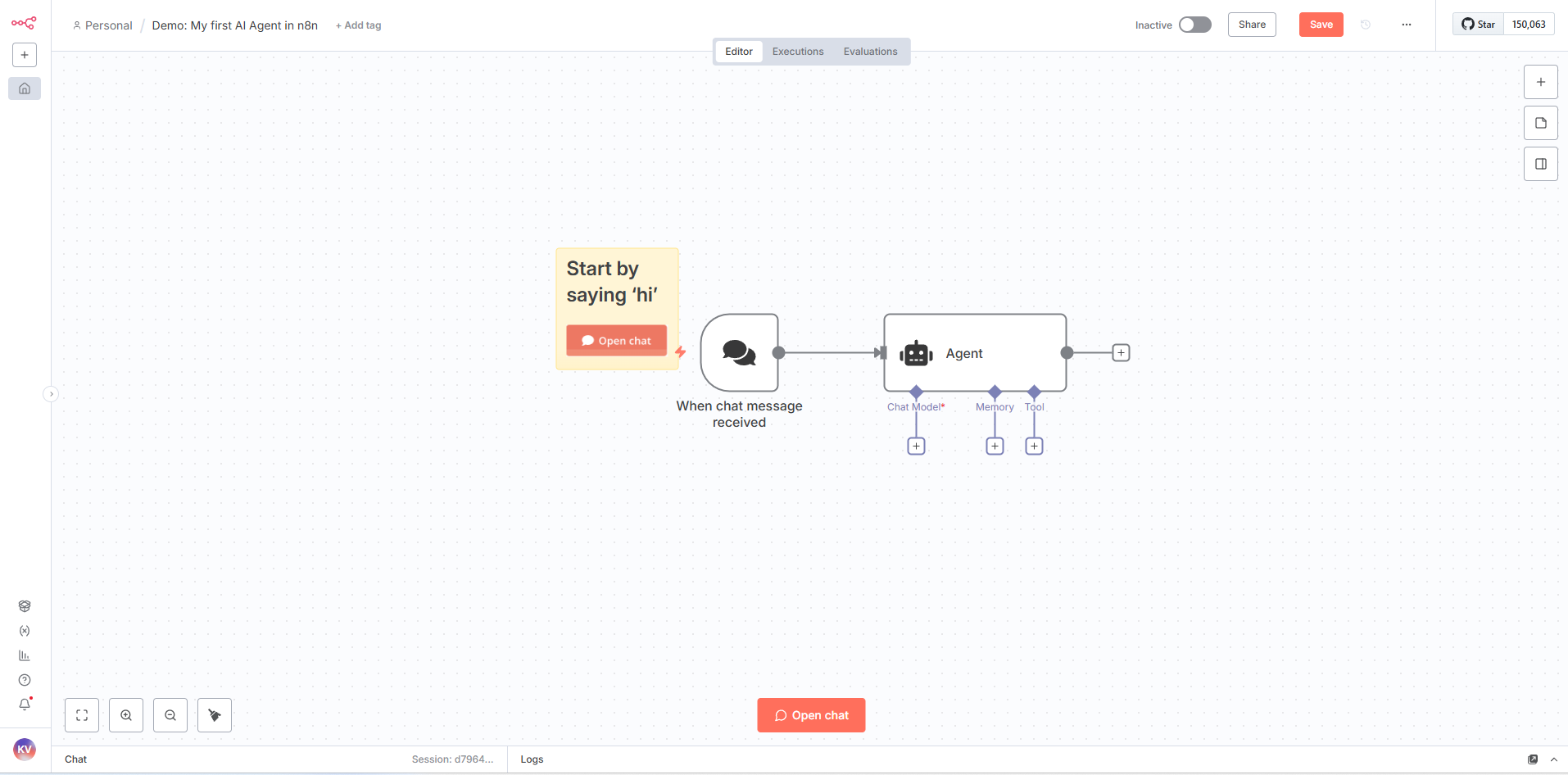
n8n workflow builder interface - Visual drag-and-drop workflow creation with multiple nodes and connections
Advanced Workflow Example
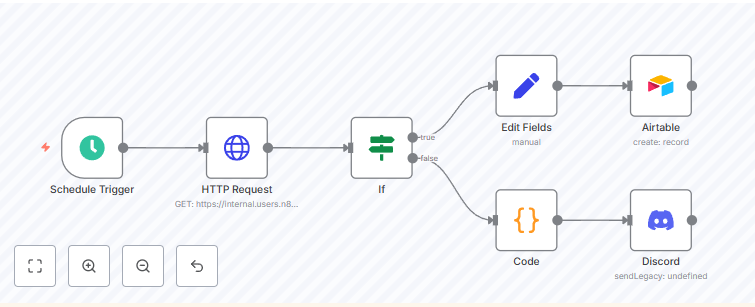
Example of a more complex n8n workflow with multiple integrations, conditional logic, and data processing nodes
Step 4: Security Configuration
Enhance security for production use:
# Enable HTTPS (recommended for production)
kubectl patch deployment n8n-simple -n n8n -p '{"spec":{"template":{"spec":{"containers":[{"name":"n8n","env":[{"name":"N8N_SECURE_COOKIE","value":"true"},{"name":"N8N_PROTOCOL","value":"https"}]}]}}}}'

# Set up custom domain (requires certificate)
# Update service to use custom domain and TLS
Configuration
Database Configuration
- Host: postgres-service-simple.n8n.svc.cluster.local
- Database: n8n
- User: n8nuser
- Password: n8n-secure-password-2024
- Port: 5432
Resource Allocation
| Component | CPU Request | CPU Limit | Memory Request | Memory Limit | Storage |
|---|---|---|---|---|---|
| PostgreSQL | 250m | 500m | 256Mi | 512Mi | 20Gi (emptyDir) |
| n8n | 250m | 1000m | 512Mi | 1Gi | 10Gi (emptyDir) |
Environment Variables
| Variable | Value | Description |
|---|---|---|
N8N_SECURE_COOKIE |
false | Cookie security (set to true for HTTPS) |
N8N_PROTOCOL |
http | Protocol (change to https for production) |
N8N_PORT |
5678 | Application port |
N8N_METRICS |
true | Enable Prometheus metrics |
DB_TYPE |
postgresdb | Database type |
DB_POSTGRESDB_HOST |
postgres-service-simple.n8n.svc.cluster.local | Database host |
DB_POSTGRESDB_DATABASE |
n8n | Database name |
Management Commands
Monitoring and Logs
# Real-time monitoring dashboard
./scripts/monitor.sh

# Continuous monitoring (auto-refresh)
./scripts/monitor.sh --watch

# View n8n logs (last 100 lines)
./scripts/get-logs.sh n8n

# Follow n8n logs in real-time
./scripts/get-logs.sh n8n --follow

# View PostgreSQL logs
./scripts/get-logs.sh postgres -n 50

# View all service logs
./scripts/get-logs.sh all --lines 200
Log Script Features:
- Follow mode for real-time log streaming
- Support for n8n, postgres, or all services
- Configurable line count
- All-pods mode for multi-replica deployments
Database Backup and Restore
# Create database backup (with automatic retention)
./scripts/backup.sh

# Create backup in custom directory
./scripts/backup.sh /path/to/backups

# Create backup with custom retention (14 days)
./scripts/backup.sh ./backups 14

# Restore from backup (with automatic pre-restore backup)
./scripts/restore.sh backups/n8n-backup-20241201-120000.sql.gz

# Restore without creating pre-restore backup (not recommended)
./scripts/restore.sh backups/n8n-backup.sql.gz --skip-backup

# View backup script options
./scripts/backup.sh --help
./scripts/restore.sh --help
Backup Features:
- Automatic backup directory creation
- Configurable retention policy (default: 7 days)
- Old backup cleanup
- Backup validation (size and integrity)
- Pre-restore safety backup
- Secure credential handling from Kubernetes secrets
Cluster Operations
# Check cluster status
kubectl cluster-info
kubectl get nodes

# Check n8n namespace resources
kubectl get all -n n8n

# View resource usage
kubectl top pods -n n8n
kubectl top nodes
Application Management
# Scale application
kubectl scale deployment n8n-simple --replicas=3 -n n8n

# Update n8n version
kubectl set image deployment/n8n-simple n8n=n8nio/n8n:1.0.0 -n n8n

# Restart deployment
kubectl rollout restart deployment/n8n-simple -n n8n
Manual Database Operations
# Connect to PostgreSQL (for manual operations)
kubectl exec -it deployment/postgres-simple -n n8n -- psql -U n8nuser -d n8n

# Manual backup (use backup.sh script instead)
kubectl exec deployment/postgres-simple -n n8n -- pg_dump -U n8nuser n8n > n8n-backup-$(date +%Y%m%d).sql

# Manual restore (use restore.sh script instead)
kubectl exec -i deployment/postgres-simple -n n8n -- psql -U n8nuser -d n8n < n8n-backup.sql
Security & Best Practices
Production Security Checklist
- Enable HTTPS/TLS with valid certificates
- Use strong, unique passwords for all accounts
- Implement network policies for pod-to-pod communication
- Enable audit logging for compliance
- Regular security updates and patches
- Backup strategy implementation
- Monitor resource usage and set alerts
Network Security
# Apply network policies (example)
kubectl apply -f - <<EOF
apiVersion: networking.k8s.io/v1
kind: NetworkPolicy
metadata:
  name: n8n-network-policy
  namespace: n8n
spec:
  podSelector:
    matchLabels:
      app: n8n-simple
  policyTypes:
  - Ingress
  - Egress
  ingress:
  - from: []
    ports:
    - protocol: TCP
      port: 5678
EOF
Monitoring & Observability
Health Checks
The deployment includes comprehensive health monitoring:
- Liveness Probe - HTTP GET
/healthzevery 30s - Readiness Probe - HTTP GET
/healthzevery 10s - Startup Probe - HTTP GET
/healthzwith 60s timeout
Metrics Collection
# Enable metrics collection
kubectl port-forward service/n8n-service-simple 8080:80 -n n8n

# Access metrics endpoint
curl http://localhost:8080/metrics
Log Aggregation
# Stream logs from all n8n pods
kubectl logs -f -l app=n8n-simple -n n8n

# Export logs to file
kubectl logs deployment/n8n-simple -n n8n > n8n-logs-$(date +%Y%m%d).log
Cost Calculation
Monthly Cost Breakdown by Region
US East (us-east-1) - Lowest Cost
| Component | Standard | Cost-Optimized |
|---|---|---|
| EKS Control Plane | $73.00 | $73.00 |
| EC2 (t3.medium × 2) | $58.40 | - |
| EC2 (t3.small × 1 Spot) | - | $8.76 |
| Network Load Balancer | $16.43 | $16.43 |
| EBS Storage (60GB) | $6.00 | $1.60 |
| Total | ~$154/month | ~$100/month |
Singapore (ap-southeast-1) - Regional Pricing
| Component | Standard | Cost-Optimized |
|---|---|---|
| EKS Control Plane | $73.00 | $73.00 |
| EC2 (t3.medium × 2) | $67.68 | - |
| EC2 (t3.small × 1 Spot) | - | $10.14 |
| Network Load Balancer | $18.40 | $18.40 |
| EBS Storage (60GB) | $4.80 | $2.40 |
| Total | ~$164/month | ~$104/month |
Europe (eu-west-1) - Frankfurt
| Component | Standard | Cost-Optimized |
|---|---|---|
| EKS Control Plane | $73.00 | $73.00 |
| EC2 (t3.medium × 2) | $61.32 | - |
| EC2 (t3.small × 1 Spot) | - | $9.20 |
| Network Load Balancer | $18.25 | $18.25 |
| EBS Storage (60GB) | $5.40 | $1.80 |
| Total | ~$158/month | ~$102/month |
Cost Optimization Strategies
1. Ultra Cost-Optimized Deployment
# View cost-optimized deployment options
./scripts/deploy-cost-optimized.sh --help

# Deploy with minimal resources and spot instances
./scripts/deploy-cost-optimized.sh

# Deploy to specific region
REGION=us-east-1 ./scripts/deploy-cost-optimized.sh
Features (New in v2.0):
- Automatic cluster configuration generation
- Secure credential handling (no hardcoded passwords)
- Full validation and error handling
- Uses Kubernetes secrets for database credentials
- Clear warnings about non-production use
Configuration:
- Single t3.small spot instance: 70% savings on compute
- Minimal resource allocation: Reduced CPU/memory requests
- emptyDir storage: Non-persistent for cost savings
- Estimated cost: $100-110/month globally
Important: This deployment is suitable for development/testing only, NOT for production workloads.
2. Scheduled Scaling (Additional 40% savings)
# Scale down during off-hours (nights/weekends)
kubectl scale deployment n8n-simple --replicas=0 -n n8n
kubectl scale deployment postgres-simple --replicas=0 -n n8n

# Scale up during business hours
kubectl scale deployment n8n-simple --replicas=1 -n n8n
kubectl scale deployment postgres-simple --replicas=1 -n n8n
- Potential monthly cost: $60-75/month
3. Reserved Instances (1-3 year commitment)
- 1-year commitment: 30-40% savings on EC2
- 3-year commitment: 50-60% savings on EC2
4. Alternative Architectures
Fargate Option (Serverless)
- No EC2 management required
- Pay per vCPU/GB-hour used
- Estimated: $80-120/month for light usage
ECS on EC2 (Lower cost alternative)
- No EKS control plane fee ($73 savings)
- Estimated: $50-80/month with spot instances
Regional Cost Comparison
| Region | Standard Setup | Cost-Optimized | Savings |
|---|---|---|---|
| us-east-1 | $154/month | $100/month | 35% |
| us-west-2 | $162/month | $105/month | 35% |
| eu-west-1 | $158/month | $102/month | 35% |
| ap-southeast-1 | $164/month | $104/month | 37% |
| ap-northeast-1 | $168/month | $108/month | 36% |
Cost Monitoring Commands
# Check current resource usage
kubectl top pods -n n8n
kubectl top nodes

# Monitor costs with AWS CLI
aws ce get-cost-and-usage --time-period Start=2024-01-01,End=2024-01-31 \
  --granularity MONTHLY --metrics BlendedCost \
  --group-by Type=DIMENSION,Key=SERVICE

# Set up billing alerts
aws budgets create-budget --account-id YOUR_ACCOUNT_ID \
  --budget BudgetName=n8n-monthly,BudgetLimit=Amount=150,Unit=USD
Production vs Development Costs
Development Environment
- Single node with spot instances
- Scheduled scaling (8 hours/day)
- Estimated: $30-50/month
Production Environment
- Multi-AZ with 3 nodes
- Reserved instances
- Managed RDS PostgreSQL
- Estimated: $200-300/month
Troubleshooting
Common Issues
Pods Not Starting
# Check pod status and events
kubectl describe pod <pod-name> -n n8n
kubectl get events -n n8n --sort-by='.lastTimestamp'

# Check resource constraints
kubectl describe resourcequota n8n-quota -n n8n
Database Connection Issues
# Test database connectivity
kubectl exec -it deployment/n8n-simple -n n8n -- nc -zv postgres-service-simple 5432

# Check database logs
kubectl logs deployment/postgres-simple -n n8n --tail=50
LoadBalancer Issues
# Check service status
kubectl describe service n8n-service-simple -n n8n

# Check AWS Load Balancer Controller
kubectl get pods -n kube-system | grep aws-load-balancer
Performance Optimization
# Increase resources for high workload
kubectl patch deployment n8n-simple -n n8n -p '{"spec":{"template":{"spec":{"containers":[{"name":"n8n","resources":{"requests":{"cpu":"500m","memory":"1Gi"},"limits":{"cpu":"2000m","memory":"2Gi"}}}]}}}}'

# Enable horizontal pod autoscaling
kubectl autoscale deployment n8n-simple --cpu-percent=70 --min=2 --max=10 -n n8n
Cleanup
The cleanup script now includes comprehensive validation, multiple cleanup modes, and orphaned resource detection.
Remove n8n Application Only (Keep Cluster)
# Delete only the n8n namespace and resources
./scripts/cleanup.sh --namespace-only

# Or manually
kubectl delete namespace n8n
Use Case: When you want to redeploy n8n but keep the EKS cluster infrastructure.
Complete Infrastructure Cleanup
# View cleanup options
./scripts/cleanup.sh --help

# Interactive cleanup (with confirmation)
./scripts/cleanup.sh

# Automated cleanup (skip confirmation - use with caution!)
./scripts/cleanup.sh --yes

# Cleanup with custom settings
CLUSTER_NAME=my-cluster REGION=us-west-2 ./scripts/cleanup.sh
Cleanup Features:
- Automatic namespace deletion with PVC cleanup
- EKS cluster removal with all associated resources
- Orphaned LoadBalancer detection and removal
- Comprehensive resource verification
- Two modes: namespace-only or full cleanup
- Safety confirmations (unless --yes flag used)
Verification After Cleanup
# Verify namespace is deleted
kubectl get namespace n8n

# Verify cluster is deleted
aws eks list-clusters --region us-east-1 --profile default

# Check for orphaned resources
aws elbv2 describe-load-balancers --region us-east-1 --profile default
Manual Cleanup (If Automated Script Fails)
# Delete EKS cluster (replace with your region and cluster name)
eksctl delete cluster --region=$REGION --name=$CLUSTER_NAME --profile=$AWS_PROFILE

# Clean up any remaining CloudFormation stacks
aws cloudformation list-stacks --region=$REGION --profile=$AWS_PROFILE

# Check and delete orphaned LoadBalancers
aws elbv2 describe-load-balancers --region=$REGION --profile=$AWS_PROFILE
Production Considerations
Scaling Recommendations
- Horizontal Scaling - Use HPA for automatic pod scaling based on CPU/memory
- Vertical Scaling - Increase resource limits for CPU-intensive workflows
- Database Scaling - Consider managed RDS PostgreSQL for production workloads
- Storage - Implement persistent volumes with EBS for data durability
High Availability Setup
# Multi-AZ deployment with pod anti-affinity
kubectl patch deployment n8n-simple -n n8n -p '{"spec":{"template":{"spec":{"affinity":{"podAntiAffinity":{"preferredDuringSchedulingIgnoredDuringExecution":[{"weight":100,"podAffinityTerm":{"labelSelector":{"matchExpressions":[{"key":"app","operator":"In","values":["n8n-simple"]}]},"topologyKey":"kubernetes.io/hostname"}}]}}}}}}'
Useful Resources
Documentation
n8n Learning Resources
AWS Resources
Contributing
- Fork the repository
- Create a feature branch (
git checkout -b feature/amazing-feature) - Commit your changes (
git commit -m 'Add some amazing feature') - Push to the branch (
git push origin feature/amazing-feature) - Open a Pull Request
License
This project is licensed under the MIT License - see the LICENSE file for details.
Version Information
- Project Version: 2.0 (Code Quality Release)
- n8n Version: Latest (automatically updated)
- PostgreSQL Version: 15
- Kubernetes Version: 1.32
- EKS Platform Version: Latest
- Last Updated: November 2025
Changelog
v2.0 (November 2025) - Code Quality & Best Practices Release
- Added comprehensive error handling and validation to all scripts
- Created shared functions library (
common.sh) - Enhanced backup script with retention policy
- Added pre-restore backup safety feature
- Implemented watch mode for monitoring
- Added follow mode for log streaming
- Enhanced cleanup with namespace-only mode
- Improved security: credentials from Kubernetes secrets
- Added help documentation for all scripts
- Color-coded output for better UX
v1.0 - Initial Release
- Basic deployment scripts
- Multi-region support
- Cost-optimized deployment option
Deployment Type: Kubernetes Native License: MIT License Multi-Region Support: All AWS Regions