

n8n-trace
Self-hosted observability dashboard for n8n
Execution analytics • Instance metrics • RBAC • Audit logging
This is an unofficial community project and not affiliated with n8n GmbH.




Quick Start · Connect n8n · Features · Security · Deploy · Security Guide · Contribute
What is n8n-trace?
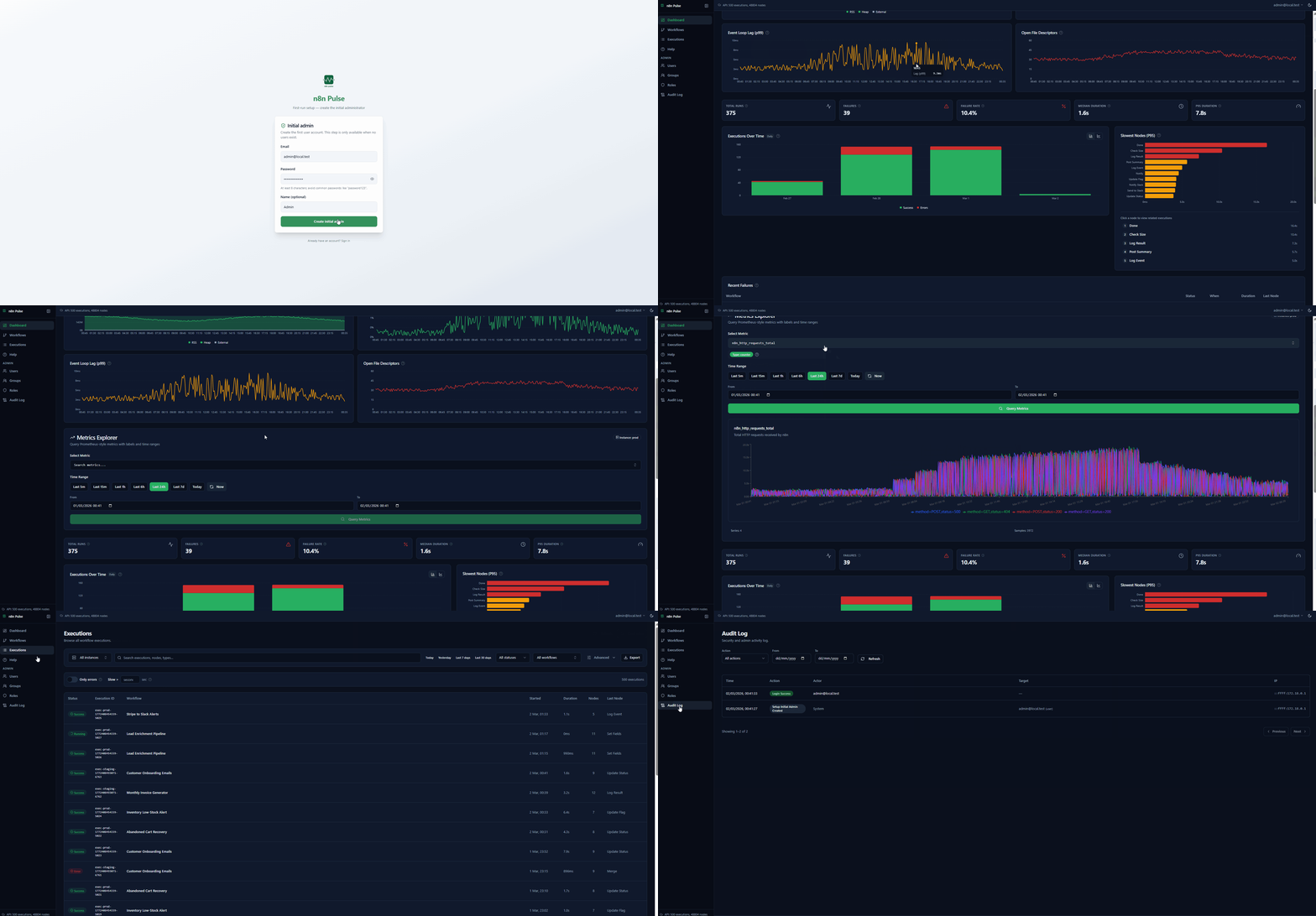
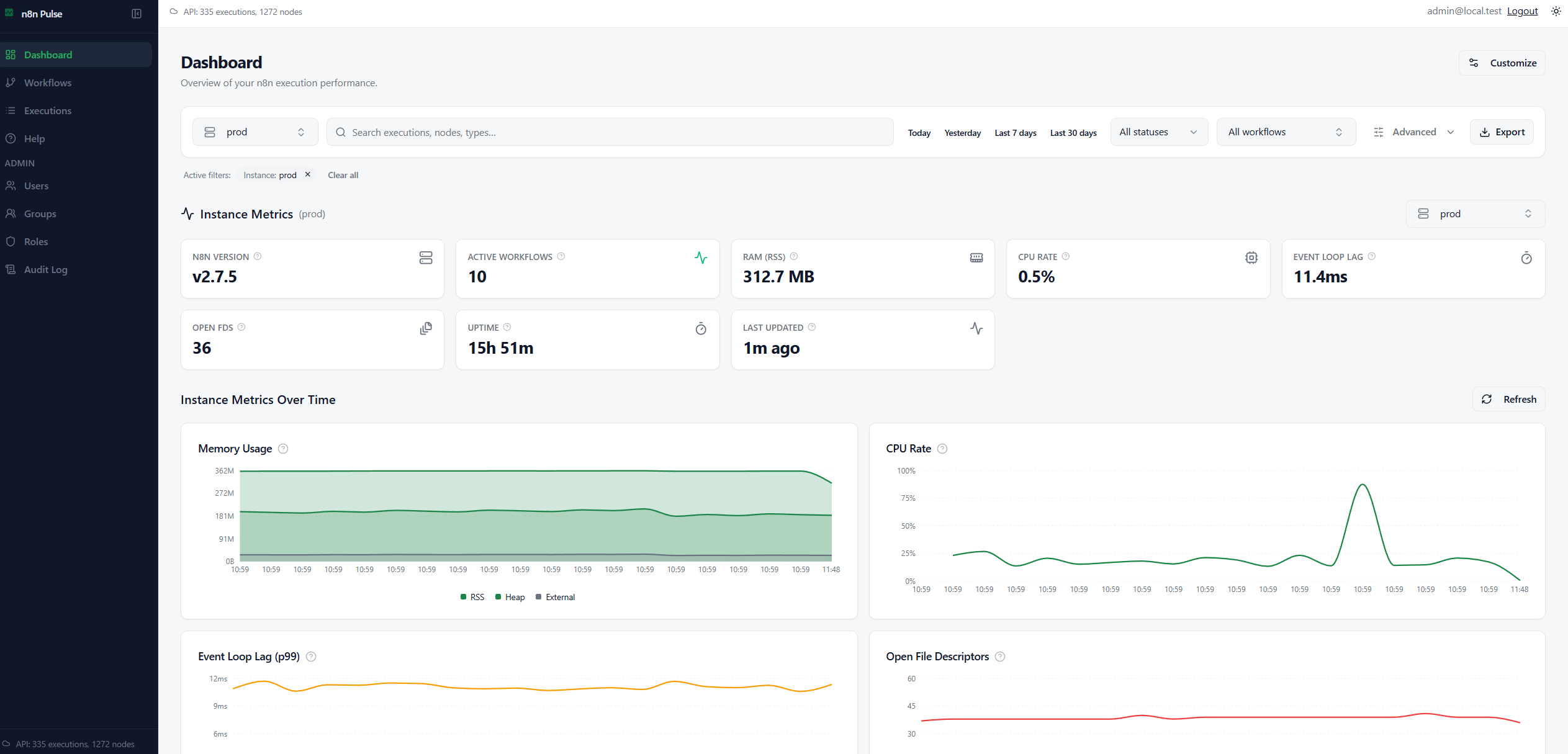
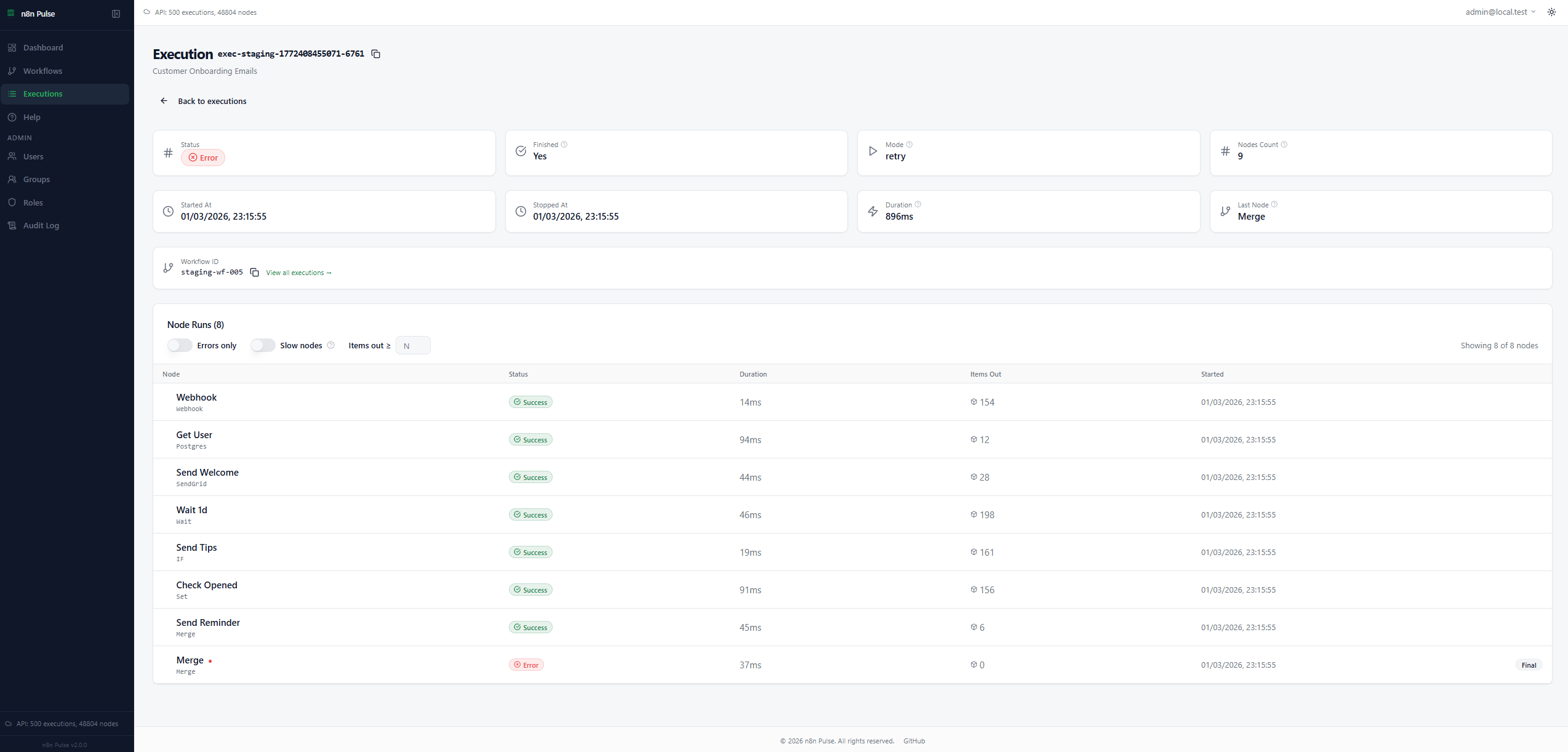
n8n-trace is a self-hosted observability and analytics platform for n8n. It gives you execution analytics, instance health monitoring, a Prometheus-style metrics explorer, and role-based access control — purpose-built for production environments.
n8n-trace runs as a single hardened Docker container alongside PostgreSQL. It never makes outbound calls to your n8n instances. Data flows one way: n8n pushes to n8n-trace, not the other way around.
Who is this for?
- Teams self-hosting n8n who need centralized visibility into what their workflows are doing.
- Platform engineers managing multiple n8n instances (prod, staging, dev) from a single unified dashboard.
- Cross-functional Teams (e.g., Management, QA): Departments that need to track workflow successes and failures without being exposed to sensitive payload data or underlying configurations.
- Security-conscious organizations that require audit logging, RBAC, and strict data privacy. n8n-trace intentionally excludes workflow payloads and raw error logs, ensuring GDPR compliance by design.
- Anyone who wants execution analytics without depending on n8n's built-in UI or paying for Enterprise roles just to get a "Viewer" access.
Why n8n-trace alongside n8n?
n8n-trace complements n8n's built-in UI with enterprise observability features:
| Feature | n8n Built-in | n8n-trace |
|---|---|---|
| Node-level metrics (P95) | ❌ | ✅ |
| Multi-instance dashboard | ❌ | ✅ |
| Advanced RBAC (workflow scoping) | Limited | ✅ Full |
| Audit logging | ❌ | ✅ |
| Prometheus explorer | ❌ | ✅ (optional) |
| Viewer Role Access | ❌ Enterprise only (sees payload) | ✅ Included (metadata only) |
| Payload Privacy | Execution logs expose sensitive data | ✅ 100% blind to payload & secrets |
n8n-trace is your dedicated observability layer — it works alongside n8n without replacing the workflow editor.
Features
Core capabilities designed for production environments:
| Feature | Description |
|---|---|
| 📊 Execution Analytics | Success/failure rates, duration trends, node-level performance |
| 📈 Instance Monitoring | CPU, memory, event loop metrics via Prometheus endpoint |
| 🔍 Metrics Explorer | Query and chart any Prometheus metric with label filtering |
| 🧭 Multi-Instance | Monitor prod, staging, dev from a single dashboard |
| 👥 Role-Based Access | Admin, Analyst, Viewer roles with instance/workflow scoping |
| 🔒 Audit Logging | All security events logged with configurable IP privacy |
| 🗑️ Data Retention | Automatic cleanup of old execution data |
| ⬇️ CSV Export | Export execution data and metrics for analysis |
| 📦 Single Container | Google Distroless image — minimal attack surface |
Quick Start
Prerequisites: Docker + Docker Compose v2+
git clone https://github.com/Mohammedaljer/n8nTrace.git
cd n8n-trace
cp .env.example .env
[!IMPORTANT] Generate strong secrets:
openssl rand -base64 24  # POSTGRES_PASSWORD
openssl rand -base64 32  # JWT_SECRET
[!NOTE] Metrics optional: Set
RETENTION_ENABLED: "false"if you only want workflow executions. n8n-trace works without Prometheus metrics.
docker compose -f docker-compose.prod.yml up -d
Open http://localhost:8899/setup → create admin user.
[!NOTE] Metrics are optional. If you don’t enable metrics collection on your n8n side, you can disable metrics features in n8n-trace too and still use execution analytics and workflow views.
Set in
.env:METRICS_ENABLED="false"
Connect n8n to n8n-trace
Data flows from n8n to n8n-trace via two included n8n workflows that write directly to the database.
1. Import workflows
Import these from the /Workflows folder:
| Workflow | Purpose |
|---|---|
n8n-trace-Execution-Collector.json |
Syncs executions and node data |
metrics-snapshot.json |
Collects instance health metrics (optional) |
2. Configure database connection
Add to .env:
TRACE_INGEST_USER=trace_ingest
TRACE_INGEST_PASSWORD=<your-strong-password>
Configure PostgreSQL node in each workflow with trace_ingest credentials.
Architecture
┌─────────────┐      ┌────────────────────────────────────┐
│   n8n       │      │           n8n-trace                │
│  Instance   │ ───► │  ┌──────────┐  ┌────────────────┐  │
│             │      │  │PostgreSQL│◄─│ Express + SPA  │  │
│  (writes    │      │  │  :5432   │  │     :8899      │  │
│   via       │      │  └──────────┘  └────────────────┘  │
│   ingest)   │      └────────────────────────────────────┘
└─────────────┘                     ▲
                                    │ HTTPS
                               Your Browser
- Single container — Express.js serves the React SPA and REST API (Google Distroless, Node.js 22)
- Push-based ingestion — n8n workflows write directly to PostgreSQL; Trace never calls n8n
See the Architecture Guide for the full request flow, proxy trust model, and deployment topologies.
Security
n8n Trace is designed for production self-hosting with defense-in-depth:
| Layer | Implementation |
|---|---|
| 🐳 Container | Google Distroless (no shell, no package manager), non-root UID, read-only filesystem |
| 🛡️ Headers | Strict CSP via Helmet (default-src 'self', frame-ancestors 'none') |
| 🔐 Auth | JWT in HttpOnly/Secure/SameSite cookies, bcrypt password hashing |
| 🚫 Brute Force | Account lockout (10 attempts / 15-min lock) + per-IP rate limiting |
| 🔑 Passwords | 12-char minimum, ~60-entry common-password denylist |
| ♻️ Sessions | Token versioning with "Log out all devices" + admin session revocation |
| 🧱 CSRF | Origin/Referer validation on all mutating /api/ endpoints |
| 🕵️ Privacy | GDPR-compliant audit logs with configurable IP handling (raw / hashed / none) |
| 🗄️ Database | Least-privilege ingest user, parameterized SQL, no string concatenation |
| 🚦 Startup | Fail-fast checks reject insecure configs in production |
[!WARNING] In production, always set
COOKIE_SECURE=true, use HTTPS, and ensureCORS_ORIGINis an exact URL (not*). Trace enforces this — it will refuse to start with insecure settings.
See the full Security Guide.
Docker Hub

services:
  app:
    image: mohammedaljer/n8n_Trace:v2.0.0
[!NOTE] Upgrading from v1.x? The separate
n8n_Trace_backendandn8n_Trace_frontendimages are deprecated. Use the single unified imagemohammedaljer/n8n_Trace:v2.0.0. See the Deployment Guide.
RBAC
| Role | Access |
|---|---|
| Admin | Full access — users, groups, roles, audit logs, retention, all data and metrics |
| Analyst | Read + export — dashboards, full metrics, CSV export |
| Viewer | Read-only — dashboards and version info only |
Non-admin users can be scoped to specific instances, workflows, or tags. Instance-level metrics (CPU, RAM) require explicit instance scope — tag or workflow scopes alone do not grant infrastructure visibility.
See RBAC Guide for groups, scopes, and the full permission matrix.
Environment Variables
Required
| Variable | Description |
|---|---|
POSTGRES_PASSWORD |
Database password (openssl rand -base64 24) |
JWT_SECRET |
JWT signing key, min 32 chars (openssl rand -base64 32) |
Security
| Variable | Default | Description |
|---|---|---|
COOKIE_SECURE |
true |
Require HTTPS for auth cookies |
CORS_ORIGIN |
— | Exact frontend URL (no trailing slash, no wildcard) |
PASSWORD_MIN_LENGTH |
12 |
Minimum password length |
ACCOUNT_LOCKOUT_THRESHOLD |
10 |
Failed login attempts before lockout |
ACCOUNT_LOCKOUT_DURATION_MINUTES |
15 |
Lockout duration in minutes |
AUDIT_LOG_IP_MODE |
raw |
IP storage mode: raw, hashed, none |
See .env.example for all options, or the Environment Reference.
Documentation
| Guide | Description |
|---|---|
| 🚀 Getting Started | Local setup and first steps |
| 🏗️ Architecture | Request flow, trust model, deployment topologies |
| 🐳 Deployment | Production Docker, Portainer, reverse proxy |
| ⚙️ Configuration | All environment variables explained |
| 🧠 Backend | API reference, database schema, migrations |
| 🎨 Frontend | React components, routing, widget system |
| 🔒 Security | CSP, lockout, passwords, audit logging, GDPR |
| 👥 RBAC | Roles, groups, scopes, permission matrix |
| 🌍 Environment | Docker environment variable reference |
| 🔄 Workflows | n8n collector workflow setup and design |
| 🛠️ Troubleshooting | Common issues and solutions |
Health Check
curl http://localhost:8899/health
# {"ok":true,"db":"connected"}
The /health and /ready endpoints require no authentication — use them for Docker health checks, Kubernetes probes, or uptime monitoring.
Contributing
Contributions are welcome. See CONTRIBUTING.md for guidelines.




License
MIT © 2026 Mohammed Aljer
Built for n8n community • Unofficial project, not affiliated with n8n GmbH
Brought to life with the assistance of modern AI coding tools.