
🗂️ naoTab — Your Personal Tab Knowledge Base
A Chrome Extension (Manifest V3) that turns your browser tabs into an organized, searchable personal knowledge base — no server, no backend, everything runs locally inside the extension.
✨ Features
- Save tabs with context — add a summary, reason for saving, and tags to any tab
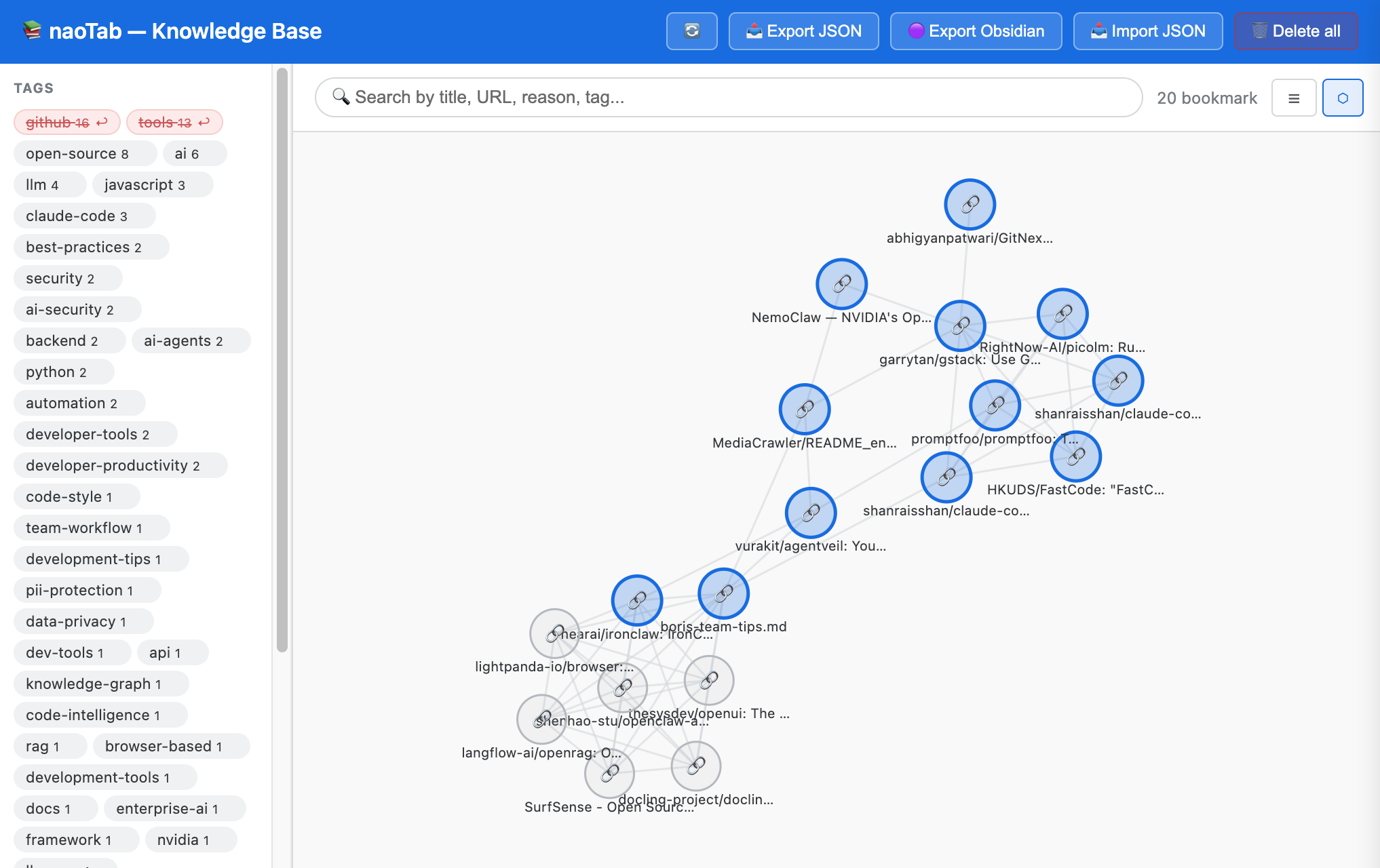
- Brain Visualize — D3.js force-directed graph; nodes = bookmarks, edges = shared tags; blue node = has summary, grey = no summary
- List view — searchable card list with full-text search across title, URL, reason, and tags
- Node panel — click any node or card to open a side panel with full details and inline editing
- Exclude tags from graph — temporarily hide a tag's connections without deleting it, to declutter the graph
- AI integration (optional, off by default) — auto-suggest tags and summaries via OpenAI, Claude, Groq, Ollama, OpenRouter, or any OpenAI-compatible provider
- AI Suggest in panel — re-run AI on any saved bookmark directly from its detail panel
- AI Batch — one-click AI processing for all currently visible/filtered nodes; skips nodes that already have a summary; live progress bar with real-time color update
- SEO meta extraction — reads page meta tags (og:description, keywords, author, etc.) on save; ~10× more token-efficient than scraping body text
- Save whole window — bulk-save all tabs in a window, each with its own meta tags captured
- Obsidian export — ZIP of
.mdfiles with YAML frontmatter, ready to open as an Obsidian vault - JSON export / import — full backup and restore
- Connected nodes — node panel shows all bookmarks linked to the selected node (within current filter), click to navigate between them
- Sidebar node list — left sidebar split into Tags (top) + live node list (bottom), updates with filter/search in real time
- Hover tooltips — hover any node or sidebar item to preview title + summary instantly
- 100% local — all data in
chrome.storage.local, nothing leaves your machine except optional AI API calls
📦 Installation
- Download or clone this repository
- Open
chrome://extensions/ - Enable Developer mode (top right)
- Click Load unpacked → select this folder
- Pin the extension to your toolbar
🚀 Usage
Saving tabs
| Action | How |
|---|---|
| Save active tab | Click 💾 Tab this in the toolbar |
| Save any tab | Click 💾 next to a tab in the list |
| Save whole window | Click 💾 Save window — captures meta for every tab |
Fill in summary (optional), reason (optional), and tags. If AI is enabled, click ✨ AI Suggest.
Brain Visualize (Graph view)
- Default view when opening the Knowledge Base
- 🔵 Blue node = has summary (AI or manual) · ⚪ Grey node = no summary yet
- Click a node → side panel opens; connected nodes highlight, others dim
- Double-click a node → opens the URL in a new tab
- Click the background → reset highlights, close panel
- Drag nodes to rearrange the layout
Excluding a tag from the graph
In the left sidebar, hover over any tag → click ✕ to exclude it from graph edges. The tag turns red with strikethrough. Click ↩ to restore it. Useful when a generic tag like github connects too many unrelated nodes.
Editing a bookmark
Click any node or card → edit summary, reason, and tags in the side panel → 💾 Save.
AI Suggest in the panel
If AI is configured, the ✨ AI Suggest button appears in the panel. It uses the saved page meta to re-generate tags and summary.
Settings
Click ⚙️ → choose a provider preset → enter API key and model → 🧪 Test connection → 💾 Save Settings.
🤖 AI Integration
| Provider | API Format |
|---|---|
| OpenAI, Groq, Ollama, OpenRouter, custom | OpenAI-compatible (/chat/completions) |
| Anthropic (Claude) | Native Anthropic API (/messages) |
AI reads only page meta tags (~75 tokens) instead of full page body (~750 tokens) — 10× more efficient.
AI is off by default. Offline keyword + domain-based tag suggestions always work without any API key.
🗄️ Data Schema
{
  "id": "1712345678901",
  "url": "https://...",
  "title": "Page title",
  "reason": "Why I saved this",
  "summary": "AI or manual summary",
  "tags": ["rust", "async"],
  "favIconUrl": "https://...",
  "pageMeta": {
    "description": "...",
    "ogTitle": "...",
    "keywords": "...",
    "author": "...",
    "siteName": "...",
    "ogType": "...",
    "ogImage": "...",
    "lang": "en",
    "canonical": "https://..."
  },
  "savedAt": "2024-01-01T00:00:00.000Z",
  "updatedAt": "2024-01-01T00:00:00.000Z"
}
🔒 Permissions
| Permission | Reason |
|---|---|
tabs |
Read title, URL, and favicon of open tabs |
storage |
Save bookmarks and settings locally |
unlimitedStorage |
Remove the default 10MB cap |
scripting + host_permissions |
Read page meta tags on demand |
🛠️ Development
After editing any file, open the popup and click 🔄 to reload the extension.
naoTab/
├── manifest.json              # Manifest V3
├── popup.html / popup.css / popup.js   # Extension popup
├── app.html / app.js          # Full-page Knowledge Base
├── settings.html / settings.js # AI provider settings
├── storage.js                 # Shared: bookmarks CRUD + settings + AI call
├── d3.min.js                  # D3.js v7 (bundled locally — CSP)
├── jszip.min.js               # JSZip (bundled locally — CSP)
└── icons/                     # Extension icons
🗺️ Roadmap
- Google Drive sync
- Dark mode
- Duplicate tab detector
- AI-powered bookmark grouping
- Browser history integration
📄 License
MIT — see LICENSE