

nelsonlai.dev


Welcome to my personal blog and portfolio website! This repository contains a modern Next.js application where I share my thoughts, projects, and insights.
Features
Core Technologies
- Next.js 16 with App Router
- TypeScript with strict configuration
- Tailwind CSS for styling
- MDX for content
- Drizzle ORM
- I18n for internationalization support
UI/UX
- Base UI for accessible UI components
- Responsive design
- Light/Dark mode
- Image zoom in blog posts
- Shiki for code syntax highlighting
- Motion for animations
- Table of contents for blog posts
Blog Features
- Comment system
- Like functionality
- Post view counter
- Blog post search
- RSS feed
- Sitemap
Performance & SEO
- Lighthouse score of nearly 100
- SEO optimized with meta tags and JSON-LD
- Dynamic open graph images using
next/og
Development Experience
- Vitest for unit testing
- Playwright for E2E testing
- ESLint configuration
- Prettier code formatting
- Lefthook
- Conventional commit
Authentication & Data
- Better Auth
- Redis caching
- Upstash for API rate limiting
- t3-env for environment variables
- Umami Analytics
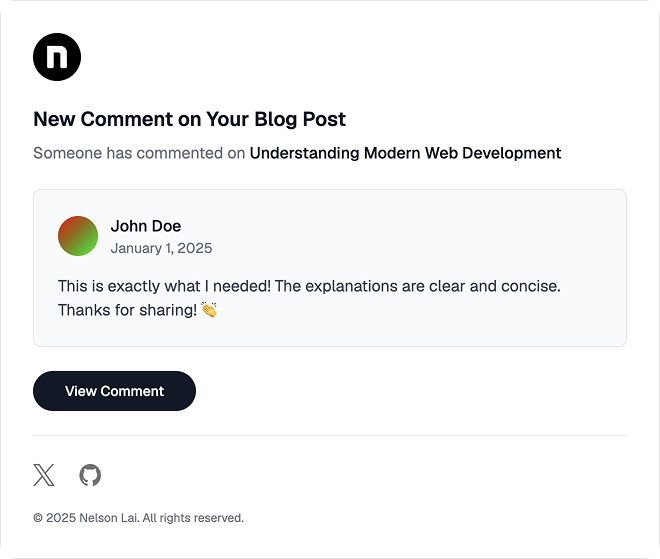
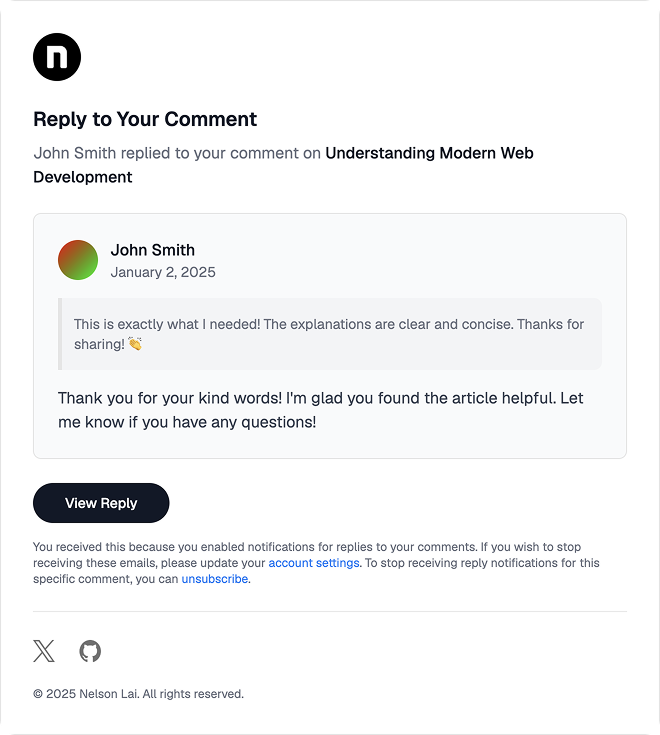
Email Templates
Comment Notification
Reply Notification
Getting Started
Prerequisites
- Node.js >= 24
- bun >= 1.3
- Docker
- Visual Studio Code with recommended extensions
- Optionally React Developer Tools
Project Structure
nelsonlai.dev/
├── public/           # Static assets (images, fonts, videos)
├── src/
│   ├── app/          # Next.js app router pages
│   ├── components/   # React components
│   ├── constants/    # Application constants
│   ├── content/      # MDX blog posts and content
│   ├── contexts/     # React contexts
│   ├── db/           # Database schema and migrations
│   ├── emails/       # Email templates
│   ├── hooks/        # Custom React hooks
│   ├── i18n/         # Internationalization
│   ├── lib/          # Utility libraries
│   ├── mdx-plugins/  # Custom Rehype and Remark plugins
│   ├── orpc/         # oRPC API routes
│   ├── styles/       # Global styles
│   ├── tests/        # Unit and E2E tests
│   └── utils/        # Utility functions
├── docker-compose.yml
└── package.json
Development
To run this project locally, you need to set up the development environment.
Setup
- Clone the repository:
git clone https://github.com/nelsonlaidev/nelsonlai.dev
- Navigate to the project directory:
cd nelsonlai.dev
- Install dependencies using bun:
bun install
Environment Setup
- Copy
.env.exampleto.env.localand update the environment variables as needed.
cp .env.example .env.local
- Run required services using Docker:
docker compose up -d
- Run the database migrations:
bun db:migrate
- Seed the database:
bun db:seed
- Run the app:
bun dev          # Run the development server
# or
bun email:dev    # Run the email preview server separately
The services will be available at the following URLs:
| Service | URL |
|---|---|
| App | localhost:3000 |
| React Email | localhost:3001 |
| Cosmos | localhost:3002 |
| Database | localhost:5432 |
| Redis | localhost:6379 |
| Redis serverless | localhost:8079 |
Available Scripts
# Development
bun dev               # Start development server
bun email:dev         # Run email preview server
bun cosmos            # Start Cosmos component playground

# Build & Production
bun run build         # Build for production (includes cosmos:export)
bun start             # Start production server
bun analyze           # Analyze bundle size

# Quality & Testing
bun check             # Run all quality checks (lint, typecheck, format, etc.)
bun lint              # Run ESLint
bun typecheck         # Run TypeScript type checking
bun format            # Format code with Prettier
bun knip              # Find unused dependencies/exports
bun test:unit         # Run unit tests
bun test:e2e          # Run Playwright E2E tests

# Database
bun db:migrate        # Run database migrations
bun db:seed           # Seed the database
bun db:push           # Push schema changes directly to DB
bun db:reset          # Reset database
bun db:studio         # Open Drizzle Studio
Credits
This project has been made possible thanks to the wonderful open-source community. Special thanks to:
- Timothy for the Tailwind nextjs starter blog template.
- Eihab for the UI design inspiration (Figma)
This project also uses/adapts the following open-source projects:
- Comment System - from fuma-comment
- Rehype Plugins - from fumadocs
- UI components - from shadcn/ui
- Admin UI - from shadcn-admin
The following projects were referenced for inspiration:
- fumadocs
- leerob.io
- nerdfish.be
- nextra.site
- theodorusclarence.com
- ped.ro
- delba.dev
- joshwcomeau.com
- blog.maximeheckel.com
- zenorocha.com
- jahir.dev
- anishde.dev
- nikolovlazar.com
- samuelkraft.com
- bentogrids.com
- ui.aceternity.com
- hover.dev
- vocs.dev
Author
Donation
If you find this project helpful, consider supporting me by sponsoring the project.
License
This project is open source and available under the MIT License.
Made with ❤️ in Hong Kong