
🌍 NerdTracker



Smartphone + free services = real-time tracking & location history for active people. Privacy-focused, you own your data!
📑 Table of Contents
- 🌍 NerdTracker
📱 What's This?
NerdTracker was born from real-world needs during extensive overland travel throughout the Americas. As a digital nomad driving from Alaska to Ushuaia and exploring South America multiple times, I needed a better way to:
- Track new vs. previously driven roads
- Remember and return to favorite spots
- Share real-time location with trusted contacts during remote travel
- Maintain a comprehensive database of my movements for analysis
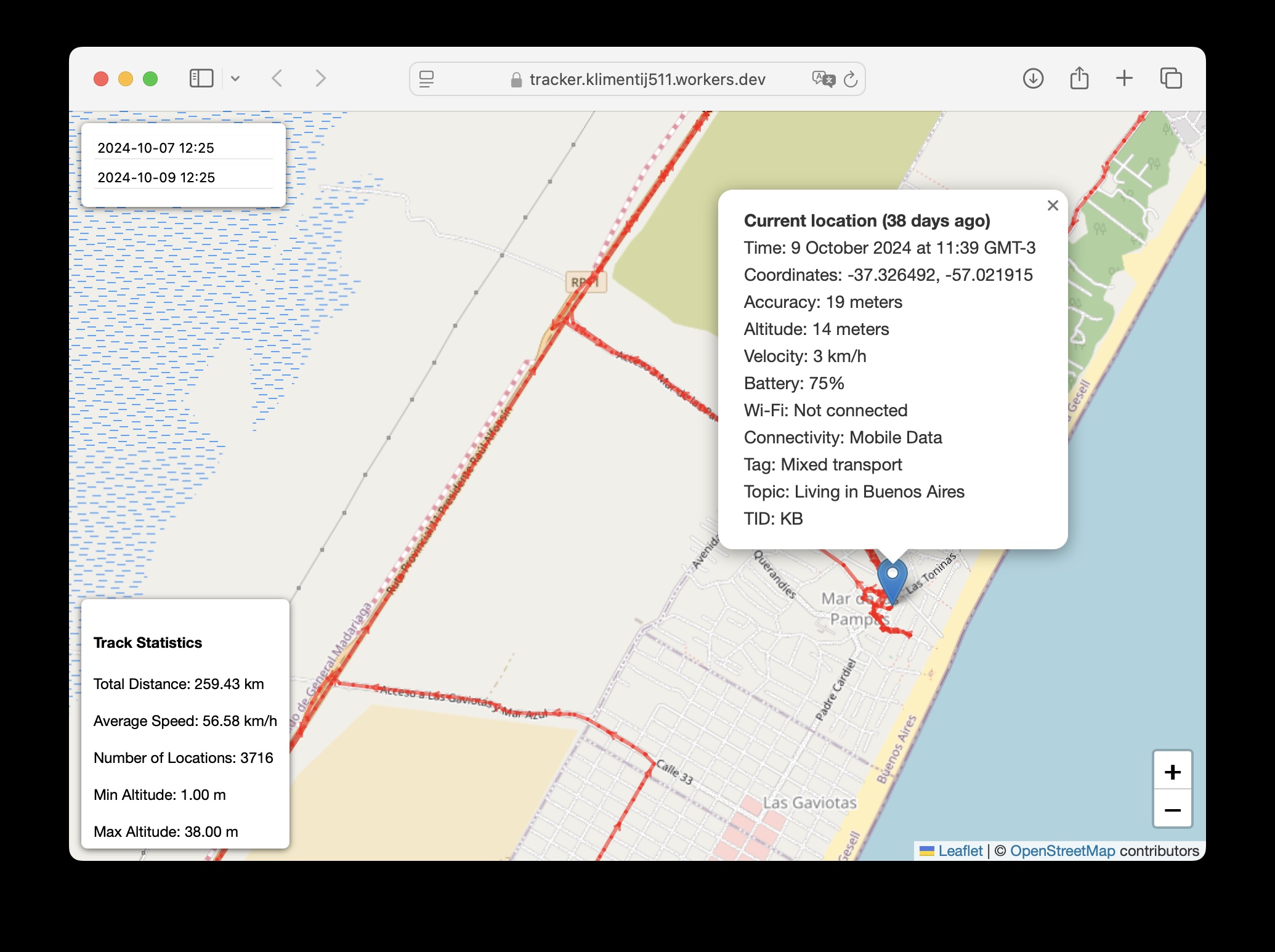
Unlike temporary location sharing in messaging apps, it continuously records your movements and provides both real-time location and detailed movement history.
🎯 Who Is This For?
- Overlanders & Adventurers exploring remote areas who need reliable tracking and safety features
- Digital Nomads wanting to maintain detailed travel logs and avoid repeated routes
- Remote Travelers needing to share location with trusted contacts for safety
- Privacy-Conscious Users who want full control over their location data
- Data Enthusiasts interested in analyzing their movement patterns
💡 Why I Created This
After years of overland travel, I faced several challenges:
- Safety in Remote Areas: Needed a way for trusted contacts to check my last known location, speed, and connected WiFi networks in case of emergencies
- Route Planning: Existing solutions made it difficult to identify truly new routes vs. previously traveled paths
- Data Ownership: Manual uploading of KML/GPX files to Google My Maps was time-consuming and limiting
- Offline Capability: Required a system that could queue location updates during spotty signal
- Privacy & Control: Wanted full ownership of location data in a queryable database format
- Cost: Needed a free, sustainable solution for continuous tracking
🌟 Key Benefits
- Safety First - Share a URL with trusted contacts for emergency location monitoring
- Comprehensive Data - Track locations, speeds, WiFi connections, and more
- Offline Ready - Queues updates during poor connectivity
- Zero Cost - Built entirely on free tiers of Supabase and Cloudflare
- True Privacy - Your data stays in your own database
- Data Analysis Ready - SQL-queryable database for custom analysis
🌟 Overview
NerdTracker is an open-source solution for digital nomads and location tracking enthusiasts who want complete control over their movement data. Built with privacy in mind, it leverages free-tier services to create a powerful, cost-effective tracking system.
✨ Key Features
- 📱 24/7 iPhone location tracking via OwnTracks
- 🗄️ Personal data ownership with Supabase storage
- 🎯 Real-time location sharing with friends
- 📊 Detailed tracking data (altitude, WiFi, speed)
- 🏷️ Trip tagging and categorization
- ⚙️ Customizable tracking parameters
- 💨 Fast, serverless architecture
- 💰 Completely free to run
- 🔄 Smart Stationary Mode
- Automatically detects when you're stationary
- Prevents database clutter by updating existing records
- Configurable distance threshold (default: 100m)
- Considers the last N locations (default: 10)
🛠️ Prerequisites
-
📱 Mobile Device
- iPhone or Android with OwnTracks installed
- Primary testing done on iPhone 11, but Android is supported
-
☁️ Required Accounts
- Cloudflare Account (Free tier)
- Supabase Account (Free tier)
🔧 Development Environment Setup
Note: This setup guide is written and tested for macOS but can be adapted for Linux or Windows systems.
-
Install nvm (Node Version Manager):
curl -o- https://raw.githubusercontent.com/nvm-sh/nvm/v0.40.0/install.sh | bashIf curl command fails or nvm not found:
# Install via Homebrew brew install node -
Install Node.js:
# If using nvm (restart terminal first): nvm install 23 # If installed via Homebrew, skip this step -
Verify installations:
node -v npm -v -
Install Wrangler CLI:
npm install -g wrangler -
Authenticate with Cloudflare:
wrangler login
🚀 Setup Instructions
You can run NerdTracker in two ways:
Option 1: Cloud Deployment (Supabase + Cloudflare Workers)
1. Project Setup
- Clone this repository
- Install dependencies from the root directory:
npm install --prefix location-inserter
npm install --prefix app
2. Supabase Configuration
-
Create a new Supabase project:
- Go to supabase.com/dashboard/projects
- Click "New Project"
- Note down:
- Project URL
anonpublic key (Settings -> API)
-
Create database table:
- Go to SQL editor in Supabase dashboard
- Execute the following SQL:
-- Create the table create table if not exists locations ( id serial primary key, -- Unique identifier for each entry "lat" float8, -- Latitude of the location "lon" float8, -- Longitude of the location "acc" int, -- Accuracy of the reported location in meters "alt" int, -- Altitude above sea level in meters "vel" int, -- Velocity in km/h "vac" int, -- Vertical accuracy of the altitude in meters "p" float8, -- Barometric pressure in kPa "cog" int, -- Course over ground in degrees "rad" int, -- Radius around the region in meters "tst" int8, -- UNIX epoch timestamp of the location fix "created_at" int8, -- Timestamp when the message is constructed "tag" varchar, -- Custom tag "topic" varchar, -- MQTT topic "_type" varchar, -- Type of the payload "tid" varchar(2), -- Tracker ID used to display the initials of a user "conn" varchar, -- Internet connectivity status "batt" int, -- Device battery level in percent "bs" int, -- Battery status (0=unknown, 1=unplugged, 2=charging, 3=full) "w" boolean, -- Indicates if the phone is connected to WiFi "o" boolean, -- Indicates if the phone is offline "m" int, -- Monitoring mode (1=significant, 2=move) "ssid" varchar, -- SSID of the WiFi "bssid" varchar, -- BSSID of the WiFi "inregions" text[], -- List of regions the device is currently in "inrids" text[], -- List of region IDs the device is currently in "desc" varchar, -- Description (used for waypoints and transitions) "uuid" varchar, -- UUID of the BLE Beacon "major" int, -- Major number of the BLE Beacon "minor" int, -- Minor number of the BLE Beacon "event" varchar, -- Event that triggered the transition "wtst" int8, -- Timestamp of waypoint creation "poi" varchar, -- Point of interest name "r" varchar, -- Response to a reportLocation cmd message "u" varchar, -- Manual publish requested by the user "t" varchar, -- Trigger for the location report "c" varchar, -- Circular region enter/leave event "b" varchar, -- Beacon region enter/leave event "face" text, -- Base64 encoded PNG image for user icon "steps" int, -- Steps walked with the device "from_epoch" int8, -- Effective start of time period for steps "to_epoch" int8, -- Effective end of time period for steps "data" text, -- Encrypted and Base64 encoded original JSON message "request" varchar -- Request type (e.g., "tour") ); -- Enable RLS alter table locations enable row level security; -- Drop existing policy if it exists drop policy if exists "Enable insert access for all users" on "public"."locations"; -- Create policy for anonymous users to insert create policy "Enable insert access for all users" on "public"."locations" for insert to anon with check (true);- Click "Run" to execute the SQL commands
3. Application Configuration
- Run the setup script:
python3 setup.py- Enter your Supabase project URL and anon key when prompted
- Save the generated passwords securely
4. Deploy Services
-
Deploy location ingestion service from root directory:
npx wrangler secret bulk location-inserter/secrets.json --name location-inserter
npm run deploy --prefix location-inserter
Note the deployed URL (e.g.,
https://location-inserter.your-name.workers.dev) -
Deploy web interface from root directory:
npx wrangler secret bulk app/secrets.json --name tracker
npm run deploy --prefix app
5. Configure OwnTracks
-
Install and open OwnTracks app on your phone
-
Go to Settings (click ⓘ icon)
-
Configure the following settings:
- TrackerID: Your initials (e.g., "KS")
- DeviceID: Descriptive device name (e.g., "Klim's iPhone")
- UserID: Use "AUTH_USER" from location-inserter/secrets.json
- Password: Use "AUTH_PASS" from location-inserter/secrets.json
- URL: Your location-inserter URL (from deployment step)
-
Optional Settings:
- pubTopicBase: Current trip name (will be added to every location)
-
Recommended GPS Settings (for high-accuracy permanent tracking):
Mode: Move
ignoreInaccurateLocations: 50
locatorDisplacement: 80
locatorInterval: 30
positions: 10
maxHistory: 0
monitoring: -1
downgrade: 0
extended data: True
For more details on location tracking parameters, see the OwnTracks Documentation.
Option 2: Local deployment with Docker
ToDo: location-reporter doesn't work in local deployment:
[wrangler:wrn] Miniflare 3 does not currently trigger scheduled Workers automatically.
1. Prerequisites
- Docker and Docker Compose installed
- No cloud accounts needed
2. Setup
- Follow
Cloud Deploymentactions to generate keys - Create
.envusing.env.exampleand keys generated bypython setup.py
3. Services will be available at:
- Main app: http://localhost:3000
- Location inserter API: http://localhost:3001
- Location reporter: Runs as background scheduler
4. Useful commands:
# Start services
docker compose up --build

# View logs
docker compose logs -f

# Stop services
docker compose down

# Connect to local PostgreSQL
docker exec -it -u postgres nerdtracker-postgres-1 psql -d nerdtracker
🔒 Security Notes
- Store all passwords from setup.py output securely
- All endpoints use HTTPS encryption
- Authentication is required for all access
- Location data is stored only in your Supabase database
Location Inserter Configuration
The location inserter includes a smart "hangout" detection algorithm to prevent database clutter when you're staying in one place. Here's how it works:
- When a new location is received, it checks the last 10 locations
- If all these locations are within 100 meters of each other, it considers you're "hanging out" in the same spot
- Instead of creating new entries, it updates the most recent location record
- This helps prevent thousands of nearly identical records when you're stationary
Default values (defined in location-inserter/src/index.ts):
HANGOUT_SILENCE_DIST = 100    // Maximum distance (meters) between locations to be considered a hangout
LAST_LOCATIONS_COUNT = 10     // Number of recent locations to check
To modify these values:
- Update the constants in
location-inserter/src/index.ts - Redeploy the worker with
npm run deploy --prefix location-inserter
This feature is particularly useful for:
- Reducing database size and costs
- Cleaner location history
- Better performance in the web interface
Location Reporter Configuration
Follow these steps to configure and deploy the location-reporter worker:
- Copy
location-reporter/secrets.dist.jsontolocation-reporter/secrets.json. - Fill in your Supabase credentials, your Telegram Bot Token (obtained from @BotFather), and your numeric Telegram Chat ID (you can get this from a bot like @userinfobot by sending
/startto it). - Install dependencies:
npm install --prefix location-reporter. - Generate Wrangler types:
npm run cf-typegen --prefix location-reporter. - Deploy:
npm run deploy --prefix location-reporter.
🆓 Free Tier Limits & Scaling Considerations
Current Free Tier Limits (as of Nov 2024)
Supabase Free Tier (View current limits)
- 50,000 monthly active users
- 500 MB database space
- 5 GB bandwidth
- 1 GB file storage
- Projects paused after 1 week of inactivity
- Limited to 2 active projects
Cloudflare Workers Free Tier (View current limits)
- 100,000 requests per day
- 10ms CPU time per invocation
- No charge for duration
Real-World Usage Example
With the recommended settings (30-second location updates):
- ~2,000-3,000 location-inserter function requests per day
- ~4.24 MB of new location data per month (based on actual usage data while being mostly based in a single city with occasional trips)
- Full-time traveling with daily movement would consume significantly more data
- At current usage rates, the 500 MB free tier limit would support ~9.45 years of tracking
- Each location record uses approximately 0.5 KB of storage
This means the free tier limits comfortably support personal tracking needs, with Cloudflare using only ~2-3% of its daily request limit.
📈 Scaling Considerations
As your tracking data grows, you may need to:
-
Manage Database Size:
- Export and archive older records
- Delete unnecessary location points
- Consider implementing data retention policies
-
Optimize Costs:
- Reduce Cloudflare Workers usage by adjusting tracking frequency
- Implement more aggressive stationary detection
- Clean up duplicate or unnecessary location points
-
Upgrade Options:
- If you need more storage/bandwidth, consider Supabase Pro ($25/month)
- For high-frequency tracking, consider Cloudflare Workers Paid ($5/month)
- Cost-benefit analysis vs. data management effort
💡 Tip: For hobby projects, managing data size through exports/cleanup is often more cost-effective than upgrading tiers.
🤝 Contributing
Contributions are what make the open source community amazing! Any contributions you make are greatly appreciated.
- Fork the Project
- Create your Feature Branch (
git checkout -b feature/AmazingFeature) - Commit your Changes (
git commit -m 'Add some AmazingFeature') - Push to the Branch (
git push origin feature/AmazingFeature) - Open a Pull Request
📜 Credits
This project wouldn't be possible without these amazing open source projects:
- OwnTracks iOS - The incredible iOS app that powers location tracking
- License: MIT
- Copyright (c) 2015-2023 OwnTracks
⭐️ If this project helped you, don't forget to give it a star!