
nested-logrus-formatter


Human-readable log formatter, converts logrus fields to a nested structure:
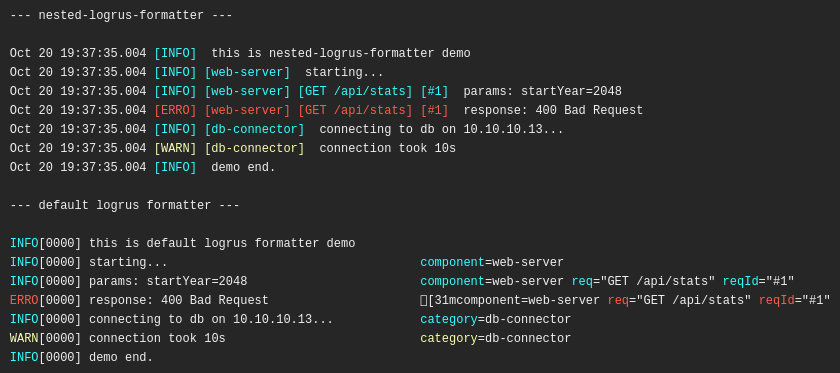
Configuration:
type Formatter struct {
	// FieldsOrder - default: fields sorted alphabetically
	FieldsOrder []string

	// TimestampFormat - default: time.StampMilli = "Jan _2 15:04:05.000"
	TimestampFormat string

	// HideKeys - show [fieldValue] instead of [fieldKey:fieldValue]
	HideKeys bool

	// NoColors - disable colors
	NoColors bool

	// NoFieldsColors - apply colors only to the level, default is level + fields
	NoFieldsColors bool

	// NoFieldsSpace - no space between fields
	NoFieldsSpace bool

	// ShowFullLevel - show a full level [WARNING] instead of [WARN]
	ShowFullLevel bool

	// NoUppercaseLevel - no upper case for level value
	NoUppercaseLevel bool

	// TrimMessages - trim whitespaces on messages
	TrimMessages bool

	// CallerFirst - print caller info first
	CallerFirst bool

	// CustomCallerFormatter - set custom formatter for caller info
	CustomCallerFormatter func(*runtime.Frame) string
}
Usage
import (
	nested "github.com/antonfisher/nested-logrus-formatter"
	"github.com/sirupsen/logrus"
)

log := logrus.New()
log.SetFormatter(&nested.Formatter{
	HideKeys:    true,
	FieldsOrder: []string{"component", "category"},
})

log.Info("just info message")
// Output: Jan _2 15:04:05.000 [INFO] just info message

log.WithField("component", "rest").Warn("warn message")
// Output: Jan _2 15:04:05.000 [WARN] [rest] warn message
See more examples in the tests file.
Development
# run tests:
make test

# run demo:
make demo