
Net Worth Tracker







Description
Net Worth Tracker is a full-featured personal finance application built for Italian investors. It provides comprehensive portfolio tracking, performance analytics, cashflow management, dividend monitoring, and long-term financial planning tools — all in a single dashboard.
The app integrates with Yahoo Finance for real-time price updates and includes advanced features like Monte Carlo simulations, FIRE (Financial Independence, Retire Early) projections, AI-powered performance analysis, and a dedicated AI assistant foundation via Claude. The UI is in Italian while the codebase follows English conventions.
Key Features
Portfolio Management
- Multi-asset tracking across stocks, ETFs, bonds, crypto, real estate, commodities, and cash — added via a guided two-step dialog: pick the asset type first, then fill in only the relevant fields for that type
- Multi-currency support: assets priced in USD, GBP, CHF, etc. are automatically converted to EUR for all portfolio calculations using live Frankfurter exchange rates; LSE pence (GBp) normalized to GBP automatically
- Automatic price updates via Yahoo Finance (all assets) and Borsa Italiana (Italian bonds with ISIN)
- Bond coupon scheduling: automatic coupon generation with step-up rate tiers and final premium (Premio Finale) support — full BTP Valore compatible
- Average cost tracking with 4-decimal precision, including a built-in multi-broker PMC calculator for positions spread across multiple brokers
- Current vs target asset allocation visualization
- Asset allocation analysis built around one question — how much, am I in line, what to do: a hero with total allocated wealth and a balance verdict (classes off target + biggest gap), a consolidated rebalancing plan (how much to buy/trim per class), an adjustable drift threshold (±2% / ±5% / the 5/25 rule / custom), a no-sell contribution planner (where to invest new cash, per asset class and sub-category), and a single unified composition list with inline drill-down and per-row current-vs-target bars. Trade Republic-inspired, with COMPRA / VENDI / OK action chips; colors follow the selected theme
- Portfolio exposure breakdown: a collapsible section at the bottom of the Allocation page that aggregates underlying-company, sector, and ETF-issuer exposure across all your ETFs plus direct stocks. See your true exposure to a single company (e.g. Nvidia) when it's split across multiple ETFs, with click-to-expand calculation drill-down showing the formula per source ("X% di €Y = €Z") and a total per row. Data sourced server-side from Yahoo Finance and cached per user; the "Aggiorna" button forces a fresh server-side computation when needed
- Current-year historical tables use a hidden previous-month baseline so January can show growth vs the previous December without rendering an extra visible column
- Asset management table supports column sorting (Valore Totale, G/P%, Peso%, Nome, Classe) and a group-by-class toggle; the ticker shows under each asset's name and the per-asset performance columns (Δ month / YTD / since start) are revealed on demand via an "Andamento" toggle, keeping the default table free of horizontal scroll; every numeric cell is monospaced and all gain/loss colors follow the active theme. On mobile, assets render as cards with a 12-month price sparkline and an inline performance breakdown; the Gestione / Anno Corrente / Storico section switcher uses a segmented pill control so all three sections are visible at a glance
Performance Analytics
- Comprehensive metrics across 4 sections (Returns, Risk, Context, Dividends) — each section leads with a dominant hero number (TWR, Sharpe, Net Cash Flow, YOC Net) followed by compact secondary rows; metric definitions accessible via inline popovers
- Period selector (YTD / 1Y / 3Y / 5Y / All-time) uses a segmented pill control on mobile with spring animation; custom date ranges appear as a dismissible chip, not a permanent tab slot
- Yield on Cost (YOC) and Current Yield calculations
- Monthly returns heatmap and underwater drawdown chart (theme-aware colors, boosted contrast in dark themes); all metric values and benchmark comparison tooltips adapt correctly to all six color themes in both light and dark mode
- Rolling 12-month CAGR and Sharpe Ratio charts with 3-month moving average; always visible with an informative empty state when data is insufficient
- Benchmark comparison: compare your portfolio against six model portfolios (60/40, All Weather, Buffett 90/10, Golden Butterfly, Permanent Portfolio, 100% ACWI) with an indexed growth-of-100 chart and a comprehensive risk/return table — TWR, Volatility, Sharpe, Sortino, Calmar, Max Drawdown, best/worst month, and positive/negative month counts; optional USD→EUR conversion via Frankfurter API
- Progressive disclosure: methodology section collapsed by default; one-time guide strip for new users; "Avanzato" badge on technical metrics (TWR, IRR, Sharpe, YOC)
- Animated metric cards: values count up on load and settle more naturally during period changes; staggered entrance cascade per section
- Dashboard KPI cards (Total Portfolio, Liquid Net Worth, Unrealized Gains, Taxes) animate their values on page load — numbers count up from zero once on mount; each card animates independently so the rest of the page stays stable during the animation
- All major pages (Dashboard, Hall of Fame, History, Performance, Dividends) animate on load with staggered card entrances and smooth expand/collapse transitions; respects system "Reduce Motion" preference
- All charts animate on load: bars grow up from baseline, lines draw in left to right, area fills expand, pie slices fan out — covers every page with data visualization (History, Performance, Cashflow, Dividends, FIRE, Monte Carlo, Goals)
- AI-powered analysis using Claude with Extended Thinking and web search
- AI Assistant organized around a single period axis — Month, Year, YTD, Total history, or Libera (free chat) in one selector, with the period picker right beside it. Selecting a period fills a live context card (net worth delta, cashflow, allocation changes, sub-category breakdown, target allocation vs current gap) before you ask, so you decide what to analyse with the numbers in front of you; in Libera mode you can optionally attach any period as context. After each answer the assistant proposes follow-up questions you can send with one tap. It remembers goals, preferences, risk profile, and stable facts across conversations — shown inline ("what it knows about you") and managed in a Memory panel — and surfaces a proactive "goal reached" banner when it detects from your data that a tracked target has been met. A "Allocazione vs target" prompt chip triggers an instant allocation-vs-target comparison with purchase priorities. Conversations and Memory open as side panels on every screen size; responses stream as markdown (including tables) with full thread continuity. Web search for macro/geopolitical context (with a dedicated "searching the web" indicator and event citation) and behaviour preferences (response style, web context, automatic memory) in one place. Controlled rollout via feature flag.
- Fully responsive on mobile and tablet: dropdown period selector, stacked header, color-only heatmap view on small screens
Cashflow
- Income, expense, and transfer tracking with custom categories and subcategories. Choose the transaction type — Variable, Fixed, Debt/Installment, Income, or Transfer (move money between your own cash accounts) — and the dialog shows only the relevant fields, with advanced options (cost center, installments, monthly recurrence) in a collapsible section. Transfers are net-zero: they debit the origin account and credit the destination automatically, and are excluded from all income/expense/savings/budget and performance metrics
- Analisi page (
/dashboard/analisi): dedicated standalone page for cashflow analysis with a three-state period selector (current year / specific year + optional month / full history). Top Expenses block shows the largest individual expenses sorted by amount (top 5 by default, expandable). Anomaly detection automatically flags categories with unusually high spending vs the 6-month rolling average — tap a chip to jump to the Sankey drill-down. Year-over-year comparison (grouped bar charts by month or category). Savings Rate Trend (24-month line chart with 20% target reference). Per-category sparkline grid with expandable bar charts. In full-history mode, an "Andamento nel Tempo" section adds long-term charts: income / expenses / net savings together in euros (the net line goes negative in deficit periods), plus a multi-line per-category breakdown of income or expenses (top 6 categories by total, with tooltip rows ordered to match the lines), both with a shared monthly/yearly toggle. 5-layer Sankey diagram and pie chart drill-downs, both with aggregated total rows. All charts respect the "history start year" preference from Settings - Budget tab: create your own budgets per category or sub-category — only the budgets you create are shown — with an optional overall monthly spending ceiling that validates your category budgets stay within it. Each budget runs on a monthly or annual horizon (annual ones, e.g. holidays, are tracked year-to-date) and income categories can have separate income targets. Changes auto-save as you type (no Save button), paused while you're over the overall budget. Includes an end-of-month spending forecast, insights (top category, categories at risk, spend vs your usual pace by today, daily average) and threshold alerts (50/75/90/100% + forecast overrun) shown in-app and in your emails. Fully responsive on mobile
- Bulk move transactions between categories/subcategories (cross-type supported)
- CSV export
Dividends
- Multi-currency dividend recording with automatic EUR conversion
- Borsa Italiana scraping for Italian market data (dividends and bond prices)
- Monthly calendar view with synchronized date focus and drill-down
- Dividend statistics, contextual payment detail, and yield calculations
- Total Return per Asset: table combining unrealized capital gain % and all-time net dividends received % (calculated at historical cost basis per payment, not diluted by later purchases) to show the true investment return per asset; card layout on mobile
- Dividend Per Share Growth: year-by-year gross DPS history per equity asset with YoY% and CAGR columns; portfolio median growth rate shown as a summary; tap any asset on mobile to open a vertical year-by-year dialog
Historical Analysis
- Automatic monthly portfolio snapshots (via Vercel cron)
- Page opens with a hero block showing current net worth, total growth since tracking began, and estimated CAGR — with section navigation pills to jump to any chapter
- Net worth evolution, asset class breakdown, and liquidity charts — all colors theme-aware across the six color themes
- Doubling time analysis with geometric calculations and fixed milestone thresholds — promoted to the top of the page as the most distinctive analysis; summary cards show fastest doubling, average time, and progress toward the next milestone
- Savings vs Investment Growth comparison (annual and monthly views)
- Labor & Investments section: lifetime KPI cards for Earned from Work, Saved from Work, Investment Growth Gross/Net, plus positive/negative month counters and a monthly breakdown chart — shows a setup prompt linking to Settings when labor categories are not yet configured
- Year-over-Year variation and raw monthly snapshot data available in a collapsible section (collapsed by default)
- Per-instrument value breakdown ("Valore per Strumento"): pick any recorded month to see each individual holding's value that month (read straight from the saved snapshot, so currency/real-estate/price rules are already applied), select a subset of instruments to total their value and its share of the month, and chart that subset's combined value across every month on record. The trend chart's tooltip splits each month's change versus the previous month into a price effect (market movement) and a quantity effect (your buys and sells), so a drop reads as "sold" vs "market fell" at a glance
FIRE Planning
- FIRE calculator with primary residence exclusion; the settings panel sits at the top and stays collapsed once you've set your withdrawal rate
- Coast FIRE tab — Trade Republic-inspired layout: configuration panel at the top (collapsed once you've set your age, opens automatically when setup is incomplete), Coast FIRE number as a dominant hero metric, then the Bear/Base/Bull scenario cards (one row on wider screens) above the projection chart, followed by coverage phases, detail, pension impact, and interpretation. Hero rows show overall progress, liquid-only progress, total net worth, and liquid net worth. "Annulla" button resets unsaved changes in one tap. All chart colors theme-aware
- Coast FIRE supports one or more state pensions with editable IRPEF brackets, exact pension start dates, scenario-specific real net conversion, a guided summary that separates target-age need, bridge years, and post-pension steady state
- Multi-scenario projections (Bear / Base / Bull) with inflation adjustment
- Per-scenario FIRE numbers with automatic savings stop at FIRE reached
- Historical FIRE runway view with rolling 12-month expenses and separate total/liquid deltas
- What If Analysis tab — stress-test your plan against life events (job loss, major purchase, savings/spending change, windfall) and see the before → after impact on both traditional FIRE and Coast FIRE; hosts the years-to-FIRE sensitivity matrix (how your timeline shifts as annual spending and savings vary). The job-loss event lets you select which income sources stop (by category and sub-category, e.g. a single partner's salary in a shared portfolio) and shows a step-by-step breakdown — missed savings vs portfolio drawdown — with each formula filled in from your own figures
- Goal-Based Investing: allocate portfolio portions to financial goals (house, retirement, emergency fund, etc.) with progress tracking and recommended asset class comparison. The tab opens with a hero block showing total allocated value; goals are displayed as a single flat list — tap any row to expand it inline and see the progress bar, assigned assets, allocation comparison bars, and edit/delete actions. Two-tap inline delete confirmation prevents accidental removal
- Goal-Driven Allocation: optionally derive portfolio allocation targets as a weighted average of goal recommended allocations, with automatic fallback to manual targets
- Fully responsive on mobile and tablet — tab navigation uses a dropdown on small screens, year-by-year projection table switches to a card layout
Monte Carlo Simulations
- Trade Republic-inspired layout: Success Rate (probability of not depleting the portfolio) is the dominant hero metric, always visible before and after a simulation run
- Settings split into core inputs (always visible) and market parameters (collapsible, auto-opens when values differ from defaults) — reduces cognitive load from 18 simultaneous fields to 6
- Animated mode switcher between Single Simulation and Bear/Base/Bull Scenario Comparison with spring pill animation
- 4 asset classes: Equity, Bonds, Real Estate, Commodities — editable return and volatility per class
- Progressive percentile fan chart (p10/p25/p50/p75/p90) and final-value distribution histogram with staged bar reveal
- Bear/Base/Bull scenario comparison with overlay chart (3 median lines + p10–p90 bands), side-by-side distribution histograms, and a 5-year-interval comparison table
- All chart colors and tooltips theme-aware across all six color themes
- Auto-fill allocation from real portfolio (crypto and cash excluded, normalized to 100%)
- Scenario parameters (return, volatility, inflation per asset class) saved to Firestore per user
- Fully responsive on mobile and tablet — percentile table switches to a card layout, scenario parameter cards stack vertically
Other
- Periodic email summaries with AI commentary — Automatic portfolio recap emails sent at the end of each month, quarter (March/June/September/December), half-year (June 30 / December 31), and year (December 31), each with its own toggle. Emails include net worth change vs the previous period, asset class breakdown with allocation %, best/worst performing asset class (by Δ% and Δ€), income vs expenses with savings rate, full income and expense category breakdowns, top 5 individual expense transactions, dividends received, and a Confronti table comparing net worth, income, expenses, and savings against both the previous period and the same period one year earlier (net worth from end-of-period snapshots, cashflow from period totals). The AI-generated narrative is comparison-driven, structured in five sections (overview, vs previous period, vs same period last year, income/expense changes with likely causes, takeaways) — the cause analysis uses your subcategories and transaction notes, and web search adds macro context for net-worth moves. Recipients shared across all email types; manual send buttons in Settings for on-demand previews. A separate opt-in weekly budget email is sent every Sunday with the status and progress of all your monthly and annual budgets plus a one-line AI summary; any category that has actually gone over its limit also lists the individual expenses behind the overrun (date, subcategory, note, amount). Powered by Resend (free tier sufficient for personal use)
- Public demo mode — "Try the Demo" button on the login page and landing page auto-logs visitors into a shared read-only account. All mutation actions are disabled; the AI Assistant is fully blocked. Set
NEXT_PUBLIC_DEMO_*env vars to enable; leave them empty to hide the CTA on self-hosted deploys - Color Themes — Six selectable color themes (Default, Solar Dusk, Elegant Luxury, Midnight Bloom, Cyberpunk, Retro Arcade) with per-user persistence in Firestore and localStorage. Theme selector in Settings → Aspetto with light/dark preview swatches. Switching dark/light mode plays a circle-reveal animation from the toggle. Charts update their palette to match the active theme
- Dark mode — Full dark/light/system theme support. The header toggle cycles through three states: Light, Dark, and System (follows OS preference), using Sun, Moon, and Monitor icons. Every page, chart tooltip, and UI component is properly themed
- Authentication flow — Login and registration screens follow the same visual language as the dashboard, with accessible focus states, 44px keyboard-reachable password toggles,
autoCompletehints for browsers and password managers, and clearer in-place submit feedback including an inline password mismatch error on Register - Hall of Fame — Personal records dashboard with an all-time best hero block, monthly and annual ranking tables, current-period spotlight, and contextual notes. Mobile navigation shows one section at a time; desktop tables are full-height with no internal scroll
- PDF Export — 8 configurable sections with custom year/month period selection; sections auto-disabled for past periods when historical data is unavailable
- Settings — Trade Republic-inspired layout: the Allocation tab opens with a hero block showing the total allocation percentage, followed by a single unified flat list for all six asset classes (Equity, Bonds, Real Estate, Crypto, Commodities, Cash) — sub-categories expand inline without nested cards. Mobile tab navigation uses a segmented pill control (all five tabs visible at a glance). Unsaved-change feedback, smooth nested allocation editing, and inline two-tap confirmations for sensitive category actions
Quick Start
# Clone the repository
git clone https://github.com/GiuseppeDM98/net-worth-tracker.git
cd net-worth-tracker

# Install dependencies
npm install

# Copy and configure environment variables
cp .env.local.example .env.local
# Edit .env.local with your Firebase credentials (see Prerequisites below)

# Start development server
npm run dev
# → http://localhost:3000
For the full setup guide including Firebase configuration and Firestore security rules, see SETUP.md.
Prerequisites
- Node.js 18.x or higher
- Firebase project with Firestore + Authentication enabled (free tier is sufficient)
- Vercel account (recommended for deployment and cron jobs) or Docker for self-hosting
- Anthropic API key (optional — enables AI performance analysis)
Environment Variables
Copy .env.local.example to .env.local and fill in your values:
| Variable | Required | Description |
|---|---|---|
NEXT_PUBLIC_FIREBASE_* (6 vars) |
Yes | Firebase client SDK configuration |
FIREBASE_ADMIN_* or FIREBASE_SERVICE_ACCOUNT_KEY |
Yes | Firebase Admin SDK (server-side) |
CRON_SECRET |
Yes | Secret for authenticating cron job requests |
NEXT_PUBLIC_APP_URL |
Yes | Your deployed application URL |
NEXT_PUBLIC_REGISTRATIONS_ENABLED |
No | Toggle new user registration (default: true) |
NEXT_PUBLIC_REGISTRATION_WHITELIST_ENABLED |
No | Enable email whitelist for registration |
NEXT_PUBLIC_ENABLE_TEST_SNAPSHOTS |
No | Enable test snapshot generation in Settings |
ANTHROPIC_API_KEY |
No | Enables AI-powered performance analysis |
FRED_API_KEY |
No | Enables period-accurate Sharpe/Sortino in benchmark comparison (ECB deposit facility rate history via FRED); falls back to user-configured rate if absent |
RESEND_API_KEY |
No | Enables automatic monthly portfolio summary emails (via Resend) |
RESEND_FROM_EMAIL |
No | Sender address for monthly emails (e.g. [email protected] for personal use) |
NEXT_PUBLIC_DEMO_USER_ID |
No | Firebase UID of the shared demo account |
NEXT_PUBLIC_DEMO_EMAIL |
No | Email for demo auto-login (shown on landing page) |
NEXT_PUBLIC_DEMO_PASSWORD |
No | Password for demo auto-login |
See .env.local.example for detailed comments on each variable.
Security Notes
NEXT_PUBLIC_FIREBASE_*values are client configuration, not server secrets. They are expected to be visible in the browser bundle.- Keep
FIREBASE_ADMIN_*,FIREBASE_SERVICE_ACCOUNT_KEY,CRON_SECRET, andANTHROPIC_API_KEYserver-only. - Private App Router API routes are expected to verify Firebase ID tokens server-side. Scheduled cron flows authenticate separately with
CRON_SECRET.
Architecture
┌─────────────────────────────────────┐
│          Next.js App Router         │
│  (SSR pages + API routes + cron)    │
├──────────┬──────────┬───────────────┤
│  React   │  React   │   API Routes  │
│  Pages   │  Query   │  (server-side)│
├──────────┴──────────┴───────────────┤
│           Service Layer             │
│  (Firestore, Yahoo Finance, AI,    │
│   scraping, metrics, PDF)           │
├─────────────────────────────────────┤
│  Firebase Auth  │  Firestore DB     │
└─────────────────┴───────────────────┘
         External APIs:
   Yahoo Finance · Frankfurter · Borsa Italiana · Anthropic · FRED
Key design patterns:
- App Router with protected dashboard routes
- Service layer (
lib/services/) for all business logic - React Query for client-side data caching and mutations
- Feature-based component organization (by domain, not by layer)
- Shared layout system (
PageContainer,PageHeader,PageTabBar) for consistent page structure - Timezone-aware date handling (Europe/Rome)
Tech Stack
| Category | Technology | Purpose |
|---|---|---|
| Framework | Next.js 16, React 19 | SSR, routing, API routes |
| Language | TypeScript 5 | Type safety |
| Styling | Tailwind CSS v4, shadcn/ui | UI components and design system |
| Data | React Query (TanStack) | Client-side caching and server state |
| Backend | Firebase (Firestore + Auth) | Database and authentication |
| Animation | framer-motion | Page transitions and micro-interactions |
| Charts | Recharts, @nivo/sankey | Data visualization |
| Finance | yahoo-finance2 | Real-time price data |
| AI | @anthropic-ai/sdk | Performance analysis |
| @react-pdf/renderer | Export reports | |
| Forms | react-hook-form, zod | Form handling and validation |
| Dates | date-fns, date-fns-tz | Timezone-aware date operations |
| Scraping | cheerio | Borsa Italiana dividend and bond price data |
| Testing | Vitest | Unit testing (218 tests) |
Development
Commands
npm run dev        # Start dev server with hot-reload
npm run build      # Production build
npm run start      # Start production server
npm run lint       # Run ESLint
npm test           # Run unit tests (single run)
npm run test:watch # Run tests in watch mode
Conventions
- UI language: Italian
- Code language: English (comments explain WHY, not WHAT — see COMMENTS.md)
- Responsive breakpoint:
desktop:(1440px) instead of Tailwind's defaultlg: - Radix UI imports: All
components/ui/primitives import from theradix-uiumbrella package with named imports ({ X as XPrimitive }) — not from individual@radix-ui/react-*packages - Radix Select: No empty string values — use sentinel values like
__all__ - Settings changes: Always update type definition + getter + setter together
Deployment
Vercel (recommended)
- Import the repository on vercel.com
- Add all environment variables from
.env.local - Deploy — cron jobs for snapshots and dividends are configured in
vercel.json
Two cron jobs run daily at 18:00 UTC:
/api/cron/monthly-snapshot— Automatic monthly portfolio snapshots/api/cron/daily-dividend-processing— Dividend data processing
For detailed instructions, see VERCEL_SETUP.md.
Docker (self-hosted)
Run the app on any VPS or server with Docker. Firebase still handles authentication and the database.
cp .env.local.example .env.local  # fill in your Firebase credentials
docker compose up -d --build
For the full guide including cron job setup and nginx/HTTPS configuration, see DOCKER.md.
Project Structure
net-worth-tracker/
├── app/                    # Next.js App Router
│   ├── api/                # API routes (17 endpoints)
│   ├── dashboard/          # Protected pages (8 sections)
│   ├── login/              # Auth pages
│   └── register/
├── components/             # React components (~116)
│   ├── ui/                 # shadcn/ui base components
│   ├── layout/             # Sidebar, header, navigation
│   ├── assets/             # Portfolio management
│   ├── performance/        # Metrics and charts
│   ├── cashflow/           # Income/expense tracking
│   ├── dividends/          # Dividend calendar and tables
│   ├── fire-simulations/   # FIRE calculator
│   ├── goals/              # Goal-based investing
│   ├── monte-carlo/        # Monte Carlo UI
│   ├── history/            # Historical analysis
│   ├── hall-of-fame/       # Rankings
│   └── pdf/                # PDF export (sections + primitives)
├── lib/
│   ├── services/           # Business logic (22 services)
│   ├── utils/              # Helpers (formatters, dates, auth)
│   ├── hooks/              # Custom React hooks
│   ├── constants/          # App config, colors, defaults
│   ├── firebase/           # Firebase client + admin setup
│   └── query/              # React Query key factory
├── types/                  # TypeScript definitions (9 files)
├── contexts/               # React contexts (AuthContext)
└── public/                 # Static assets
Contributing
Contributions are welcome! When contributing:
- Fork the repository and create a feature branch
- Follow the existing code conventions (Italian UI, English code)
- Read COMMENTS.md for the project's commenting philosophy
- Ensure
npm run buildpasses before submitting a PR
Reporting Issues
- Use the bug report template for bugs
- Use the feature request template for new ideas
Known Issues
- Currency conversion depends on the Frankfurter API (falls back to 24h-cached rates); non-EUR assets created before the FX update will show native price as EUR until the next price refresh
- Demo account requires manual setup: create a Firebase user, populate Firestore with realistic fake data, and set the three
NEXT_PUBLIC_DEMO_*env vars
License
This project is licensed under the GNU Affero General Public License v3.0 (AGPL-3.0).
This means you are free to use, modify, and distribute this software, but any modified version that is accessible over a network must also make its source code available under the same license.
See LICENSE.md for the full license text.
Screenshots
Screenshots recorded on the live app with anonymized data.
Dashboard & Portfolio
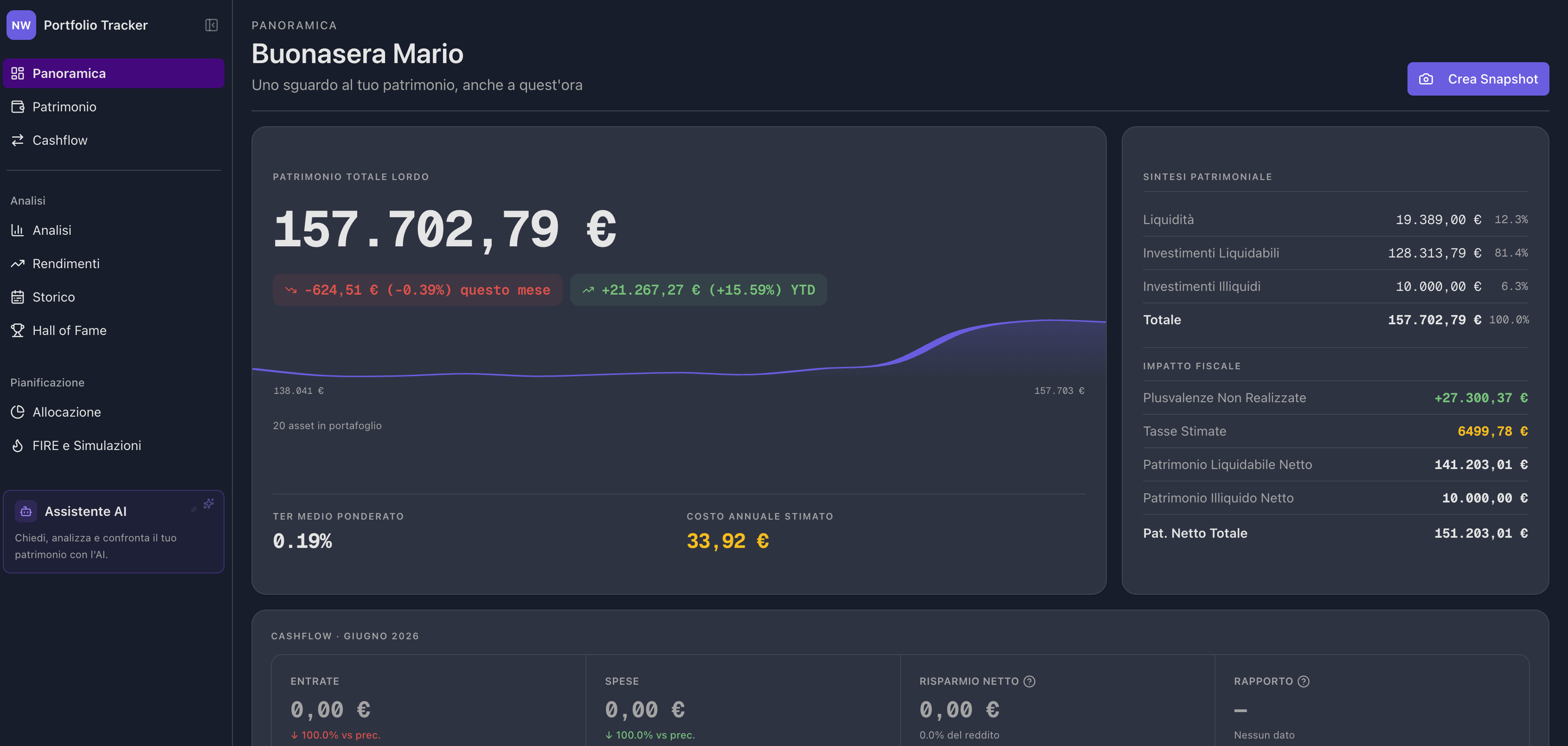 Portfolio overview with asset breakdown and allocation
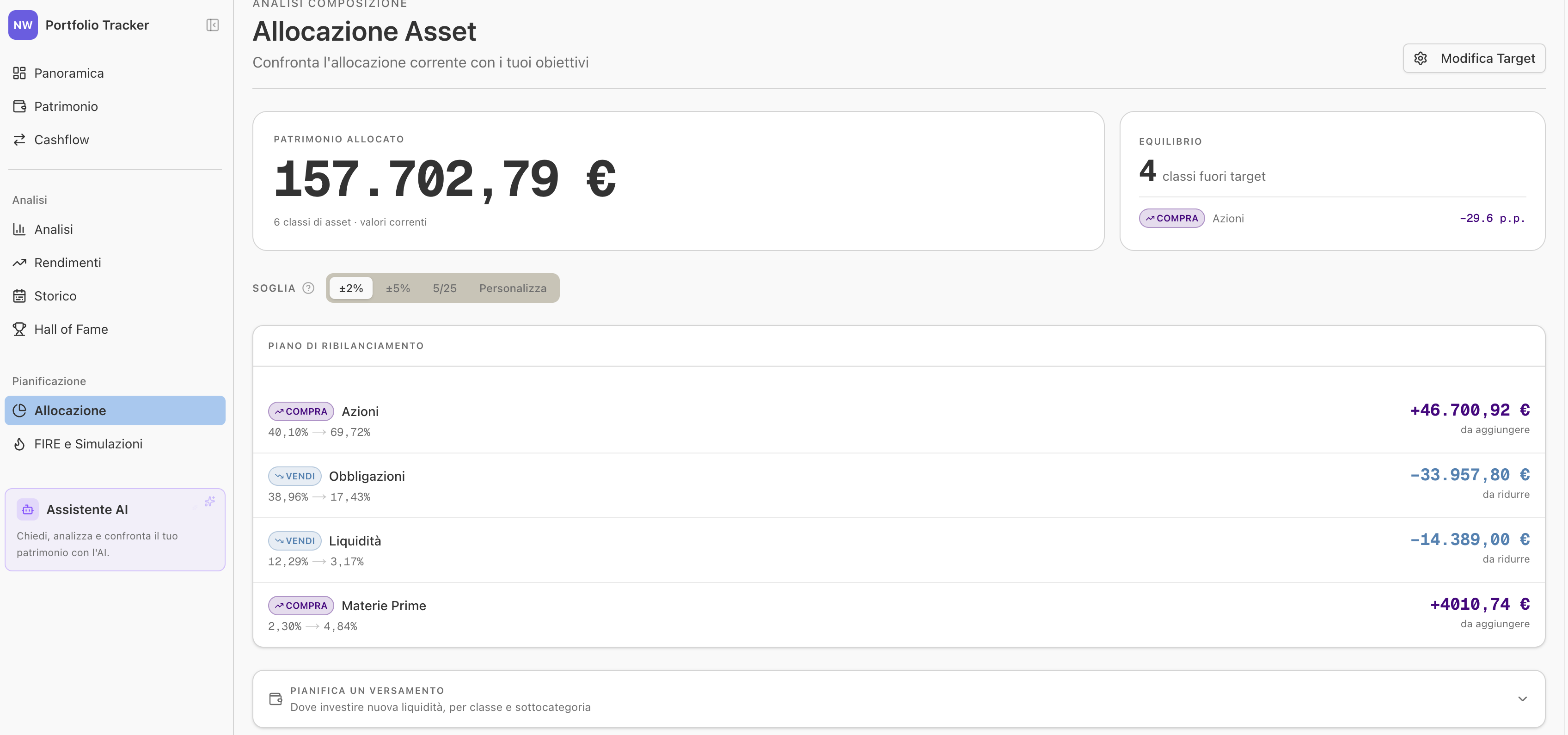 Current vs target asset allocation
Cashflow
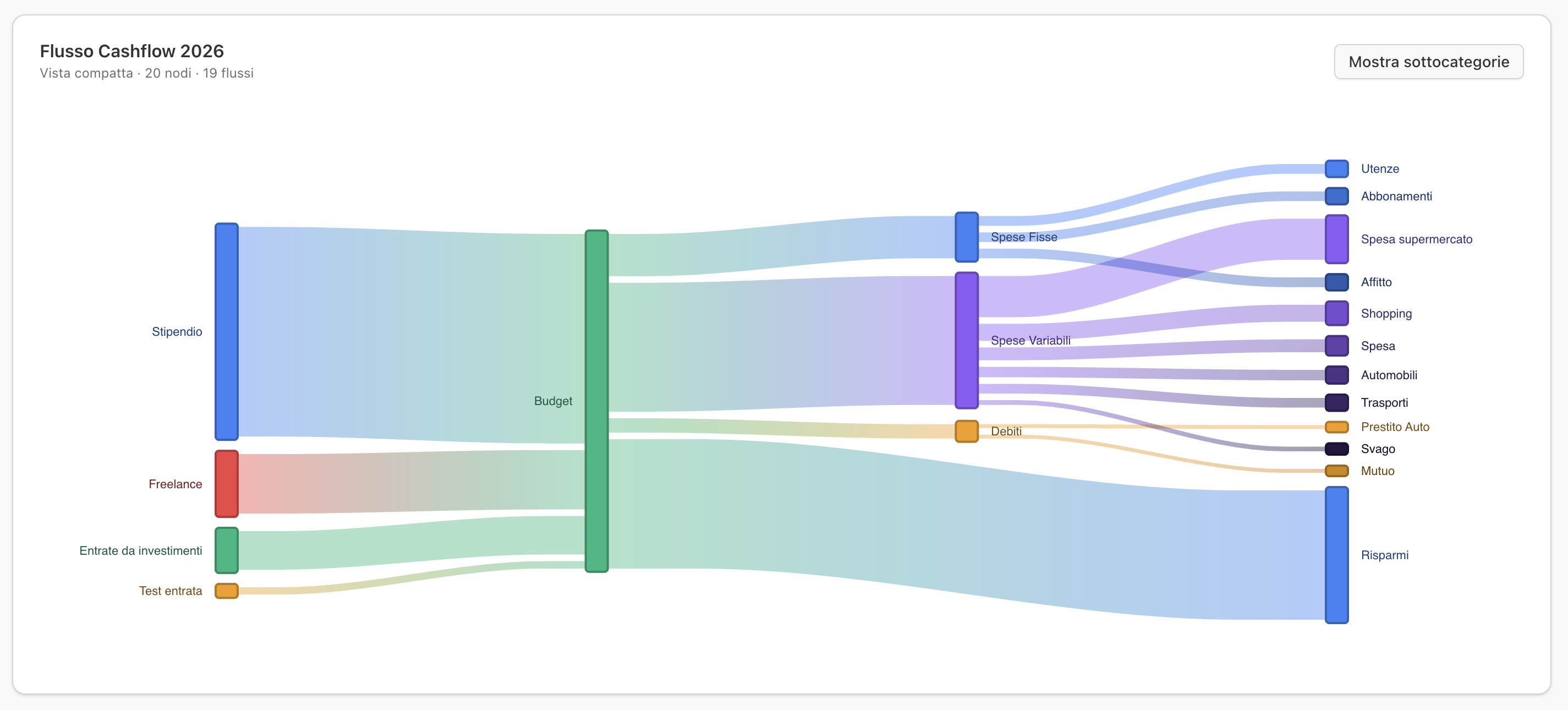
 5-layer Sankey diagram of income and expenses
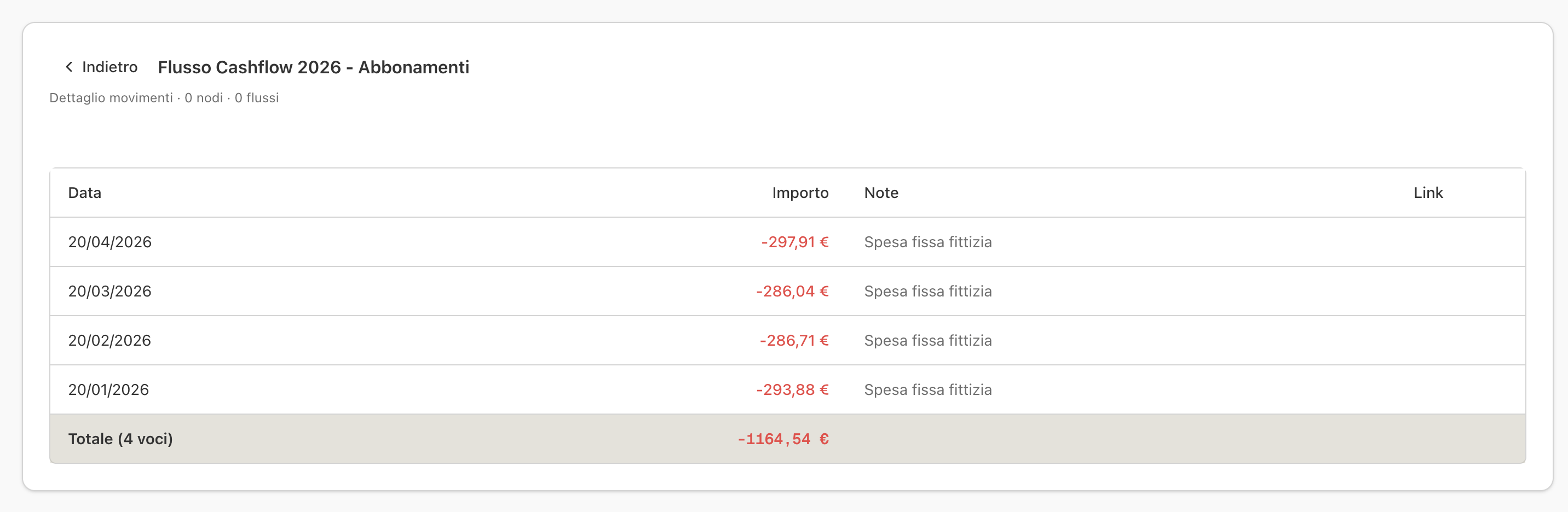
 4-level drill-down into expense categories
Performance & History
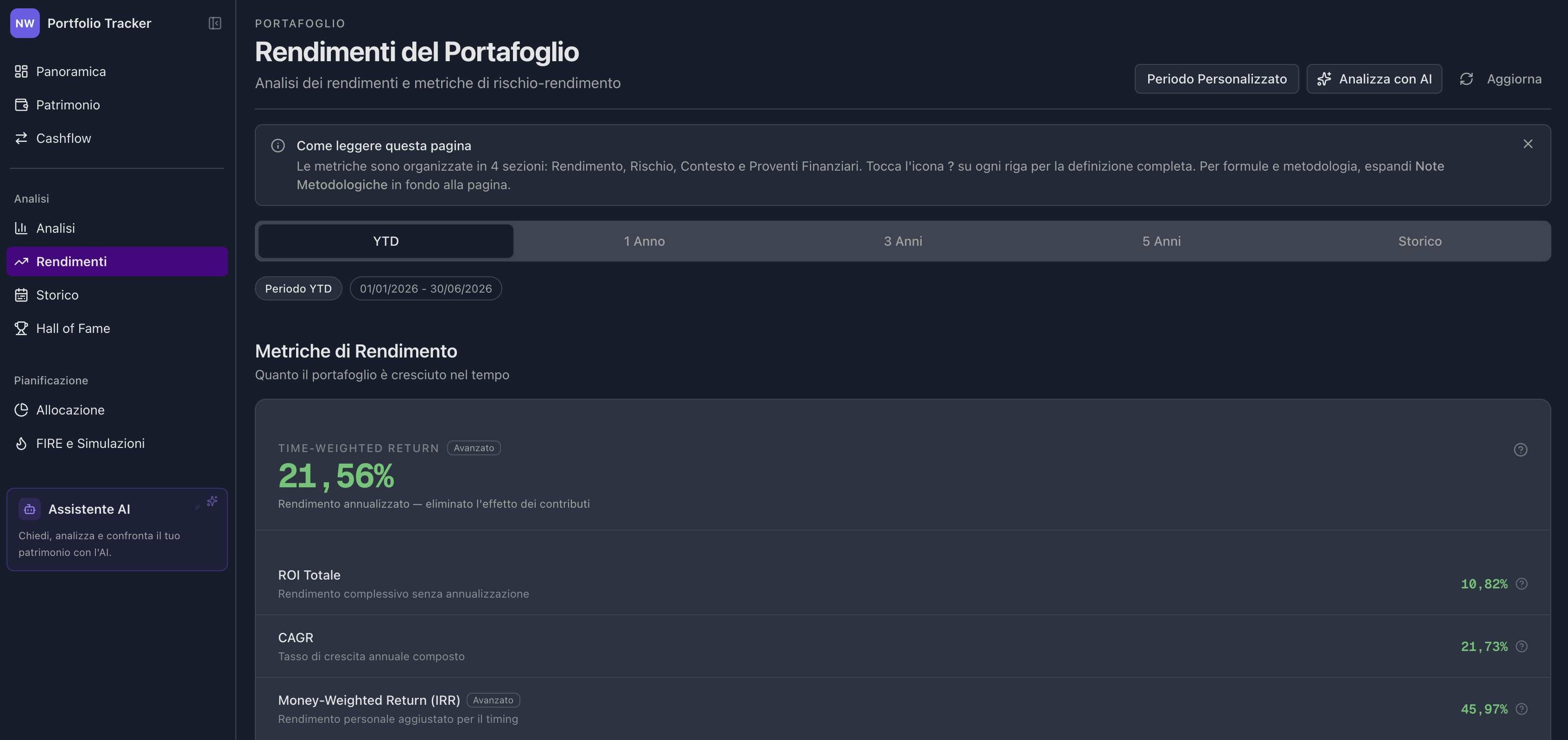 ROI, CAGR, Sharpe Ratio, drawdown and more
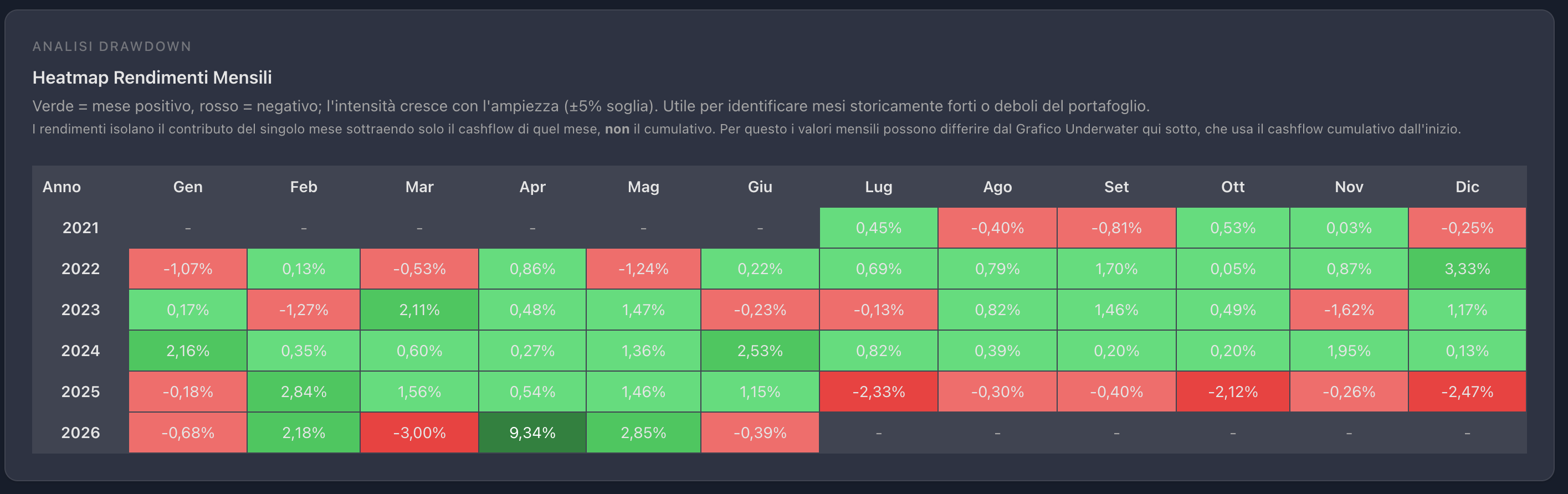 Monthly returns heatmap
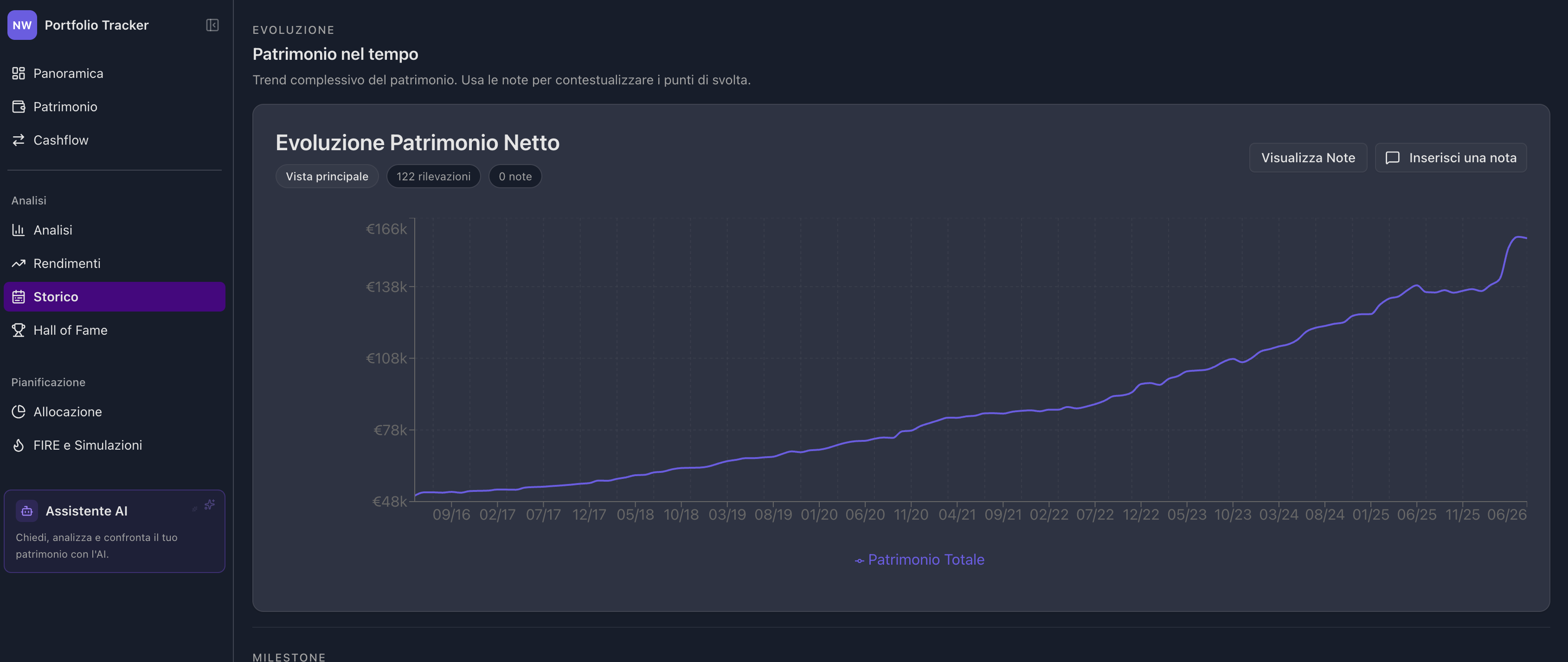 Net worth evolution over time
FIRE & Simulations
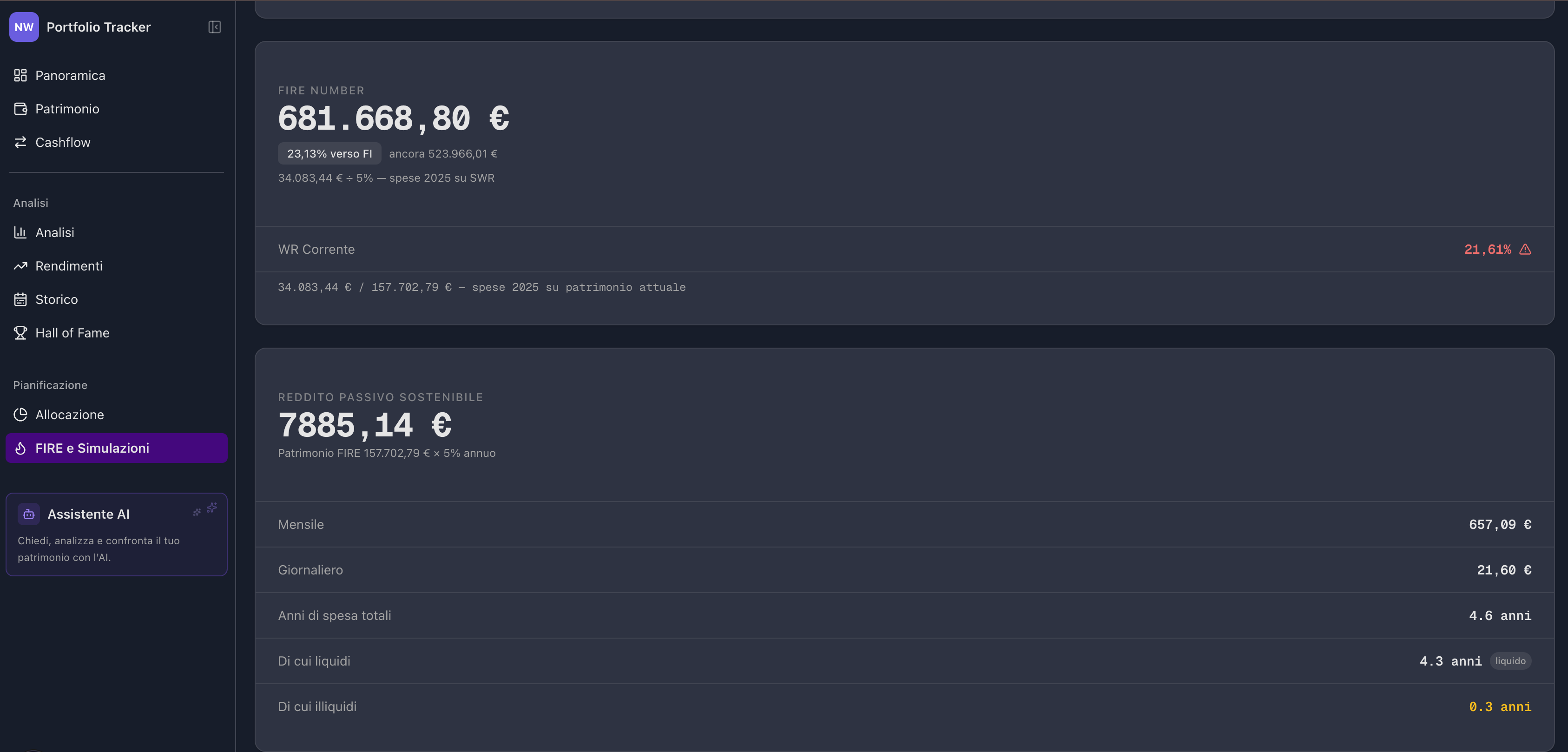 FIRE projections with Bear/Base/Bull scenarios
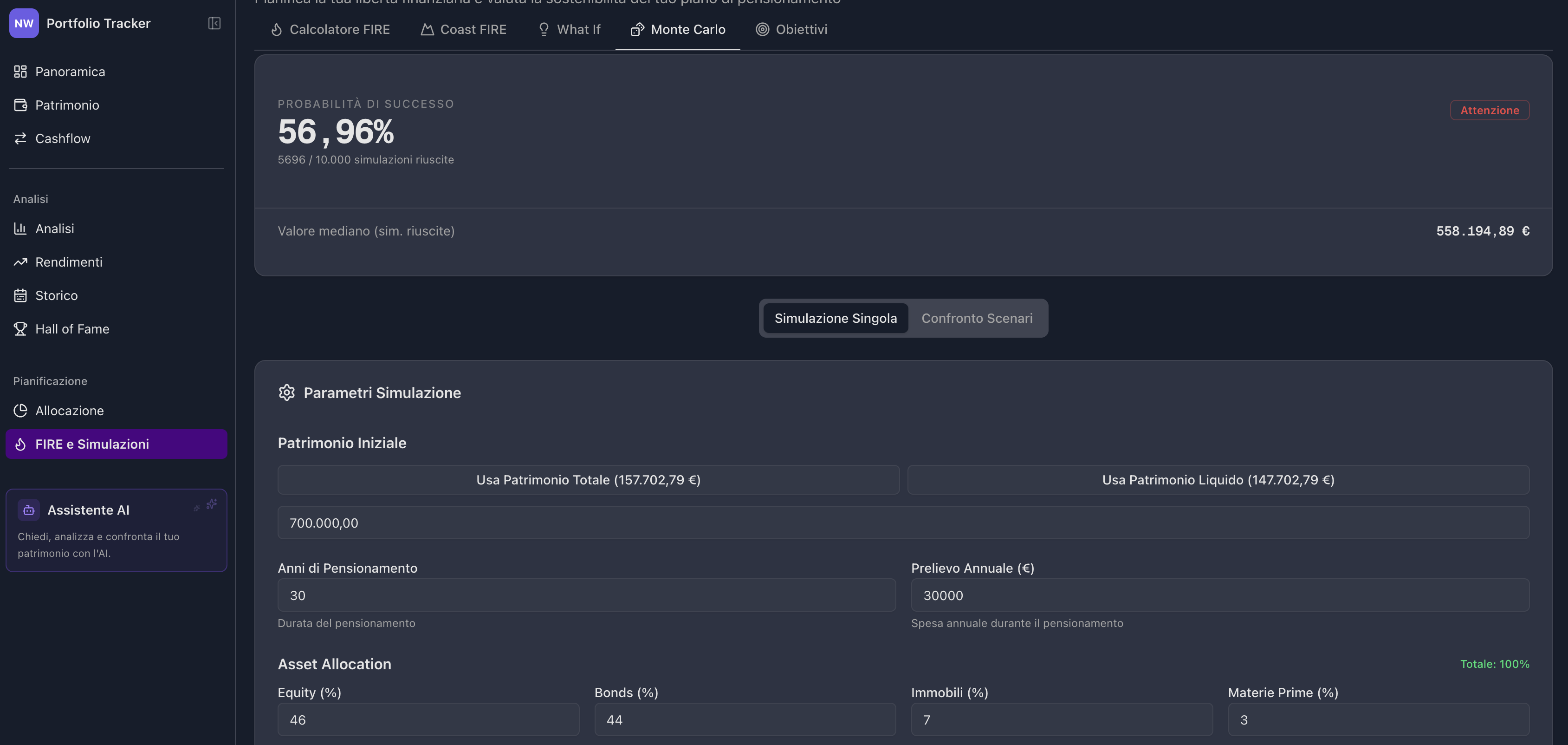 Monte Carlo simulation with scenario comparison
Dividends & Hall of Fame
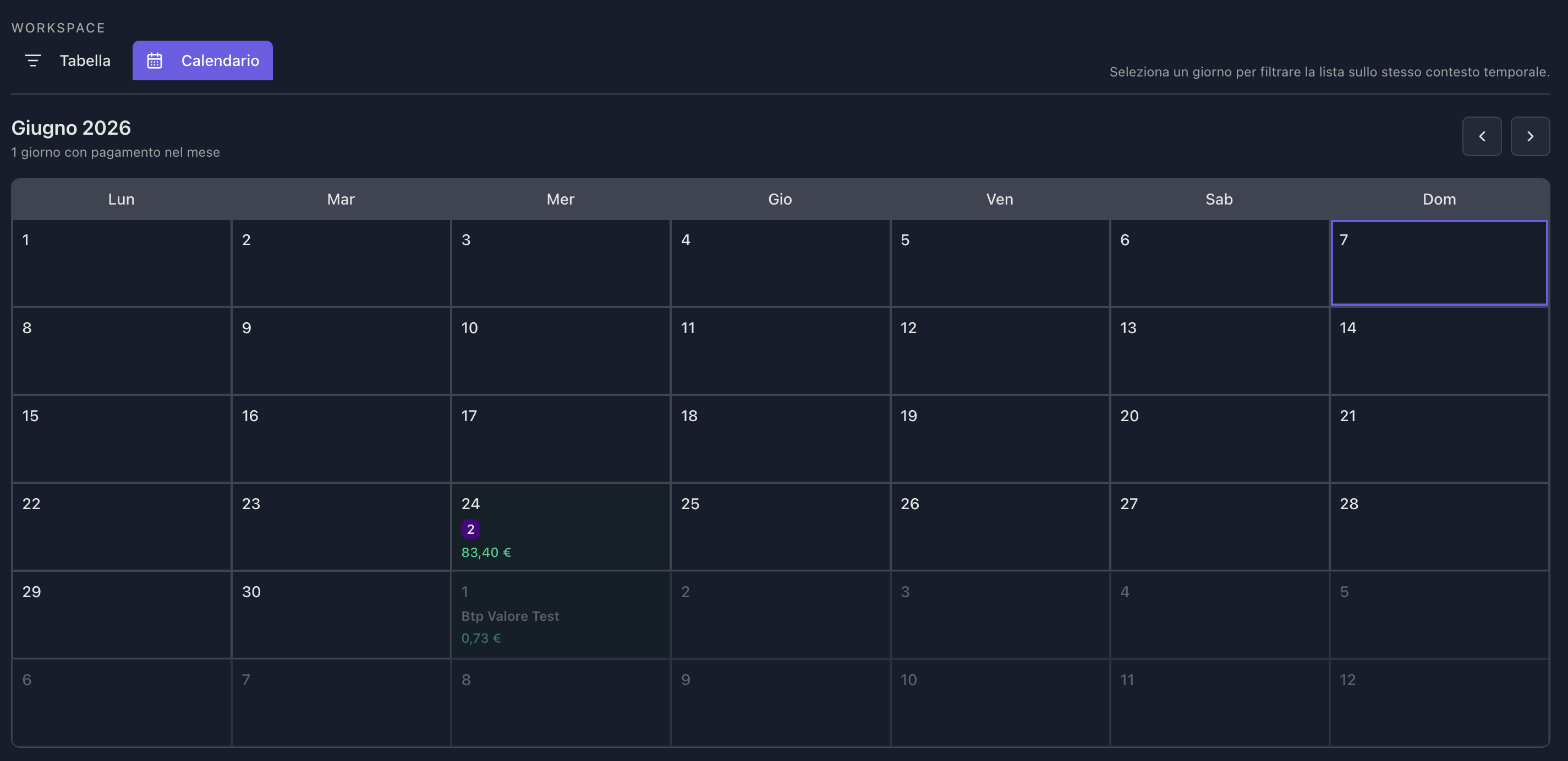 Monthly dividend calendar with drill-down
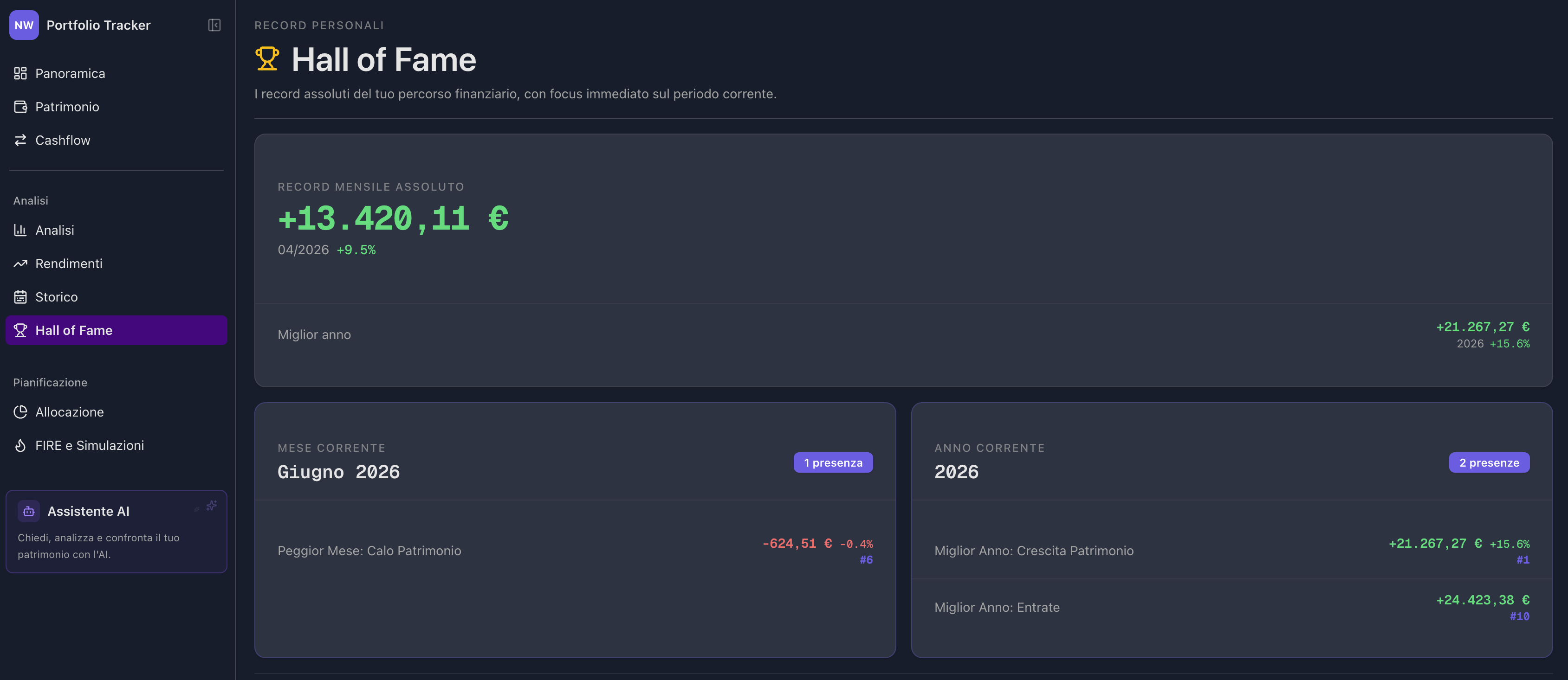 Monthly and annual performance rankings