
NeuralLift-360: Lifting An In-the-wild 2D Photo to A 3D Object with 360° Views
News
- 23.03.12 Basic workflow is released! Gradio App released!
We're working on rolling out new exciting features soon and will prepare tutorials and better interface using gradio. Stay tuned!
Pipeline
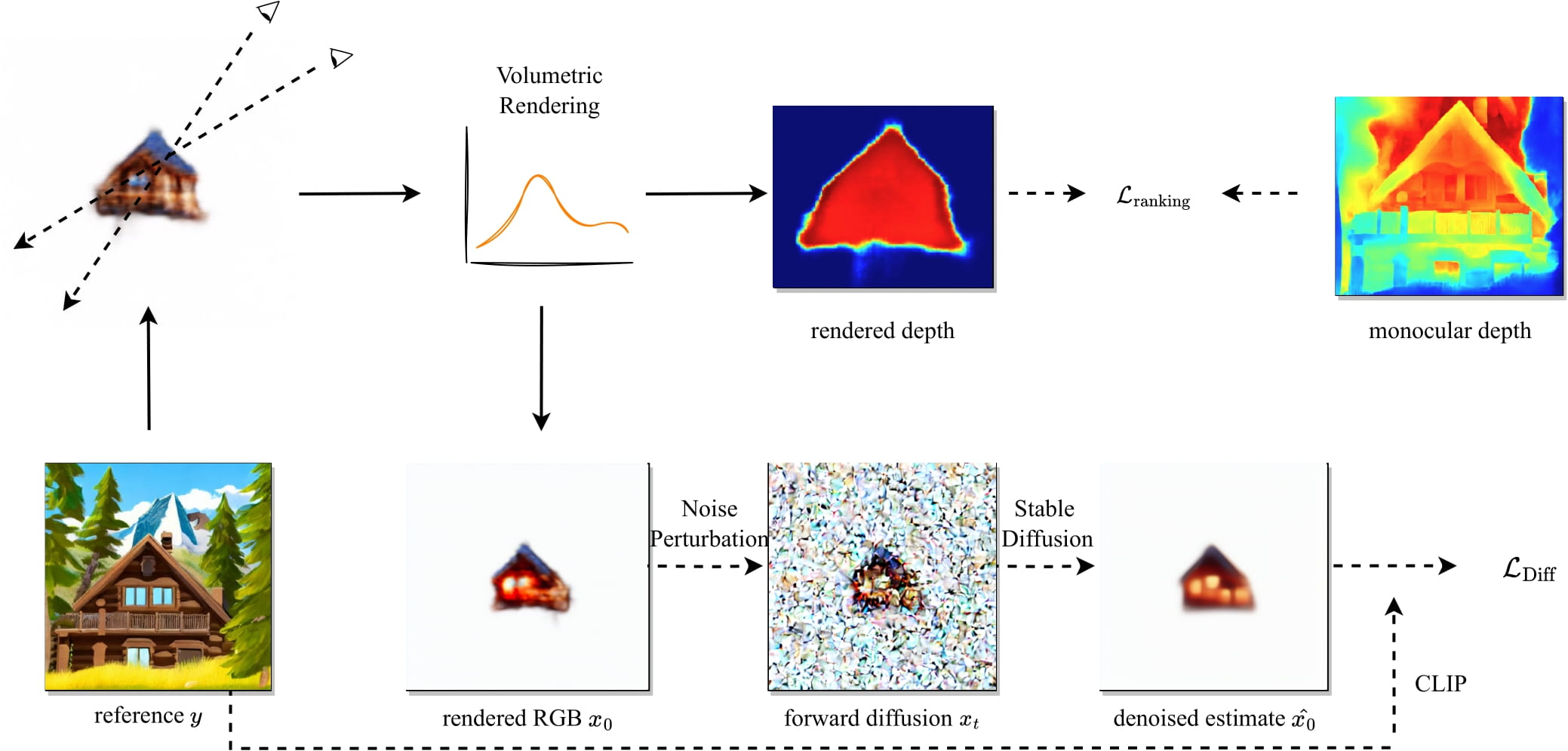
Environment
pip install -r requirements.txt will do the job.
pip install gradio if you want to run the Gradio App.
Data Preparation
In our experiments, we use the depth from Boost Your Own depth together with LeRes.
The colab notebook to export depth in numpy can be found here.
The foreground mask can be obtained using this repo: https://github.com/Ir1d/image-background-remove-tool
Gradio
python gradio_app.py
# add `--share` if you want an external public link
We prepare a Gradio App as well!
Note: Currently, we load config from a pre-defined yaml file and we'll update this later. Also, it's a bit slower compared to directly running the training script because we have to render during training.
Training
We prepare the config files in the yaml file in configs directory.
python main.py --config configs/cabin.yaml
Text inversion [Optional]
The following script runs text inversion to obtain a better text embedding.
export MODEL_NAME="runwayml/stable-diffusion-v1-5"
accelerate launch text_inversion.py \
  --pretrained_model_name_or_path=$MODEL_NAME \
  --learnable_property="object" \
  --placeholder_token="<cabin>" --initializer_token="cabin" \
  --resolution=512 \
  --train_batch_size=1 \
  --gradient_accumulation_steps=4 \
  --max_train_steps=1000 \
  --learning_rate=5.0e-04 --scale_lr \
  --lr_scheduler="constant" \
  --lr_warmup_steps=0 \
  --output_dir="cabin_ti" \
  --im_path='data/cabin4_centered.png' \
  --mask_path='data/cabin4_centered_mask.png'
test_dm.py can be used to validate the effectiveness of textual inversion.
An example config is provided in configs/cabin_ti.yaml
The corresponding training script is:
python main.py --config configs/cabin_ti.yaml
Imagic Finetuning [Optional]
Coming soon.
Testing
After training process finishes, the code will automatically generates a video named lift_ep0100_rgb.mp4
You can filter out all these videos in the log folder and sort them by time using the following code.
find ./ -name lift_ep0100_rgb.mp4 -printf "%T@ %Tc %p\n" | sort -n
If you want to run test only, go to the yaml config file, change test: False to test: True and ckpt: to the path of the trained checkpoint.
Acknowledgement
Codebase based on https://github.com/ashawkey/stable-dreamfusion . Thanks Jiaxiang Tang for sharing and the insightful discussions!
Citation
If you find this repo is helpful, please cite:
@InProceedings{Xu_2022_neuralLift,
author = {Xu, Dejia and Jiang, Yifan and Wang, Peihao and Fan, Zhiwen and Wang, Yi and Wang, Zhangyang},
title = {NeuralLift-360: Lifting An In-the-wild 2D Photo to A 3D Object with 360° Views},
journal={arXiv preprint arXiv:2211.16431},
year={2022}
}