
ngods: opensource data stack
This repository contains Docker compose script that creates opensource data analytics stack on your local machine.
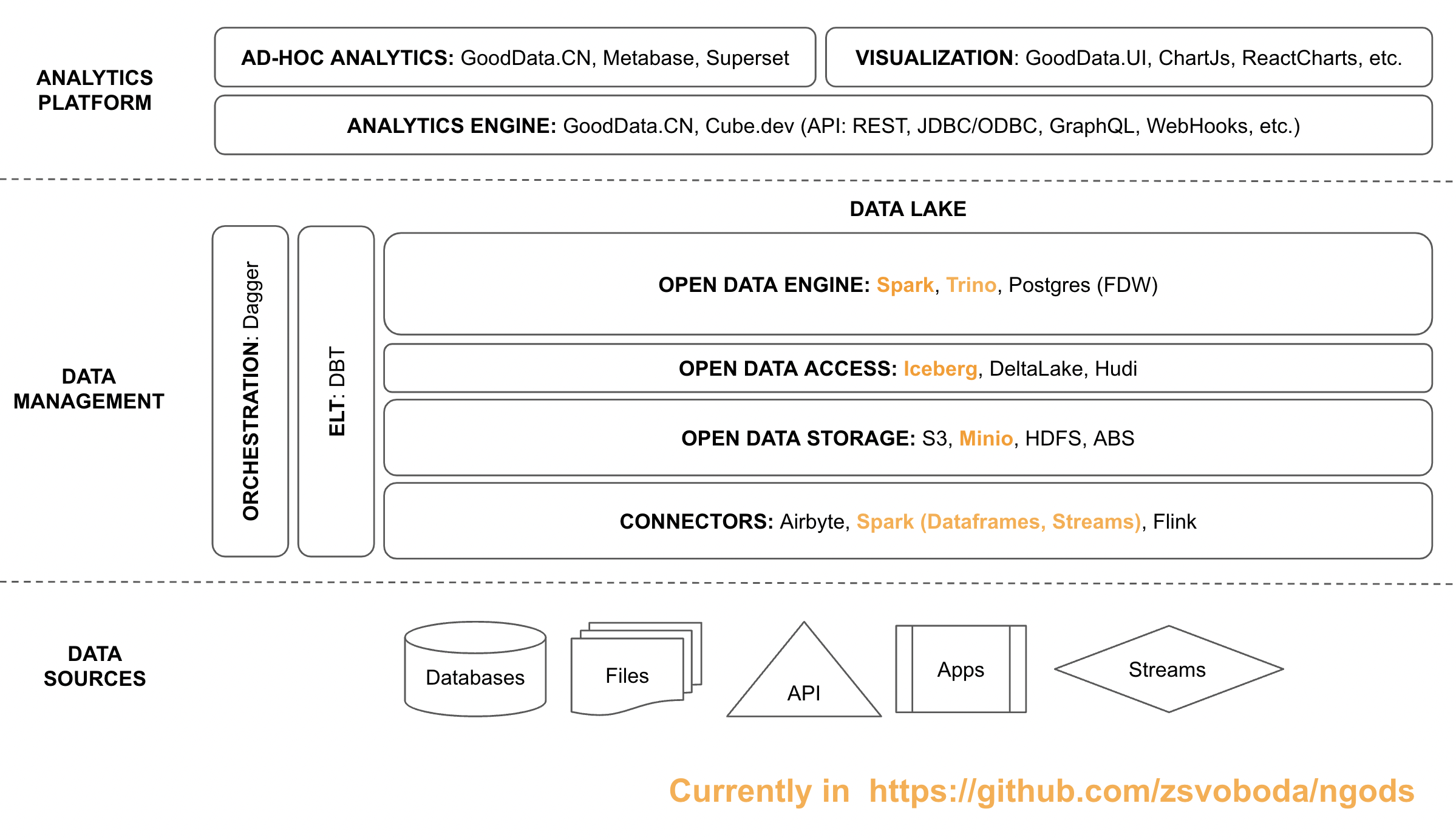
Currently, the stack consists of multiple components:
- Trino for low-latency distributed SQL queries
- Apache Spark for data pipeline
- Apache Iceberg for atomic data pipeline with schema evolution, and partitioning for performance
- Hive Metastore for metadata management (metadata are stored in MariaDB)
- Minio for mimicking S3 storage on a local computer
I plan to add more components soon:
- Postgres for low-latency queries (if Trino on Iceberg doesn't provide satisfactory low-latency queries). I'll also add Postgre Foreign Data Wrapper technology for more convenient ELT between Trino and Postgres
- DBT for ELT on top of Spark SQL or Trino
- GoodData.CN or Cube.dev for analytics model and metrics
- Metabase or Apache Superset for dashboards and data visualization
How ngods works: Simple example
You can simply start the ngds by executing
docker-compose up
from the top-level directory where you've cloned this repo.
Once all images are pulled and all containers start, open Minio in your browser http://localhost:9000 log in with minio username and minio123 password and create a top level bucket called bronze .
Then use your favorite SQL console tool (I use DBeaver) and connect to the Trino instance running on your local machine (jdbc url: jdbc:trino://localhost:8080, username: trino, empty database) and execute the following script:
create schema if not exists warehouse.bronze with (location = 's3a://bronze/');

drop table if exists warehouse.bronze.employee;

create table warehouse.bronze.employee (
   employee_id integer not null,
   employee_name varchar not null
)
with (
   format = 'parquet'
);

insert into warehouse.bronze.employee (employee_id, employee_name) values (1, 'john doe');
insert into warehouse.bronze.employee (employee_id, employee_name) values (2, 'jane doe');
insert into warehouse.bronze.employee (employee_id, employee_name) values (3, 'joe doe');
insert into warehouse.bronze.employee (employee_id, employee_name) values (4, 'james doe');

select * from warehouse.bronze.employee;
How ngods works: Loading parquet file as table
Now we'll load the February 2022 NYC taxi trip data parquet file as a new table to ngods.
First, create a new nyc directory in the ./data/stage directory and download the February 2022 NYC taxi trips parquet file to it.
Then open and execute the ngods Spark notebook script that loads the data as a new table to the bronze schema of a warehouse database.
df=spark.read.parquet("/home/data/stage/nyc/fhvhv_tripdata_2022-02.parquet")
df.writeTo("warehouse.bronze.ny_taxis_feb").create()
Now open your SQL console again, connect to the the Trino instance running on your local machine (jdbc url: jdbc:trino://localhost:8080, username: trino, empty database) and execute this SQL queries:
select count(*) from warehouse.bronze.ny_taxis_feb;

select
	hour(pickup_datetime),
	sum(trip_miles),
	sum(trip_time),
	sum(base_passenger_fare)
from warehouse.bronze.ny_taxis_feb group by 1 order by 1;
You should see your query results in no time!