
nsstats
A simple terminal-based DNS statistics viewer for Technitium DNS Server, written in Nim.
Screenshots
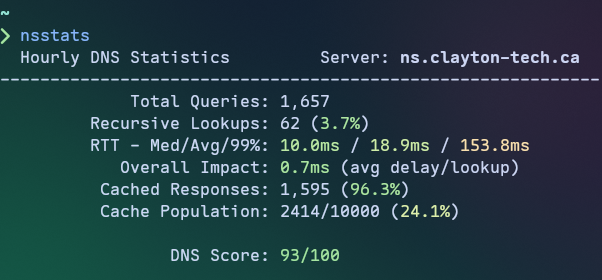
Core Metrics (default)
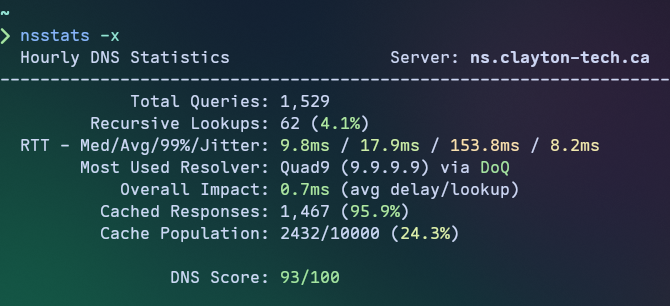
w/Extra Metrics
Features
- Live DNS statistics displayed in a dynamically colorized terminal interface
- Time range selection — View hourly (updated minutely), daily (updated hourly), or weekly (updated daily) statistics
- Performance metrics including recursive response times (median, average, 99th percentile)
- Cache efficiency tracking with hit/miss rates and population stats
- DNS Score — Composite experience score (0-100) based on multiple metrics, gives you an at-a-glance idea of your DNS performance
- First-run configuration wizard for easy setup
Requirements
- Only Linux is supported at this time
- A Technitium DNS Server instance with the Query Logs (SQLite) App installed
- Must be configured to use the in-memory database option for performance reasons.
- A Technitium API token with the following permissions:
Dashboard:ViewSettings:ViewLogs:ViewCache:View(only needed for extra metrics, used by the most used resolver metric)
Installation
Download Binary
Download the latest release from the GitHub Releases page.
Build from Source
# Clone the repository
git clone https://github.com/sjclayton/nsstats.git
cd nsstats

# Build debug (development) binary
nimble debug

# Build release binary
nimble release
The compiled binary will be at bin/nsstats, you can place it in your $PATH or copy it
to another location of your choice for convenience.
Prerequisites for building:
- Nim compiler >= 2.2.10
- nimble package manager
Usage
On first run, nsstats will prompt you to configure your Technitium DNS Server connection:
nsstats
If no option is provided, shows current (last hour) stats.
Command Line Options
Usage: nsstats [OPTIONS]

Options:
  -d, --daily    Show daily stats (last 24 hours)
  -w, --weekly   Show weekly stats (last 7 days)
  -x, --extra    Show extra metrics (Resolver Health, Most Used Resolver)
  -c, --config   Use an alternate config file (-c /path/to/config.toml)
  -v, --version  Show current version
  -h, --help     Show this help message
Configuration
Configuration is stored in TOML format at:
$XDG_CONFIG_HOME/nsstats/config.tomlor~/.config/nsstats/config.toml
Example configuration:
conn_mode = "http" # Options: "http", "https"
host = "192.168.1.1"
port = "5380" # Defaults: HTTP -> 5380, HTTPS -> 53443
token = "your-api-token-here"
extra_metrics = false # Show extra metrics (Resolver Health, Most Used Resolver)
Generate an API token from the Technitium DNS Server web console under Administration > Sessions.
Displayed Metrics
Core Metrics
| Metric | Description |
|---|---|
| Total Queries | Total number of DNS queries processed (recursive/cached only) |
| Recursive Lookups | Queries requiring recursive resolution (with miss rate %) |
| Median/Avg/99% RTT | Round-trip response time statistics (recursive lookups only) |
| Overall Impact | Average delay per lookup (weighted by recursive/total queries ratio) |
| Cached Responses | Responses served from the cache (with hit rate %) |
| Cache Population | Ratio of cached entries to configured maximum cache size |
| DNS Score | Composite experience score (0-100) based on weighted metrics |
Extra Metrics
The following metrics require -x/--extra or extra_metrics = true in your config file:
| Metric | Description |
|---|---|
| Jitter | Network conditions current effect on upstream resolution (displayed with RTT's) |
| Most Used Resolver | Upstream resolver with highest response rate - shows name, IP, and protocol in use |
Contributing
Anyone who wishes to contribute is welcome to open an issue or submit a pull request.
License
MIT License - see LICENSE file for details