
Nusgmon - Network Usage Monitor
Lightweight Python CLI (command-line interface) network usage monitor for Linux.
Designed to run as a systemd service.



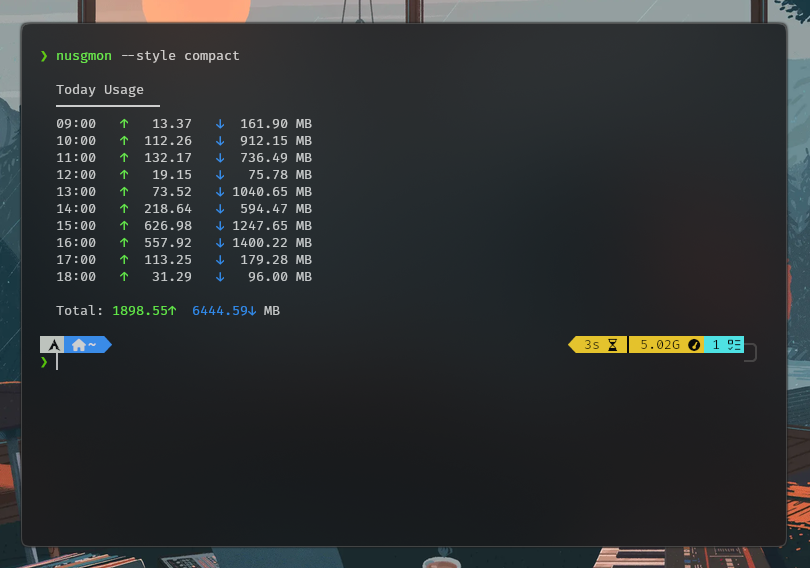
Usage examples
Start recording network usage:
nusgmon record
Start recording network usage every second and of a specific interface only:
nusgmon record -w 1 --iface wlp2s0
View today's usage:
nusgmon --today
View current week's usage in JSON format:
nusgmon --thisweek --json
View usage after certain date:
nusgmon --since 2026-03-15
Prune records before 30 days:
nusgmon db --prune 30
Features
-
Record a specific interface data usage or of all as bundle
-
Lightweight network usage monitor
-
Stores usage history in SQLite
-
Daily / weekly / monthly statistics
-
Graph style options for statistics
-
JSON output for scripting
-
Works with systemd
-
Configuration file support
-
Sends data usage notification alerts (needs nusgmon-alert)
Dependencies
Requires Python 3 and psutil library.
pip install psutil # or install `python-psutil` as system-wide through your package manager
Installation
For Arch Linux (AUR)
yay -S nusgmon-git
For any other distro
The setup script installs the nusgmon program and performs the required
file copy, permission, PATH variable etc. setup.
[!NOTE] Run the script as root to install system-wide. To install only for your user, just remove sudo from the command
sudo ./setup.sh.
git clone https://github.com/LUCKYS1NGHH/nusgmon.git
cd nusgmon
chmod +x setup.sh
sudo ./setup.sh
Uninstall
If Arch Linux
yay -R nusgmon-git
Optional (removes the database):
rm -rf ~/.nusgmon
If installed system-wide
sudo systemctl disable --now nusgmon
sudo rm /etc/systemd/system/nusgmon.service
sudo rm /usr/local/bin/nusgmon
sudo systemctl daemon-reload
If installed as normal user
systemctl --user disable --now nusgmon
rm ~/.config/systemd/user/nusgmon.service
rm ~/.local/bin/nusgmon
systemctl --user daemon-reload
Wanna Contribute? 🤝
- Fork this repository to your own GitHub account.
- Create a branch for your changes:
git checkout -b feature/your-feature
- Write and test your changes (add tests if possible).
- Submit a pull request with a clear description of what you changed and why.
Reporting issues
Please.. if you are facing any issue with nusgmon, please open a GitHub issue with details.
Author
LUCKYS1NGHH