
OCR-Corrector
专为OCR设计的纠错器。
未来考虑增加OCR需要的各种NLP工具,包括:
- 粘连文本分词
- 命名实体识别
- 键值对匹配
功能
输入OCR识别结果(文本+单字符置信度),输出修正后的文本。 (单字符置信度:识别网络最后 softmax 输出的概率值,用来进行方便地发现错字。)
示例
输入:
text = ['我爱北京大安门']
probs = [[0.99, 0.99, 0.99, 0.99, 0.56, 0.99, 0.99]]
输出:
text_corrected = ['我爱北京天安门']
输入:
text = ['本着平等、白愿、诚信、互利的原则']
probs = [[0.99, 0.99, 0.99, 0.99, 0.99, 0.78, 0.99, 0.99, 0.99, 0.99, 0.99, 0.99, 0.99, 0.99, 0.99, 0.99]]
输出:
text_corrected = ['本着平等、自愿、诚信、互利的原则']
细分场景
目前按照业务场景,分别开发了两种纠错器:文档识别纠错器,单据识别纠错器
文档识别
文档是指书籍内页拍摄的图片、扫描的合同等有大段文字的图片。
纠错效果
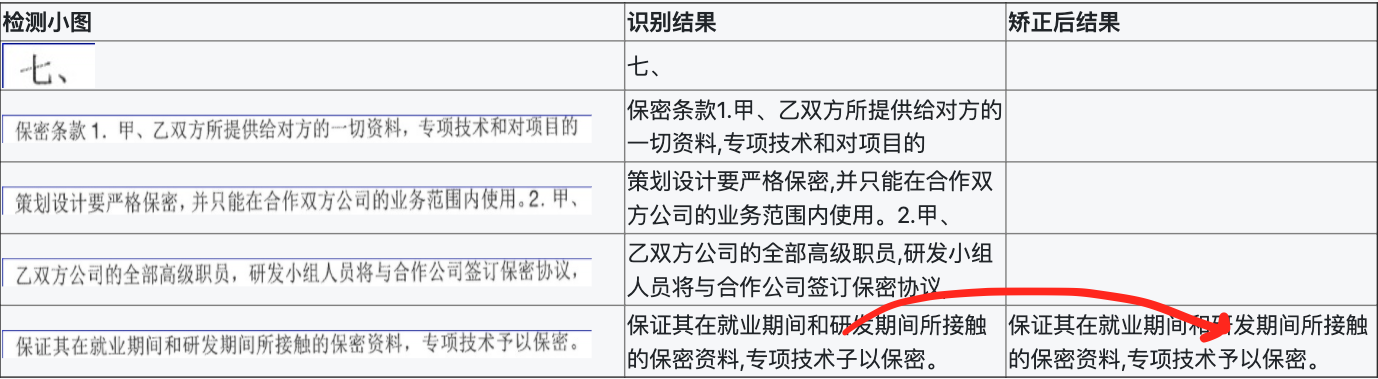
单据识别
单据是指字段、格式相对固定,有统一模板或者近似统一的图片,比如各种表单、证件、发票等等,主要特点是单据上出现的文本段相对固定。
使用央行征信报告作为示例:
纠错效果
 (原图质量较差,所以识别错误很多)
使用方法
- clone 项目
git clone https://github.com/tiantian91091317/OCR-Corrector.git
pip install -r requirements.txt
- 下载模型和数据
- 下载预训练好的BERT模型 到 corrector/model/pre-trained 目录下
2)下载用于评价字形相似度的 char_meta.txt 放到 corrector/config 目录下 下载地址:https://pan.baidu.com/s/1iqA-GbzzHBBWfWaxe1g_fg 密码:3f11
- 安装
python setup.py install
pip install -r requirements
使用
方法一
可以嵌入到OCR识别的代码里面,将识别模型输出的结果输入纠错器。
import ocr_corrector

corrector = ocr_corrector.initial()
ocr_results, recog_probs = my_ocr(img)
ocr_res_corrected = corrector.correct(ocr_results, recog_probs, biz_type)
可以通过运行以下命令进行测试:
# 测试文档识别纠错
python demo.py --img=corrector/data/1.jpg --biz=doc --api=own
# 测试单据识别纠错
python demo.py --img=corrector/data/2.jpg --biz=report --api=own
方法二
可以调用识别API后进行后处理。目前支持阿里高精版识别接口的调用。
需要先申请 app code(可以开通免费试用);然后在 corrector/api_call/ali_ocr.py 中更新app code:
url = 'https://ocrapi-advanced.taobao.com/ocrservice/advanced'
post_data = {"img":img,
             "prob":True,
             "charInfo":True
             }
app_code = your_app_code
然后可以传任意图片测试纠错结果:
python demo.py --img=corrector/data/your_img.jpg --biz=[doc|report|your_type] --api=ali
新增单据类型
文档识别的纠错主要利用局部语义信息进行纠错,无需特殊配置;
对于单据识别,由于主要基于其关键词表进行纠错,所以需要进行配置:
- 在
corrector/config/config.json中增加新单据类型的配置(以新增保单识别为例):
{
      "biz_type": "insurance",
      "corrector_type":"keyword",
      "prob_threshold": 0.9,
      "similarity_threshold": 0.6,
      "char_meta_file": "config/char_meta.txt",
      "key_words_file": "config/kwds_insurance.txt"
    }
- 在
corrector/config/目录下增加关键词表kwds_insurance.txt:
投保人
被保险人
受益人
险种名称
……
原理
见文章: https://zhuanlan.zhihu.com/p/179957371
参考项目
- Faspell https://github.com/iqiyi/FASPell
- pycorrector https://github.com/shibing624/pycorrector
未来计划
- 将纠错拓展到非汉字的其他字符,比如 日期、证件号码、标点符号等;
- 形成OCR所需的NLP工具包,包括粘连文本分词、命名实体识别、键值对匹配等等