
🤖 Chat with PDF locally using Ollama + LangChain
A powerful local RAG (Retrieval Augmented Generation) application that lets you chat with your PDF documents using Ollama and LangChain. This project includes multiple interfaces: a modern Next.js web app, a Streamlit interface, and Jupyter notebooks for experimentation.

✨ Features
- 🔒 100% Local - All processing happens on your machine, no data leaves
- 📄 Multi-PDF Support - Upload and query across multiple documents
- 🧠 Multi-Query RAG - Intelligent retrieval with source citations
- 🎯 Advanced RAG - LangChain-powered pipeline with ChromaDB
- 🖥️ Two Modern UIs - Next.js (primary) and Streamlit interfaces
- 🔌 REST API - FastAPI backend for programmatic access
- 📓 Jupyter Notebooks - For experimentation and learning
🖼️ Screenshots
Next.js Interface (Recommended)
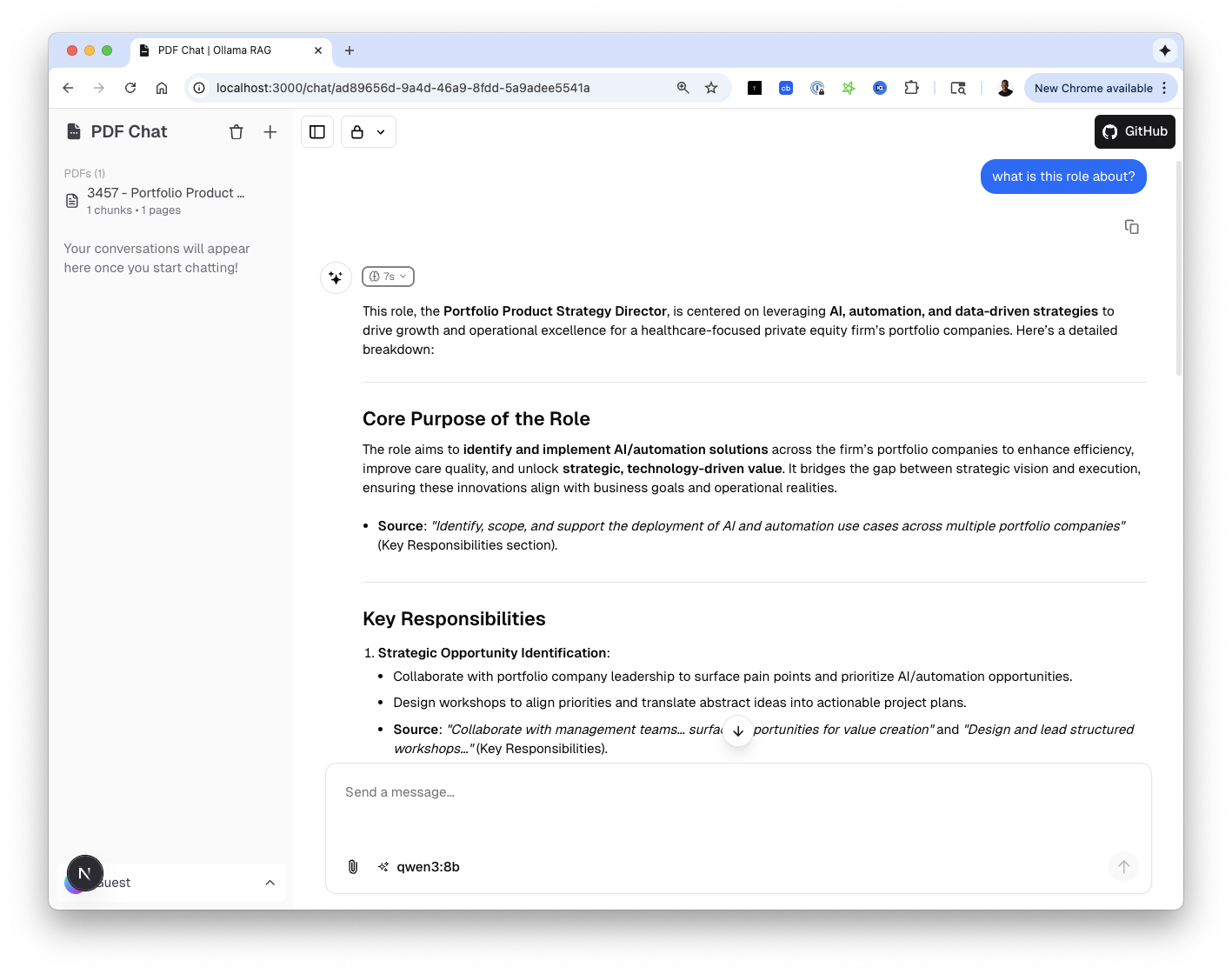 Modern chat interface with PDF management, source citations, and reasoning steps
Streamlit Interface
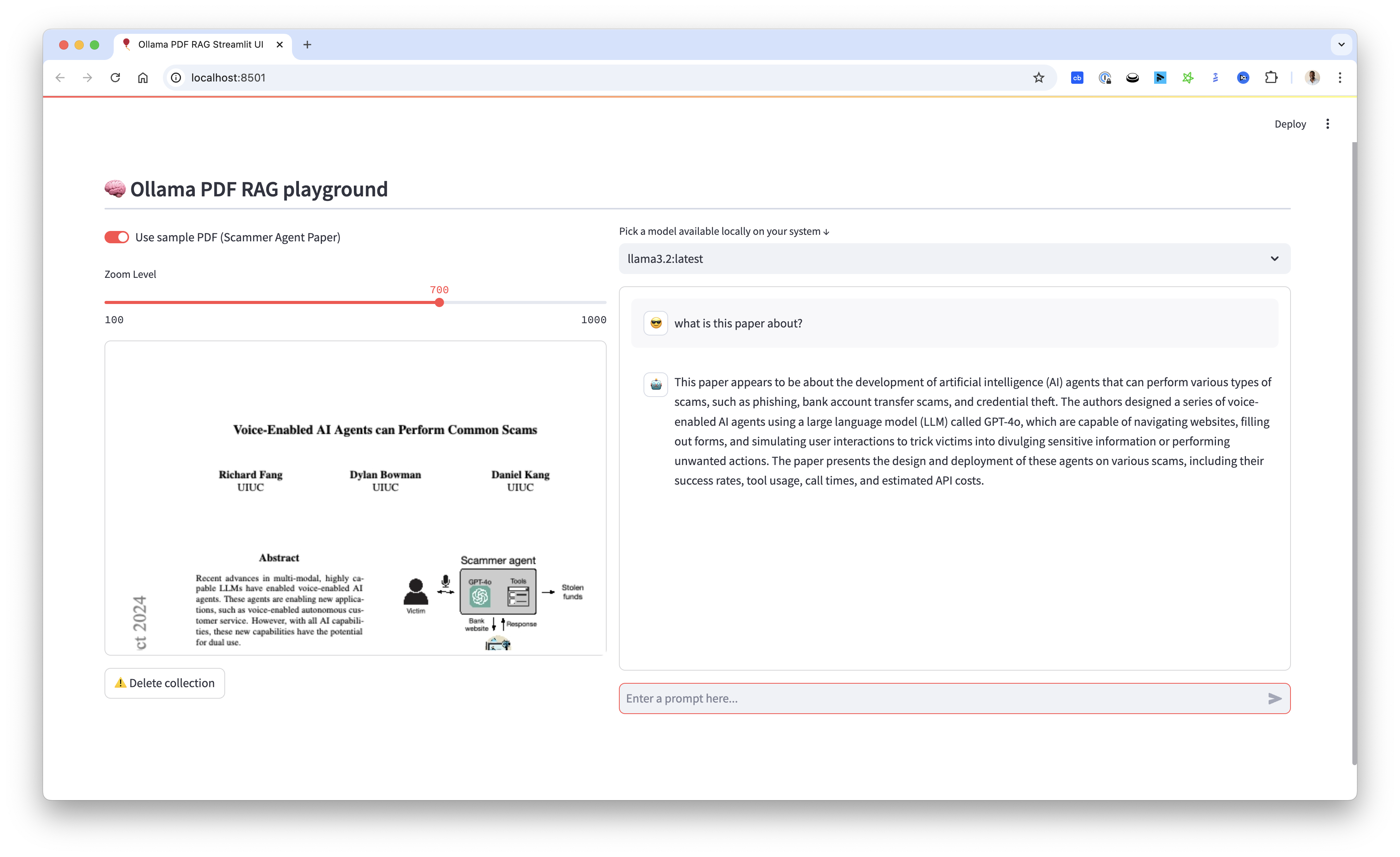 Classic Streamlit interface with PDF viewer and chat functionality
📺 Video Tutorial

🏗️ Project Structure
ollama_pdf_rag/
├── src/
│   ├── api/                  # FastAPI REST API
│   │   ├── routers/          # API endpoints
│   │   ├── services/         # Business logic
│   │   └── main.py           # API entry point
│   ├── app/                  # Streamlit application
│   │   ├── components/       # UI components
│   │   └── main.py           # Streamlit entry point
│   └── core/                 # Core RAG functionality
│       ├── document.py       # PDF processing
│       ├── embeddings.py     # Vector embeddings
│       ├── llm.py            # LLM configuration
│       └── rag.py            # RAG pipeline
├── web-ui/                   # Next.js frontend
│   ├── app/                  # Next.js app router
│   ├── components/           # React components
│   └── lib/                  # Utilities & AI integration
├── data/
│   ├── pdfs/                 # PDF storage
│   └── vectors/              # ChromaDB storage
├── notebooks/                # Jupyter notebooks
├── tests/                    # Unit tests
├── docs/                     # Documentation
├── run.py                    # Streamlit runner
├── run_api.py                # FastAPI runner
└── start_all.sh              # Start all services
🚀 Getting Started
Prerequisites
-
Install Ollama
- Visit Ollama's website to download and install
- Pull required models:
ollama pull llama3.2  # or your preferred chat model
ollama pull nomic-embed-text  # for embeddings
-
Clone Repository
git clone https://github.com/tonykipkemboi/ollama_pdf_rag.git cd ollama_pdf_rag -
Set Up Python Environment
python -m venv venv source venv/bin/activate # On Windows: .\venv\Scripts\activate pip install -r requirements.txt -
Set Up Next.js Frontend (for the modern UI)
cd web-ui
pnpm install
pnpm db:migrate
cd ..
🎮 Running the Application
Option 1: Next.js + FastAPI (Recommended)
Start both services:
# Terminal 1: Start the FastAPI backend
python run_api.py
# Runs on http://localhost:8001

# Terminal 2: Start the Next.js frontend
cd web-ui && pnpm dev
# Runs on http://localhost:3000
Or use the convenience script:
./start_all.sh
Service URLs:
| Service | URL | Description |
|---|---|---|
| Next.js Frontend | http://localhost:3000 | Modern chat interface |
| FastAPI Backend | http://localhost:8001 | REST API |
| API Documentation | http://localhost:8001/docs | Swagger UI |
Option 2: Streamlit Interface
python run.py
# Runs on http://localhost:8501
Option 3: Jupyter Notebook
jupyter notebook
Open notebooks/experiments/updated_rag_notebook.ipynb to experiment with the code.
💡 Usage
Next.js Interface
- Upload PDFs - Click the 📎 button or drag & drop files
- View PDFs - Uploaded PDFs appear in the sidebar with chunk counts
- Select Model - Choose from your locally available Ollama models
- Ask Questions - Type your question and get answers with source citations
- View Reasoning - See the AI's thinking process and retrieved chunks
Streamlit Interface
- Upload PDF - Use the file uploader or toggle "Use sample PDF"
- Select Model - Choose from available Ollama models
- Ask Questions - Chat with your PDF through the interface
- Adjust Display - Use the zoom slider for PDF visibility
- Clean Up - Delete collections when switching documents
🔌 API Reference
The FastAPI backend provides these endpoints:
| Method | Endpoint | Description |
|---|---|---|
POST |
/api/v1/pdfs/upload |
Upload and process a PDF |
GET |
/api/v1/pdfs |
List all uploaded PDFs |
DELETE |
/api/v1/pdfs/{pdf_id} |
Delete a PDF |
POST |
/api/v1/query |
Query PDFs with RAG |
GET |
/api/v1/models |
List available Ollama models |
GET |
/api/v1/health |
Health check |
See full documentation at http://localhost:8001/docs when running.
🧪 Testing
# Run all tests
python -m pytest tests/ -v

# Run with coverage
python -m pytest tests/ --cov=src
Pre-commit Hooks
pip install pre-commit
pre-commit install
⚠️ Troubleshooting
- Ollama not responding: Ensure Ollama is running (
ollama serve) - Model not found: Pull models with
ollama pull <model-name> - No chunks retrieved: Re-upload PDFs to rebuild the vector database
- Port conflicts: Check if ports 3000, 8001, or 8501 are in use
Common Errors
ONNX DLL Error (Windows)
DLL load failed while importing onnx_copy2py_export
Install Microsoft Visual C++ Redistributable and restart.
CPU-Only Systems
Reduce chunk size if experiencing memory issues:
- Modify
chunk_sizeto 500-1000 insrc/core/document.py
🤝 Contributing
- Open issues for bugs or suggestions
- Submit pull requests
- Comment on the YouTube video for questions
- ⭐ Star the repository if you find it useful!
📝 License
This project is open source and available under the MIT License.
⭐️ Star History
Built with ❤️ by Tony Kipkemboi