
OneGlanse — Open-source GEO & AI Visibility Tracker
OneGlanse is the open-source tool for tracking how your brand appears in AI-generated responses. It monitors ChatGPT, Gemini, Perplexity, Claude, and Google AI Overview — not via model APIs, but through the actual product UIs the same way a real user would. Free to run. Fully self-hosted. MIT licensed.
Keywords: GEO · generative engine optimization · AI visibility tracking · AI brand monitoring · open-source GEO tool · self-hosted AI tracker · ChatGPT brand tracking · Perplexity brand tracking
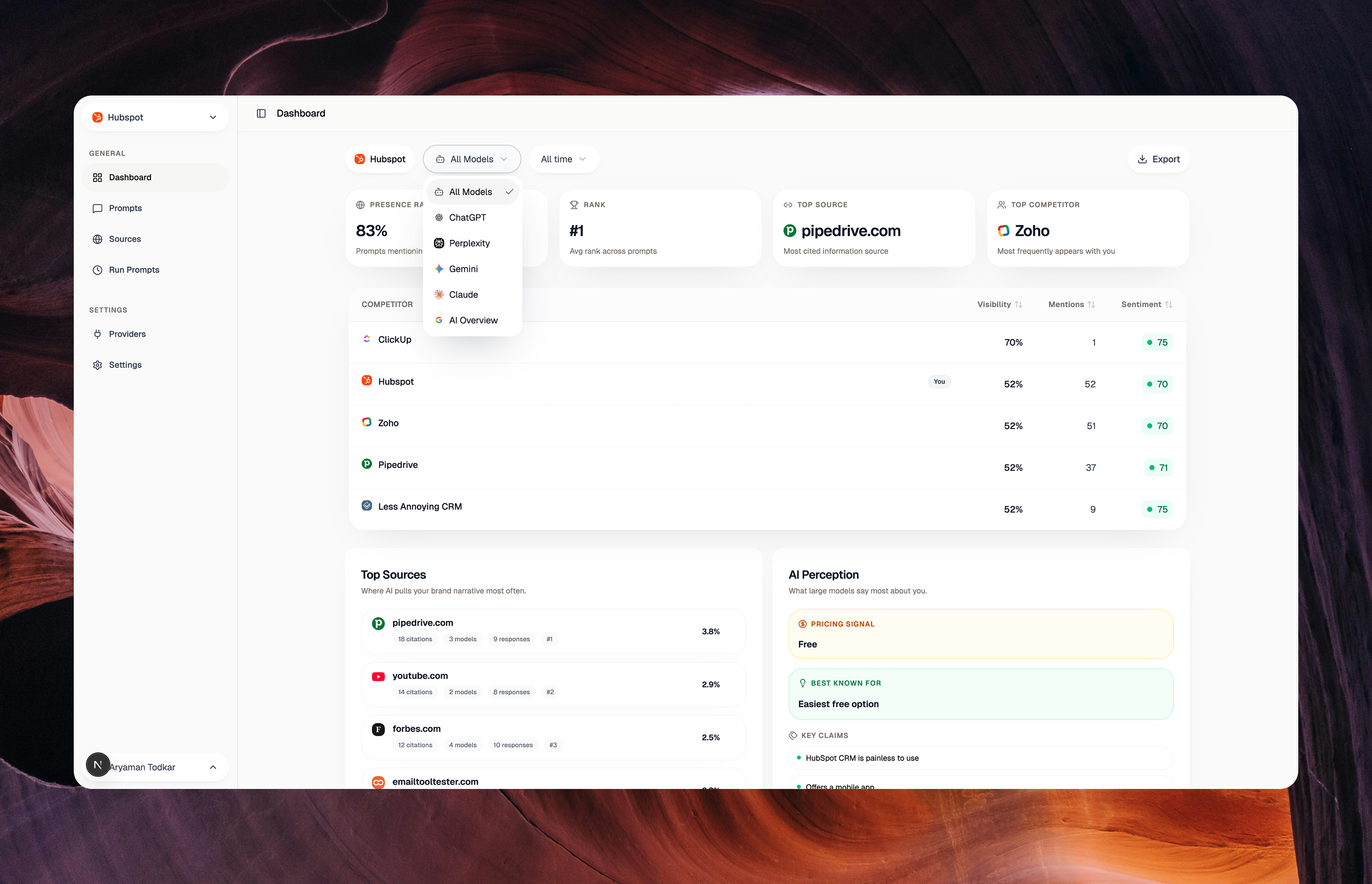
OneGlanse monitors how your brand appears inside real AI products: ChatGPT, Gemini, Perplexity, Claude, and Google AI Overview. It is open source, MIT licensed, and costs nothing to run on your own machine or VPS.
It doesn't call the model API. It opens the actual ChatGPT, Gemini, Perplexity, Claude, and AI Overview interfaces in a real browser, the same way a user would, and captures exactly what gets rendered: the full response, inline citations, recommended sources, and how your brand is positioned relative to competitors. API responses omit all of this. OneGlanse captures what users actually see.
That is the core differentiator. OneGlanse is built for GEO measurement against production chat surfaces, not benchmark-style API output. The answer visible in ChatGPT, Gemini, Perplexity, Claude, or Google AI Overview is often not the same as the raw API completion for the same prompt. The UI layer can add or suppress citations, reorder recommendations, inject product-specific formatting, and change how competitors and sources are presented. If you care about what users actually see, you need the UI response, not just the API response. The same distinction is discussed in Surfer's write-up on LLM scraped AI answers vs API results.
After capturing responses, OneGlanse uses OpenAI or Anthropic to analyze them. Once a prompt run completes, the captured responses are sent to the LLM of your choice (OpenAI GPT or Claude) using your own API key. The LLM extracts GEO scores, sentiment, visibility, rank position, competitor mentions, citation sources, and the AI perception breakdown you see in the dashboard. You bring your own key. The call goes directly from your machine to OpenAI or Anthropic. Nothing passes through any third-party server.
Your data stays on your machine. Responses, analytics, and auth sessions are stored in a PostgreSQL and ClickHouse instance you own and control, whether running locally via Docker or on your own VPS. No data is ever sent to an external server.
You use your own provider accounts. OneGlanse authenticates to ChatGPT, Gemini, Perplexity, Claude, and Google using your own existing logins. No shared credentials. No scraped accounts. Your sessions, stored locally.
The public surfaces are deployed separately:
oneglanse.com(landing site) is deployed on Verceldocs.oneglanse.com(documentation) is deployed on Mintlify- the self-host flow in this repo deploys only the app runtime
Quick Start
Requirements: Node.js 20+, pnpm 10+, Docker
WSL is not supported for Camoufox browser automation. OneGlanse depends on Camoufox opening real provider browser windows for auth and UI capture. Run the local setup from native macOS, native Linux, or native Windows instead of inside WSL. WSL/WSLg may show a Camoufox taskbar icon without a usable login window, which prevents choosing the provider account reliably.
If you don't have pnpm: npm install -g pnpm@latest
git clone https://github.com/aryamantodkar/oneglanse
cd oneglanse
cp .env.example .env
Open .env and set your LLM API key. This is the only value you must provide. Everything else is auto-configured:
# Pick one:
OPENAI_API_KEY=sk-...

# or, to use Claude instead:
ANTHROPIC_API_KEY=sk-ant-...
ANALYSIS_LLM_PROVIDER=claude
Then start the app:
pnpm local
Opens at http://localhost:3000. On first run the script auto-generates secrets, starts Postgres / ClickHouse / Redis, runs migrations, and bootstraps the browser runtime. Sign up with email. Google OAuth is optional and not required.
Once you're in, go to /providers to connect your AI provider accounts, then add prompts and run.
Docs and Self-Hosting
For VPS deployment, recurring scheduling, provider auth transfer, and all configuration options, see docs.oneglanse.com
The landing site is deployed separately on Vercel, and the docs are deployed separately on Mintlify. pnpm self-host is only for the app stack. On machines where the published app images are not available for the current architecture yet, it automatically falls back to a local Docker build.
Features
- 5 providers: ChatGPT, Gemini, Perplexity, Claude, Google AI Overview
- UI-first capture: browser automation against real product interfaces, not the API. What users see is what you get.
- GEO scoring: visibility, sentiment, rank position, and recommendation type, tracked per prompt over time
- Competitor co-mentions: see which brands appear alongside yours and how they're framed
- Citation tracking: which domains and articles AI products are citing for your category
- AI perception analysis: how models characterize your pricing, key claims, and brand positioning
- Your own LLM key: response analysis uses your OpenAI or Anthropic key, called directly from your infrastructure
- ClickHouse analytics: high-volume time-series storage built for prompt tracking at scale
- Self-hosted, free forever: full stack deploys to any VPS with a single command
Your overall GEO score, top competitor, rank position, and most-cited sources in one view. The dashboard shows your visibility score across all AI models, which competitor co-appears most often alongside your brand, your average rank position across all prompts, and which domains the AI products cite when your category comes up.
The actual AI response, scored. Every captured response is tagged with a GEO score, sentiment score, visibility percentage, and rank position. The perception panel on the right extracts how the model is framing your brand: what it says your pricing signal is, what you're best known for, and what specific claims it repeats most often about you.
Which sources drive your AI presence and how you compare. The left panel shows every article and domain being cited about your brand, with the exact article title so you know why that domain ranks. The competitor chart on the right tracks your position against rivals across three dimensions: Presence (are you mentioned), Recommendation (are you recommended), and Sentiment (how positively you're framed).
Per-prompt breakdown, not aggregated averages. Every prompt you track gets its own row: GEO score, sentiment, visibility percentage, and rank position. You can see exactly which queries you own and which ones you're losing, and track how both change over time.
Why There Is No Cloud Version
OneGlanse is built around collecting responses from the real logged-in chat interfaces of ChatGPT, Gemini, Perplexity, Claude, and Google. That means the product depends on authenticated browser sessions tied to your own provider accounts.
OneGlanse does not use logged-out sessions for GEO tracking because logged-out experiences are materially worse for measuring what real users actually see:
- they are more likely to trigger bot detection or rate limits
- they often return shorter, stripped-down answers
- they frequently hide or reduce citations and source cards
- they can gate richer UI features behind login
That matters because GEO is not just about "did the model mention me". It is also about how your brand is framed, which competitors are shown beside you, and which sources the product actually surfaces to users. Logged-out experiences are thinner and less representative of what real signed-in users see.
That is why we do not offer a hosted cloud product with shared sessions. OneGlanse is designed to run with your own accounts, your own browser sessions, your own proxy setup when needed, and your own infrastructure. It is the more reliable and more accurate way to measure AI visibility without pretending API output or stripped-down logged-out pages are equivalent to the real user experience.
Why UI-First Instead Of APIs
Most GEO tooling talks about "tracking ChatGPT" or "tracking Gemini" while actually querying model APIs. That is not the same thing.
OneGlanse uses the real chat UIs because those interfaces are where end users see:
- inline citations and source cards
- recommendation ordering
- brand comparisons and product framing
- provider-specific formatting and UI-level post-processing
Those layers are critical to GEO analysis and are exactly the layers that often differ from API output. OneGlanse captures the rendered answer first, then runs analysis on top of that captured UI response.
Why Camoufox Instead Of Chrome
OneGlanse uses Camoufox, an anti-fingerprint Firefox-based browser, for provider sessions.
That is a deliberate product decision, not an implementation accident.
AI chat products aggressively defend their web apps against scripted access. In practice, stock Chrome / Chromium automation and generic Playwright browser profiles are much more likely to hit one or more of these failure modes:
- sign-in loops
- forced verification or bot checks
- repeated session invalidation
- blank or degraded responses
- UI flows that work manually but fail under automation
The main issue is not just "browser compatibility". It is the combination of:
- automation fingerprints
- browser fingerprint consistency
- session reputation
- IP reputation
Camoufox gives OneGlanse a browser runtime that is materially better suited for authenticated UI collection against anti-bot-protected chat products. It reduces fingerprint mismatch and makes provider sessions more stable than standard Chrome-style automation in this use case.
Credit to the Camoufox project for making that possible. OneGlanse builds on their work rather than pretending this is solved by plain Playwright + Chrome alone.
Why Proxies Are Required On VPS
Local runs are usually fine without a proxy because requests come from a normal residential or office IP.
VPS environments are different. Most VPS providers expose datacenter IP ranges, and those ranges are commonly flagged, rate-limited, challenged, or blocked by AI chat products. Even if login works once, ongoing UI automation from a datacenter IP is much less reliable.
That is why self-hosted VPS runs require a residential proxy:
- the VPS still runs the worker and schedule
- browser traffic exits through a residential IP
- provider sites see a normal-looking client origin instead of a datacenter address
Without that proxy layer, provider access from a VPS is often unstable or blocked outright.
For ThorData specifically, whitelist your VPS IP first, then generate the endpoint with Whitelisted IPs, API Link, and Sticky session. Use a valid target-audience country where the providers are supported, and save that generated API link as THORDATA_PROXY_API_URL. The full walkthrough is in the self-hosted docs: docs.oneglanse.com.
Stack
| Layer | Technology |
|---|---|
| Web app | Next.js 15, React 19, tRPC, Drizzle ORM |
| Browser worker | Camoufox, Playwright, BullMQ |
| Analytics DB | ClickHouse |
| Relational DB | PostgreSQL 16 |
| Queue | Redis |
| Auth | Better Auth |
| Response analysis | OpenAI or Anthropic (your key) |
Contributing
I'm relatively new to open source. This is one of my first public projects, and I'd genuinely love help from the community. Whether it's fixing a bug, adding a new provider, improving the docs, or just telling me what's confusing, please open an issue or a PR. Every contribution means a lot.
See CONTRIBUTING.md to get started.
Acknowledgements
| Project | Use | License |
|---|---|---|
| Camoufox | Anti-fingerprint Firefox-based browser used for all provider sessions | MPL-2.0 |
| Playwright | Browser automation and page control | Apache-2.0 |
| BullMQ | Redis-backed job queue for provider workers | MIT |
| ClickHouse | Analytics and time-series storage | Apache-2.0 |
| Drizzle ORM | TypeScript ORM | Apache-2.0 |
| Better Auth | Authentication framework | MIT |
| Turndown | HTML to Markdown conversion | MIT |
How Scoring Works
Once a response is captured, it is sent to your LLM (OpenAI or Anthropic) with a structured analysis prompt. The LLM reads the raw response text and produces the metrics you see in the dashboard. The full prompt is in packages/services/src/analysis/analysisPrompt.ts.
Every metric is grounded in the actual text of the AI response. The analysis LLM is instructed to quote the passage that justifies each score before assigning it. If no passage exists, the conservative default is used.
GEO Score (0 to 100)
The headline number. A weighted average of four equal components:
| Component | Weight | What it measures |
|---|---|---|
| Visibility | 25% | How prominently the brand surfaces in the response |
| Rank | 25% | Absolute position across the full response (#1 = 100, #2 = 80, #3 = 65 …) |
| Sentiment | 25% | How positively the brand is described |
| Recommendation | 25% | Whether the brand is actively recommended |
Visibility (0 to 100)
How much "space" the brand occupies for someone reading the response. Calculated across five dimensions:
- Coverage (25%): what proportion of the response discusses the brand
- Placement (25%): where the brand first appears (opening = higher score)
- Structural Prominence (20%): whether it appears in a heading, numbered list, or top-3 slot
- Frequency (15%): how many times the brand is referenced
- Contextual Framing (15%): whether the brand is the direct answer vs. a passing mention
Sentiment (0 to 100)
How the response frames the brand. 50 is neutral. The scale:
| Range | Meaning |
|---|---|
| 0 to 20 | Actively warned against |
| 21 to 40 | Notable drawbacks highlighted |
| 41 to 59 | Factual, no evaluative language |
| 60 to 80 | Favorable with some caveats |
| 81 to 100 | Explicit superlatives ("best", "excellent") with no caveats |
A brand not mentioned scores 50. Absence is neutral, not negative.
Recommendation Type
- top_pick: named as the overall #1 choice with clear superlative language
- strong_alternative: top 3 absolute rank with favorable language, or 4+ with explicitly strong praise
- conditional: recommended only for specific use cases or audiences
- mentioned_only: described but not recommended
- discouraged: explicitly warned against
- not_mentioned: absent from the response
Rank Position
The brand's absolute position in the reading order of the full response, not its local rank within a sub-category. If a response has "Best for SMBs: 1. X, 2. Y" and "Best for Enterprise: 1. Z", Z's absolute rank is 3, not 1.
If you spot a scoring inaccuracy or think the methodology could be improved, please open an issue or submit a PR against analysisPrompt.ts. Contributions to the scoring logic are especially welcome.
Telemetry
OneGlanse collects anonymous usage telemetry to help understand how many people are running the project.
What is collected:
- A one-way SHA-256 hash of your internal user ID. This cannot be reversed to an email address or any personal information
- Event type: whether a new account was created (
user_signed_up) or an existing user is active (user_active) - Timestamp of the event
What is NOT collected: email addresses, names, IP addresses, prompt data, responses, scores, or any other information related to your usage of the tool.
The hash is consistent per user (so we can count unique users and MAU), but it is not linked to any identity outside your local database. It is computationally infeasible to reverse.
Data is sent to PostHog and is used solely to track the number of active self-hosted instances. No data is sold or shared.
License
MIT