
OnnxOCR
If this project helps you, please consider giving it a Star.

A high-performance multilingual OCR project based on ONNXRuntime


Version Updates
-
2026.05.27
- Added a new OCR + Qwen3.5-2B ONNX information-extraction workflow.
- Added
onnxocr.qwen35_2bas the package-level Qwen3.5-2B ONNX download, verification, and pure Python inference module. - Added
examples/id_card_extract_with_qwen.pyas an end-to-end example: OnnxOCR full-text recognition first, then Qwen3.5-2B extracts structured ID-card fields. - Qwen3.5-2B ONNX uses a dedicated ModelScope repository: supersong/qwen2bonnx.
-
2026.05.01
- Added ONNX license plate detection and recognition.
- Added RapidTable-based ONNX table recognition.
- Added RapidLayout-based Chinese and English layout analysis.
- Added RapidDoc-based document layout analysis and Markdown export.
- Added
/plate,/table,/layout,/layout_markdown, and related HTTP endpoints.
-
2025.05.21
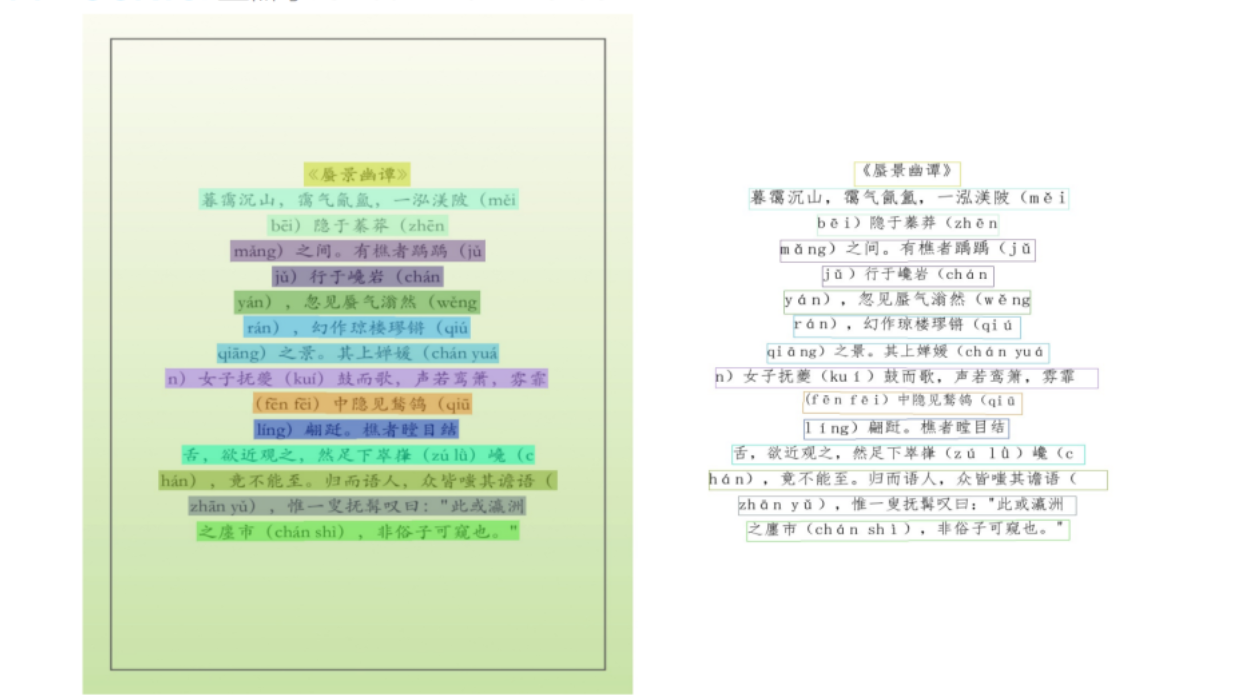
- Added PP-OCRv5 models, supporting Simplified Chinese, Traditional Chinese, Chinese Pinyin, English, and Japanese in one model.
- Improved overall recognition accuracy compared with PP-OCRv4.
- Recognition accuracy is consistent with PaddleOCR 3.0.
Core Advantages
- Deep learning framework free: a general OCR project ready for deployment.
- Cross-architecture support: PaddleOCR-converted ONNX models can run on ARM and x86 devices.
- Unified inference engine: all ONNX models create ONNXRuntime sessions through
onnxocr/inference_engine.py. - Multilingual support: one model supports 5 text types.
- Source-level integration:
rapid_layout,rapid_table, andrapid_doclive under theonnxocr/package, with no dependency onrapidocr==3.4.3orrapid-orientation. - Hardware adaptation friendly: downstream vendors can adapt GPU/NPU providers by modifying the unified inference engine.
Environment Setup
python>=3.8
pip install -i https://pypi.tuna.tsinghua.edu.cn/simple -r requirements.txt
Notes:
- By default, the repository only includes the PP-OCRv5 general OCR model files required by
tests/test_general_ocr.py. - Extra models for license plate recognition, table recognition, layout analysis, orientation classification, and RapidDoc Markdown export are large and should be downloaded on demand. For international users, HuggingFace is recommended.
- Larger PP-OCRv5 Server ONNX models can also be downloaded separately and used to replace det/rec models under
onnxocr/models/ppocrv5/.
Model Download
Extra models are hosted on HuggingFace: jingsongliu/onnxocr_model. International users are recommended to download from HuggingFace:
python scripts/download_models.py --source huggingface
The core HuggingFace API is:
from huggingface_hub import snapshot_download

model_dir = snapshot_download("jingsongliu/onnxocr_model")
For users in mainland China, ModelScope remains the default and recommended source:
python scripts/download_models.py
ModelScope repository: supersong/onnxocr_model.
The script copies the repository models/ directory into local onnxocr/models/ and checks required optional files such as onnxocr/models/rapid_doc/layout/pp_doclayoutv2.onnx.
To check local models only:
python scripts/download_models.py --check-only
Qwen3.5-2B Extraction Backbone
OnnxOCR can also use a local Qwen3.5-2B ONNX model as an information-extraction backbone after OCR. This is useful for workflows such as:
- OCR first: run OnnxOCR to get full-page text and text boxes.
- Extract second: send the OCR text into Qwen3.5-2B ONNX to produce structured JSON.
- Keep data local: both OCR and extraction run with local Python + ONNXRuntime.
Qwen3.5-2B ONNX uses a dedicated model repository, separate from other optional OCR models:
- ModelScope: supersong/qwen2bonnx
- Local path:
onnxocr/models/qwen_2b
Prepare the Qwen3.5-2B ONNX files:
python examples/qwen35_2b_onnx.py download --variant q4
python examples/qwen35_2b_onnx.py verify
The model is stored under:
onnxocr/models/qwen_2b
Pure Python text or image-text smoke test:
python examples/qwen35_2b_onnx.py run-python --prompt "Hello, introduce yourself briefly."
python examples/qwen35_2b_onnx.py run-python --image onnxocr/models/qwen_2b/images/demo.jpeg --prompt "Describe this image in one short sentence."
Use the package API directly:
from onnxocr.qwen35_2b import Qwen35ONNX

qwen = Qwen35ONNX("onnxocr/models/qwen_2b")
text, stopped = qwen.generate("Extract key fields from this OCR text: ...")
print(text)
DIY a new extraction scenario:
from onnxocr.qwen35_2b import ExtractionTemplate, QwenScenarioExtractor

invoice_template = ExtractionTemplate(
    name="invoice_basic",
    description="invoice OCR",
    fields=["invoice_number", "seller", "buyer", "amount", "date"],
    rules=[
        "Extract fields only from the OCR text.",
        "Use an empty string when a field is missing or uncertain.",
        "Return JSON only.",
    ],
)

extractor = QwenScenarioExtractor(model_dir="onnxocr/models/qwen_2b")
fields, raw = extractor.extract(ocr_text, template=invoice_template)
print(fields)
The base package does not ship vertical-scene prompts. Put scenario-specific templates in your application or under examples/, then pass the template into QwenScenarioExtractor. You can add templates for invoices, business licenses, contracts, logistics waybills, medical reports, or any other vertical OCR scene by defining fields and rules.
One-Click Run
python test_ocr.py
test_ocr.py runs only general OCR by default. The optional examples are commented out; uncomment them after downloading the corresponding models with python scripts/download_models.py.
Feature-specific tests:
python tests/test_general_ocr.py
python tests/test_license_plate_ocr.py
python tests/test_table_ocr.py
python tests/test_layout_analysis.py
python tests/test_layout_markdown.py
Generated files are written to result_img/, which is ignored by git.
General OCR
import cv2
from onnxocr.onnx_paddleocr import ONNXPaddleOcr

img = cv2.imread("onnxocr/test_images/715873facf064583b44ef28295126fa7.jpg")
model = ONNXPaddleOcr(use_angle_cls=False, use_gpu=False)
result = model.ocr(img)
print(result)
OCR + Qwen Information Extraction
examples/id_card_extract_with_qwen.py is a minimal end-to-end vertical-scene example. The reusable Qwen inference and generic template extraction code lives in onnxocr.qwen35_2b; the ID-card fields and prompt rules live only in this example.
Default example:
python examples/id_card_extract_with_qwen.py
Specify an image explicitly:
python examples/id_card_extract_with_qwen.py --image "onnxocr/test_images/8f113149-ff64-4c9f-8dc0-e34100365aa4.jpg"
Output:
result_img/id_card_front_qwen_extract.json
The script does not print sensitive ID-card fields by default. Use --show-sensitive only in a trusted local environment.
License Plate Recognition
License plate recognition is integrated into ONNXPaddleOcr as an optional mode. Existing general OCR usage is unchanged.
from onnxocr.onnx_paddleocr import ONNXPaddleOcr, sav2PlateImg

plate_model = ONNXPaddleOcr(
    use_angle_cls=True,
    use_gpu=False,
    use_plate_recognition=True,
    plate_min_score=0.4,
)
plate_result = plate_model.ocr(img)
sav2PlateImg(img, plate_result, name="./result_img/test_plate_vis.jpg")
Model files:
onnxocr/models/license_plate/car_plate_detect.onnx
onnxocr/models/license_plate/plate_rec.onnx
Table Recognition
Table recognition is integrated from RapidTable. It reuses general OCR detection/recognition results, restores table structure, and outputs HTML, cell boxes, and logical row/column coordinates.
from onnxocr.onnx_paddleocr import ONNXPaddleOcr, sav2TableImg

table_model = ONNXPaddleOcr(
    use_angle_cls=True,
    use_gpu=False,
    use_table_recognition=True,
    table_model_type="slanet_plus",
)
table_result = table_model.ocr(img)
print(table_result["html"])
sav2TableImg(img, table_result, name="./result_img/test_table_vis.jpg")
Model files:
onnxocr/models/table/slanet-plus.onnx
onnxocr/models/table/ch_ppstructure_mobile_v2_SLANet.onnx
onnxocr/models/table/en_ppstructure_mobile_v2_SLANet.onnx
Chinese / English Layout Analysis
Layout analysis is integrated from RapidLayout. It locates document elements such as titles, text blocks, tables, figures, headers, and footers.
from onnxocr.onnx_paddleocr import ONNXPaddleOcr, sav2LayoutImg

layout_model = ONNXPaddleOcr(
    use_gpu=False,
    use_layout_analysis=True,
    layout_model_type="pp_layout_cdla",
)
layout_result = layout_model.ocr(img)
sav2LayoutImg(img, layout_result, name="./result_img/test_layout_vis.jpg")
For English layout analysis, set layout_model_type to pp_layout_publaynet.
Model files:
onnxocr/models/layout/layout_cdla.onnx
onnxocr/models/layout/layout_publaynet.onnx
Document To Markdown
Document-to-Markdown export is integrated from RapidDoc. It analyzes titles, paragraphs, tables, figures, and other layout elements, then saves the result as a Markdown file.
from onnxocr.layout_markdown import LayoutMarkdownConverter

converter = LayoutMarkdownConverter(
    layout_model_type="pp_doclayoutv2",
    formula_enable=False,
    table_enable=True,
)
result = converter.convert_file(
    "onnxocr/test_images/layout_cdla.jpg",
    output_md_path="./result_img/test_layout_markdown.md",
)
print(result["markdown_path"])
RapidDoc model files:
onnxocr/models/rapid_doc/layout/pp_doclayoutv2.onnx
onnxocr/models/rapid_doc/table/q_cls.onnx
onnxocr/models/rapid_doc/table/unet.onnx
onnxocr/models/rapid_doc/table/slanet-plus.onnx
Inference Engine Adaptation
General OCR, license plate recognition, table recognition, layout analysis, and RapidDoc document parsing all create ONNXRuntime sessions through onnxocr/inference_engine.py.
To adapt a downstream GPU/NPU provider, start from:
from onnxocr.inference_engine import create_session
Main extension points:
create_session(model_path, providers=None, use_gpu=False, gpu_id=0, sess_options=None)build_providers(use_gpu=False, gpu_id=0, providers=None)build_providers_from_engine_cfg(engine_cfg)ProviderConfig(engine_cfg)
Only onnxocr/inference_engine.py imports onnxruntime directly. Feature modules do not call ONNXRuntime APIs directly.
API Service
app-service.py is the deployable JSON API service. webui.py is the browser UI service. Keeping them separate makes the repository easier to deploy, test, and extend.
Start API service:
python app-service.py
Environment variables:
ONNXOCR_PORT: service port, default5005.ONNXOCR_USE_GPU: set to1/trueto enable GPU providers.ONNXOCR_DEBUG: set to1/trueto enable Flask debug mode.ONNXOCR_OUTPUT_DIR: output directory for generated Markdown/assets, defaultresult_img.ONNXOCR_MAX_UPLOAD_MB: max upload size in MB, default200.
Main endpoints accept JSON base64 images or multipart file uploads:
/health: service health check./ocr: general OCR./plate: license plate recognition./table: table recognition./layout: layout analysis./layout_markdown: image/PDF to Markdown.
JSON example:
curl -X POST http://127.0.0.1:5005/ocr \
  -H "Content-Type: application/json" \
  -d "{\"image\":\"<base64-image>\"}"
Multipart example:
curl -X POST http://127.0.0.1:5005/ocr \
  -F "image=@onnxocr/test_images/715873facf064583b44ef28295126fa7.jpg"
Start WebUI:
python webui.py
Docker Image
docker build -t ocr-service .
docker run -itd --name onnxocr-service -p 5006:5005 ocr-service
The Docker image excludes generated outputs and optional large model artifacts through .dockerignore. Mount or download optional models when you need plate, table, layout, or RapidDoc features.
Project Layout
app-service.py                 # deployable JSON API service
webui.py                       # browser UI service
test_ocr.py                    # one-click local OCR demo
requirements.txt               # runtime dependencies
Dockerfile                     # container image for API deployment
.dockerignore                  # keeps caches/outputs/large models out of Docker context
Readme.md                      # English documentation
Readme_cn.md                   # Simplified Chinese documentation
Readme_ja.md                   # Japanese documentation
onnxocr/
  inference_engine.py        # single ONNXRuntime entry
  onnx_paddleocr.py          # public user API
  predict_det.py             # general OCR detection
  predict_rec.py             # general OCR recognition
  orientation.py             # local RapidOrientation ONNX adapter
  license_plate.py           # license plate OCR
  table_recognition.py       # table recognition wrapper
  layout_recognition.py      # layout analysis wrapper
  layout_markdown.py         # RapidDoc Markdown wrapper
  rapid_layout/              # source-level RapidLayout ONNX integration
  rapid_table/               # source-level RapidTable ONNX integration
  rapid_doc/                 # source-level RapidDoc ONNX integration
  models/                    # local ONNX models
scripts/
  download_models.py         # optional model download/check helper
tests/                       # feature-specific tests and API smoke tests
Effect Demonstration
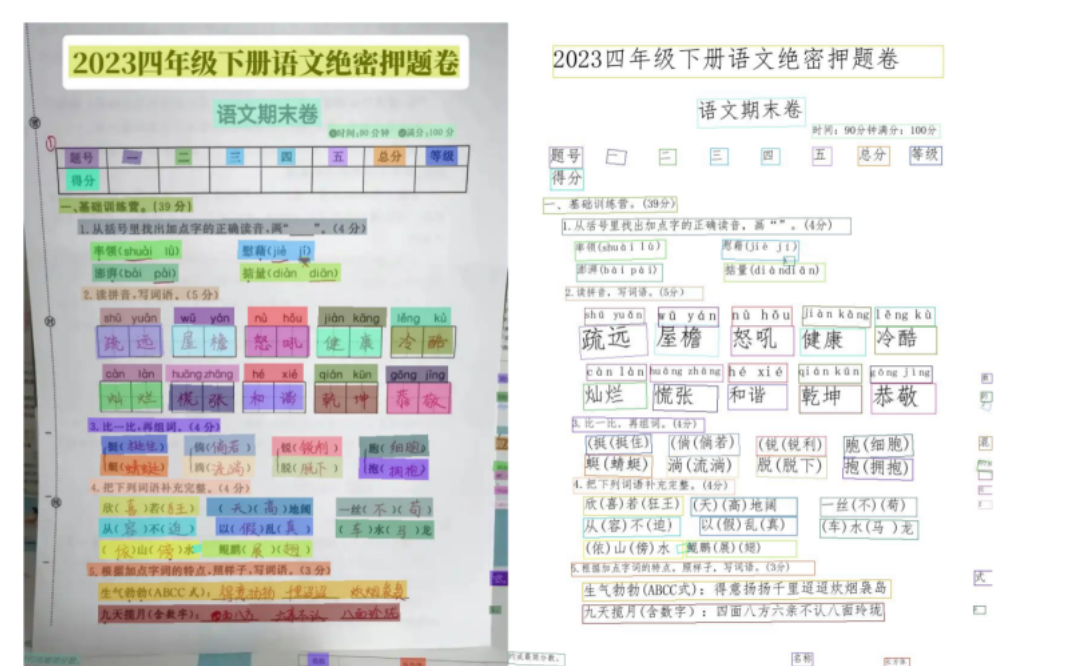
| Example 1 | Example 2 |
|---|---|
 |
 |
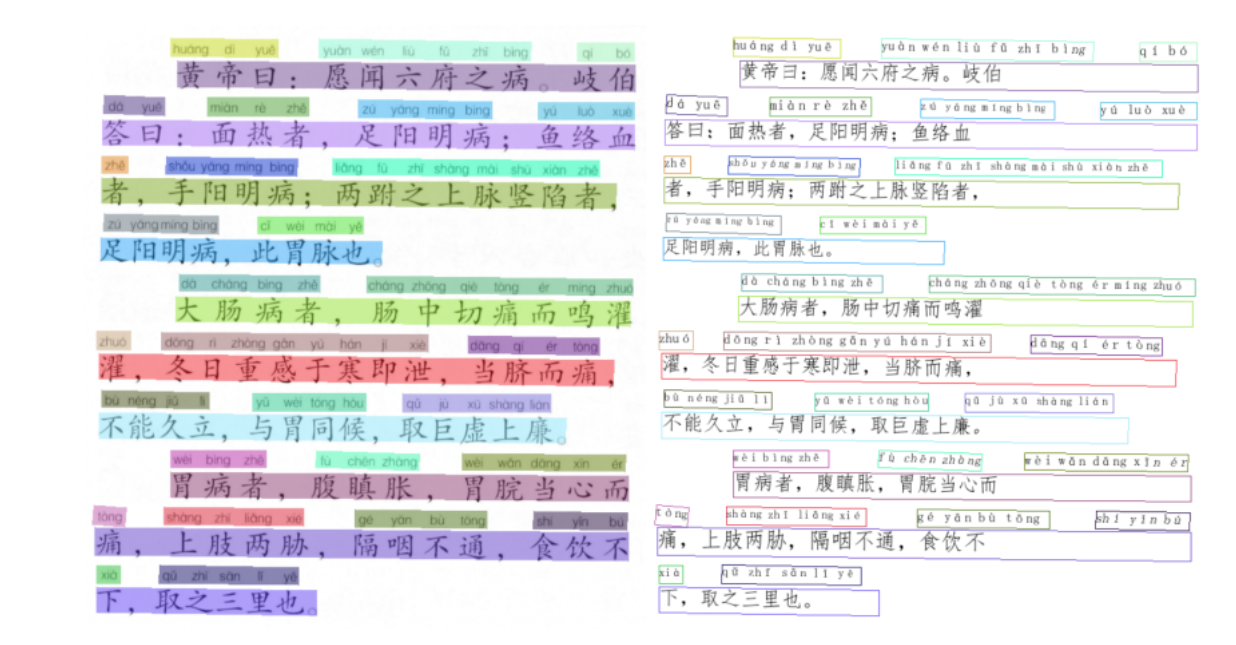
| Example 3 | Example 4 |
|---|---|
 |
 |
Contact & Communication
OnnxOCR Community
Acknowledgments
Thanks to PaddleOCR for technical support and model references.
Thanks to the RapidAI open-source community, including RapidTable, RapidLayout, RapidDoc, and RapidOrientation, for excellent models, code, and engineering references.
Open Source & Donations
If you recognize this project, you can support it via Alipay or WeChat Pay.


Star History
Contribution Guidelines
Issues and Pull Requests are welcome. To keep the project usable for open-source users, please follow these rules:
- Keep API-only behavior in
app-service.pyand browser/UI behavior inwebui.py. - Do not commit generated files from
result_img/,results/,uploads/, or local cache directories. - Do not commit private documents, ID cards, bank cards, medical records, contracts, waybills, or production secrets.
- Use public samples, official examples, or authorized anonymized samples for tests and documentation.
- If a feature requires optional model files, document the exact model files and download command.
- Keep README examples runnable against the current repository. Do not document commands that are not implemented.
Recommended checks before opening a pull request:
python -B -m pytest tests/test_app_service.py -p no:cacheprovider
python tests/test_general_ocr.py
python tests/test_license_plate_ocr.py
python tests/test_table_ocr.py
python tests/test_layout_analysis.py
python tests/test_layout_markdown.py
Some tests require optional model files. If you cannot run them locally, mention the missing model files in your pull request.