

OpenSCAD Studio
From idea to 3D printed part in seconds





🌐 Try it now — OpenSCAD Studio is available as a web app (no install needed) or as a macOS desktop app. The web version runs entirely in your browser using WebAssembly. The desktop app bundles a native OpenSCAD binary for faster rendering and full filesystem access.
Desktop: macOS 10.15 (Catalina) or later.
🔩 What It Is
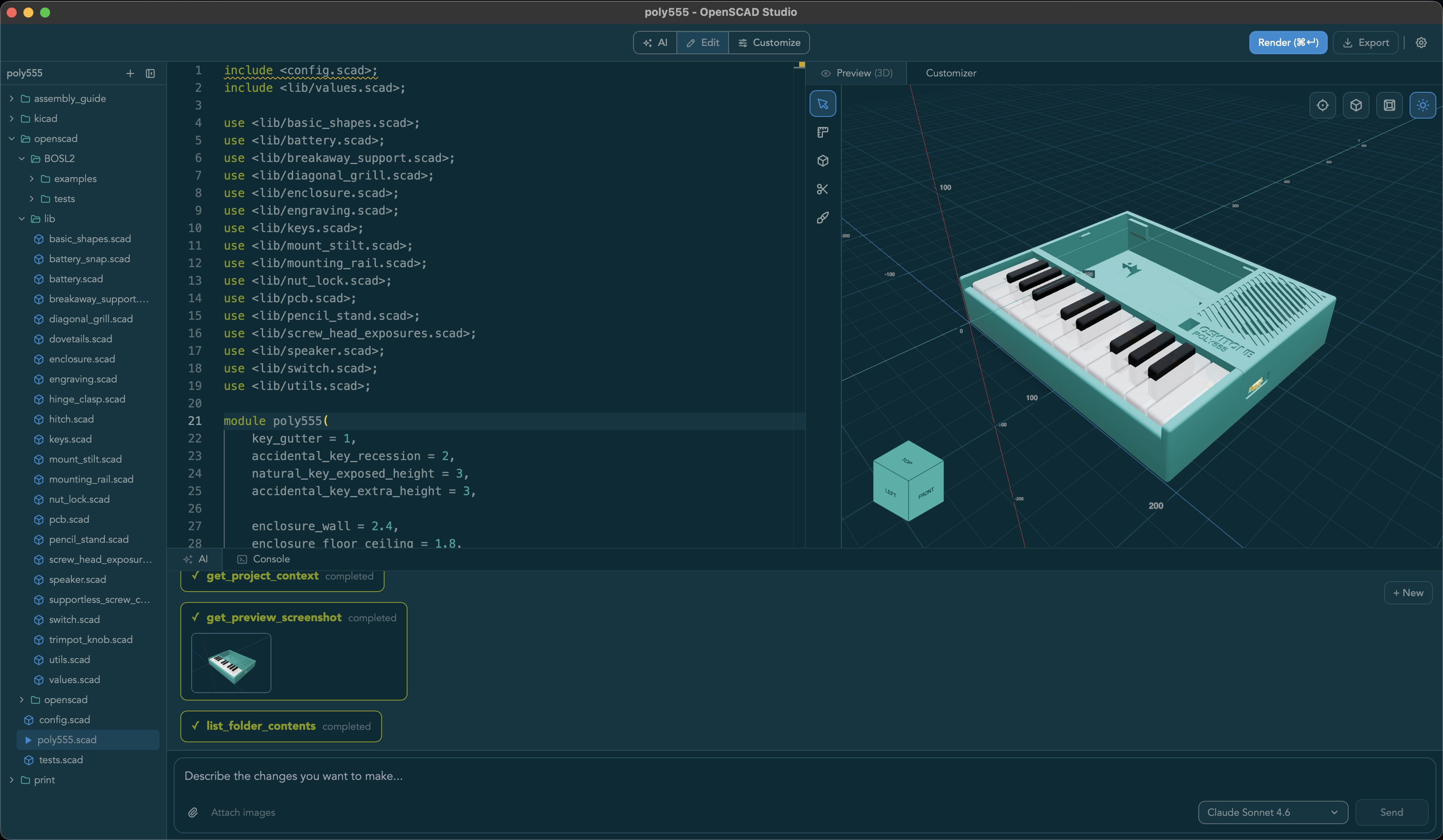
OpenSCAD Studio is a professional editor for OpenSCAD — the programmable solid 3D and 2D CAD modeler. It replaces the stock OpenSCAD editor with a modern development environment purpose-built for makers: live preview, real-time diagnostics, an AI copilot, and a full multi-file project workflow.
✨ Features
Editor
- Multi-file projects — File tree, multiple tabs, and
include/usepath resolution against the project root (desktop) - Real-time diagnostics — Inline error and warning markers with line/column precision parsed directly from the OpenSCAD compiler
- Monaco-based editing — OpenSCAD syntax highlighting, multi-tab support, formatter, and vim mode with configurable keybindings
Preview
- Live 3D preview — Interactive mesh viewer with orbit controls, orthographic mode, wireframe, shadows, and section planes
- 2D mode — Dedicated SVG viewer for laser cutting and engraving workflows
- Measurement tools — In-canvas 2D and 3D measurement overlays
- Customizer panel — Interactive parameter controls auto-generated from your OpenSCAD file, with live re-rendering on change
AI Copilot
- In-app chat — Stream responses from Claude or GPT to generate, explain, and fix OpenSCAD code (bring your own API key)
- MCP support (desktop) — Exposes a localhost MCP server so external agents like Claude Code can render models, read diagnostics, capture screenshots, and edit files in your active workspace
Platform
- Runs everywhere — Web app at openscad-studio.pages.dev and macOS desktop app
- Share links — Publish browser-based share links with thumbnail previews for remixable examples
Known limitation: Special operators (!, #, %, *) are not yet reflected in the preview.
📦 Installation
Web (No Install)
Visit openscad-studio.pages.dev. Works in recent Chrome, Edge, and Firefox builds with SharedArrayBuffer support. No OpenSCAD installation needed — rendering is done via WebAssembly in your browser.
Desktop (macOS)
Install via Homebrew:
brew tap zacharyfmarion/openscad-studio
brew install --cask openscad-studio
Or download the latest DMG from GitHub Releases. Requires macOS 10.15 (Catalina) or later.
Development
Local setup, share-feature testing, project structure, AI setup, and contributor-facing references now live in DEVELOPMENT.md.
🤝 Contributing
Contributions are welcome! Please:
- Check existing issues or create a new one to discuss your idea
- Fork the repository and create a feature branch
- Follow the code style (prettier for TypeScript, rustfmt for Rust)
- Update documentation as needed
- Submit a pull request
For detailed development guidelines, see CLAUDE.md and CONTRIBUTING.md.
📄 License
This project is licensed under the GNU General Public License v2.0 - see LICENSE for details.
This license change was made to comply with OpenSCAD's GPL-2.0 license, as the project bundles openscad-wasm (web) and the native OpenSCAD binary (desktop).
🙏 Acknowledgments
Built with:
- Tauri - Rust-powered desktop framework
- React - UI framework
- Monaco Editor - Code editor
- Three.js - 3D rendering
- OpenSCAD - The amazing CSG tool this editor is built for
- openscad-wasm - WebAssembly build of OpenSCAD
- Vercel AI SDK - AI streaming framework
Made with ❤️ for the OpenSCAD community