
orangu
orangu is a local workspace-aware tool-driven coding environment for OpenAI-compatible servers - especially llama.cpp.
orangu does not require an Internet connection after llama.cpp and models have been downloaded.
orangu is named after the Orangutan - the smartest ape.
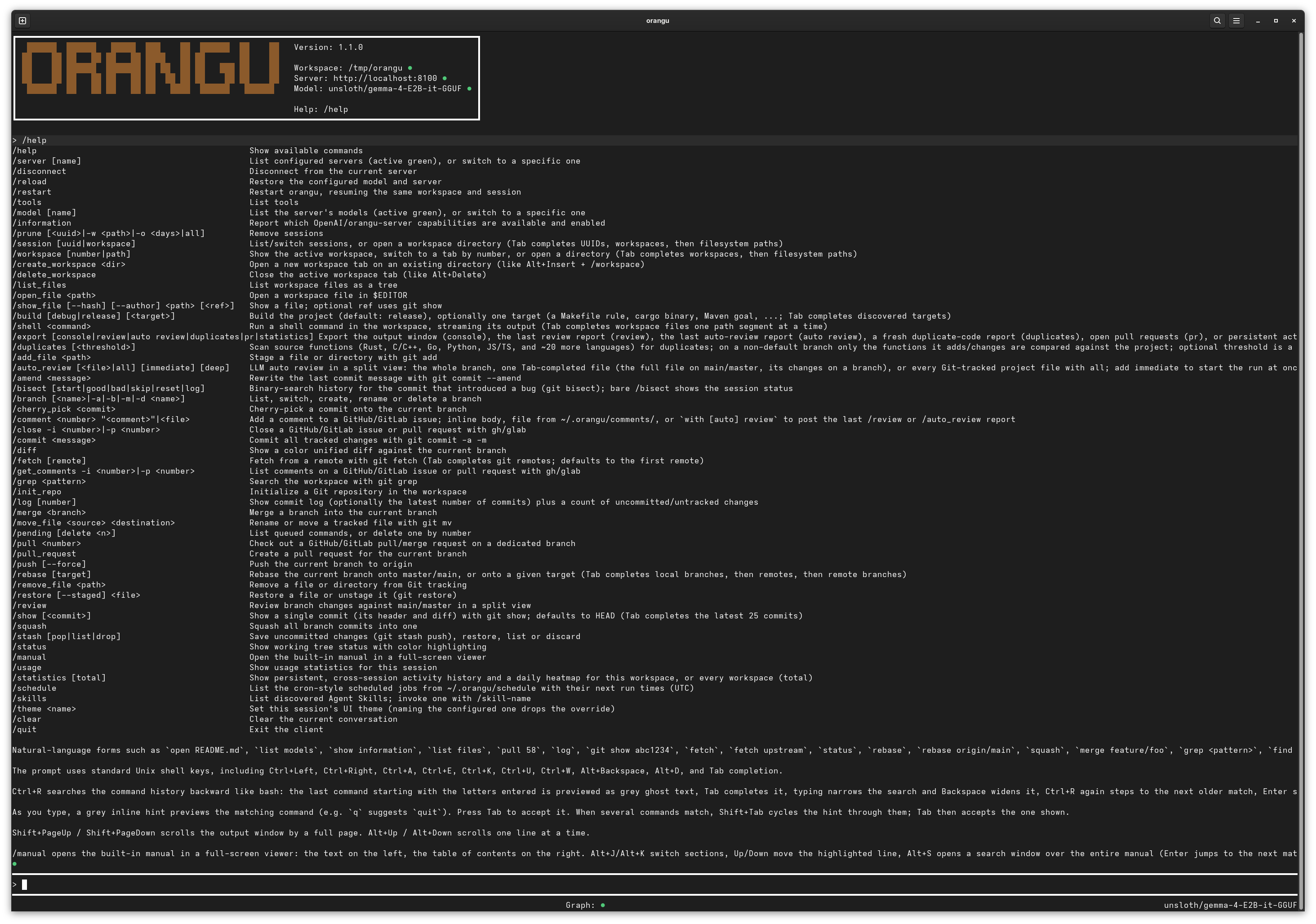
Table of Contents
- Features
- Installation
- Configuration and first run
- Documentation
- Tested platforms
- Sponsors
- Contributing
- Community
- License
Features
- OpenAI-compatible chat completions, with special attention to llama.cpp workflows
- Workspace-aware local tools for reading, editing, listing, fetching, and shell commands
- Persistent terminal UI with workspace, server, and model status in the header, refreshed every minute while idle
- Shell-style prompt editing, history, scrolling, and context-sensitive Tab completion, with grey inline command hints (Tab accepts, Shift+Tab cycles between matches)
- Local commands such as
/help,/manual,/model,/server,/list_files,/show_file,/tools,/diff,/status,/log,/pull,/rebase,/merge,/checkout,/add_file,/remove_file,/move_file,/cherry_pick,/comment,/close,/get_comments,/commit,/amend,/push,/review,/auto_review,/init_repo,/squash,/delete, and/open_file - Natural-language local aliases such as
open README.md,list models,list files,pull 58,log,status,rebase,merge feature/foo,checkout main,add README.md,remove README.md,move old.rs new.rs,cherry pick abc1234,commit "[#42] My feature",amend "[#42] My feature",push,force push,get comments for issue 51,review,auto review,init repo,squash,delete feature/foo,show manual, andshow help - Streaming responses with live footer status such as
Thinking (...)and llama.cpp-nativeWorking @ X.Y t/s (...) - Queued local commands while a response is in flight, plus double-
Escrequest cancellation - Markdown rendering in the console, including bold, italic, headings, lists, links, and code
- Syntax highlighting for fenced code blocks in supported programming languages
- LLM-driven auto review (
/auto_review) of the branch changes against main/master: the model reviews the whole change and each file by itself across the Overall, Code, Security, Memory, Performance, Test Suite, and Documentation categories plus a final Conclusion verdict (each file's extension enables the categories scanned — a file detected as documentation skips the code-related checks), marks each file with a green or red dot, shows the file, category, overall progress, and elapsed time in a status area at the top, and copies the report to the clipboard on exit - Built-in user manual (
/manual) in a/review-style two-pane viewer with full-text search (Alt+S) — the manual text is embedded in the binary at compile time, so it works offline
Installation
Install dependencies on Fedora
Install the tools needed to build and run orangu from source:
dnf install -y git rust cargo
Release build
The following commands build an optimized release binary:
git clone https://github.com/mnemosyne-systems/orangu.git
cd orangu
cargo build --release
The binary will be available at:
target/release/orangu
To install it system-wide:
sudo install -Dm755 target/release/orangu /usr/local/bin/orangu
Debug build
The following commands build a debug binary:
git clone https://github.com/mnemosyne-systems/orangu.git
cd orangu
cargo build
The binary will be available at:
target/debug/orangu
Configuration and first run
The quickest way to get a working configuration is the interactive wizard:
orangu --init
It asks for the LLM URL, auto-detects a model the server advertises (and
pre-fills it as the Model), then walks every option showing its default.
Anything left at its default is omitted from the file, and the result is shown
for confirmation before being written to ~/.orangu/orangu.conf (creating the
directory if needed, and overwriting any existing file). The provider is
assumed to be llama.cpp.
Alternatively, start from the sample configuration:
cp doc/etc/orangu.conf ./orangu.conf
Default configuration lookup order:
./orangu.conf~/.orangu/orangu.conf
Run the client:
orangu --config ./orangu.conf
Or run it directly from the build tree:
./target/release/orangu --config ./orangu.conf
By default, local tools operate on the current working directory. Use --workspace /path/to/project (-w) to point orangu at another tree.
The startup flags also have short forms: -c for --config, -w for --workspace, -r for --resume, and -i for --init.
Shell completion scripts (bash, zsh, fish) for these flags live in contrib/shell/.
Useful first commands:
/help
/tools
/list_files
/open_file README.md
/show_file README.md
/amend "[#42] My feature"
/cherry_pick abc1234
/commit "[#42] My feature"
/delete feature/foo
/log
/log 5
/squash
/status
Documentation
- Latest manual
- Getting Started
- Quick start
- Configuration
- Terminal interface
- Core tools
- Git tools
- Usage tools
- Tools
Tested platforms
- Fedora 44
Sponsors
Contributing
Contributions to orangu are managed on GitHub:
Contributions are most welcome.
Please consult the Code of Conduct before contributing.
Community
- GitHub: mnemosyne-systems/orangu
- Discussions: GitHub Discussions