
Paqet-Tunnel-Manager | 📄 فارسی
Management script for paqet: a raw socket, KCP-based tunnel designed for firewall/DPI bypass. Supports Kharej (external) server and Iran client (entry point) configurations.
Updates are only explained on Telegram. Telegram Channel: https://t.me/BehzadEa12




Quick Start
Run the script on both servers as root:
bash <(curl -fsSL https://raw.githubusercontent.com/behzadea12/Paqet-Tunnel-Manager/main/paqet-manager.sh)
Old version (3.8) – If you encounter issues with the new version, you can use this one:
bash <(curl -fsSL https://raw.githubusercontent.com/behzadea12/Paqet-Tunnel-Manager/main/paqet-manager3-8.sh)
Select option 0, then option 1 to install prerequisites.
Installation Steps
Step 1: Setup Server (Kharej – VPN Server)
Run the script:
bash <(curl -fsSL https://raw.githubusercontent.com/behzadea12/Paqet-Tunnel-Manager/main/paqet-manager.sh)
Configuration Steps
- Select option 2 (Kharej)
- Enter a service name for the tunnel between the two servers (e.g.
fanland1) - Enter the listen port (e.g.
443or8443) - Press Enter to auto-generate the secret key
- Save the generated secret key, then press
Yto confirm and continue - Select KCP mode (default:
fast) - conn value → Number of KCP connections (e.g.
4) - MTU → Default is
1350(press Enter) or set manually (e.g.1200) - Select encryption option (default:
aes-128-gcm) - pcap sockbuf → Press Enter to keep default
- transport tcpbuf → Press Enter to keep default
- transport udpbuf → Press Enter to keep default
Step 2: Setup Server (Iran – Client/Entry Point)
Configuration Steps
- Select option 3 (Iran)
- Enter a service name for the tunnel (e.g.
fanland) - Enter the Kharej server IP (e.g.
65.109.206.29) - Enter the server port used between the two servers (e.g.
443) - Enter the secret key generated on the server side
- Select KCP mode (default:
fast) - conn value → Number of KCP connections (default:
1) - MTU → Default is
1350(press Enter) - Select encryption option (default:
aes-128-gcm) - pcap sockbuf → Press Enter to keep default
- transport tcpbuf → Press Enter to keep default
- transport udpbuf → Press Enter to keep default
- Enter forward port(s)
Single:
333— Multiple:333,394,395 - Select protocol for each port
1tcp2udp3tcp/udp
Update (You can do this after setting up the tunnel — or before it, it doesn’t matter. If you already installed the tunnel with this core, you don’t need to reinstall the core again!):
Installing the customized & optimized core:
To install via URL:
Copy the link according to your server’s architecture:
For linux-amd64:
https://github.com/behzadea12/Paqet-Tunnel-Manager/releases/download/PaqetOptimized/paqet-linux-amd64-v2.2.0-optimize.tar.gz
For linux-arm64:
https://github.com/behzadea12/Paqet-Tunnel-Manager/releases/download/PaqetOptimized/paqet_linux_arm64-v2.2.0-optimize.tar.gz
Steps:
- Enter/run the script:
bash <(curl -fsSL https://raw.githubusercontent.com/behzadea12/Paqet-Tunnel-Manager/main/paqet-manager.sh)
-
Enter option 0 → (Install Paqet Binary / Manager)
-
Enter option 3 → (Download from custom URL)
-
Paste the link and press Enter — wait for the download to finish (duration depends on your server speed).
-
Go back to the main menu of the script → restart your service.
- If you have many services and want to restart all of them at once, go to option 5 and choose sub-option 10 (auto-restart all services).
Important notice:
Anyone who tries to sell this version of my core/binary or my script is basically publicly announcing that they are using a his mother bitch!.
Please don’t misuse it. Be human.
Note: The core/binary must be the same version on both the foreign server and the Iranian server.
Advanced Configuration (KCP Modes)
In Step 8 (Kharej server) and Step 9 (Iran server), you can choose different configuration modes.
KCP Modes
- normal – Normal speed, normal latency, low resource usage
- fast – Balanced speed, low latency, normal resource usage
- fast2 – High speed, lower latency, moderate resource usage
- fast3 – Maximum speed, very low latency, high CPU usage
- manual – Advanced manual configuration
Recommendation: Based on feedback from current users, option 1 (fast) provides the best overall experience for most setups. If your Iran server has network or resource limitations, test different modes to determine which works best. If you have sufficient experience and technical knowledge, use manual mode to fully customize all settings.
Network Optimization (Optional)
Run the script:
bash <(curl -fsSL https://raw.githubusercontent.com/behzadea12/Paqet-Tunnel-Manager/main/paqet-manager.sh)
Select option 7, then choose one of the following:
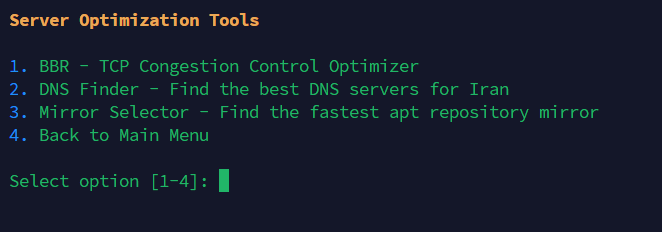
- BBR – TCP congestion control optimizer (recommended for external servers)
- DNS Finder – Find the best DNS servers for Iran (recommended for Iran servers)
- Mirror Selector – Find the fastest APT repository mirror (recommended for Iran servers)
Included Tools
- BBR – TCP Congestion Control Optimizer
- IranDNSFinder – Finds and configures optimal DNS servers
- DetectUbuntuMirror – Selects the fastest APT mirror (Ubuntu/Debian only)
Troubleshooting: Paqet Installation Issues
If Paqet fails to install automatically during configuration (e.g., you see "Failed to install Paqet" or the script gets stuck when adding a new config in Server/Kharej or Client/Iran mode), follow these steps:
1️⃣ Download / Binary Not Found
- Manually download the Paqet binary
Visit the official releases page:
https://github.com/hanselime/paqet/releases
- Choose the latest release.
- Download the file matching your server architecture:
paqet-linux-amd64-*.tar.gz→ x86_64 / amd64paqet-linux-arm64-*.tar.gz→ arm64
- Place the downloaded file in this folder:
/root/paqet/
If the folder does not exist, create it first:
mkdir -p /root/paqet
- Run the manager script again
The script will automatically detect the file inside
/root/paqet/, extract it, and complete the installation:
bash <(curl -fsSL https://raw.githubusercontent.com/behzadea12/Paqet-Tunnel-Manager/main/paqet-manager.sh)
2️⃣ GLIBC_2.32 or GLIBC_2.34 Not Found
If the service fails with an error like:
/usr/local/bin/paqet: /lib/x86_64-linux-gnu/libc.so.6: version `GLIBC_2.34' not found
The pre-built Paqet binary requires a newer glibc than your system provides (e.g., Ubuntu 18.04 or Debian 10).
Option A: Upgrade the OS
Upgrade to a distro with glibc 2.34+:
- Ubuntu 22.04 or newer
- Debian 12 or newer Then reinstall Paqet using the manager (option 0).
Option B: Build Paqet from Source
Build Paqet directly on your current system so it uses your installed glibc:
apt install -y golang git
git clone https://github.com/hanselime/paqet.git && cd paqet
go build -o paqet ./cmd/paqet
sudo cp paqet /usr/local/bin/paqet
sudo chmod +x /usr/local/bin/paqet
Then start your Paqet service again from the manager: List Services → Manage → Start
Option C: Use a Newer VPS
Deploy a VPS with a newer OS (e.g., Ubuntu 22.04) and install Paqet there.
3️⃣ bind: address already in use (Port Already in Use)
If Paqet fails with an error like:
failed to bind TCP socket on 0.0.0.0:8443: bind: address already in use
The port (e.g., 8443) is already being used by another program, or the same port was added twice in the forward list.
Fix 1: Check What Uses the Port
ss -tuln | grep 8443
or
lsof -i :8443
Stop the conflicting service or choose another port in the Paqet configuration.
Fix 2: Remove Duplicate Port
If a port appears twice in your forward list:
- Edit the configuration file:
nano /etc/paqet/your_config.yaml
- Under
forward:, remove the duplicatelistenentry for that port. - Restart the service:
systemctl restart paqet-your_config
In newer script versions, duplicate ports are automatically removed.
⚠️ Need Help?
If you encounter any issues, contact me on Telegram:
I am usually online and will assist you as soon as possible.
Requirements
- Linux server (Ubuntu, Debian, CentOS, etc.)
- Root access
libpcap-deviptablespaqet
📸 Script Screenshots
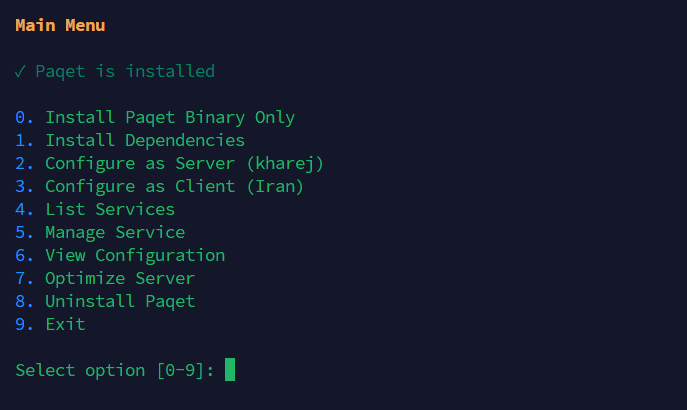
Main Menu
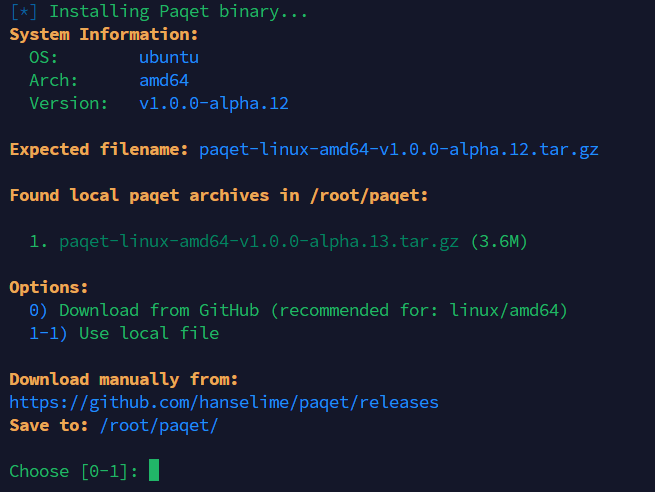
Install Paqet
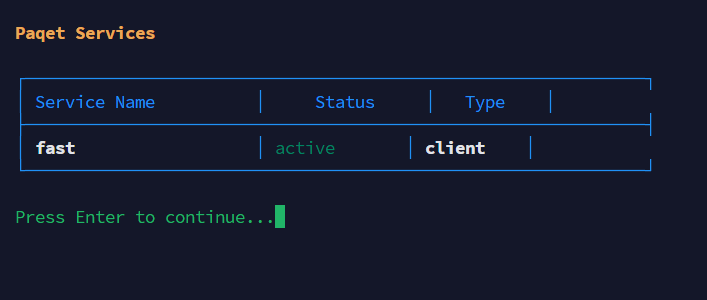
List Services
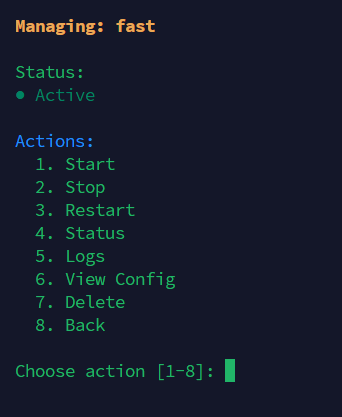
Manage Service
Optimize Server
License
This project is licensed under the MIT License.
💖 Support / Donate
If you are using Paqet-Tunnel-Manager and want to support the development of this project, you can contribute via:
Tron (TRC20): TFYnorJt5gvejLwR8XQdjep1krS9Zw8pz3
Ton: UQBXx5-u5Wzv58BUjIKtMGKG06Je0pGUO0sQ4HFh2Y_AOXgR
Tether:
Trc20
TFYnorJt5gvejLwR8XQdjep1krS9Zw8pz3
Ton
UQBXx5-u5Wzv58BUjIKtMGKG06Je0pGUO0sQ4HFh2Y_AOXgR
bep20
0x06B904248da14E20D3d33eb6Ab7Be282AA9e6fBe
Tron (TRC20):
TFYnorJt5gvejLwR8XQdjep1krS9Zw8pz3

Any contribution, big or small, helps keep the project alive and motivates further development. 🙏
Credits
- paqet – Raw packet tunneling library by hanselime