
PeerLink





A high-performance, open-source distributed file sharing platform engineered for scale.
Table of Contents
- Introduction
- System Architecture
- Tech Stack
- Getting Started
- Configuration
- Running the Application
- Contributing
Introduction
PeerLink is not just a file transfer tool; it is a sophisticated distributed system designed to handle high-throughput data transfer across a clustered environment. Built with a "performance-first" mindset, it leverages a microservices-inspired architecture to ensure that no single point of failure exists.
Whether you are running a single instance or a fleet of nodes across different continents, PeerLink's intelligent routing layer ensures your data gets where it needs to go—instantly.
Showcase
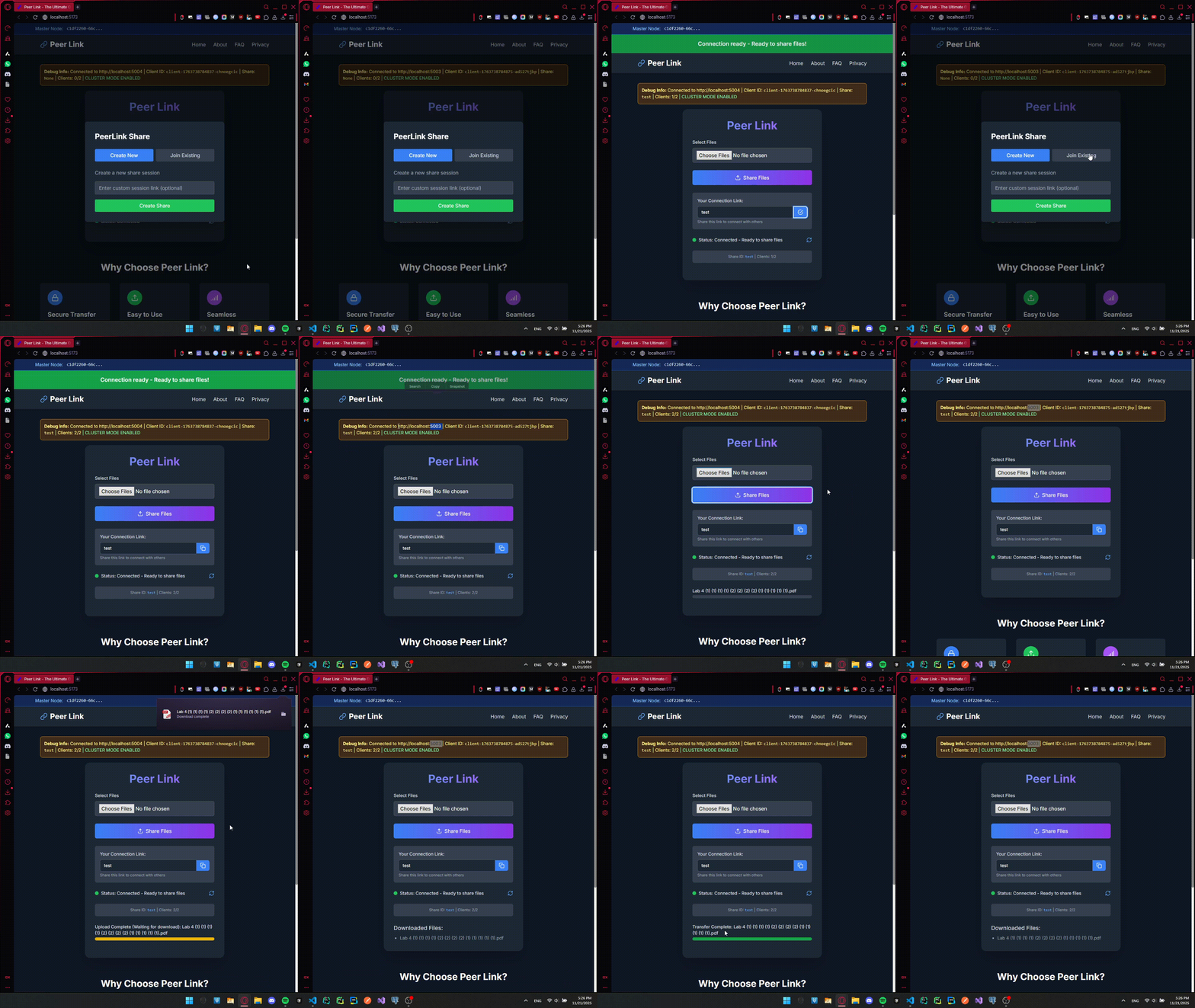
System Architecture
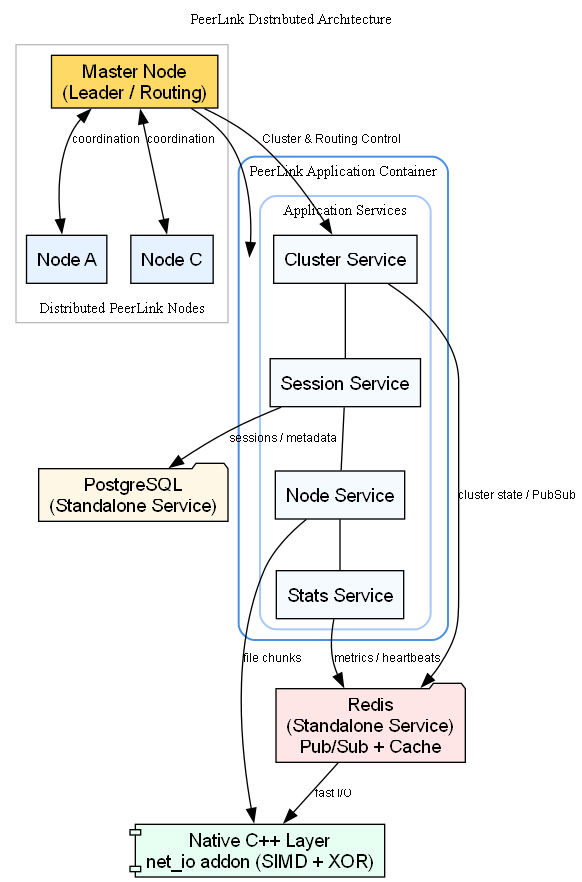
PeerLink moves away from the traditional monolithic server model. Instead, it operates as a collection of intelligent Nodes that form a cooperative cluster. These nodes are fully decoupled and can run on separate physical machines, different cloud regions, or distinct containers, creating a truly distributed network.
Microservices & Modularity
The backend is strictly decoupled into autonomous services, each responsible for a specific domain. This modularity allows for independent scaling and maintenance.
Application Services:
- Cluster Service: The brain of the operation. It manages leader election, node discovery, and inter-node routing.
- Session Service: Handles user state, authentication, and connection persistence across the cluster.
- Node Service: Manages the lifecycle of individual worker nodes, performing health checks and self-healing routines.
- Stats Service: Aggregates real-time metrics from all nodes to provide a holistic view of system health.
Infrastructure Services:
- PostgreSQL Database: Operates as a completely separate, dedicated service for persistent data storage, ensuring data integrity independent of application nodes.
- Redis: Runs as a standalone high-performance service handling caching, Pub/Sub messaging, and cluster coordination.
The Cluster Protocol
How do nodes talk to each other? We built a custom event-driven backbone using Redis Pub/Sub.
- Leader Election: Nodes automatically elect a "Master" node to handle complex routing decisions and cluster-wide synchronization.
- Smart Routing: If User A (on Node 1) sends a file to User B (on Node 2), the system identifies the target node and routes the data stream internally. The users never know they are on different servers.
- State Consistency: All session states are persisted in PostgreSQL but cached in Redis for millisecond-level access speeds.
- Dynamic Scaling: The system supports hot-swappable nodes. As you spin up new Docker containers, the frontend automatically discovers them via Redis, enabling seamless horizontal scaling with zero downtime.
Native Performance Layer
JavaScript is fast, but C++ is faster. For CPU-intensive tasks, we bypass the Node.js event loop and drop down to bare metal.
net_ioAddon: A custom C++ N-API module built specifically for PeerLink.- SIMD Checksums: We utilize AVX/SSE instructions to calculate file integrity hashes 400% faster than standard crypto libraries.
- XOR Cipher: Real-time stream obfuscation with zero latency overhead.
Tech Stack
| Component | Technology | Description |
|---|---|---|
| Frontend | React + Vite | Ultra-fast UI rendering and bundling. |
| Styling | Tailwind CSS | Utility-first CSS for consistent design. |
| Runtime | Node.js | Asynchronous event-driven JavaScript runtime. |
| Language | TypeScript | Strict typing for robust, error-free code. |
| Transport | Socket.IO | Real-time bidirectional event-based communication. |
| Database | PostgreSQL | Relational data integrity for sessions and nodes. |
| ORM | Prisma | Type-safe database access and schema management. |
| Cache/Msg | Redis | High-performance caching and Pub/Sub messaging. |
| Native | C++ (N-API) | Low-level optimization for critical paths. |
Getting Started
Prerequisites
Ensure your environment is ready for high-performance computing.
- Node.js: v18.0.0 or higher
- PostgreSQL: v14+
- Redis: v6+ (Essential for Cluster Mode)
- Build Tools: Python 3 & C++ compiler (Visual Studio Build Tools on Windows,
build-essentialon Linux) for compiling the native addon.
Installation
-
Clone the Repository
git clone https://github.com/MohamedAYassin/PeerLink.git cd PeerLink -
Backend Setup
cd backend npm install # Configure Environment cp .env.example .env # EDIT .env with your DB/Redis credentials! # Initialize Database npm run prisma:generate npm run prisma:push -
Frontend Setup
cd frontend
npm install
cp .env.example .env
Configuration
PeerLink is designed to be flexible. Control every aspect of the system via environment variables.
Backend Configuration (backend/.env)
Database
| Variable | Default | Description |
|---|---|---|
DATABASE_URL |
postgresql://... |
Connection string for PostgreSQL. |
Server & Cluster
| Variable | Default | Description |
|---|---|---|
PORT |
5000 |
The port the server listens on. |
NODE_ENV |
development |
Environment mode (development or production). |
NODE_HOSTNAME |
localhost |
Hostname for this specific node (used in cluster discovery). |
NODE_PORT |
5000 |
Port for this specific node. |
Redis (Caching & Pub/Sub)
| Variable | Default | Description |
|---|---|---|
REDIS_HOST |
localhost |
Redis server hostname. |
REDIS_PORT |
6379 |
Redis server port. |
REDIS_PASSWORD |
- | Redis password (leave empty if none). |
REDIS_DB |
0 |
Redis database index. |
REDIS_MAX_RETRIES |
3 |
Max connection retries. |
REDIS_RETRY_DELAY |
100 |
Delay between retries (ms). |
REDIS_CONNECT_TIMEOUT |
10000 |
Connection timeout (ms). |
Redis TTL (Time-To-Live)
| Variable | Default | Description |
|---|---|---|
TTL_CLIENT_SESSION |
3600 |
Session duration in seconds (1 hour). |
TTL_SHARE_SESSION |
86400 |
Share link duration in seconds (24 hours). |
TTL_UPLOAD_STATE |
7200 |
Upload state retention (2 hours). |
TTL_RATE_LIMIT_WINDOW |
60 |
Rate limit window (1 minute). |
TTL_HEARTBEAT |
300 |
Node heartbeat expiration (5 minutes). |
Security & Rate Limiting
| Variable | Default | Description |
|---|---|---|
CORS_ORIGIN |
http://localhost:5173 |
Allowed frontend origin. |
RATE_LIMIT_UPLOADS_PER_MINUTE |
100 |
Max uploads per user/min. |
RATE_LIMIT_DOWNLOADS_PER_MINUTE |
100 |
Max downloads per user/min. |
RATE_LIMIT_WEBSOCKET_MESSAGES_PER_MINUTE |
1000 |
Max socket messages per user/min. |
File Transfer
| Variable | Default | Description |
|---|---|---|
MAX_FILE_SIZE |
1073741824 |
Max file size in bytes (1GB). |
CHUNK_SIZE |
16384 |
Size of each file chunk (16KB). |
MAX_CONCURRENT_UPLOADS |
10 |
Max simultaneous uploads per node. |
MAX_CONCURRENT_DOWNLOADS |
10 |
Max simultaneous downloads per node. |
MAX_CONCURRENT_TRANSFERS |
5 |
Max active transfers per user. |
ACK_TIMEOUT_MS |
10000 |
Timeout for chunk acknowledgement. |
MAX_RETRIES |
3 |
Max retries for failed chunks. |
Performance & Features
| Variable | Default | Description |
|---|---|---|
USE_NATIVE_ADDON |
true |
Enable C++ SIMD optimizations. |
USE_REDIS |
true |
Enable Redis (Required for Cluster). |
USE_CLUSTER |
true |
Enable distributed cluster mode. |
ENABLE_COMPRESSION |
true |
Enable WebSocket per-message compression. |
ENABLE_METRICS |
true |
Enable Prometheus-style metrics. |
Frontend Configuration (frontend/.env)
API & Network
| Variable | Default | Description |
|---|---|---|
VITE_BACKEND_URL |
http://localhost:5000 |
URL of the backend API. |
VITE_WS_URL |
http://localhost:5000 |
URL of the WebSocket server. |
Cluster Configuration
| Variable | Default | Description |
|---|---|---|
VITE_USE_CLUSTER |
false |
Enable dynamic load balancing and node discovery. |
VITE_CLUSTER_NODES |
... |
Initial list of backend nodes for bootstrapping connection. |
Transfer Settings
| Variable | Default | Description |
|---|---|---|
VITE_CHUNK_SIZE |
65536 |
Chunk size for uploads (64KB). |
VITE_UPLOAD_CONCURRENCY |
6 |
Parallel chunk uploads. |
Socket Settings
| Variable | Default | Description |
|---|---|---|
VITE_SOCKET_RECONNECTION_DELAY |
1000 |
Initial reconnection delay (ms). |
VITE_SOCKET_RECONNECTION_DELAY_MAX |
5000 |
Max reconnection delay (ms). |
VITE_SOCKET_RECONNECTION_ATTEMPTS |
5 |
Max reconnection attempts. |
Clustering Guide
PeerLink is designed to run as a distributed cluster of backend nodes behind multiple frontend instances. Nodes communicate via Redis Pub/Sub, with automatic leader election and cross-node message routing.
How Clustering Works
- Leader Election: Each backend node attempts to acquire a master lock in Redis using
SET NXwith a 15-second TTL. The node that holds the lock acts as the Master, handling routing decisions. If the Master goes down, another node automatically takes over within 5 seconds. - Cross-Node Routing: When a user on Node A sends a file to a user on Node B, the system routes the signal via Redis Pub/Sub — the users never know they're on different servers.
- Session State: All sessions are persisted in PostgreSQL and cached in Redis for fast lookups. The Redis session store maps
clientId -> { nodeId, socketId }, enabling direct worker-to-worker routing. - Frontend Load Balancing: The frontend randomly picks from a list of backend nodes (
VITE_CLUSTER_NODES) for initial connection. Each node handles its own connected clients.
Single Node Setup (Default)
By default, PeerLink runs in standalone mode (single node, no clustering). Redis is still used for caching and session storage but not for Pub/Sub.
Multi-Node Cluster Setup
Option A: Docker Compose (Easiest)
-
Set the backend replica count:
docker-compose up -d --scale backend=3This starts 3 backend nodes plus PostgreSQL, Redis, and the frontend. Each backend registers itself as a separate node in the cluster.
-
Update the frontend config to list all backend nodes (edit
docker-compose.ymlor pass build args):frontend: build: args: - VITE_USE_CLUSTER=true - VITE_CLUSTER_NODES=http://backend:5000,http://backend:5001,http://backend:5002With Docker Compose scaling, all replicas use port 5000 internally, so
http://backend:5000is sufficient — Docker's internal DNS load-balances across replicas.
Option B: Manual Setup (Bare Metal / VMs)
Each backend node needs its own environment configuration.
Node 1 (terminal 1):**
cd backend
export PORT=5000
export NODE_HOSTNAME=192.168.1.10   # This node's reachable IP
export NODE_PORT=5000
export USE_CLUSTER=true
export USE_REDIS=true
export REDIS_HOST=192.168.1.10      # Shared Redis instance
npm run dev
Node 2 (terminal 2 or another machine):
cd backend
export PORT=5001
export NODE_HOSTNAME=192.168.1.11   # This node's reachable IP
export NODE_PORT=5001
export USE_CLUSTER=true
export USE_REDIS=true
export REDIS_HOST=192.168.1.10      # Same shared Redis instance
npm run dev
Important: All nodes must point to the same Redis and PostgreSQL instances — they share state through these services.
Option C: Hybrid (Docker Nodes + Native Nodes)
You can run some nodes in Docker and some natively, as long as they all connect to the same Redis instance and are on the same network.
Frontend Configuration for Cluster
The frontend connects to the cluster via environment variables:
| Variable | Example | Description |
|---|---|---|
VITE_USE_CLUSTER |
true |
Enable cluster-aware load balancing |
VITE_CLUSTER_NODES |
http://node1:5000,http://node2:5000 |
Comma-separated list of backend nodes |
The frontend randomly selects a node from VITE_CLUSTER_NODES on connection. If a node goes down, refresh the page to get re-assigned to a live node.
Cluster Environment Variables
These backend variables control clustering behavior:
| Variable | Default | Description |
|---|---|---|
USE_CLUSTER |
true |
Enable distributed cluster mode. Requires USE_REDIS=true. |
USE_REDIS |
true |
Required for cluster (Pub/Sub, session cache, leader election) |
NODE_HOSTNAME |
localhost |
This node's hostname/IP, must be reachable from other nodes |
NODE_PORT |
5000 |
This node's public port |
If USE_CLUSTER=false, the node runs in standalone mode — it acts as Master without Redis Pub/Sub but still uses Redis for caching (if USE_REDIS=true).
Verifying the Cluster
Once running, open the frontend. When cluster mode is active:
- The debug banner (yellow) shows CLUSTER MODE ENABLED
- The bottom status bar shows Cluster Mode next to the node address
- Active/total node counts appear (e.g.,
Nodes: 3/3) - If the Master node goes down, you'll see Reconnecting to master… until a new master is elected
Architecture Diagram
         ┌──────────────┐
         │  Frontend A  │──┐
         └──────────────┘  │  ┌─────────────────┐
                           ├──│  Backend Node 1  │──┐
         ┌──────────────┐  │  │   (Worker/Master) │  │
         │  Frontend B  │──┤  └─────────────────┘  │
         └──────────────┘  │                        ├──► Redis (Pub/Sub + Cache)
                           ├──┐  ┌─────────────────┐  │
                           │  └──│  Backend Node 2  │──┘
                           │     │   (Worker/Master) │
                           │     └─────────────────┘
                           │
                           ├──┐  ┌─────────────────┐
                           │  └──│  Backend Node 3  │
                           │     │   (Worker/Master) │
                           │     └─────────────────┘
                           │
                           └────────── PostgreSQL
                                    (Persistent Storage)
Running the Application
Development Mode
Run the full stack with hot-reloading enabled.
Terminal 1 (Backend):
cd backend
npm run dev
Terminal 2 (Frontend):
cd frontend
npm run dev
Production Build
Compile the TypeScript code and build the C++ native addons for maximum performance.
# Build Backend (includes C++ compilation)
cd backend
npm run build
npm run copy-native
npm start

# Build Frontend
cd frontend
npm run build
Docker Deployment
PeerLink is fully containerized and ready for production deployment using Docker Compose.
Prerequisites
- Docker and Docker Compose installed.
Running with Docker
-
Build and Start Services
docker-compose up --buildThis will start:
- Frontend:
http://localhost - Backend:
http://localhost:5000 - PostgreSQL: Port 5432 (Separate Service)
- Redis: Port 6379 (Separate Service)
- Frontend:
-
Scale Up (Hot Swapping) To demonstrate dynamic scaling, you can spin up multiple backend nodes:
docker-compose up -d --scale backend=3The frontend automatically discovers the new nodes via Redis.
Contributing
We welcome contributions from the community. However, to maintain the high stability standards of PeerLink, we have strict guidelines.
Reporting Bugs
If you encounter an issue, you must provide a complete reproduction path. Vague reports like "it doesn't work" will be closed immediately without review.
Required Format for Issues:
- Environment: OS, Node Version, Browser.
- Configuration: Are you using Cluster Mode? Redis? Native Addons?
- Steps to Reproduce: A numbered list of exact actions taken.
- Logs: Paste the full error stack trace from the backend terminal and browser console.
Feature Requests
Have an idea to make PeerLink even faster? Open a Pull Request! Please ensure your code follows the existing modular structure and includes proper typing.
Built with precision. Engineered for speed.