Pensieve
Pensieve is a system that generates adaptive bitrate algorithms using reinforcement learning. http://web.mit.edu/pensieve/
Prerequisites
- Create a virtual envirnment with python 3.8
- Install prerequisites (tested with Ubuntu 18.04, python3.8, Tensorflow v2.7.0, TFLearn v0.5.0 but not tested on Selenium)
pip install tensorflow tflearn matplotlib selenium
python setup.py
Training
- To train a new model, put training data in
sim/cooked_tracesand testing data insim/cooked_test_traces, then insim/runpython get_video_sizes.pyand then run
python multi_agent.py
The reward signal and meta-setting of video can be modified in multi_agent.py and env.py.
Monitoring the testing curve of rewards, entropy and td loss can be done by launching tensorboard from the terminal as follows:
tensorboard --logdir=path/to/results
Where path/to/results is in dir sim. More details can be found in sim/README.md.
Testing
- To test the trained model in simulated environment, first copy over the model to
test/modelsand modify theNN_MODELfield oftest/rl_no_training.py, and then intest/runpython get_video_sizes.pyand then run
python rl_no_training.py
Similar testing can be performed for buffer-based approach (bb.py), mpc (mpc.py) and offline-optimal (dp.cc) in simulations. More details can be found in test/README.md.
Running experiments over Mahimahi
- To run experiments over mahimahi emulated network, first copy over the trained model to
rl_server/resultsand modify theNN_MODELfiled ofrl_server/rl_server_no_training.py, and then inrun_exp/run
python run_all_traces.py
This script will run all schemes (buffer-based, rate-based, Festive, BOLA, fastMPC, robustMPC and Pensieve) over all network traces stored in cooked_traces/. The results will be saved to run_exp/results folder. More details can be found in run_exp/README.md.
Real-world experiments
- To run real-world experiments, first setup a server (
setup.pyautomatically installs an apache server and put needed files in/var/www/html). Then, copy over the trained model torl_server/resultsand modify theNN_MODELfiled ofrl_server/rl_server_no_training.py. Next, modify theurlfield inreal_exp/run_video.pyto the server url. Finally, inreal_exp/run
python run_exp.py
The results will be saved to real_exp/results folder. More details can be found in real_exp/README.md.
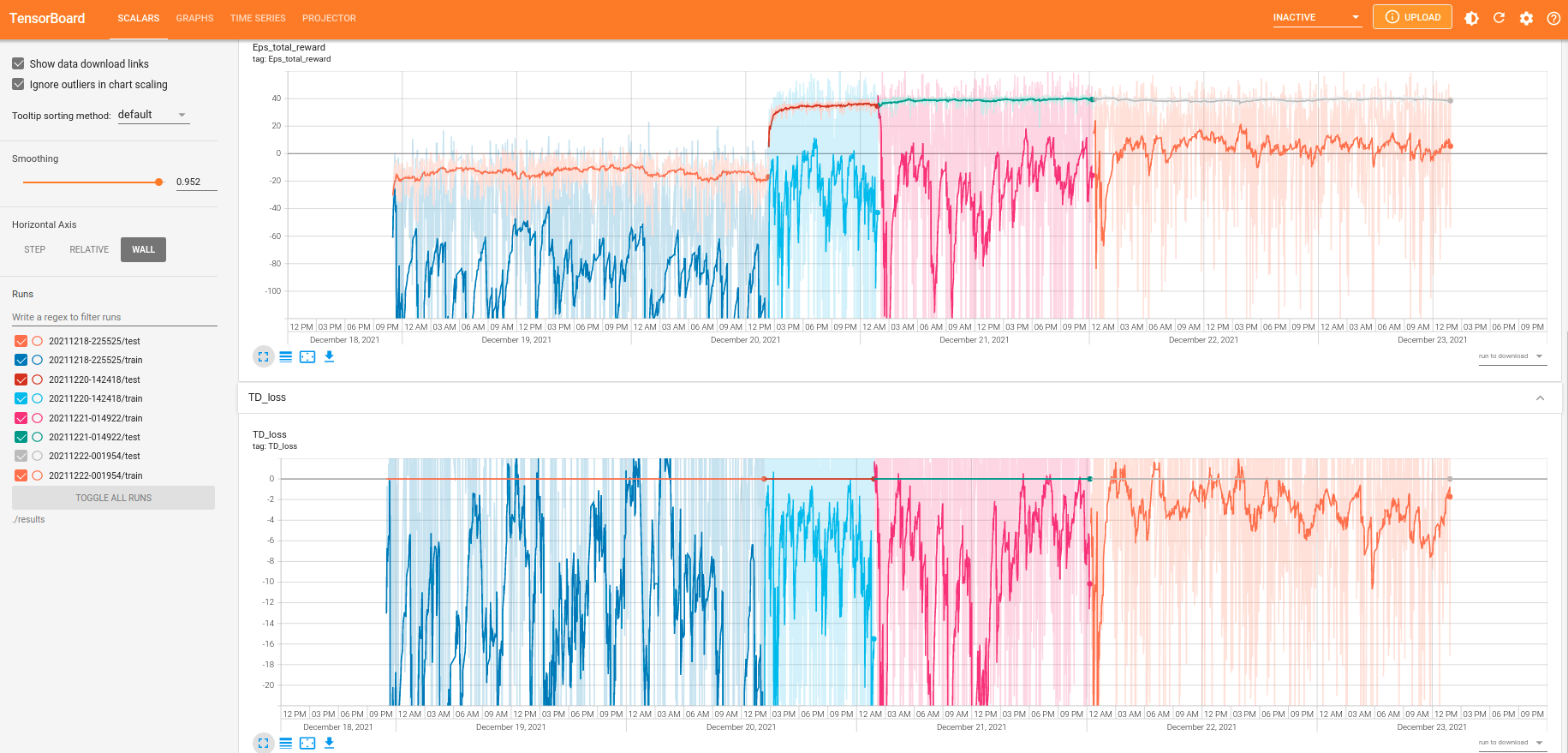
Training and cross-validation (testing) Curve using tensorboard
The RL-model converges after 3 days of continuous training using training data in sim/cooked_traces and testing data in sim/cooked_test_traces.
TD Loss & Total Reward of sim/multi-agent.py: