PequeRoku
Real root-access VMs for you and your AI agents: a self-hosted, Replit-style cloud lab in the browser, plus an MCP server and public API that hand the same VMs to any agent — Claude Code, Cursor, or your own.


Demo
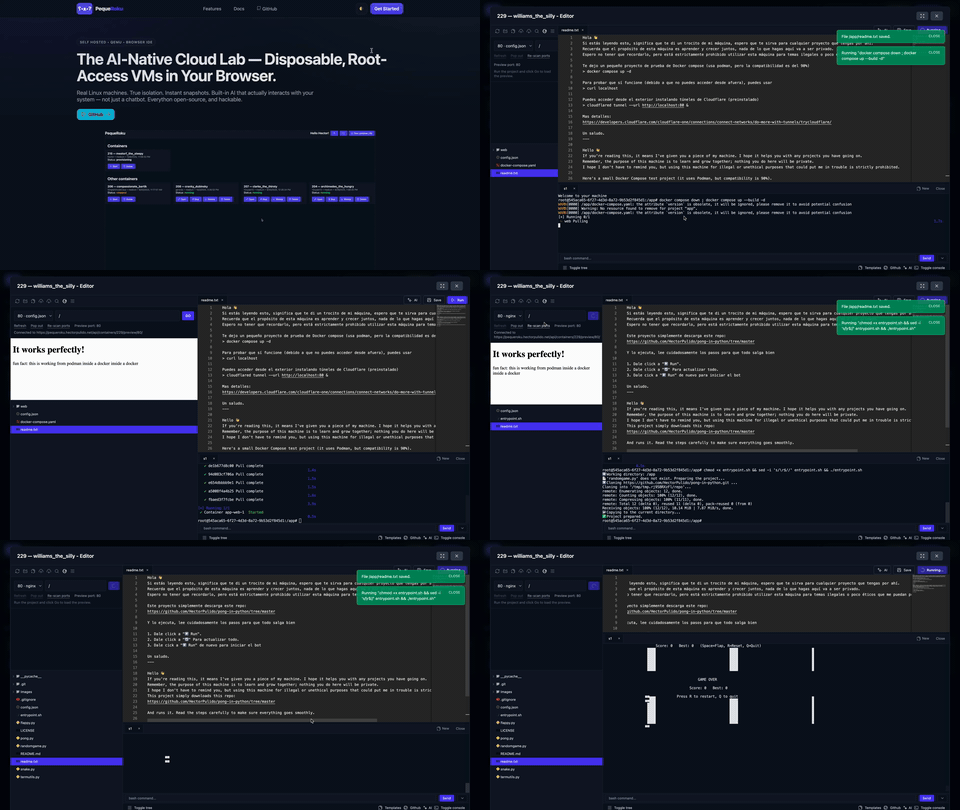
Open a real Linux VM from any device: laptop, tablet, or phone. No setup, no waiting.
What Is It?
PequeRoku is an open-source, self-hosted alternative to Replit, Codespaces, and Gitpod — and, through its MCP server and public API, to agent sandboxes like E2B and Daytona. Instead of a locked-down container, you get a real virtual machine (QEMU/KVM) with full root, a browser IDE, a built-in AI agent that operates the box, and an MCP server that gives any agent you already use the same hands.
It is always on, with no cold starts, no sandbox, and no per-seat billing. The only limits are the ones your own hardware sets.
Quick Start
git clone https://github.com/HectorPulido/pequeroku.git
cd pequeroku/source
./start.sh
start.sh is idempotent — re-run it anytime. It creates the .env files with random secrets, turns on KVM when /dev/kvm exists, and runs docker compose up. (Prefer two steps? ./setup.sh && docker compose up is equivalent.)
- Open
http://localhost/dashboard/. - Log in and create your first VM.
- Start coding, or ask Pequenin to scaffold the project for you.
Faster VM boots (optional). The first run boots VMs from a stock Debian cloud image (~50 s to SSH). Bake a golden image once to cut that to ~10 s:
./vm_service/scripts/build-golden.sh --force
docker compose restart vm_services
SSH keys are generated automatically in the persistent vm_data volume, so there is zero key setup. Bringing your own key, or upgrading a checkout that predates start.sh? See UPGRADING.md. Detailed walkthrough: Wiki, Getting Started.
Why PequeRoku
- Real root on a real VM. Install Docker, run
systemd, build a kernel. It is a Linux machine (QEMU/KVM), not a container with guardrails. - Always on. No cold starts: your workspace is ready when you are, and resets to a clean slate when you want one.
- An agent that operates the box. Pequenin edits files, runs your tests, starts servers, and verifies them live inside the VM.
- A sandbox for your agent. Point Claude Code — or any MCP client — at
/mcpand it gets real, disposable, root-access VMs to run code in. The blast radius is one VM, not your laptop. - Reachable from anywhere. The IDE is responsive — laptop, tablet, or phone — with a live preview of whatever your VM serves.
- Yours. Open source (MIT), hackable at every layer, cheap to run on a homelab — with quotas and roles for when you share it with a team.
I built PequeRoku because I could not find a remote dev platform that was open, root-accessible, always-on, reachable from anywhere, and affordable to run myself. So I made one.
Meet Pequenin, the AI That Operates Your VM
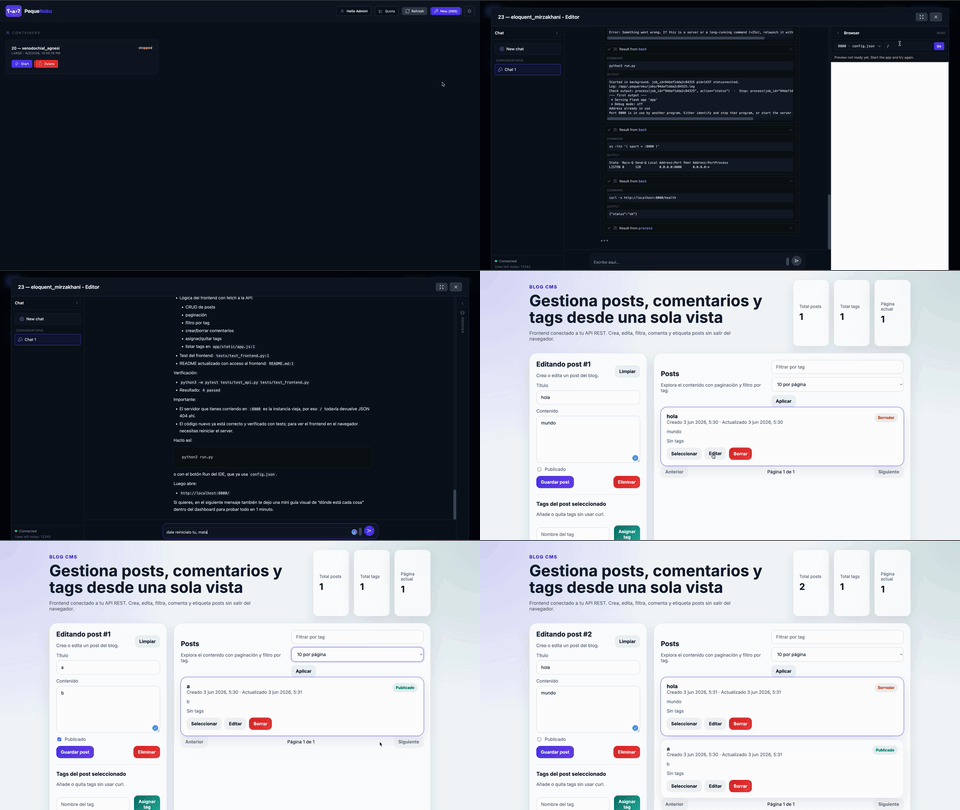
Pequenin does not just suggest. It edits, runs, and verifies inside your VM.
Pequenin lives in the IDE chat and works through real tools:
- Reads, writes, and edits files with whitespace-tolerant, surgical edits.
- Searches your code (glob, grep) and runs shell commands, including long-running background jobs it can monitor.
- Brings services up and checks that they respond.
- Searches the web, spawns subagents to explore in parallel, and keeps switchable conversations per VM.
- OpenAI-compatible, so you bring your own provider: Groq for speed, OpenAI for quality, or HuggingFace for flexibility.
The result is not a snippet to copy. Pequenin creates the files, installs the dependencies, starts the server, and confirms it responds. Agent loop, tools, and event protocol: AI.md.
How It Works
Three services and your VM work together:
Browser            React IDE (Monaco + Xterm.js)
   |
   |  HTTPS / WebSocket
   v
web_service        Django, DRF, Channels
   |               auth, quotas, templates, Pequenin (the AI brain)
   |  HTTP
   v
vm_service         FastAPI
   |               VM lifecycle (QEMU), SSH pool, live terminal
   |  SSH / SFTP
   v
Your VM            Debian, full root, /app workspace
The brain (the AI and agentic loop) runs in web_service. The hands (files, exec, terminal) are SSH operations that vm_service executes inside the VM. The front end only ever talks to web_service.
Stack: Django · DRF · Channels · FastAPI · QEMU/KVM · React · Monaco · Xterm.js · Postgres · Redis · Docker
Full architecture and setup: Wiki.
Public API & MCP server
The same substrate that powers the IDE is exposed as a versioned, public API —
infra as API. Anything the dashboard does, a script, the SDK, or an AI agent
can do too, authenticated with an API key. There are no privileged side paths:
the SDK and the MCP server are just clients of /api/v1.
Get a key
In the dashboard, click API & MCP in the header. It's a self-serve page to
create, list, and revoke API keys, and it shows your MCP connection string and a
ready-to-paste claude mcp add command. The secret is shown once — only its
hash is stored. Keys carry scopes — read < exec < admin — so you decide how
much power each script or agent gets (read can't run code; exec can't
create/destroy). Operators can also mint keys from the CLI:
docker compose exec web python manage.py create_api_key <username> --scopes read,exec,admin
REST API (/api/v1)
The spec is the documentation: OpenAPI at /api/v1/schema/, Swagger UI at
/api/v1/schema/swagger-ui/. Errors use a stable envelope
{"error": {"code", "message"}} with enumerated codes (quota_exceeded,
machine_not_running, forbidden_scope, timeout, …).
| Method & path | Does |
|---|---|
POST /api/v1/containers |
Create a container ({type, name?, ttl_seconds?}) |
GET /api/v1/containers |
List your containers |
POST /api/v1/containers/{id}/exec |
Run a command → {stdout, stderr, exit_code} (or background → process_id) |
PUT /api/v1/containers/{id}/files |
Batch-write files |
GET /api/v1/containers/{id}/ports |
Listening ports + preview paths |
POST /api/v1/runs |
One-shot: create + run + destroy, sync or async |
GET /api/v1/runs/{id} |
Poll an async run |
GET /api/v1/types |
Flavors available to you + credit cost |
One-shot run in a throwaway VM:
curl -X POST http://localhost/api/v1/runs \
  -H "Authorization: Bearer pk_xxx" -H "Content-Type: application/json" \
  -d '{"command":"python main.py","files":[{"path":"main.py","content":"print(\"hi\")"}]}'
# → {"status":"succeeded","stdout":"hi\n","exit_code":0, ...}
Python SDK
from pequeroku import PequeRoku                # sdk/
pq = PequeRoku(api_key="pk_xxx", base_url="http://localhost")
print(pq.run("echo hello").stdout)             # one-shot
c = pq.create_container(type="small", name="blog")
pq.exec(c["id"], "python -m http.server 8000", background=True)
See sdk/README.md.
Drive it from any agent
PequeRoku ships an MCP server over streamable
HTTP at /mcp, so any MCP-capable agent — Claude Code, Claude Desktop, Cursor,
opencode, or your own — gets hands on a real sandbox: create VMs, run code,
move files, inspect ports. Connect it with the key from the dashboard's
API & MCP page:
claude mcp add --transport http pequeroku http://localhost/mcp \
  --header "Authorization: Bearer pk_xxx"
Any other MCP client, same idea:
{
  "mcpServers": {
    "pequeroku": {
      "type": "http",
      "url": "http://localhost/mcp",
      "headers": { "Authorization": "Bearer pk_xxx" }
    }
  }
}
The agent gets 10 task-shaped tools:
| Tool | Does |
|---|---|
run_code |
one-shot: boot a throwaway VM, write files, run a command, return output, destroy it |
list_types |
VM flavors your key may use, with specs and credit cost |
list_containers |
your persistent containers with status and flavor |
get_or_create_container |
idempotent named workspace — create it once, come back to it |
container_exec |
run a command in a container; background=true returns a process_id |
process_status |
status and recent output of a background process |
write_files |
batch-write files into a container |
read_path |
file → contents; directory → listing |
get_preview |
listening ports and preview paths for a running app |
destroy_container |
destroy a container (refuses without confirm=true) |
It also ships 3 ready-made prompts (run_in_sandbox, deploy_web_app,
setup_workspace) and hands the client a block of instructions on connect, so
the agent starts knowing the workflow instead of guessing. The blast radius of
anything an agent runs is one isolated VM, not your machine — that's the
pitch: give your agent a real sandbox with sane defaults (destroy needs
confirmation, runs carry a timeout + TTL).
The MCP server is platform-only by design: it never exposes Pequenin or any agent internals. The MCP client already is the agent; PequeRoku provides the hands, not the brain. See the boundary in AI.md. Details:
source/mcp_service/README.md.
How It Compares
PequeRoku competes on two fronts at once: cloud IDEs built for humans, and sandboxes built for agents. It is the only one on the row that does both — on your own hardware.
| PequeRoku | Replit / Codespaces / Gitpod | E2B / Daytona (agent sandboxes) | |
|---|---|---|---|
| Built for | Humans and agents | Humans | Agents only |
| Hosting | Self-hosted, your hardware | Their cloud | Their cloud, usage-metered |
| Compute | Real VM (QEMU/KVM) | Containers | MicroVMs / containers |
| Root access | Full root | Limited | Root, but ephemeral |
| Lifespan | Persistent, always-on | Boot and wait | Short-lived by design |
| Human IDE | Browser IDE (Monaco + terminal) | Yes | None |
| AI | Built-in agent, plus MCP/API for yours | Mostly autocomplete or chat | Bring your own agent (SDK) |
| Source | Open source (MIT) | Proprietary | Open core, SaaS-first |
| Cost | Your hardware | Per-seat or usage | Per sandbox-second |
Roadmap
- Fast snapshots and one-click rollback
- Automations: a push triggers tests in the active VM
- Richer multi-user roles and guardrails
- A standalone AI microservice and more Pequenin capabilities (AI.md)
Contribute & Support
PequeRoku is open to ideas, bug reports, and pull requests — browse the Issues; I reply to everything. If the project resonates with you: star the repo, spread the word, and run it in your homelab — then tell me how it went.
PequeRoku is not the ultimate platform. It is your platform, a small way to take back control.
Links
- pequeroku.net
- GitHub Wiki
- Medium Article
- License: MIT. See the LICENSE file for details.
Let's connect