
piclaw — your self-hosted AI workspace

PiClaw packages the Pi Coding Agent into a self-hosted workspace with a streaming web UI, persistent state, multi-provider LLM support, and a practical built-in toolset that includes many add-ons.
It is for people who want one stateful agent workspace they can run locally or in a container without stitching together half a dozen separate services.
Why PiClaw
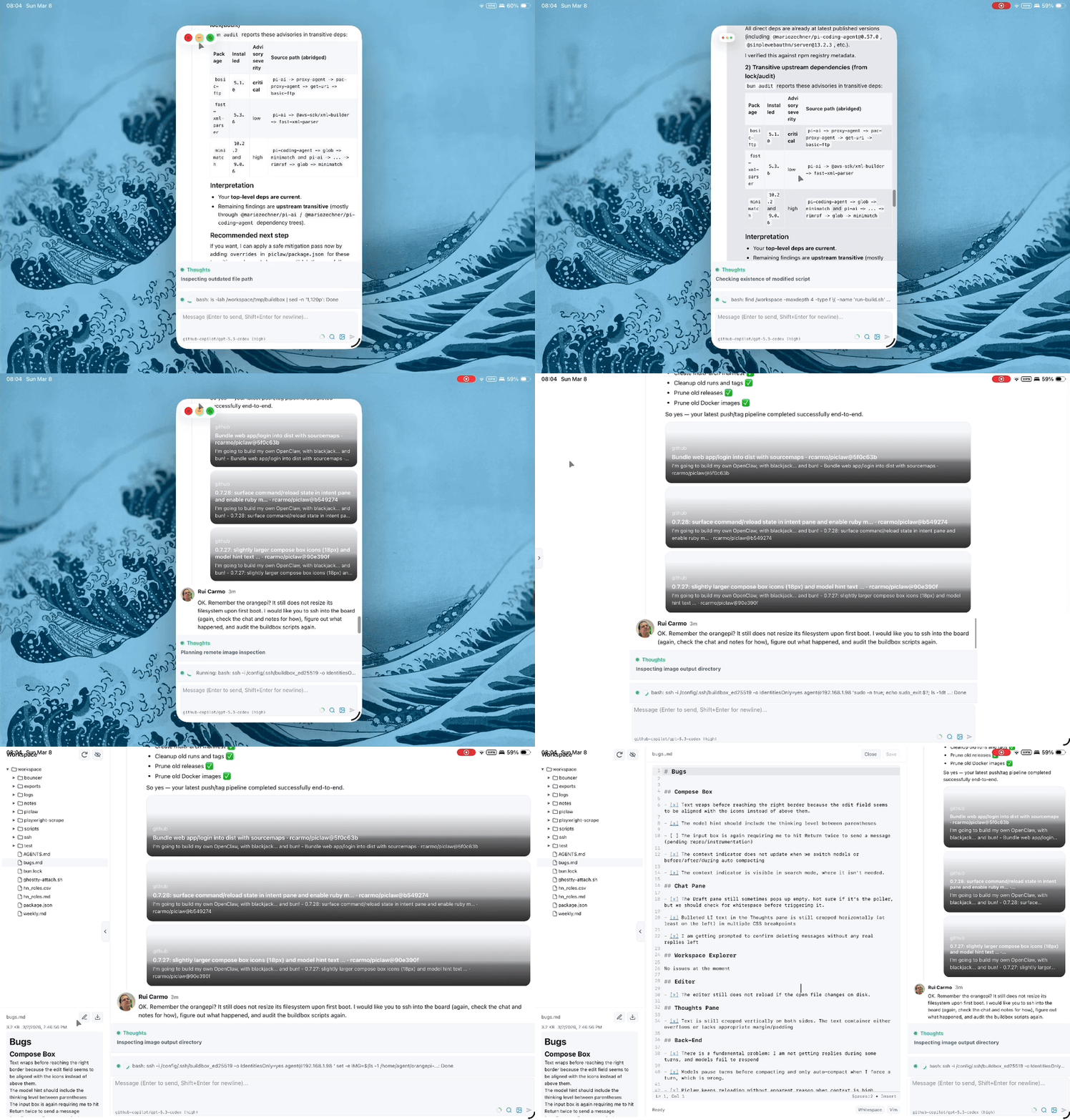
- One workspace, one app — chat, editor, terminal, viewers, boards, uploads, and automation in the same web UI
- Persistent state — SQLite-backed messages, media, tasks, token usage, encrypted keychain, and session-scoped SSH / Proxmox / Portainer profiles
- Practical built-ins — code editing, Office/PDF/CSV/image/video viewing, draw.io, VNC, browser automation, image processing, MCP, infra tools, and optional cross-instance IPC for paired remote peers
- Agent-first workflows — steering, queued follow-ups, side prompts, autoresearch loops, scheduled tasks, and visual artifact generation
- Context conservation — small always-active tool baseline with staged discovery via
list_tools/list_scripts - Optional auth/channels — passkeys/TOTP for the web UI, plus optional WhatsApp integration
Quick start
mkdir -p ./home ./workspace

docker run -d \
  --init \
  --name piclaw \
  --restart unless-stopped \
  -p 8080:8080 \
  -e PICLAW_WEB_PORT=8080 \
  -v "$(pwd)/home:/config" \
  -v "$(pwd)/workspace:/workspace" \
  ghcr.io/rcarmo/piclaw:latest
Open http://localhost:8080 and type /login to configure your LLM provider, including custom OpenAI-compatible endpoints when you are not using one of the built-in hosted providers.
[!TIP] Keep
--initenabled fordocker run/podman runso the runtime inserts a tiny init process for signal forwarding and zombie reaping. The bundleddocker-compose.ymlnow sets the equivalentinit: trueflag.
| Mount | Container path | Contents |
|---|---|---|
| Home | /config |
Agent home (.pi/, .gitconfig, .bashrc) |
| Workspace | /workspace |
Projects, notes, and piclaw state |
[!NOTE] In the container image,
/home/agent/.piis backed by/config/.pi. With the stockdocker run/docker-compose.ymlexamples above, Pi home state therefore persists on the host under./home/.pi/agent/.That means provider login state and model metadata should survive rebuilds/recreates when stored under files such as:
./home/.pi/agent/auth.json./home/.pi/agent/models.jsonMounting directly to
/home/agentor/home/agent/.pi/agentcan also work, but/configis the canonical documented persistence path for the container image.
[!WARNING] Never delete
/workspace/.piclaw/store/messages.db. It contains chat history, media, and task state.
[!IMPORTANT] You do not need to set provider API keys in piclaw environment variables. PiClaw reuses provider credentials configured in Pi Agent settings.
[!NOTE] Power users can place workspace-scoped shell environment overrides in
/workspace/.env.sh. PiClaw sources that file for the embedded terminal and on runtime startup, which is useful for things likePATHtweaks or persistinggh auth loginwithGH_CONFIG_DIR=/workspace/.config/gh. This hook is user-controlled: if its contents break PiClaw startup, shell behavior, or tool resolution, that breakage is the user's responsibility.
Web UI at a glance
PiClaw is single-user, mobile-friendly, and streams updates over SSE.
| Area | Highlights |
|---|---|
| Chat | Thought/draft panels, steering, queued follow-ups, Adaptive Cards, /btw, link previews, threaded turns, recovery/timeout chips |
| Status UX | Tool/intended status stays visible during silence probing, recent activity restores useful context, and tool rows can show compact x ago hints in the meta row |
| Workspace | Sidebar browser, drag-and-drop uploads, file-reference pills, explorer search/reindex status |
| Editor | CodeMirror 6, search/replace, dirty-state tracking, syntax highlighting, lazy local bundle |
| Terminal | Bundled xterm.js web terminal as dock or tab; detachable popouts; Ghostty is available separately as an optional add-on |
| Viewers | Draw.io, Office docs, CSV/TSV, PDF, images, video, code previews, kanban boards, VNC |
| Automation | /image, /flux, image_process, cdp_browser, mcp, experimental m365, Windows-only win_* tools |
For the full feature tour, see docs/web-ui.md.
[!NOTE] The default terminal renderer is now the bundled xterm.js implementation. The former Ghostty/WASM renderer was moved out of core and is available as the optional
@rcarmo/piclaw-addon-ghostty-terminaladd-on for high-end browsers.
Configuration
Most users only need a few environment variables:
| Variable | Default | Purpose |
|---|---|---|
PICLAW_WEB_PORT |
8080 |
Web UI port |
PICLAW_WEB_TERMINAL_ENABLED |
1 on Linux/macOS, 0 on Windows |
Enable or disable the authenticated bundled web terminal |
PICLAW_WEB_VNC_ALLOW_DIRECT |
1 on Linux/macOS/Windows |
Allow or disable direct VNC targets supplied at runtime |
PICLAW_WEB_TOTP_SECRET |
(empty) | Base32 TOTP secret; enables login gate (or initialize with /totp) |
PICLAW_WEB_PASSKEY_MODE |
totp-fallback |
totp-fallback, passkey-only, or totp-only |
PICLAW_ASSISTANT_NAME |
PiClaw |
Display name in the UI |
PICLAW_ENABLE_M365_EXPERIMENTAL |
0 |
Enable the experimental Microsoft 365 extension bundle |
PICLAW_KEYCHAIN_KEY |
(empty) | Master key for encrypted secret storage |
PICLAW_TRUST_PROXY |
0 |
Enable when behind a reverse proxy or tunnel |
For the full list, auth setup (TOTP/passkeys), session-scoped SSH-backed remote tools, reverse proxy configuration, SSHFS/FUSE support, and the workspace environment hook, see docs/configuration.md.
Other install methods
Install without Docker
bun add -g github:rcarmo/piclaw
Experimental. Linux/macOS/Windows. See docs/install-from-repo.md.
On Windows, PiClaw remains a secondary / not-officially-supported target. Shell-like child processes now run attached there (detached=false) so stdout/stderr remain capturable; Unix-like hosts still use detached process groups for cleaner tree termination on abort/shutdown.
Experimental desktop shell
PiClaw also has an optional Electrobun desktop wrapper around the existing local web UI:
bun run build:desktop
The desktop shell starts Piclaw on 127.0.0.1 using an available port starting at 18080, opens a native window, and stores its default workspace under the platform application-data directory. Set PICLAW_DESKTOP_URL to wrap an already-running Piclaw web server instead of starting one.
Build from source
See docs/development.md.
Documentation
| Area | Docs |
|---|---|
| Getting started | Configuration, Web UI, Install from repo |
| Operations | Azure VM deployment, Reverse proxy, Release process |
| Runtime internals | Architecture, Runtime flows, Runtime stream sessions, Storage model, Observability |
| UI extension model | Web pane extensions, Extension UI contract, Vendored widget libraries |
| Agent capabilities | Tools and skills, Visual artifact generator, MCP via pi-mcp-adapter, Keychain |
| Other references | Dream memory system, Web notification delivery policy, iOS PWA reference, WhatsApp, Cross-instance interop, Experimental M365 extension, Development |
| Platform study | Azure Functions feasibility study |
Contributing
Work items and bug reports are tracked in GitHub Issues.
See WORKITEMS.md for board lane definitions and label taxonomy.
Credits
- pi.dev for a stupendously flexible and extensible core
- rcarmo/agentbox
- qwibitai/nanoclaw
- badlogic/pi-mono
- davebcn87/pi-autoresearch — autonomous experiment loop by Tobi Lutke and David Cortés (now carried by the autoresearch add-on in
rcarmo/piclaw-addons) - nicobailon/visual-explainer — visual artifact generation skill philosophy, prompt workflow, and template patterns by Nico Bailon (adapted, not vendored)
[!NOTE] piclaw is not directly affiliated with pi.dev. It is a derivative work that leverages all of its core Pi functionality and builds additional runtime, tooling, and UI layers around it.
Licence
MIT