
Pix2D

A powerful animated sprite, game art, and pixel art editor with modern UI, optimized for desktop, tablet, and smartphone use.
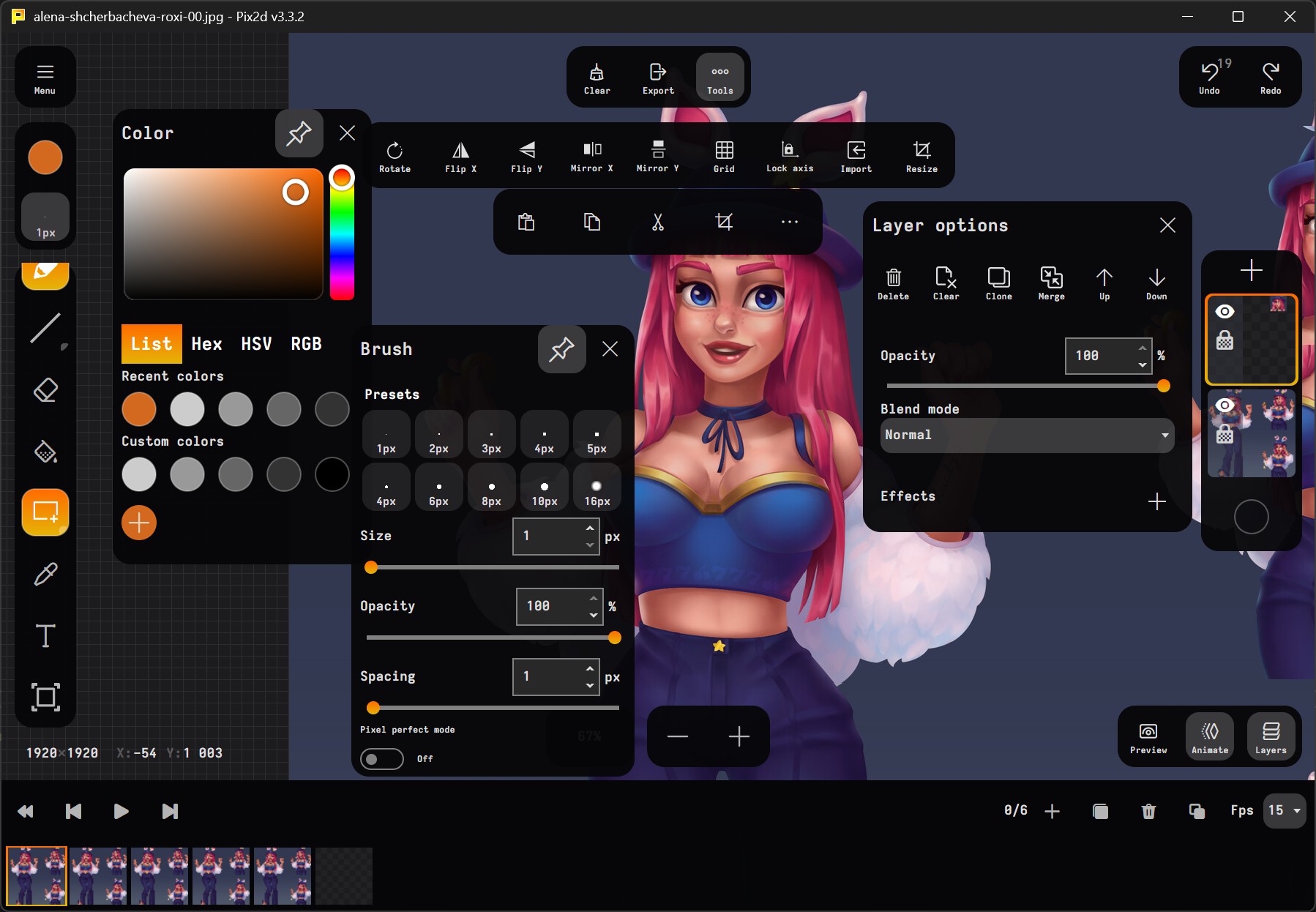
Art made by Alena Shcherbacheva
Description
Pix2D is a versatile graphics editor designed specifically for game developers and digital artists. It provides a comprehensive set of tools for creating and editing sprites, pixel art, and animations with a focus on modern user experience across multiple platforms.
Key Features
- Modern UI optimized for desktop, tablet, and smartphone use
- Sprite Creation & Editing with advanced tools
- Pixel Art Toolset with pixel-perfect precision
- Animation Support with onion skinning
- Layer System with blend modes and effects
- Cross-Platform support (Windows, Linux, Android, Web)
- Plugin Architecture for extensibility
- Custom File Format (.pix2d) for project management
- Multiple Export Formats support
- Professional Tools:
- Palette control
- Brush settings
- Layer effects
- Custom grids
- Text tools
- Pixel-perfect shapes
Status
This repository contains the official documentation and projects for Pix2D. The public APIs and plugin system are under development and will be available soon.
Installation
Windows
- Download from Windows Store
- Or download the Windows Installer from our official website
Linux
- Linux version available at pix2d.com
Android
- Get it on Google Play
Web Version
- Access online at pix2d.com
Usage
For detailed usage instructions and tutorials, please visit our documentation.
Contributing
We welcome contributions! Please see our Contributing Guidelines for details on how to:
- Report bugs
- Suggest new features
- Submit code changes
- Improve documentation
Support
- Official Website: pix2d.com
- Telegram channel: https://t.me/pix2dApp
- Bug Reports: GitHub Issues
Privacy & Crash Reporting
The Android build of Pix2D integrates Sentry to collect anonymous reports of fatal crashes. This helps us diagnose issues that escape testing on real devices.
- Opt-in only. No telemetry is sent until the user explicitly allows anonymous crash reporting; until then the local crash report flow is the only path.
- Fatal crashes only. Non-fatal log/exception calls are filtered out — only unhandled/critical exceptions are forwarded.
- No personal data. Reports include the exception, stack trace, app version, platform, and an opaque crash report id. No project files, image content, or user-identifying information are transmitted.
- Source-free DSN. The Sentry DSN is injected at build time from a CI secret rather than being checked into source.
The non-Android builds (Windows, Linux, macOS, Web) currently do not ship with a crash telemetry sink and only produce local crash reports.
License
This project is licensed under the MIT License - see the LICENSE file for details.
Modules and dependencies used in this project
| Module/Dependency | License/Source | Notes |
|---|---|---|
| Newtonsoft.Json | MIT | JSON serialization |
| Avalonia | MIT | UI framework |
| Avalonia.Markup.Declarative | MIT | Declarative UI framework for defining views with C# code instead of XAML, including .NET 6.0+ Hot Reload support |
| SixLabors.ImageSharp | Apache 2.0 (details in Six Labors Split License) | The Best image processing library for .net |
| Sentry | MIT | Crash analytics on Android (opt-in, fatal only) |
Acknowledgements
- Thanks to all contributors
- Special thanks to our community
Running Pix2D on macOS
Pix2D for macOS is distributed as an unsigned and unnotarized app bundle. Due to Apple security policies, you may see a warning when launching the app for the first time:
"Pix2D.app is damaged and can’t be opened. You should move it to the Bin."
This is a standard Gatekeeper message for unsigned apps. Pix2D is open source and does not contain malware.
How to Run Pix2D on macOS
Option 1: Right-click to Open
- Download and extract the DMG.
- Drag
Pix2D.appto yourApplicationsfolder. - Right-click (or Control-click) on
Pix2D.appand choose Open. - In the dialog, click Open again. You only need to do this the first time.
Option 2: Remove Quarantine Attribute (Terminal)
- Open Terminal.
- Run:
xattr -dr com.apple.quarantine /Applications/Pix2D.app - Now you can launch Pix2D normally from Applications.
Why this happens:
Apple requires a paid Developer ID and notarization for apps to run without warnings. Pix2D is open source and not notarized to keep it free for everyone. See Apple’s documentation for more info.
If you have questions or issues, please open an issue on GitHub!
Made with ❤️ by the Pix2D Team