
PNLCS
Open-source, self-hosted hosting billing platform — a free WHMCS alternative.
Client portal · invoicing · domain & SSL management · support tickets · reseller hosting.
Built with Laravel 13 · PHP 8.3+ · MySQL 8 · Alpine.js · Tailwind CSS 4




Docker · Installation · First Steps · Screenshots · Features · Modules · Contributing


About — Open-Source WHMCS Alternative
PNLCS is a free, open-source, self-hosted hosting billing platform and client portal — an open alternative to WHMCS for web hosting companies, reseller hosts, and infrastructure providers. It covers the full customer lifecycle: product catalog, checkout, recurring invoicing, domain registration, SSL certificate management, support tickets, knowledge base, and affiliate tracking.
If you have used WHMCS, you will feel at home: the data model, workflows, and module ecosystem (servers, gateways, registrars, SSL providers) are deliberately familiar. The difference is that PNLCS is MIT-licensed, self-hosted, and free to fork, study, and extend.
This project is built and maintained by the Panelica Server Management Panel team in our spare time, alongside our main product. We wanted an open, self-hosted billing system that integrates natively with Panelica and plays nicely with other control panels too — so we built one.
What works well today:
- Client portal, admin panel, and core billing flows
- Invoicing, orders, services, domains, tickets, knowledge base
- The Panelica server module (fully tested against live servers)
- Stripe payment gateway (tested in production)
- Multi-language UI (30 locales, admin-editable translations)
What needs your help:
- cPanel / Plesk / DirectAdmin / Proxmox server modules — code is in place but we have not tested them end-to-end. If you run one of these, please try it out and open an issue (or even better, a pull request) telling us what you found.
- PayPal / Authorize.Net / Bank Transfer gateways — same story.
- Enom domain registrar — API integration exists, needs real-world verification.
- General bug reports, typos, translation improvements.
We read every issue, but because this is a side project our response time isn't always same-day. If you can include reproduction steps or a patch, it helps us enormously.
Screenshots — Admin Panel & Client Portal
Admin Panel
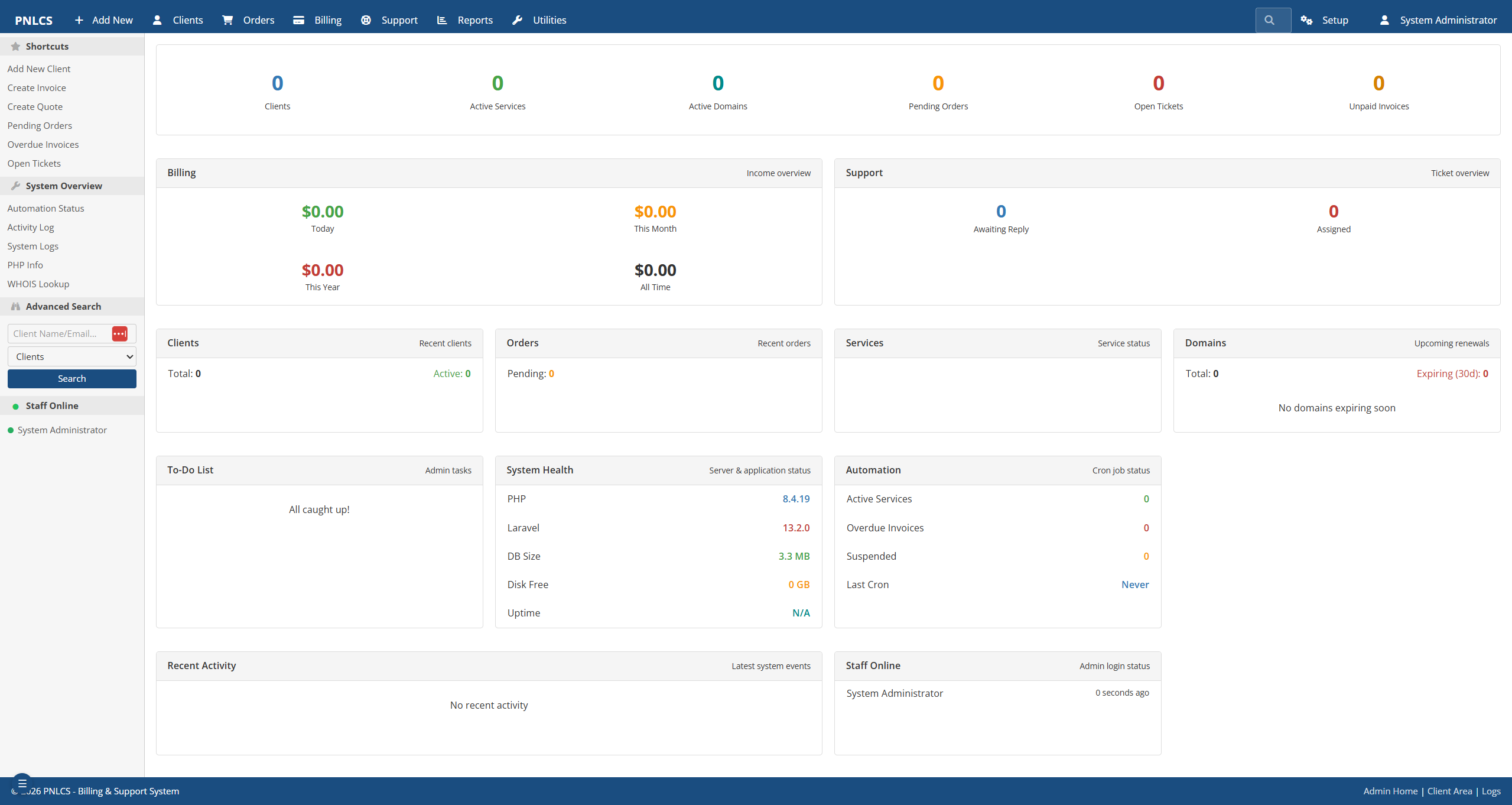 Admin dashboard with revenue, orders, and ticket overview
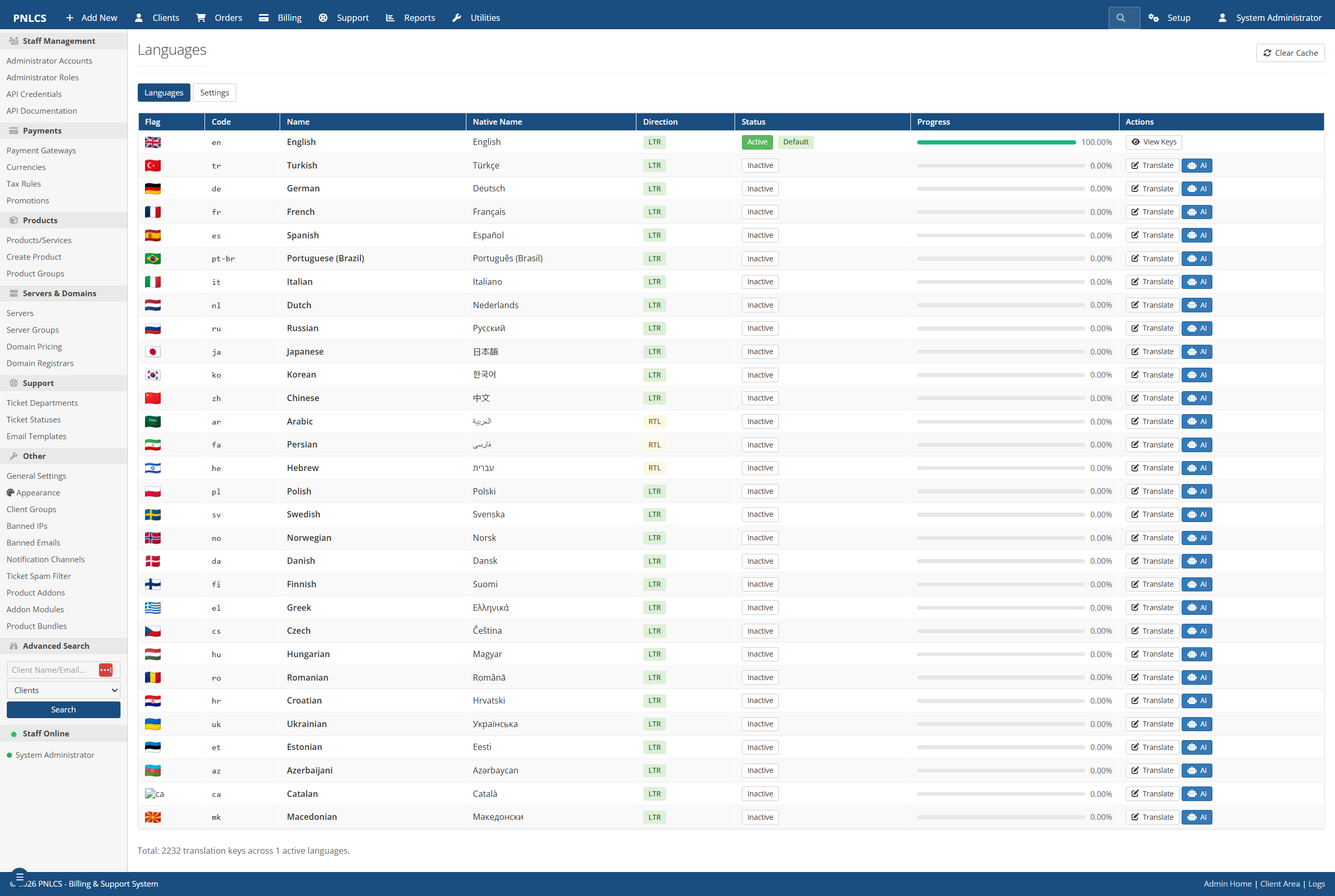 Built-in translation editor — 30 locales, 2,232 translation keys, AI-assisted bulk translate
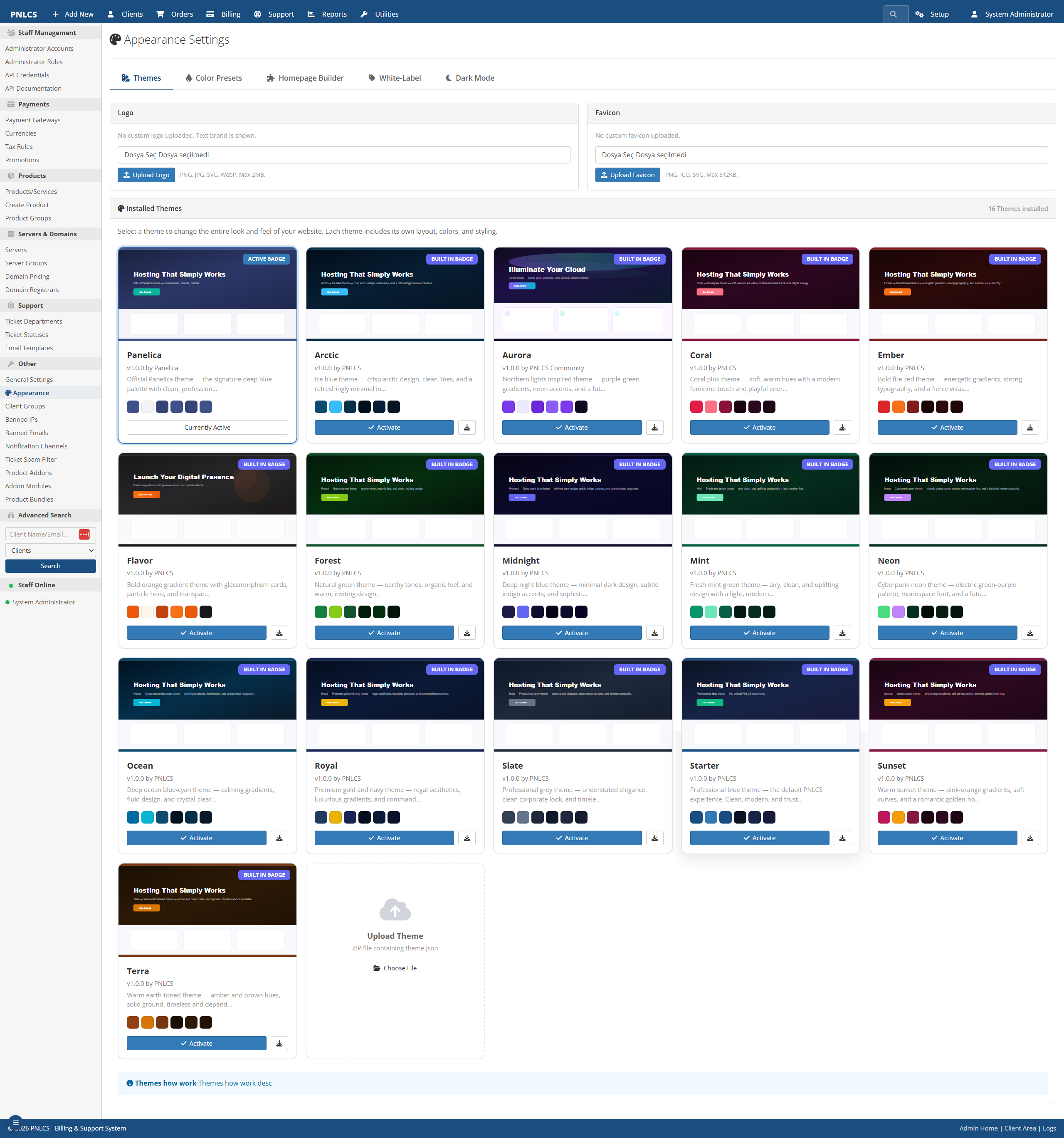 WordPress-style theme system with 15 built-in themes, logo/favicon upload, dark mode toggle, and homepage builder
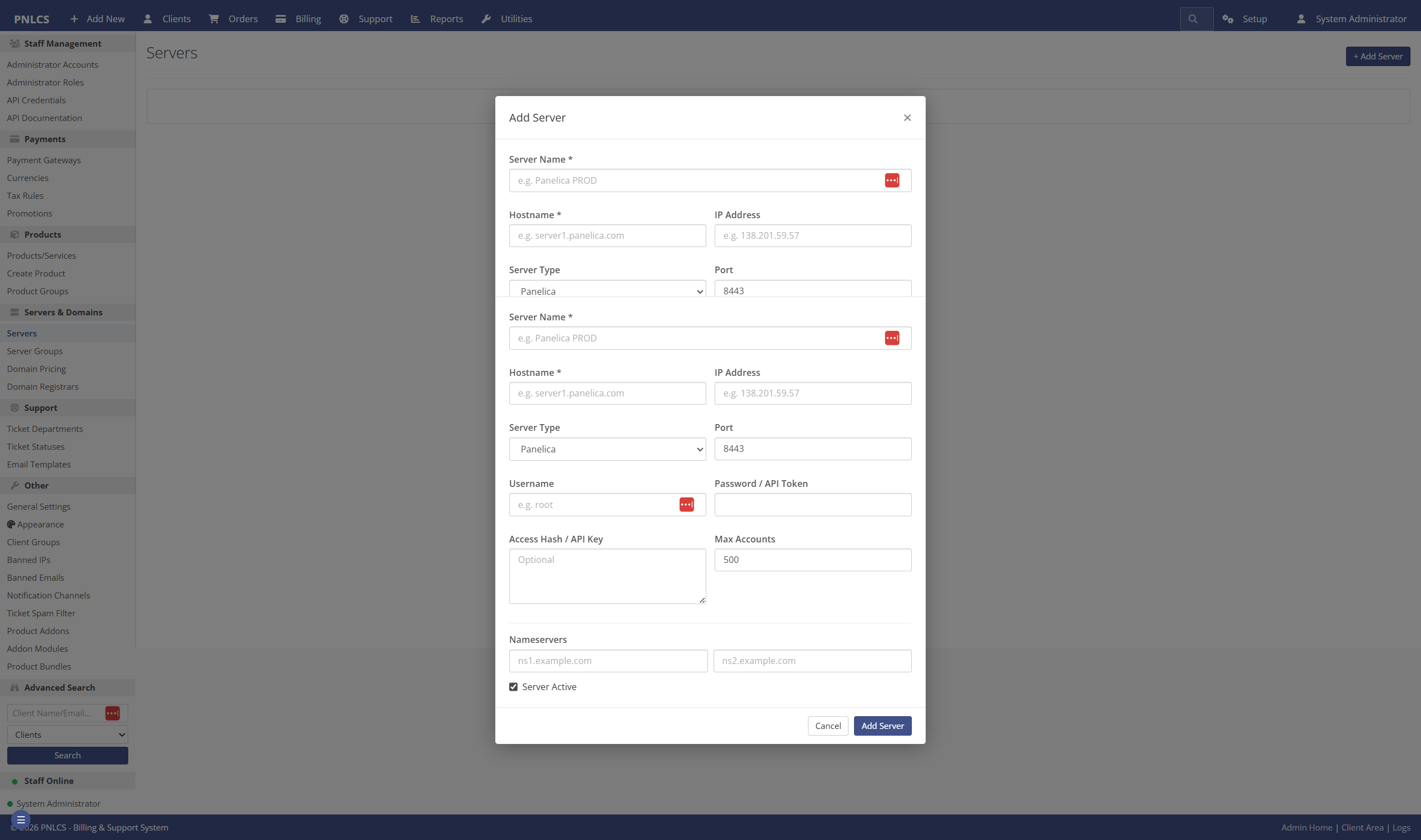 Server module management — connect Panelica, cPanel, Plesk, DirectAdmin, Proxmox, or custom servers
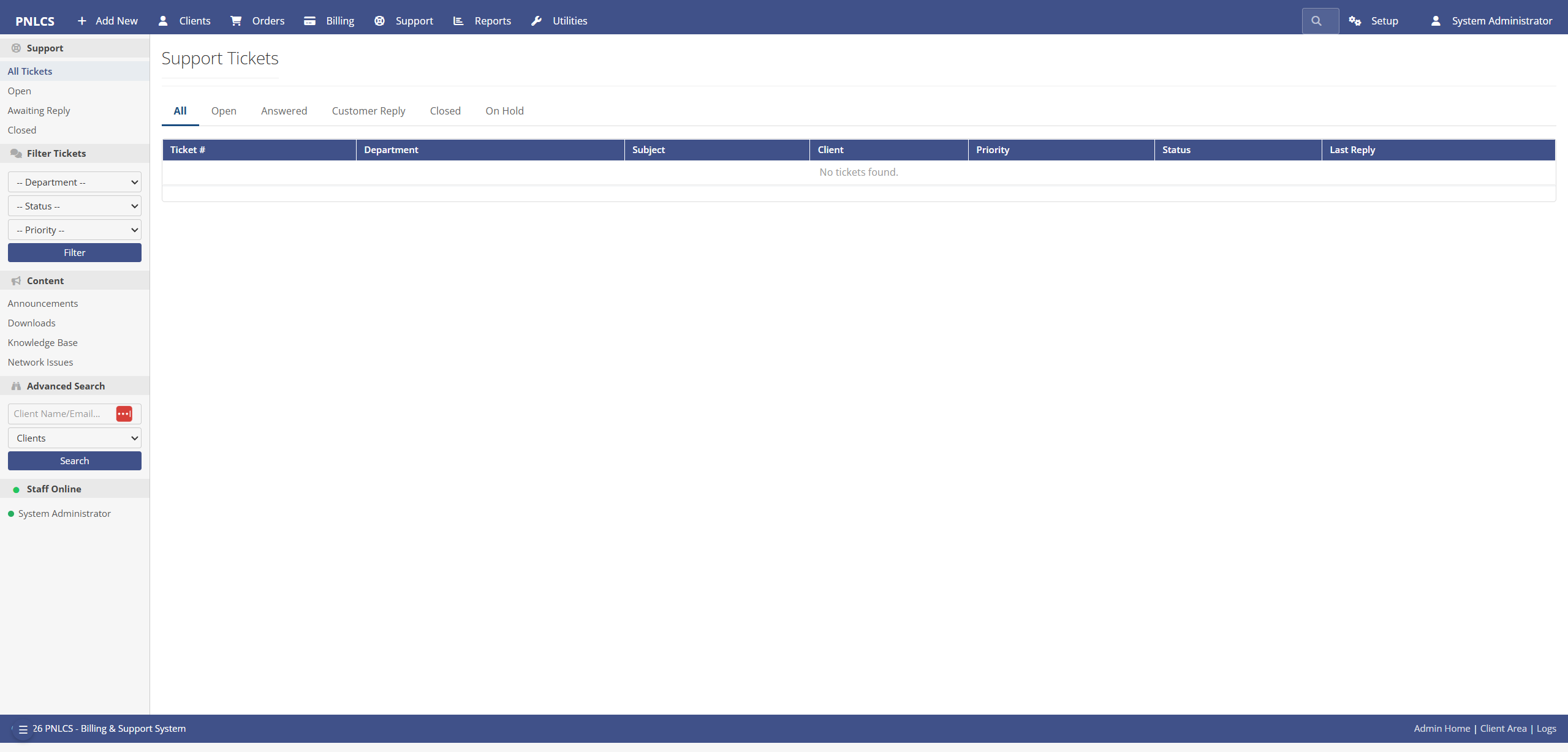 Ticket system with departments, priority routing, internal notes, and escalation rules
Client-Facing Site
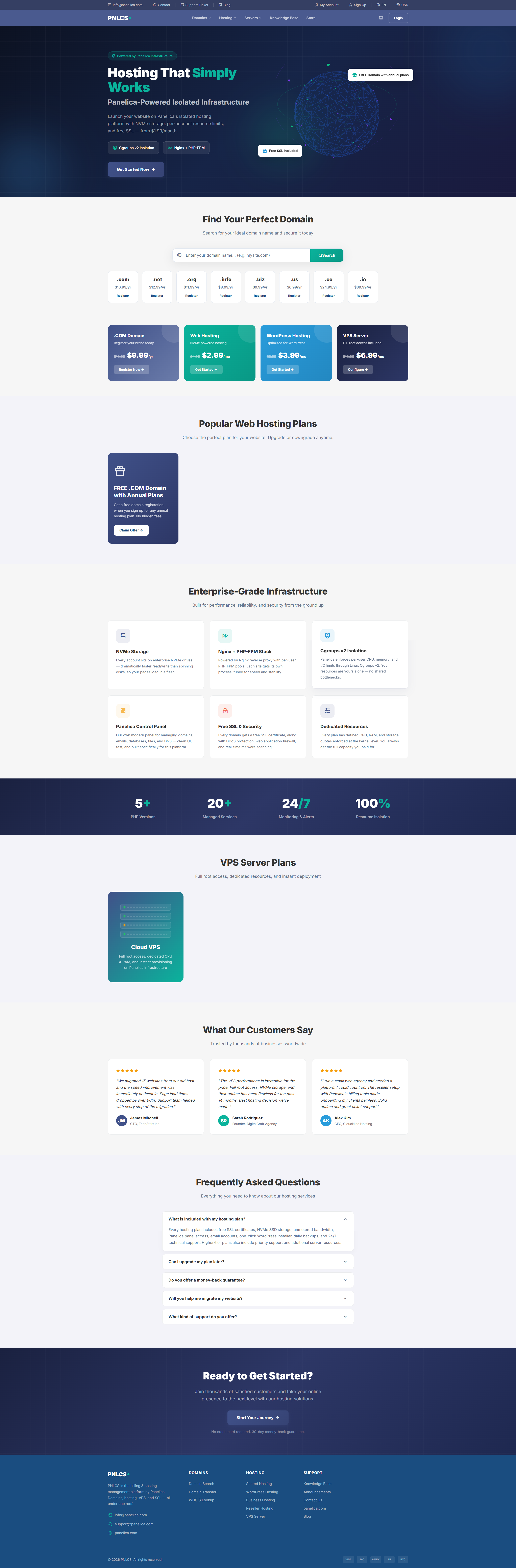 Customer-facing landing page with domain search, hosting plans, VPS servers, and FAQ — fully configurable
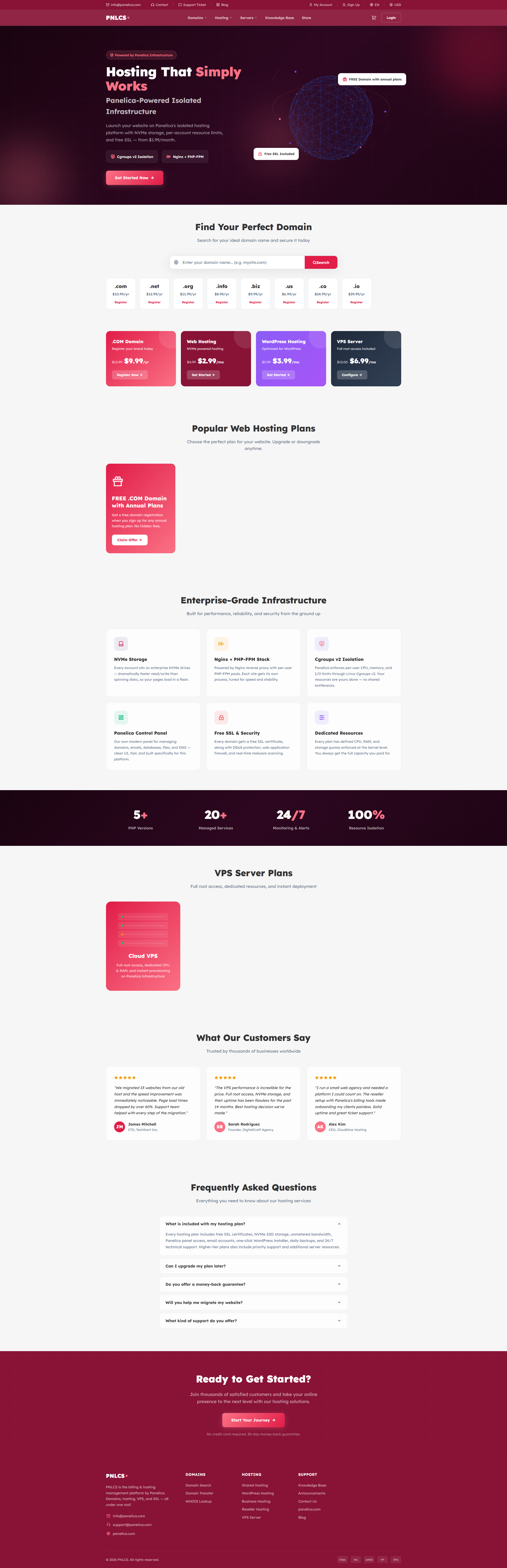 Same site with a different built-in theme applied — one click to switch
Hosting Billing Features
💼 Client Portal
- Shop & checkout — browse plans, configure service, apply coupons, pay
- Service management — upgrade, downgrade, cancel, auto-renew toggle
- Domain management — register, transfer, renew, EPP code, WHOIS
- Invoicing — view, pay online, download PDF, add-funds, credit balance
- Support tickets — attachments, priority, department routing
- Knowledge base & announcements — searchable, categorized
- SSL certificates — CSR generation, approver emails, auto-install
- Affiliate program — referral tracking, commission payouts
- Account security — 2FA (TOTP), login alerts, session history
🛡️ Admin Panel
- Dashboard — revenue, new signups, pending orders, open tickets at a glance
- Client management — profiles, impersonation, notes, billing summary
- Orders & invoices — manual create, bulk actions, mass mail, PDF export
- Products & bundles — configurable options, addons, pricing matrices
- Ticket system — internal notes, escalation rules, spam filter
- Reports — revenue, conversion funnel, MRR, churn, affiliate stats
- Bulk operations — mass email, bulk invoice, bulk service status update
- Calendar — events, reminders, scheduled tasks
- Quotes & projects — WHMCS-style pre-sales flow
🌐 Internationalization
- 30 locales, English active by default
- 2,232 translation keys for the core UI
- In-browser editor — edit strings without touching files
- AI-assisted bulk translate for missing keys
- Export / import JSON per locale
🎨 Theme System
- 15 built-in themes (Arctic, Aurora, Coral, Ember, Forest, Midnight, Mint, Neon, Ocean, Panelica, Royal, Slate, Starter, Sunset, and more)
- WordPress-style install / activate / delete workflow
- Homepage builder with reorderable sections
- Per-site white-label options (logo, favicon, footer copyright)
- Dark mode toggle per theme
🔐 Security & Access Control
- RBAC with over 45 fine-grained permissions
- 2FA (TOTP) for both admin and client portals
- Rate-limited login, 2FA verify, password reset, email resend
- IP whitelisting for admin area (optional)
- Session timeout and force logout support
- Activity log — every admin action recorded
- Banned IPs & emails at the application level
💳 Billing & Automation
- Recurring billing — monthly, quarterly, semi-annually, annually, biennially
- Auto-suspend unpaid services after configurable grace period
- Late fees, promotions, coupons, tax rules (inclusive/exclusive)
- Overage billing — disk / bandwidth metering, opt-in per product
- Credit balances & add-funds flow
- Automated reminders — invoice, payment, CC expiry, domain renewal
- Auto-renew services and domains with billing integration
⚙️ Developer Features
- REST API with API-key auth for external integrations
- Webhooks — inbound (gateway callbacks) and outbound (events)
- Queue workers for email and background jobs
- Scheduled commands — invoice generation, reminders, polling
- Modular architecture — add server / gateway / registrar modules without touching core
- Eloquent everywhere — no raw SQL, no string concatenation
Requirements
| Component | Minimum |
|---|---|
| PHP | 8.3 or 8.4 |
| MySQL | 8.0 (or MariaDB 10.6) |
| Node.js | 18+ |
| Composer | 2.x |
| Web server | Nginx or Apache with PHP-FPM |
| PHP extensions | bcmath, curl, dom, fileinfo, gd, mbstring, mysqli, openssl, pdo_mysql, tokenizer, xml, zip |
Optional but recommended: Redis (session/cache), SMTP server or relay (email delivery), supervisor (queue worker).
Quick Start with Docker
The fastest way to try PNLCS is the official Docker image
panelica/pnlcs-runtime.
It bundles PHP-FPM 8.4 + nginx + Node.js 20 + supervisor and clones the latest
code from this repository on first start. No manual composer install or
npm run build — the entrypoint handles everything.
docker network create pnlcs-net

docker run -d --name pnlcs-db --network pnlcs-net \
  -e MYSQL_ROOT_PASSWORD=changeme \
  -e MYSQL_DATABASE=pnlcs -e MYSQL_USER=pnlcs -e MYSQL_PASSWORD=changeme \
  mariadb:11

docker run -d --name pnlcs --network pnlcs-net -p 8090:80 \
  -e DB_HOST=pnlcs-db -e DB_DATABASE=pnlcs \
  -e DB_USERNAME=pnlcs -e DB_PASSWORD=changeme \
  -e APP_URL=http://localhost:8090 \
  panelica/pnlcs-runtime:1.2
Wait 3–5 minutes for the first start (composer install + npm build), then visit http://localhost:8090/install to run the in-app install wizard. The wizard guides you through requirements check, admin account creation (you choose username + password), and application settings — then locks itself permanently.
To pull the latest code from this repo into a running container:
docker exec pnlcs /usr/local/bin/update.sh
📦 Full image documentation, environment variables, screenshots, and production deployment notes: 👉 https://hub.docker.com/r/panelica/pnlcs-runtime
Self-Hosted Installation
1. Clone the repository
git clone https://github.com/Panelica/pnlcs.git
cd pnlcs
2. Install PHP dependencies
composer install --no-dev --optimize-autoloader
3. Create the database
CREATE DATABASE pnlcs CHARACTER SET utf8mb4 COLLATE utf8mb4_unicode_ci;
CREATE USER 'pnlcs'@'localhost' IDENTIFIED BY 'choose-a-strong-password';
GRANT ALL PRIVILEGES ON pnlcs.* TO 'pnlcs'@'localhost';
FLUSH PRIVILEGES;
4. Configure environment
cp .env.example .env
Open .env in your editor and set at least these values:
APP_NAME="Your Company"
APP_URL=https://billing.your-domain.com
APP_ENV=production
APP_DEBUG=false

DB_DATABASE=pnlcs
DB_USERNAME=pnlcs
DB_PASSWORD=choose-a-strong-password

MAIL_FROM_ADDRESS="[email protected]"
MAIL_FROM_NAME="Your Company"
Note: DB_CONNECTION defaults to mysql — do not change it to sqlite
unless you know what you're doing (some migrations use MySQL-specific SQL).
5. Generate the application key
php artisan key:generate
6. Build frontend assets
npm install
npm run build
7. Create the public storage symlink
php artisan storage:link
8. Cache configuration for production
php artisan optimize
9. Set directory permissions
chmod -R 775 storage bootstrap/cache
chown -R www-data:www-data storage bootstrap/cache
(adjust the user to match your server — nginx, apache, or your panel user)
10. Point your web server to public/
Whatever you use — a control panel, raw Nginx, Apache, Caddy — make sure
the document root is the public/ directory, not the project root.
11. Open the install wizard
With the web server up and pointing to public/, open in your browser:
https://billing.your-domain.com/install
The 5-step wizard:
- Requirements — verifies PHP version, extensions, writable directories
- Database — confirms your DB credentials and runs migrations
- Admin account — you choose the username, email, and password
- App settings — public URL, application name, default locale
- Done — wizard locks itself permanently and redirects to login
The wizard creates:
- Your administrator account (credentials you choose, no defaults)
- Four starter currencies (USD, EUR, GBP, TRY)
- Ticket departments, statuses, email templates
- 30 language entries (English active by default)
- 2,232 English translation keys
- Default homepage sections and domain pricing rows
Advanced / unattended install: if you cannot use the browser wizard (e.g. headless deploy, Ansible role), you can run the equivalent steps from the CLI:
php artisan migrate --force && php artisan db:seed --force. This bootstraps a defaultadmin / admin123account that you must change on first login.
12. Schedule the cron runner
Add a single line to the web user's crontab (crontab -e):
* * * * * cd /path/to/pnlcs && php artisan schedule:run >> /dev/null 2>&1
This drives invoice generation, payment reminders, automatic suspensions, SSL polling, and other background tasks.
13. Run a queue worker (optional but recommended)
Email delivery and background jobs run through the queue. A simple
supervisor entry:
[program:pnlcs-worker]
command=php /path/to/pnlcs/artisan queue:work database --sleep=3 --tries=3 --max-time=3600
autostart=true
autorestart=true
user=www-data
First Steps After Installation
Once the site loads and you can reach /admin/login, do these in order:
1. Sign in to the admin panel
- URL:
https://billing.your-domain.com/admin/login - Use the username and password you chose during the install wizard
- (If you ran the unattended CLI install: username
admin, passwordadmin123— change this immediately under My Account → Change Password) - (Recommended) Enable Two-Factor Authentication from My Account → Security.
2. Configure General Settings
Settings → General
- Company name, support email, logo, favicon
- Default language, currency, timezone
- Date format, invoice pay terms, tax behavior
3. Configure Email Delivery
Settings → Email (or edit .env directly)
- Set
MAIL_MAILERtosmtp(default islogfor testing) - Fill in
MAIL_HOST,MAIL_PORT,MAIL_USERNAME,MAIL_PASSWORD - Send a test email from the settings page to verify
Until this is done, emails are written to storage/logs/laravel.log only.
4. Customize Appearance
Settings → Appearance
- Pick a theme from the 15 built-in options
- Upload your logo and favicon
- Configure homepage sections (hero, features, pricing, testimonials)
- Set up white-label footer text
5. Add Payment Gateways
Configuration → Gateways
- Stripe — paste your API keys, enable
- PayPal — client ID + secret (sandbox or live)
- Bank Transfer — set instructions shown to clients
- Test each gateway with a small order before going live
6. Add Server Modules (if you sell hosting)
Configuration → Servers
- Add your Panelica / cPanel / Plesk / DirectAdmin server
- Test the API connection from the server edit page
- Assign servers to server groups if you have multiple
7. Create Your First Product
Products (main admin menu)
- Create a product group (e.g. "Shared Hosting")
- Create a product, link it to a server and a module
- Set pricing for monthly / quarterly / annually
- Enable auto-setup if you want provisioning on payment
8. Configure Domain Pricing (if you sell domains)
Configuration → Domain Pricing
- Add TLDs you sell (
.com,.net, ...) - Set registration, transfer, and renewal prices
- Link to a registrar module (or use Manual)
9. Set Up Tax Rules
Configuration → Tax
- Add country-level or state-level tax rules
- Choose inclusive or exclusive tax display
- Assign taxable flag to products individually
10. (Optional) Invite Staff and Define Roles
Configuration → Admin Roles / Admins
- Create custom roles (e.g. "Billing Manager", "Support Agent")
- Pick permissions per role from the 45+ available
- Add staff members and assign roles
11. Enable Email Verification for Signups (recommended)
Settings → General → Security
- Toggle Require email verification on
- New signups will receive a verification link before they can order
12. Test the Full Flow End-to-End
- Open an incognito browser
- Visit
/client/registerand create a test client - Place a test order for one of your products
- Pay with the test mode of your gateway
- Verify the invoice, service, and email flow all work
Upgrading
git pull
composer install --no-dev --optimize-autoloader
php artisan migrate --force
npm install
npm run build
php artisan optimize:clear
php artisan optimize
Always back up your database before pulling new migrations.
Modules — Servers, Payment Gateways & Domain Registrars
PNLCS ships with modular server, gateway, registrar, and SSL
provider integrations under the modules/ directory. Add control-panel
servers (cPanel, Plesk, DirectAdmin, Proxmox, Panelica), configure
payment gateways (Stripe, PayPal, bank transfer), and connect domain
registrars (Enom) without touching core code.
| Module | Type | Status |
|---|---|---|
| Panelica | Server | ✅ Tested |
| cPanel | Server | ⚠️ Needs testing |
| Plesk | Server | ⚠️ Needs testing |
| DirectAdmin | Server | ⚠️ Needs testing |
| Proxmox | Server | ⚠️ Needs testing |
| Custom | Server | ⚠️ Needs testing |
| Stripe | Gateway | ✅ Tested |
| PayPal | Gateway | ⚠️ Needs testing |
| Authorize.Net | Gateway | ⚠️ Needs testing |
| BankTransfer | Gateway | ⚠️ Needs testing |
| Enom | Registrar | ⚠️ Needs testing |
| Manual | Registrar | ✅ Works |
| GoGetSSL | SSL | ⚠️ Needs testing |
| Sectigo | SSL | ⚠️ Needs testing |
| Manual | SSL | ✅ Works |
If you run one of the "needs testing" integrations in production, please open an issue with what worked and what didn't. A short note is enough — we can iterate from there.
Adding a new module? Look at the existing ones as a reference; each module is a self-contained directory with a handler class and optional config view.
Internationalization
All UI strings live in the database (dynamic_translations table) and
flat PHP files under lang/<locale>/. Translations are editable from the
admin panel under Configuration → Languages & Translations. Exporting
to JSON, importing, and AI-assisted batch translation are supported out
of the box.
If your language isn't covered yet, you can either submit a PR against the seeder or use the admin UI's export/import flow.
Security
- All admin routes require authentication via the
admin.authmiddleware - Over 250 admin endpoints are gated by fine-grained permissions
- CSRF protection on every form
- Rate limiting on login, 2FA, password reset, and verification email resends
- Webhook routes are CSRF-exempt but validated by HMAC signatures
- Eloquent ORM everywhere (no raw SQL concatenation)
Please report security issues privately to [email protected] rather than opening a public GitHub issue.
Contributing
Issues and pull requests are welcome.
Ways to help:
- Test a module from the "Needs testing" list above and file an issue with what you found.
- Report a bug with reproduction steps — screenshots help a lot.
- Improve a translation via the admin UI's export, edit a JSON file, and send us a PR.
- Write documentation — installation on specific hosting panels, how to add a custom module, etc.
Please keep in mind:
- This is a side project for the Panelica team. We'll get to issues as quickly as we can but same-day responses are rare.
- PRs that include tests are prioritized.
- Please match the existing coding style (Laravel Pint + conventional commits).
Support & Community
Need help, want to report a bug, or have a feature request?
- 🐛 Bug reports & feature requests — GitHub Issues
- 💬 Community forum — forum.panelica.com
- 📧 Email — [email protected]
- 🌐 Main site — panelica.com
- 🔒 Security disclosures — [email protected] (please do not open public issues for security)
We're happy to help from the forum or by email, but since this is a side project your patience is appreciated. For urgent matters, the forum tends to get the fastest community response.
Credits
- Panelica Server Management Panel team — initial development and ongoing maintenance
- Laravel by Taylor Otwell and the Laravel community
- WHMCS — for inspiring much of the data model and workflow
- Every contributor who opens an issue or a pull request
License
Released under the MIT License. See LICENSE for details.
Keywords: WHMCS alternative · open-source hosting billing · self-hosted billing platform · Laravel billing · PHP client portal · hosting management software · free WHMCS · invoicing system · reseller hosting software · domain management · SSL management · support ticket system · hosting CRM