

Open-source visual AI workflow builder for developers who need transparency and control
Website • Discord • Documentation
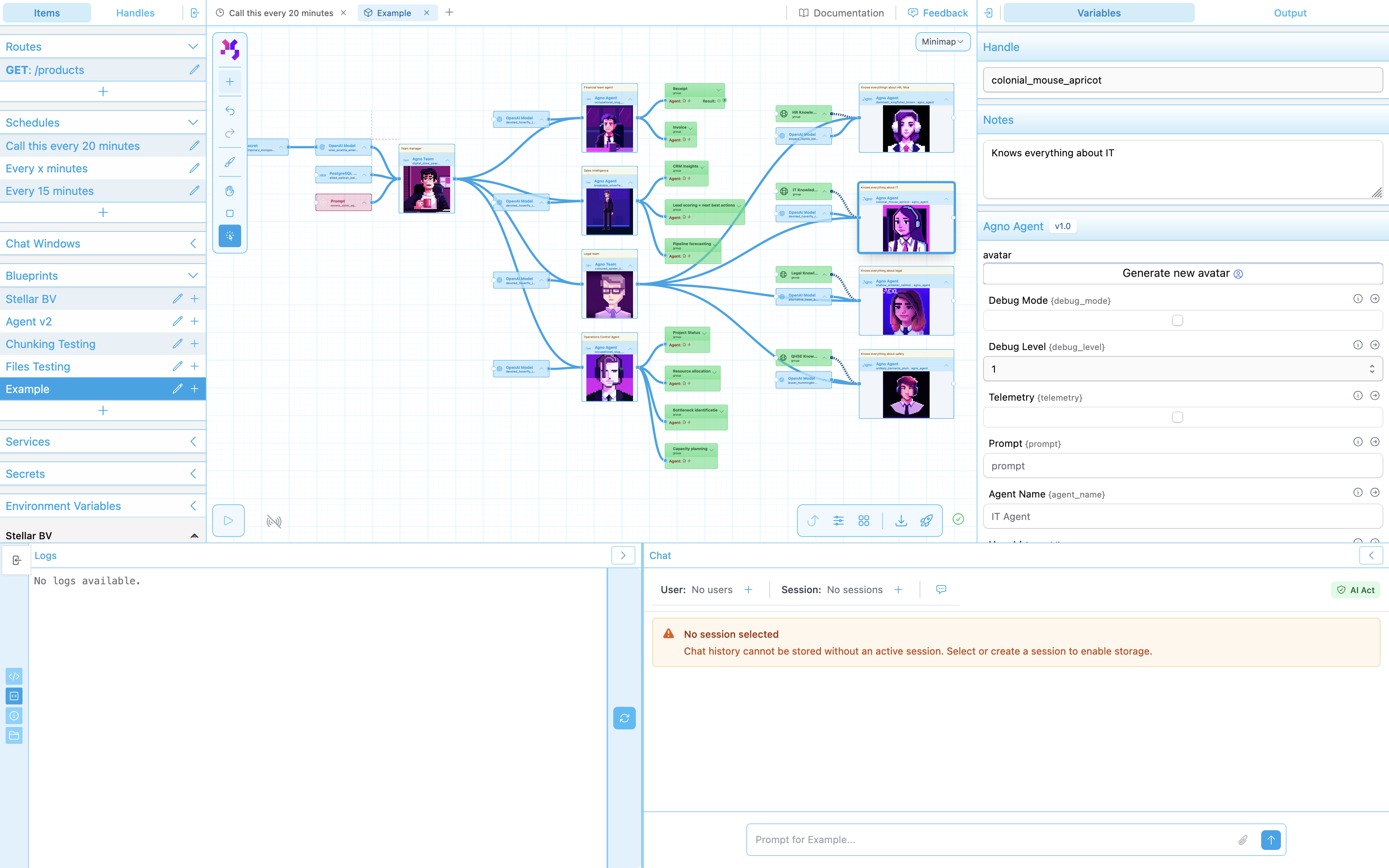
What is PolySynergy?
PolySynergy is a visual workflow builder that lets you orchestrate AI agents and integrations through a drag-and-drop interface. Unlike black-box automation tools, every step is visible, debuggable, and under your control.
See every step. Debug like actual code. No more black box guessing games.
Perfect for developers building AI applications who need:
- Multi-agent orchestration with full visibility into decision-making
- Flexible AI provider support (OpenAI, Anthropic, Mistral, Ollama)
- Real-time execution monitoring and debugging
- Complete control over data flow and logic
Status: Currently in alpha - actively developed and used in production by early adopters. Expect breaking changes.
🚀 Quick Start
PolySynergy runs fully self-hosted with Docker - no cloud dependencies required.
# Clone with submodules
git clone --recurse-submodules https://github.com/dionsnoeijen/polysynergy.git
cd polysynergy/orchestrator

# Configure environment (copy .env.example to .env in each service)
cp api-local/.env.example api-local/.env
cp router/.env.example router/.env
cp portal/.env.example portal/.env

# Start all services
docker compose up -d

# Initialize local databases
docker compose exec api_local poetry run python scripts/init_dynamodb_local.py

# Access the platform
# Portal:  http://localhost:4000
# API:     http://localhost:8090/docs
# Router:  http://localhost:8080
Requirements: Docker, Docker Compose
Self-hosted stack includes:
- PostgreSQL database
- Redis for caching and pub/sub
- DynamoDB Local for execution state
- MinIO for S3-compatible object storage
Optional: Self-Hosted AI with Ollama
For completely local AI without external APIs, add Ollama:
# Start with Ollama included
docker-compose -f docker-compose.yml -f docker-compose.ollama.yml up -d

# Pull AI models (examples)
docker exec ollama-local ollama pull llama3.1    # ~4.7 GB
docker exec ollama-local ollama pull mistral     # ~4.1 GB

# Configure in .env
echo "OLLAMA_HOST=http://ollama:11434" >> api-local/.env

# Use ModelOllama nodes in workflows
Note: Ollama requires ~10-15 GB disk space (5 GB image + models)
Key Features
🎨 Visual Workflow Editor
Drag-and-drop interface with 40+ node types including:
- AI agents (OpenAI, Anthropic, Mistral, Ollama)
- Data processing (JSON, lists, strings, files)
- Integrations (HTTP, email, AWS, databases)
- Control flow (conditionals, loops, routing)
- Custom nodes (extensible Python framework)
🔍 Transparency & Debugging
- Real-time execution monitoring via WebSocket
- Step-by-step workflow visualization
- Detailed logging and error tracking
- Full control over AI context and prompts
🚀 Deployment Options
- Self-hosted with Docker Compose (fully local, no cloud dependencies)
- Cloud deployment with AWS Lambda (optional, for serverless scaling)
- Scalable PostgreSQL + Redis + DynamoDB stack
- Secure with OIDC authentication
🔧 Developer-First
- Python-based node development
- REST API for programmatic access
- WebSocket for real-time updates
- Comprehensive test coverage
Technology Stack
| Layer | Technologies |
|---|---|
| Frontend | Next.js 15, React 19, TypeScript, Tailwind CSS |
| Backend | FastAPI, PostgreSQL, Redis, DynamoDB |
| Execution | Python 3.12, Docker / AWS Lambda |
| AI/ML | OpenAI, Anthropic, Mistral, Ollama |
Project Structure
orchestrator/
├── portal/         # Next.js visual workflow editor
├── api-local/      # FastAPI orchestration backend
├── router/         # Dynamic request routing service
├── node_runner/    # Python workflow execution framework
├── nodes/          # Core node library (40+ types)
└── nodes_agno/     # Advanced AI agent nodes
Each component is a separate repository included as a git submodule. See individual repos for detailed documentation.
Documentation
- Architecture: See CLAUDE.md for technical details
- API Reference: http://localhost:8090/docs (when running)
- Node Development: Check nodes/CLAUDE.md
- Website: https://www.polysynergy.com/ams
Contributing
Contributions welcome! This is an early-stage project with rapid iteration.
- Fork the repository
- Create a feature branch
- Submit a pull request
See individual component READMEs for development guidelines.
License
Licensed under Business Source License 1.1 (BSL 1.1)
- ✅ Free to use for non-commercial purposes
- ✅ Source available - full transparency
- ❌ Cannot offer as SaaS to third parties
- 📅 Becomes Apache 2.0 on January 1, 2028
For commercial licensing: [email protected]
Community
- Discord: Join our community
- Website: polysynergy.com
- Issues: GitHub Issues