
Portable Kanban
A lightweight, portable kanban board that lives in your filesystem as a plain .kanban (JSON) file.
Works across VS Code, the Web browser, and any terminal — all reading and writing the same file.
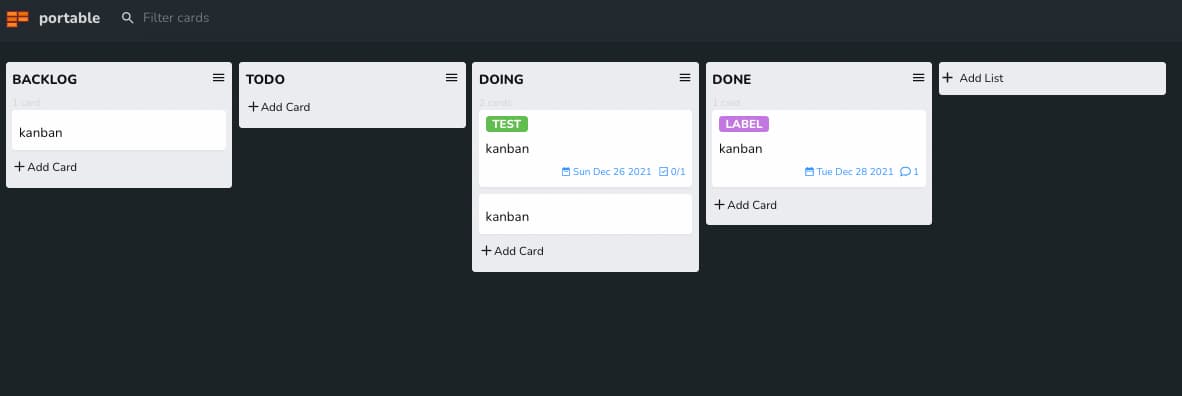
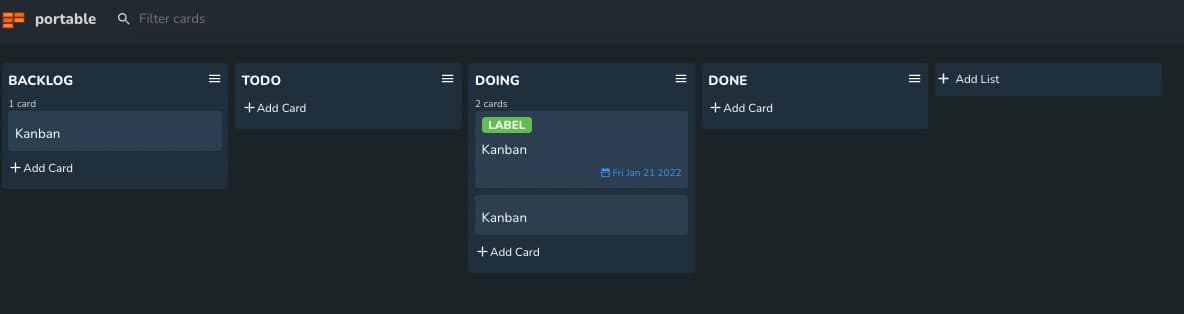
Features
- ✅ Drag and drop cards between lists (VS Code / Web)
- ✅ Add descriptions, labels, due dates, and comments to cards
- ✅ Task lists with checkboxes
- ✅ Archive cards and lists
- ✅ Search and filter functionality
- ✅ Dark / Light / System theme support
- ✅ Plain JSON
.kanbanfile format — Git-friendly and human-readable - ✅ TUI CLI — keyboard-driven terminal interface, works in any terminal
- ✅ MCP server — AI assistants can read and edit boards via Model Context Protocol
TUI CLI
A keyboard-driven terminal interface for .kanban files, built with Ink.
Installation
npm install -g portable-kanban-tui
Usage
# Open an existing kanban file
pkb my-board.kanban

# Create a new kanban file and open it
pkb new my-board.kanban
Keybindings
Board view:
| Key | Action |
|---|---|
← / h |
Move to left list |
→ / l |
Move to right list |
↑ / k |
Select card above |
↓ / j |
Select card below |
Enter |
Open card detail |
a |
Add new card to current list |
e |
Edit selected card title |
d |
Delete selected card |
H |
Move selected card to left list |
L |
Move selected card to right list |
? |
Show help |
q / Ctrl+C |
Quit |
Card detail view:
| Key | Action |
|---|---|
e |
Edit title |
d |
Edit description |
D |
Edit due date |
t |
Add task |
c |
Add comment |
1–9 |
Toggle checkbox task |
Esc / q |
Back to board |
Q |
Quit |
Customising keybindings — set PORTABLE_KANBAN_KEYMAPS to a JSON object:
PORTABLE_KANBAN_KEYMAPS='{"quit":"q","list_prev":"h","list_next":"l"}' pkb my-board.kanban
Available keys: quit, list_prev, list_next, card_up, card_down, card_add, card_edit, card_delete, card_move_left, card_move_right, help.
MCP Server (AI Integration)
The MCP server lets AI assistants (Claude Desktop, GitHub Copilot, etc.) read and manipulate .kanban files using the Model Context Protocol.
Build
pnpm build:mcp
Setup — Claude Desktop
Add to ~/Library/Application Support/Claude/claude_desktop_config.json:
{
  "mcpServers": {
    "portable-kanban": {
      "command": "node",
      "args": [
        "/path/to/portable-kanban/apps/mcp/dist/index.js",
        "/path/to/your/boards/"
      ]
    }
  }
}
Setup — GitHub Copilot CLI (.github/copilot-instructions.md or MCP config)
{
  "mcpServers": {
    "portable-kanban": {
      "command": "node",
      "args": ["/path/to/portable-kanban/apps/mcp/dist/index.js", "."]
    }
  }
}
Available Tools
Basic operations:
| Tool | Description |
|---|---|
list_boards |
List all .kanban files |
read_board |
Read a board (all lists and cards) |
get_card |
Get full details of a single card |
add_card |
Add a card to a list |
edit_card |
Edit title / description / due date |
move_card |
Move a card to another list |
delete_card |
Delete a card |
add_list |
Add a new list |
add_task |
Add a task (checkbox) to a card |
toggle_task |
Toggle a task checkbox |
add_comment |
Add a comment to a card |
Agentic workflow tools:
| Tool | Description |
|---|---|
get_next_card |
Get the first card from a list (pick next task to work on) |
start_card |
Move card to "Doing" + record start timestamp comment |
complete_card |
Check all tasks + move to "Done" + record completion comment |
Agentic task execution workflow
The intended pattern for an AI agent working through a backlog:
1. get_next_card(board="work", list="To Do")
   → returns card title, ID, description, and task list

2. start_card(board="work", card_id="<id>")
   → moves card to "Doing", records "[agent] Started at 2026-05-24 12:00"

3. ... agent performs the actual work ...
   → toggle_task(card_id, task_index=1)  ← mark each subtask done
   → toggle_task(card_id, task_index=2)
   → add_comment(card_id, "Found issue X, resolved by Y")

4. complete_card(board="work", card_id="<id>", summary="Implemented X, fixed Y")
   → checks all remaining tasks, moves to "Done"
   → records "[agent] Completed at 2026-05-24 12:05\nImplemented X, fixed Y"

5. Repeat from step 1 for the next card
Example prompts
"Work through all cards in the To Do list"
"Show me my kanban board"
"Move the 'Fix login bug' card to Done"
"Add a card 'Write tests' to the To Do list with due date 2026-06-01"
"Mark task 2 on card abc-123 as done"
"Add a comment 'Reviewed and approved' to the API card"
VS Code Extension
Installation
From VS Code Marketplace:
- Open VS Code
- Go to Extensions (
Ctrl+Shift+X) - Search for "Portable Kanban"
- Click Install
From Command Line:
ext install portable-kanban
Getting Started
- Open Command Palette (
Ctrl+Shift+P/Cmd+Shift+P) - Run "Portable Kanban: Create new Kanban"
- Choose a location — the
.kanbanfile opens as a board in a new tab
Configuration
{
  "portable-kanban.theme": "system",        // "dark" | "light" | "system"
  "portable-kanban.show-description": true, // Show card descriptions
  "portable-kanban.show-task-list": true    // Show task lists in cards
}
Keyboard Shortcuts
| Key | Action |
|---|---|
Escape |
Close modal / dialog |
Enter |
Confirm edit |
Shift+Enter |
Add multiple items at once |
Web App
A browser-based kanban board using the File System Access API.
Note: Requires a Chromium-based browser (Chrome / Edge) for full file read/write support.
Usage
pnpm dev:web      # Start dev server → http://localhost:5173
pnpm build:web    # Production build
- Open
http://localhost:5173 - Click Open file to open an existing
.kanbanfile - Click New file to create a new board
- Changes are saved automatically to the file
File Format
.kanban files are plain JSON:
{
  "lists": [
    {
      "id": "uuid",
      "title": "To Do",
      "cards": [
        {
          "id": "uuid",
          "listId": "parent-list-uuid",
          "title": "My task",
          "description": "Details here",
          "dueDate": "2026-06-01",
          "labels": [{ "id": "uuid", "title": "bug", "color": "#eb5a46" }],
          "checkboxes": [{ "id": "uuid", "title": "Step 1", "checked": false }],
          "comments": [{ "id": "uuid", "comment": "Looks good!" }]
        }
      ]
    }
  ],
  "archive": { "lists": [], "cards": [] },
  "settings": { "labels": [] }
}
Development
Prerequisites
- Node.js 18+
- pnpm 8+
Setup
git clone https://github.com/harehare/portable-kanban.git
cd portable-kanban
pnpm install
Build
pnpm build:core    # Build shared core package
pnpm build:ui      # Build shared UI package
pnpm build:vscode  # Build VS Code extension
pnpm build:web     # Build web app
pnpm build:tui     # Build TUI CLI
pnpm build:mcp     # Build MCP server
Development Servers
pnpm dev:vscode    # Watch mode for VS Code extension
pnpm dev:web       # Vite dev server for web app (http://localhost:5173)
pnpm dev:tui       # Rebuild TUI CLI
Testing & Linting
pnpm test          # Run all tests (vitest)
pnpm lint          # Run linter
Contributing
- Fork the repository
- Create a feature branch (
git checkout -b feature/amazing-feature) - Commit your changes
- Push the branch and open a Pull Request
License
MIT License
Support
- 🐛 Report bugs
- 💡 Request features
- ⭐ Star the project if you find it useful!