
portree - Git Worktree Server Manager


portree automatically manages multiple dev servers per git worktree — with automatic port allocation, environment variable injection, and *.localhost subdomain routing via reverse proxy.
Japanese version: README.ja.md
Demo

Features
- Multi-service — Define frontend, backend, and any number of services per worktree
- Automatic port allocation — Hash-based port assignment (FNV32) with per-service ranges; no port conflicts across worktrees
- Subdomain reverse proxy — Access any worktree via
branch-name.localhost:<port>(no/etc/hostsediting required) - HTTPS proxy — Auto-generated certificates or custom cert/key for local HTTPS (Secure Cookies, Service Workers, etc.)
- Environment variable injection —
$PORT,$PT_BRANCH,$PT_BACKEND_URL, etc. are injected automatically - TUI dashboard — Interactive terminal UI to start, stop, restart, and monitor all services
- Process lifecycle — Graceful shutdown (SIGTERM → SIGKILL), log files, stale PID cleanup
- Per-worktree overrides — Customize commands, ports, and env vars per branch
- AI agent friendly —
portree ls --jsonincludesurlanddirect_urlfields for automatic endpoint discovery
Quick Start
1. Install

# Homebrew
brew install fairy-pitta/tap/portree

# Go install
go install github.com/fairy-pitta/portree@latest

# Or build from source
git clone https://github.com/fairy-pitta/portree.git
cd portree
make build
2. Initialize

cd your-project
portree init
# Creates .portree.toml in the repo root
3. Configure
Edit .portree.toml to match your project:
[services.frontend]
command = "pnpm run dev"
dir = "frontend"
port_range = { min = 3100, max = 3199 }
proxy_port = 3000

[services.backend]
command = "source .venv/bin/activate && python manage.py runserver 0.0.0.0:$PORT"
dir = "backend"
port_range = { min = 8100, max = 8199 }
proxy_port = 8000

[env]
NODE_ENV = "development"
4. Start services
portree up            # Start all services for the current worktree
portree up --all      # Start all services for ALL worktrees
5. Start the proxy
portree proxy start
# :3000 → frontend services
# :8000 → backend services

# Or with HTTPS
portree proxy start --https
# Auto-generated certificates for local HTTPS
6. Open in browser
portree open                    # Opens http://main.localhost:3000
portree open --service backend  # Opens http://main.localhost:8000
Commands
| Command | Description |
|---|---|
portree init |
Create a .portree.toml configuration file |
portree up |
Start services for the current worktree |
portree up --all |
Start services for all worktrees |
portree up --service |
Start a specific service only |
portree down |
Stop services for the current worktree |
portree down --all |
Stop services for all worktrees |
portree ls |
List all worktrees, services, ports, status, and PIDs |
portree dash |
Open the interactive TUI dashboard |
portree proxy start |
Start the reverse proxy (foreground) |
portree proxy start --https |
Start the reverse proxy with HTTPS (auto-generated certs) |
portree proxy stop |
Stop the reverse proxy |
portree trust |
Install the CA certificate into the system trust store |
portree open |
Open the current worktree in a browser |
portree doctor |
Run diagnostic checks on config and ports |
portree version |
Print version information |
Configuration Reference
The .portree.toml file lives at the root of your git repository.
[services.<name>]
Define one or more services. Each worktree will run all defined services.
| Field | Type | Required | Description |
|---|---|---|---|
command |
string | yes | Shell command to start the service |
dir |
string | no | Working directory relative to worktree root (default: root) |
port_range |
{min, max} |
yes | Port allocation range for this service |
proxy_port |
int | yes | Port the reverse proxy listens on for this service |
[services.frontend]
command = "pnpm run dev"
dir = "frontend"
port_range = { min = 3100, max = 3199 }
proxy_port = 3000
[env]
Global environment variables injected into all services.
[env]
NODE_ENV = "development"
DATABASE_URL = "postgres://localhost/mydb"
[worktrees."<branch>"]
Per-worktree overrides. You can customize the command, fix a specific port, or add extra environment variables.
[worktrees.main]
services.frontend.port = 3100       # Fixed port for main branch

[worktrees."feature/auth"]
services.backend.command = "python manage.py runserver --settings=myapp.auth 0.0.0.0:$PORT"
services.backend.env = { DEBUG = "1" }
Environment Variables
portree automatically injects the following environment variables into every service process:
| Variable | Example | Description |
|---|---|---|
PORT |
3117 |
Allocated port for this service |
PT_BRANCH |
feature/auth |
Current branch name |
PT_BRANCH_SLUG |
feature-auth |
URL-safe slug of the branch name |
PT_SERVICE |
frontend |
Name of the current service |
PT_<SERVICE>_PORT |
PT_FRONTEND_PORT=3117 |
Port of each sibling service |
PT_<SERVICE>_URL |
PT_BACKEND_URL=http://feature-auth.localhost:8000 |
Proxy URL of each sibling service |
This allows services to discover each other automatically:
// next.config.js
module.exports = {
  async rewrites() {
    return [
      {
        source: "/api/:path*",
        destination: `${process.env.PT_BACKEND_URL}/api/:path*`,
      },
    ];
  },
};
How It Works
┌─────────────────────────────────────────────────────────────┐
│  git repository                                             │
│                                                             │
│  main worktree          feature/auth worktree               │
│  ┌───────────────┐      ┌───────────────┐                   │
│  │ frontend :3100│      │ frontend :3117│                   │
│  │ backend  :8100│      │ backend  :8104│                   │
│  └───────────────┘      └───────────────┘                   │
│         │                      │                            │
└─────────┼──────────────────────┼────────────────────────────┘
          │                      │
    ┌─────▼──────────────────────▼─────┐
    │     portree reverse proxy        │
    │                                  │
    │  :3000  ←  *.localhost:3000      │
    │  :8000  ←  *.localhost:8000      │
    └──────────────────────────────────┘
          │                      │
          ▼                      ▼
  main.localhost:3000    feature-auth.localhost:3000
  main.localhost:8000    feature-auth.localhost:8000
- Port allocation — Each service gets a port via
FNV32(branch:service) % range. Stable across restarts. - Process management — Services run as child processes with process groups. Logs go to
.portree/logs/. - Reverse proxy — One HTTP listener per
proxy_port. Routes based onHostheader subdomain. *.localhost— Per RFC 6761, modern browsers resolve*.localhostto127.0.0.1automatically.
TUI Dashboard
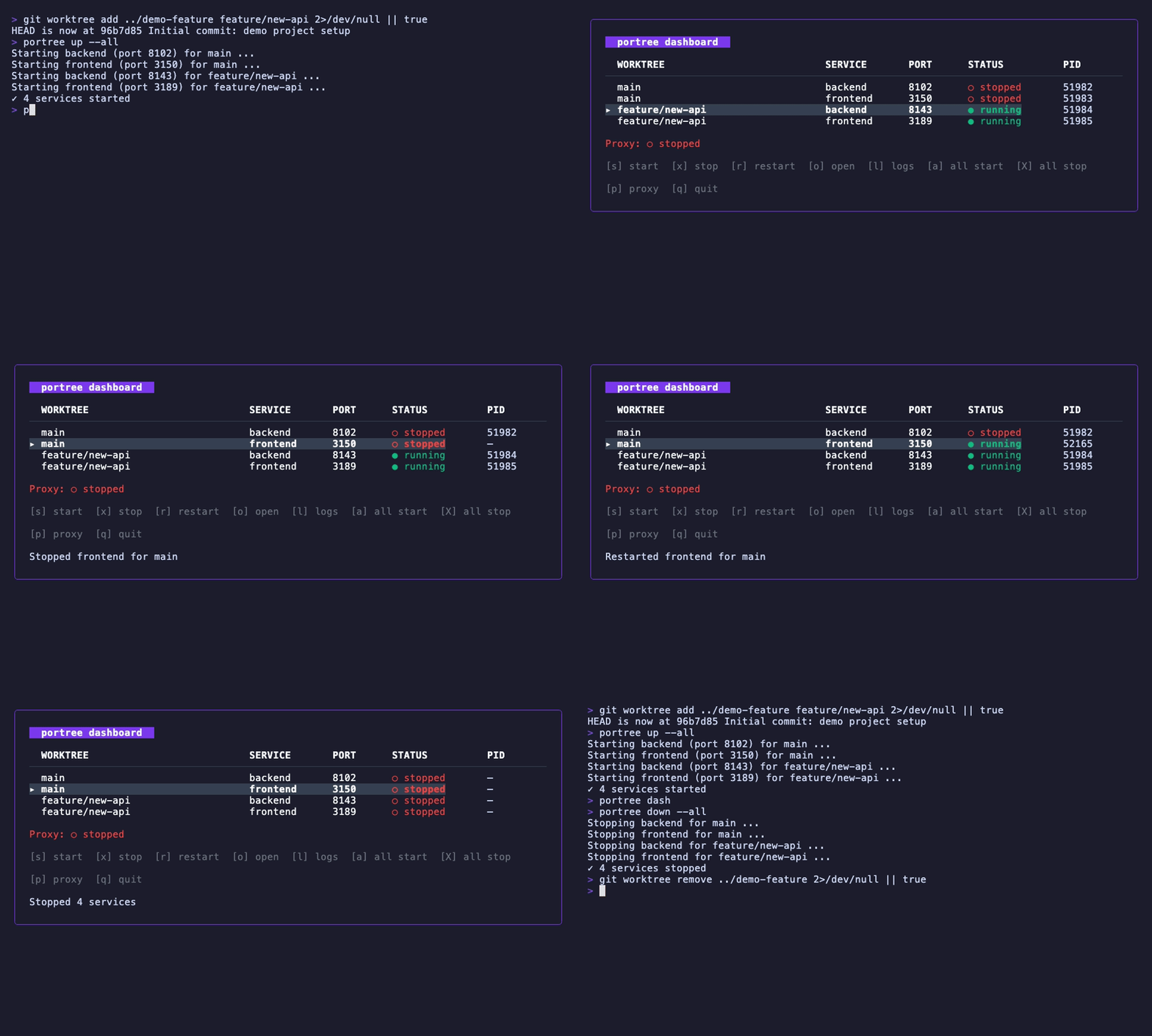
Launch with portree dash:
╭─ portree dashboard ──────────────────────────────────────────╮
│                                                               │
│  WORKTREE        SERVICE    PORT   STATUS      PID            │
│  ──────────────────────────────────────────────────────────── │
│ ▸ main           frontend   3100   ● running   12345          │
│   main           backend    8100   ● running   12346          │
│   feature/auth   frontend   3117   ○ stopped   —              │
│   feature/auth   backend    8104   ○ stopped   —              │
│                                                               │
│  Proxy: ● running (:3000, :8000)                              │
│                                                               │
│  [s] start  [x] stop  [r] restart  [o] open in browser       │
│  [a] start all  [X] stop all  [p] toggle proxy                │
│  [l] view logs  [q] quit                                      │
╰───────────────────────────────────────────────────────────────╯
Key bindings:
| Key | Action |
|---|---|
j/k |
Move cursor down/up |
s |
Start selected service |
x |
Stop selected service |
r |
Restart selected service |
o |
Open in browser |
a |
Start all services |
X |
Stop all services |
p |
Toggle proxy |
l |
View log file path |
q |
Quit |
Example Workflow
# You're working on a monorepo with frontend + backend
cd my-project

# Initialize portree
portree init
# Edit .portree.toml to define your services...

# Create a feature branch worktree
git worktree add ../my-project-feature-auth feature/auth

# Start services on your current branch
portree up
# Starting frontend (port 3100) for main ...
# Starting backend (port 8100) for main ...
# ✓ 2 services started for main

# Start services on ALL worktrees at once
portree up --all
# ✓ 4 services started

# Check status
portree ls
# WORKTREE        SERVICE    PORT   STATUS    PID
# main            frontend   3100   running   12345
# main            backend    8100   running   12346
# feature/auth    frontend   3117   running   12347
# feature/auth    backend    8104   running   12348

# JSON output (great for AI agents and scripts)
portree ls --json
# [{"worktree":"main","service":"frontend","port":3100,"status":"running",
#   "pid":12345,"url":"http://main.localhost:3000","direct_url":"http://localhost:3100"}, ...]

# Start the proxy
portree proxy start
# Access:
#   http://main.localhost:3000          → frontend (main)
#   http://main.localhost:8000          → backend (main)
#   http://feature-auth.localhost:3000  → frontend (feature/auth)
#   http://feature-auth.localhost:8000  → backend (feature/auth)

# Or start with HTTPS (for Secure Cookies, Service Workers, etc.)
portree proxy start --https
# Auto-generates certificates in .portree/certs/
# Access via https://main.localhost:3000

# Trust the CA to remove browser warnings
portree trust

# Open in browser
portree open
# Opening http://main.localhost:3000 ...

# Or use the TUI
portree dash

# When done
portree down --all
# ✓ 4 services stopped
Shell Completion
portree supports shell completion for bash, zsh, fish, and PowerShell.
bash:
source <(portree completion bash)
# Or for persistent use:
portree completion bash > /etc/bash_completion.d/portree
zsh:
portree completion zsh > "${fpath[1]}/_portree"
# You may need to start a new shell for this to take effect.
fish:
portree completion fish | source
# Or for persistent use:
portree completion fish > ~/.config/fish/completions/portree.fish
PowerShell:
portree completion powershell | Out-String | Invoke-Expression
# Or for persistent use:
portree completion powershell > portree.ps1
# and add ". portree.ps1" to your PowerShell profile.
Troubleshooting
Service fails to start
- Check the log file at
.portree/logs/<branch-slug>.<service>.logfor error output. - Verify the
commandin.portree.tomlruns correctly when executed manually. - Ensure the working
direxists relative to the worktree root.
Port conflict
- Run
portree doctorto check for port conflicts. - If a port is already in use, portree uses linear probing to find the next available port in the range.
- If the entire range is exhausted, widen the
port_rangein.portree.toml.
Stale processes
- Run
portree doctorto detect stale PIDs in the state file. - Use
portree down --allto clean up and stop all services. - If a process was killed externally,
portree lswill show it asstoppedautomatically.
Proxy not routing correctly
- Ensure the proxy is running with
portree proxy start. - Verify your browser resolves
*.localhost— modern browsers do this per RFC 6761. - Check that the target service is actually running with
portree ls. - The proxy routes based on the
Hostheader subdomain, so access viahttp://<branch-slug>.localhost:<proxy_port>.
HTTPS issues
- Auto-generated certificates are stored in
.portree/certs/when usingportree proxy start --https. - Run
portree trustto install the CA certificate into your system trust store and eliminate browser warnings. - To use custom certificates, pass
portree proxy start --cert <path> --key <path>(both flags are required together). - To verify with curl:
curl --cacert .portree/certs/ca.crt https://main.localhost:3000.
Platform Support
| Platform | Status | Notes |
|---|---|---|
| macOS | Fully supported | Primary development platform |
| Linux | Fully supported | Tested on Ubuntu, Debian, Fedora |
| Windows | Experimental | Basic functionality works; file locking uses alternative implementation. Please report issues. |
FAQ
Does *.localhost work in all browsers?
Modern browsers (Chrome, Firefox, Edge, Safari) resolve *.localhost to 127.0.0.1 per RFC 6761. No /etc/hosts editing or DNS configuration is needed.
What happens if two worktrees hash to the same port?
portree uses linear probing — if the hash-derived port is already taken, it tries the next port in the range until it finds a free one.
Can I use portree without the proxy?
Yes. portree up starts your services with allocated ports. You can access them directly at localhost:<port>. The proxy is optional.
Where are logs stored?
Service logs are written to .portree/logs/<branch-slug>.<service>.log in the main worktree's root.
Where is state stored?
Runtime state (PIDs, port assignments) is stored in .portree/state.json with file-level locking for concurrent access safety.
Can I run different commands per branch?
Yes, use [worktrees."branch-name"] overrides in .portree.toml:
[worktrees."feature/auth"]
services.backend.command = "python manage.py runserver --settings=auth 0.0.0.0:$PORT"
services.backend.env = { DEBUG = "1" }
Project Structure
portree/
├── main.go                      # Entry point
├── cmd/                         # CLI commands (cobra)
│   ├── root.go                  # Root command + repo/config detection
│   ├── init.go                  # portree init
│   ├── up.go                    # portree up
│   ├── down.go                  # portree down
│   ├── ls.go                    # portree ls
│   ├── dash.go                  # portree dash
│   ├── proxy.go                 # portree proxy start|stop
│   ├── trust.go                 # portree trust
│   ├── open.go                  # portree open
│   └── version.go               # portree version
├── internal/
│   ├── cert/cert.go             # CA + server certificate auto-generation
│   ├── config/config.go         # .portree.toml loading & validation
│   ├── git/
│   │   ├── repo.go              # Repo root / common dir detection
│   │   └── worktree.go          # Worktree listing & branch slugs
│   ├── state/store.go           # JSON state persistence with flock
│   ├── port/
│   │   ├── allocator.go         # FNV32 hash-based port allocation
│   │   └── registry.go          # Port assignment management
│   ├── process/
│   │   ├── runner.go            # Single process lifecycle
│   │   └── manager.go           # Multi-service orchestration
│   ├── proxy/
│   │   ├── resolver.go          # Slug + port → backend resolution
│   │   └── server.go            # HTTP/HTTPS reverse proxy
│   ├── browser/open.go          # OS-aware browser opening
│   └── tui/                     # Bubble Tea TUI dashboard
│       ├── app.go               # Top-level model
│       ├── dashboard.go         # Table rendering
│       ├── keys.go              # Key bindings
│       ├── messages.go          # Custom messages
│       └── styles.go            # Lip Gloss styles
├── Makefile
├── .goreleaser.yaml
└── .github/workflows/
    ├── ci.yaml
    └── release.yaml
Contributing
- Fork the repository
- Create your feature branch (
git checkout -b feature/amazing) - Commit your changes (
git commit -m 'feat: add amazing feature') - Push to the branch (
git push origin feature/amazing) - Open a Pull Request
# Development
make build      # Build binary
make test       # Run tests with race detector
make lint       # Run golangci-lint
make all        # fmt + vet + lint + test + build
License
MIT License. See LICENSE for details.