

PoShLog




Serilog for powershell
PoShLog is powershell cross-platform logging module. PoShLog allows you to log structured event data into console, file and much more places easily. It's built upon great C# logging library Serilog.
Key Features
- Structured log event data
- Clean and easy to use API
- Cross-platform
- Easily extensible
Getting started
If you are familiar with PowerShell, skip to Installation section. For more detailed installation instructions check out Getting started wiki.
Installation
To install PoShLog, run following snippet from powershell:
Install-Module PoShLog
Usage
Setup logger using pipeline fluent API and write some log messages(in this case into file and console):
Import-Module PoShLog

# Create new logger
# This is where you customize, when and how to log
New-Logger |
    Set-MinimumLevel -Value Verbose | # You can change this value later to filter log messages
    # Here you can add as many sinks as you want - see https://github.com/PoShLog/PoShLog/wiki/Sinks for all available sinks
    Add-SinkConsole |   # Tell logger to write log messages to console
    Add-SinkFile -Path 'C:\Data\my_awesome.log' | # Tell logger to write log messages into file
    Start-Logger

# Test all log levels
Write-VerboseLog 'Test verbose message'
Write-DebugLog 'Test debug message'
Write-InfoLog 'Test info message'
Write-WarningLog 'Test warning message'
Write-ErrorLog 'Test error message'
Write-FatalLog 'Test fatal message'

Close-Logger
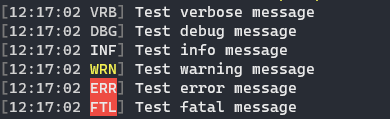
For detailed documentation see wiki
You can(and you should) log formatted data:
Write-InfoLog 'Current date and time is {DateTime}' -PropertyValues (Get-Date)

# Some example data
$position = @{
    Latitude = 25
    Longitude = 134
}
$elapsedMs = 34

Write-InfoLog 'Processed {@Position} in {Elapsed:000} ms.' -PropertyValues $position, $elapsedMs

Fluent API is too bulky? You don't need extra sinks? Use short setup version(logs into console and file):

# Create and start new logger
Start-Logger -FilePath 'C:\Data\my_awesome.log' -Console

Write-InfoLog 'Hurrray, my first log message!'

# Don't forget to close the logger
Close-Logger

Extendability
PoShLog is extensible just like Serilog. All available extensions can be found here.
Documentation
These examples are just to get you started fast. For more detailed documentation please check wiki.
Contributing
Pull requests are welcome. For major changes, please open an issue first to discuss what you would like to change.
Show your support
- :star: Star the PoShLog repository. This is the least you can do to support this project.
- :thumbsup: Give us some feedback or suggest features using Discussions or discord
- :mag_right: Test PoShLog and raise issues
- Contribute :rocket: you can start with good first issues
Contributors
Building Locally
-
Install PoShLog.Tools
Install-Module -Name PoShLog.Tools -Force -Verbose -Scope CurrentUser -
Import PoShLog.Tools
Import-Module -Name PoShLog.Tools -
Bootstrap the required modules
Bootstrap '.\cd\RequiredModules.psd1' -
Run the build script
Invoke-Build '.\src\PoShLog.Build.ps1' -Configuration '(Dev/Prod)' -Task Clean, BuildDependencies, CopyModuleFiles -ModuleVersion "$(MajorVersion).$(MinorVersion).$(BugfixVersion)"
Authors
Release Notes
License
This project is licensed under the MIT License - see the LICENSE file for details.
Credits
- Serilog - serilog.net
- Icon made by Smashicons from www.flaticon.com.