
Postcard Company Datamart
This project is a learning-by-doing data model build with dbt-core for an imaginary company selling postcards.
The company sells both directly but also through resellers in the majority of European countries.
This model is used by my other projects:
- Portable Data Stack with Mage
- Portable Data Stack with SQLMesh
- Portable Data Stack with Dagster
- Portable Data Stack with Airflow
- Postcard Company Dataform
Data model
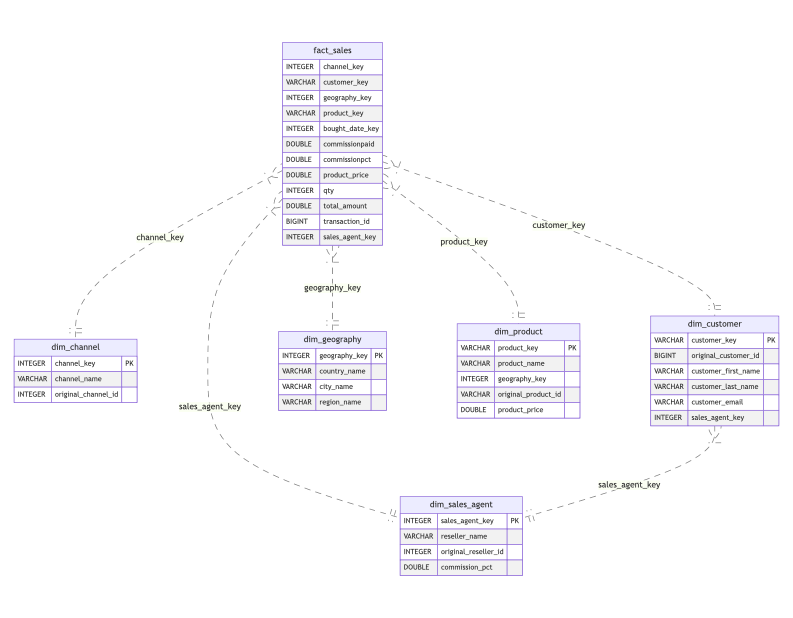
Layers
rawunrefined input datastagingstaging areacorecurated data
Dimensions
- dim_channel
- dim_customer
- dim_date
- dim_geography
- dim_sales_agent
Facts
- fact_sales
Getting started
The data is generated as parquet files by a Python script generator/generate.py using user-defined assets assets.py. These may be adjusted as per needs.
Setting up the project
-
Rename
.env.exampleto.env. This will contain relative paths for the database file (datamart.duckdb) and parquet input files -
Rename
shared\db\datamart.duckdb.exampletoshared\db\datamart.duckdbor initiate an empty database there with the same name. -
Create a Python Virtual Environment (ensure at least Python 3.10 is installed)
uv venv .venv
- Activate the Python venv
source .venv/bin/activate
- Add environment variables to the virtual environment
cat .env >> .venv/bin/activate
- Install the required packages with
uv pip
uv pip install -r requirements-ci.txt
- Generate the data
python generator/generate.py
The generated data will be under shared/parquet.
Running the dbt model
- Ensure the virtual environment is activated
source .venv/bin/activate
- Run
dbt depsto install dependencies
dbt deps --project-dir postcard_company
- Run
dbt seedto import the seed (static) data
dbt seed --project-dir postcard_company
- Run
dbt compileto compile the project
dbt compile --project-dir postcard_company
- Run
dbt runto run the models
dbt run --project-dir postcard_company
- Run
dbt testto run the tests
dbt test --project-dir postcard_company