🚀 PulsarRPAPro
💖 PulsarRPAPro: The AI-Powered, Lightning-Fast Browser Automation Solution! 💖
🌟 Key Features
Core Capabilities of PulsarRPAPro:
-
👽 AutoExtract
- 🤖 Powered by machine learning agents — no token cost!
- 🎯 High-precision data extraction
- 🏃♂️ Blazing fast performance
- 🤖 Powered by machine learning agents — no token cost!
-
🌐 Web UI — Intuitive and easy to use
-
⌨️ Command Line Interface (CLI) — Scriptable and automation-ready
Advanced Features Included:
- 🤖 AI Integration with LLMs — Smarter automation driven by large language models
- ⚡ Ultra-Fast Automation — Coroutine-safe browser concurrency with spider-grade crawling speed
- 🧠 Deep Web Understanding — Intelligent parsing of dynamic, JavaScript-rich pages
- 📊 Structured Data APIs — Extract clean, structured data with minimal effort
🤖 Automate the browser and extract data at scale with simple text:
Go to https://www.amazon.com/dp/B08PP5MSVB
After page load: scroll to the middle.

Summarize the product.
Extract: product name, price, ratings.
Find all links containing /dp/.
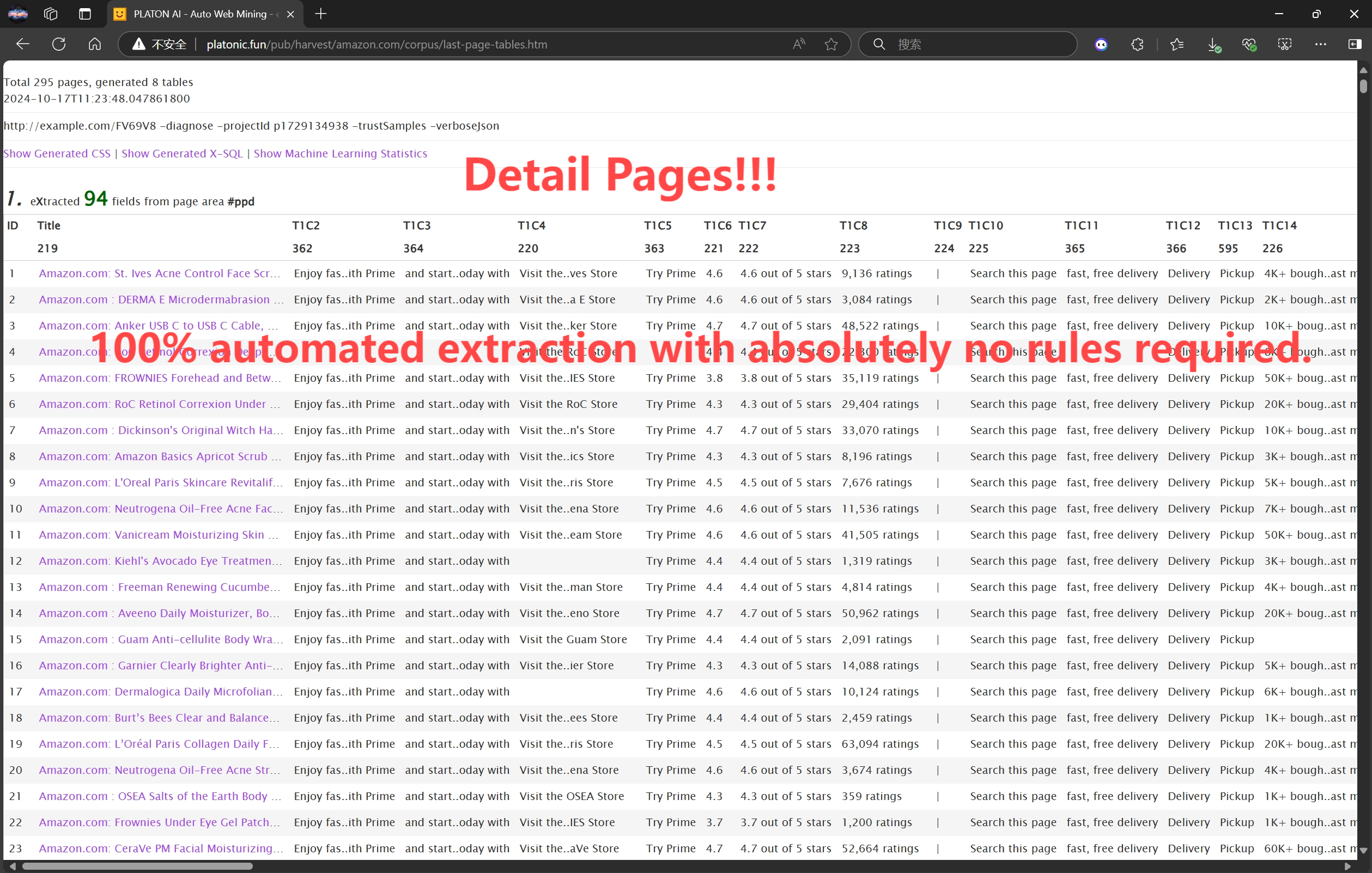
👽 Extract data with machine learning agents:
🎥 Demo Videos
-
YouTube:
🚀 Quick Start Guide
▶️ Run PulsarRPAPro
📦 Run Executable Jar - Enjoy the Best Experience
Executable JAR uses your desktop browser, you can enjoy the best experience.
Download:
curl -L -o PulsarRPAPro.jar https://github.com/platonai/PulsarRPAPro/releases/download/v3.0.0/PulsarRPAPro.jar
Run the JAR for help:
java -jar PulsarRPAPro.jar
📂 Resources
⚙️ Prerequisites
MongoDB running on port 27017 without authentication:
docker run -d --name mongodb -p 27017:27017 mongo:latest
🐳 Docker Users
Docker user can run the Docker image directly:
docker run -d -p 8182:8182 -e DEEPSEEK_API_KEY=${DEEPSEEK_API_KEY} galaxyeye88/pulsar-rpa-pro:latest
📚 Auto Extraction Guide: Just Structured Data! No Code! No Token!
Use the harvest command to extract data from a product listing using unsupervised ML:
java -jar PulsarRPAPro.jar harvest "https://www.amazon.com/b?node=1292115011" -diagnose -refresh
💡 Make sure the URL is a portal page like a product category or listing.
The tool will:
- Visit the portal
- Identify optimal item page links
- Retrieve those pages
- Analyze them automatically
📄 Example Results
See a sample extraction result in HTML: Auto Extraction Result of Amazon
🖥️ Run PulsarRPAPro Server
java -DDEEPSEEK_API_KEY=${DEEPSEEK_API_KEY} -jar PulsarRPAPro.jar serve
🧠 LLM Capabilities: Just Text, No Code!
Use the ai/command API to perform actions and extract data using natural language instructions.
curl -X POST "http://localhost:8182/api/ai/command" \
  -H "Content-Type: text/plain" \
  -d '
    Visit https://www.amazon.com/dp/B08PP5MSVB
    Summarize the product.
    Extract: product name, price, ratings.
    Find all links containing /dp/.
    After page load: click #title, then scroll to the middle.
  '
🔍 LLM + X-SQL: Precise, Flexible, Powerful
Harness the power of the x/e API for highly precise, flexible, and intelligent data extraction.
curl -X POST "http://localhost:8182/api/x/e" -H "Content-Type: text/plain" -d "
select
  llm_extract(dom, 'product name, price, ratings') as llm_extracted_data,
  dom_base_uri(dom) as url,
  dom_first_text(dom, '#productTitle') as title,
  dom_first_slim_html(dom, 'img:expr(width > 400)') as img
from load_and_select('https://www.amazon.com/dp/B08PP5MSVB', 'body');
"
🔎 Sample Output:
{
  "llm_extracted_data": {
    "product name": "Apple iPhone 15 Pro Max",
    "price": "$1,199.00",
    "ratings": "4.5 out of 5 stars"
  },
  "url": "https://www.amazon.com/dp/B08PP5MSVB",
  "title": "Apple iPhone 15 Pro Max",
  "img": "<img src=\"https://example.com/image.jpg\" />"
}
🔧 Proxies - Unlock Advanced Capabilities
Set the environment variable:
export PROXY_ROTATION_URL=https://your-proxy-provider.com/rotation-endpoint
This URL should return fresh proxy IPs when accessed.
📞 Contact Us
- 💬 WeChat: galaxyeye
- 🌐 Weibo: galaxyeye
- 📧 Email: [email protected], [email protected]
- 🐦 Twitter: @galaxyeye8
- 🌍 Website: platon.ai