
|
Puppy Stardew ServerDockerized Stardew Valley Multiplayer Server
English | 中文 Production-ready deployment, browser-based operations, and persistent save management |




Project Status: Feature-Frozen (Best-Effort Maintenance)
This project is feature-frozen and maintained on a best-effort basis. It remains usable and accepts security/compatibility fixes, but no new features are planned.
What this project is. A Dockerized, always-on dedicated host for Stardew Valley. The container runs the actual game and acts as the multiplayer host. This works well for casual day-to-day play and for keeping a world available 24/7.
The fundamental limitation you should understand before relying on it. Stardew Valley has no real "dedicated server" concept — the host is a full game participant, not a passive server process. Whenever the game takes control of the host (festivals, non-skippable events, certain cutscenes, forced animations), an unattended headless host can stall, which blocks connected players. The bundled mods paper over the common cases (hiding the host, instant sleep, skipping skippable events) but cannot fully solve this — see KNOWN_ISSUES.md. In particular, festivals and non-skippable events are not handled, and a container restart currently requires a one-time manual save reload to re-init multiplayer.
Best fit: hobbyist setups that want a 24/7 persistent world and accept best-effort behavior with occasional manual intervention.
If your goal is simply "let a few friends play together easily across platforms (PC / Mac / Android / iOS)", a human-hosted game combined with a virtual-LAN / relay layer (so clients join over IP across NAT) is far more robust, because a real human at the host handles festivals and events naturally. That direction avoids the engine limitations above entirely.
Overview
Puppy Stardew Server packages Stardew Valley, SMAPI, and a curated server-oriented mod stack into a Docker-based deployment workflow. The project is designed for operators who want a repeatable multiplayer server setup with persistent data, predictable restart behavior, and a web-based management surface.
It supports both one-command bootstrap and manual Docker Compose deployment. Once installed, the server can be operated through the web panel for save management, log inspection, runtime configuration, backups, and mod workflows.
Project Architecture
The runtime is organized as a single game container with persistent bind mounts for saves, logs, backups, panel state, and custom mods. The web panel and automation scripts live alongside the game process so operators can manage the server without attaching to the container for routine tasks.
graph TB
    subgraph "Client Layer"
        PC[PC Players]
        Mobile[iOS/Android Players]
        Console[Console Players]
    end

    subgraph "Network Layer"
        FW[Firewall<br/>Port 24642/UDP]
        VNC[VNC Access<br/>Port 5900/TCP]
        Metrics[Metrics<br/>Port 9090/TCP]
        WebPanel[Web Panel<br/>Port 18642/TCP]
    end

    subgraph "Docker Container"
        Entry[Entrypoint Script]
        Steam[SteamCMD<br/>Game Downloader]
        SMAPI[SMAPI 4.3.2<br/>Mod Loader]

        subgraph "Game Mods"
            AHH[AutoHideHost v1.2.2<br/>Instant Sleep + Hidden Host]
            AOS[Always On Server v1.20.3<br/>24/7 Automation]
            SAL[ServerAutoLoad v1.2.1<br/>Auto Load Save]
            SLG[Skill Level Guard v1.4.0<br/>Skill Protection]
        end

        Game[Stardew Valley 1.6.15<br/>Game Server]
    end

    subgraph "Data Persistence"
        Saves[(Save Files)]
        Config[(Mod Configs)]
        SteamData[(Steam Cache)]
    end

    PC --> FW
    Mobile --> FW
    Console --> FW
    FW --> Game

    VNC -.-> Entry
    Entry --> Steam
    Steam --> SMAPI
    SMAPI --> AHH
    SMAPI --> AOS
    SMAPI --> SAL
    SMAPI --> SLG
    AHH --> Game
    AOS --> Game
    SAL --> Game
    SLG --> Game

    Game -.-> Saves
    Game -.-> Config
    Steam -.-> SteamData

    style AHH fill:#90EE90
    style Game fill:#FFD700
    style SMAPI fill:#87CEEB
    style SLG fill:#FFA500
Core Capabilities
- One-command bootstrap for first-time deployment on Docker hosts
- Manual Compose deployment for operators who prefer explicit infrastructure control
- Persistent runtime state for saves, logs, backups, panel authentication, and uploaded mods
- Integrated web panel for status, logs, saves, config changes, and operational actions
- Automatic save loading through the bundled server automation stack
- Headless operation with optional VNC only when interactive setup is needed
- Backup and restore workflows including archive download and uploaded save import
- Mod management workflows for custom mod upload, installation, and cleanup
- Monitoring and recovery hooks including Prometheus metrics and crash restart controls
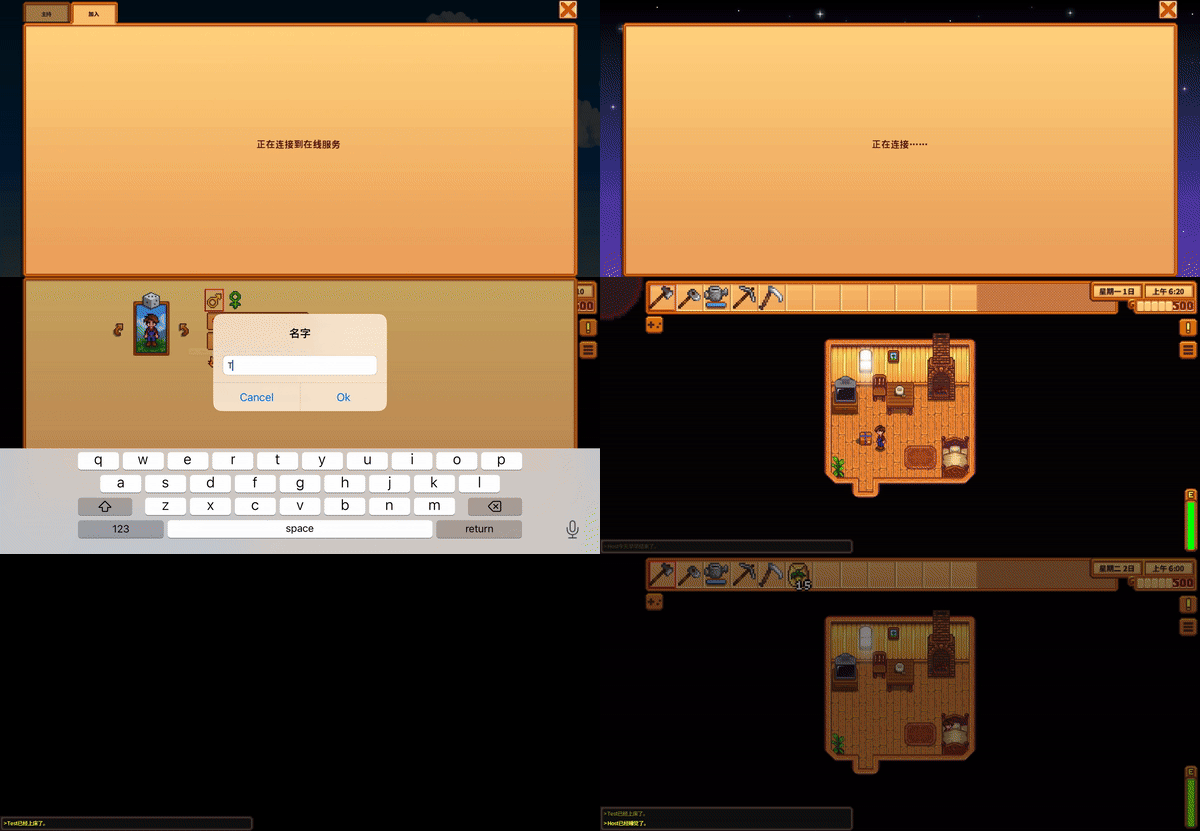
Included automation allows the server to progress without waiting on a visible host client.
Web Panel Screenshots
Dashboard
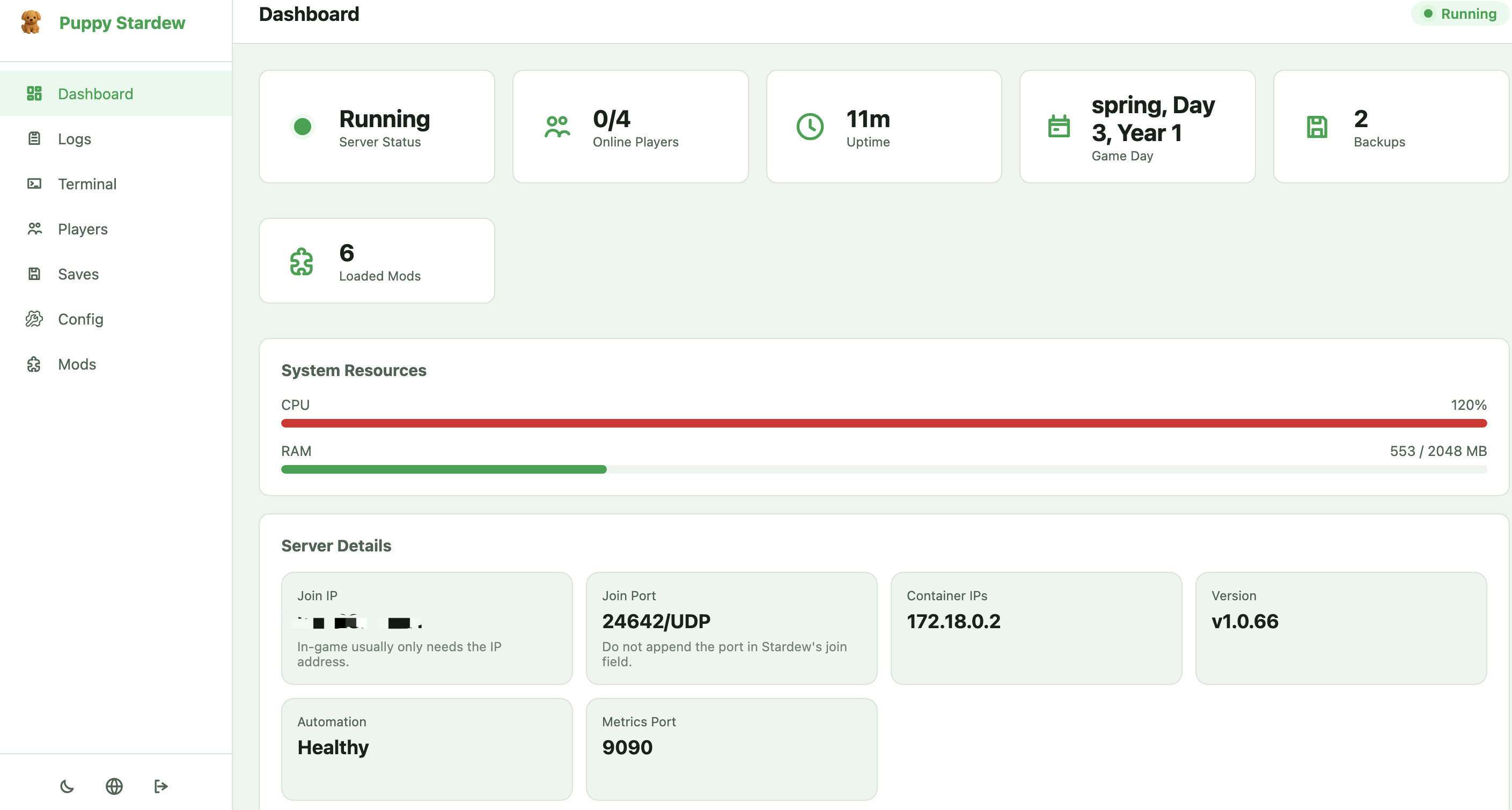
Operational overview with server status, join details, runtime metrics, and health signals.
Saves and Backups
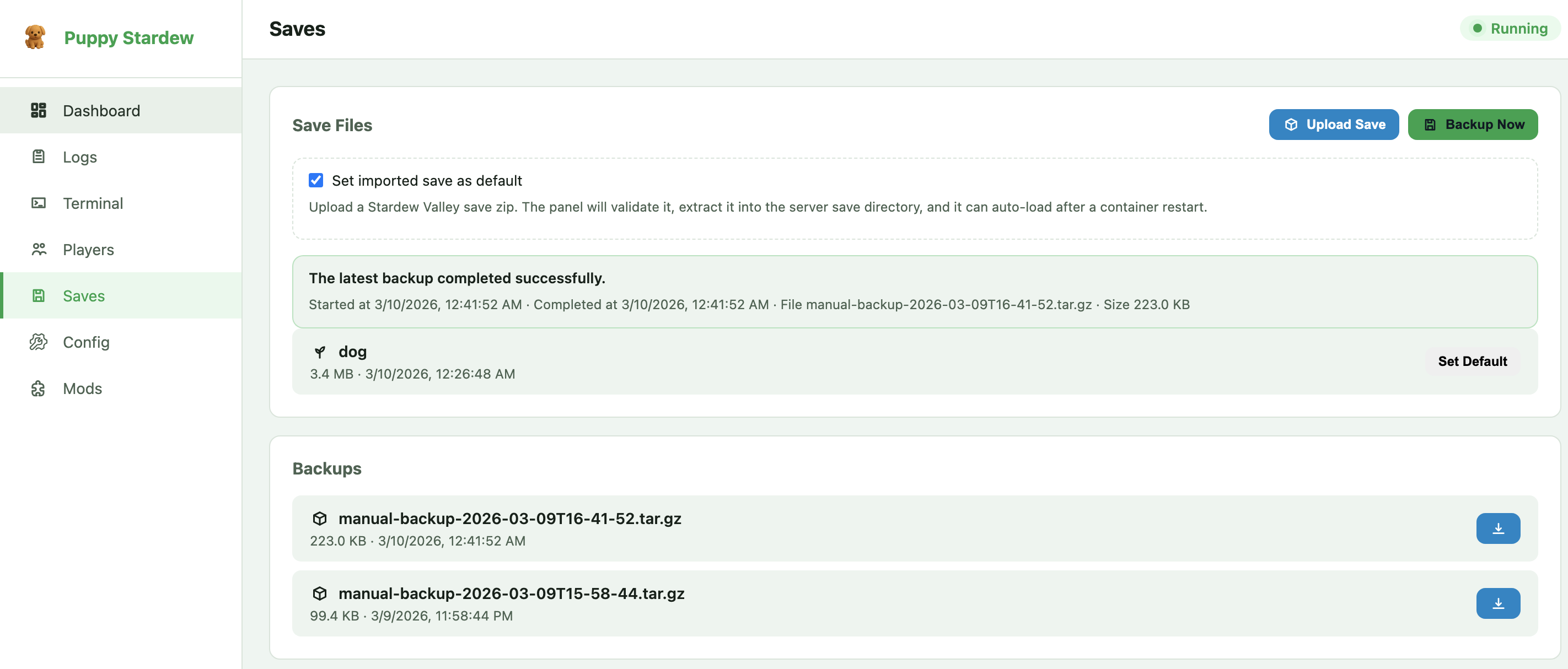
Save archive upload, default save selection, backup execution, and downloadable restore points.
Release Highlights
v1.0.77 (March 2026)
This release focused on closing the gap between a working prototype and an operator-friendly server distribution.
- First-run panel setup replaces shared default credentials with an explicit password initialization flow.
- Theme and UI polish adds light/dark mode support and improves navigation consistency across login and panel pages.
- Save management now includes uploaded save import, default save selection, background backup jobs, and downloadable backup archives.
- Config workflows support runtime updates for Steam credentials and container-affecting settings from the web panel.
- Logs and status reporting provide better categorization, richer dashboard metadata, improved join IP handling, and more accurate player state reporting.
- Bootstrap and runtime fixes clean up quick-start output, reduce headless audio noise, and improve behavior in non-interactive server environments.
Quick Start
Watch the One-Command Deployment in Action

Option 1: One-Command Deployment (Recommended for Beginners)
English Version:
curl -sSL https://raw.githubusercontent.com/AmigaMeow/puppy-stardew-server/main/quick-start.sh | bash
The script will:
- Check your Docker installation
- Guide you to enter Steam credentials
- Create all necessary directories with correct permissions
- Generate configuration files
- Start the server
- Show you connection information
That's it! ☕ Grab a coffee while it downloads the game (~1.5GB).
Option 2: Manual Setup (For Advanced Users)
Prerequisites
- Docker and Docker Compose installed
- Quick install (Linux):
curl -fsSL https://get.docker.com | sh - Or follow official guide: Get Docker
- Quick install (Linux):
- A Steam account with Stardew Valley purchased
- 2GB RAM minimum, 4GB recommended
- 2GB free disk space
Step 1: Download Configuration Files
# Clone the repository
git clone https://github.com/AmigaMeow/puppy-stardew-server.git
cd puppy-stardew-server

# Or download files directly
mkdir puppy-stardew && cd puppy-stardew
wget https://raw.githubusercontent.com/AmigaMeow/puppy-stardew-server/main/docker-compose.yml
wget https://raw.githubusercontent.com/AmigaMeow/puppy-stardew-server/main/.env.example
Step 2: Configure Environment
# Copy environment template
cp .env.example .env

# Edit with your Steam credentials
nano .env  # or use your favorite editor
.env example:
STEAM_USERNAME=your_steam_username
STEAM_PASSWORD=your_steam_password
ENABLE_VNC=true
# Leave blank to auto-generate a random password at startup
# (retrieve with: docker exec <container> cat /home/steam/web-panel/data/vnc_password.txt)
VNC_PASSWORD=
Important: You MUST own Stardew Valley on Steam. Game files are downloaded via your account.
Step 3: Initialize Data Directories
CRITICAL: This step prevents "Disk write failure" errors!
# Run the initialization script (Recommended)
./init.sh

# Or manual setup
mkdir -p data/{saves,game,steam,logs,backups,custom-mods}
chown -R 1000:1000 data/
Step 4: Start the Server
# Start the server
docker compose up -d

# View logs
docker logs -f puppy-stardew
If Steam Guard is enabled, you'll need to enter the code:
docker attach puppy-stardew
# Paste your Steam Guard code and press ENTER
# IMPORTANT: No output will be shown - this is normal!
# Wait a few seconds, game download will start automatically
# Press Ctrl+P Ctrl+Q to detach (NOT Ctrl+C!)
Initial Setup (First Run Only)
After the server starts, you have two options to manage your server:
Option A: Web Management Panel (Recommended) 🌐
Access the web panel at http://your-server-ip:18642
- First visit: you'll be prompted to create the admin password in the browser
- Features:
- Real-time server status dashboard
- Live log streaming with filters
- Interactive terminal for SMAPI console
- Player management
- Save file backup/download
- Configuration editor
- Mod management
Option B: VNC Remote Desktop
-
Connect to VNC:
-
In the VNC window:
- For NEW farm: Click "CO-OP" → "Host" → Select "Starting Cabins" (Number of Cabins)
- IMPORTANT: Starting Cabins = Number of players who can join (excluding host)
- Example: Select "3 Cabins" to allow 3 friends to join (4 players total)
- If you select "0 Cabins", other players will see "No available slots" error
- For EXISTING save: Click "Load" → Select your save file
- For NEW farm: Click "CO-OP" → "Host" → Select "Starting Cabins" (Number of Cabins)
-
Once loaded:
- The ServerAutoLoad mod will remember your save
- Future restarts will auto-load this save
- Always On Server will automatically enable Auto Mode
- You can disconnect from VNC
-
Players can now connect!
- Open Stardew Valley
- Click "Co-op" → "Join LAN Game"
- Your server should appear in the list automatically
- Or manually enter your server IP:
192.168.1.100(example) - Important:
- Just enter IP address, NO port number needed (not
192.168.1.100:24642) - Port 24642/UDP is used automatically
- For internet play with port forwarding, forward UDP protocol (not TCP)
- Just enter IP address, NO port number needed (not
What's Inside
Pre-installed Mods
| Mod | Version | Purpose | Key Features |
|---|---|---|---|
| Always On Server | v1.20.3 | Keeps server running 24/7 without host player | Headless server operation |
| AutoHideHost | v1.2.2 | Custom mod - Hides host player and enables instant sleep | Seamless day-night transitions |
| ServerAutoLoad | v1.2.1 | Custom mod - Automatically loads your save on startup | No manual VNC loading needed |
| ✨ Skill Level Guard | v1.4.0 | NEW - Prevents forced Level 10 bug & enables auto-activation | XP-based level calculation + Auto Mode activation |
What's New in v1.0.58:
- 🎉 Fixed: Always On Server auto-enables correctly after container restart
- ✅ Added: Skill Level Guard v1.4.0 with ToggleAutoMode invocation via reflection
- ✅ Verified: Game pauses when no players connected
- ✅ Tested: ServerAutoLoad and Always On Server work seamlessly together
All mods are pre-configured and ready to use!
Common Tasks
View Server Logs
# Real-time logs
docker logs -f puppy-stardew

# Last 100 lines
docker logs --tail 100 puppy-stardew
Restart Server
docker compose restart
Stop Server
docker compose down
Update to Latest Version
docker compose down
docker pull truemanlive/puppy-stardew-server:latest
docker compose up -d
Backup Your Saves
# Manual backup
tar -czf backup-$(date +%Y%m%d).tar.gz data/saves/

# Or use the backup script (after running quick-start.sh)
./backup.sh
Replace or Upload New Save
You can replace the current save or upload a new one at any time.
Method 1: Upload Save from Your PC
-
Locate your save on your PC:
- Windows:
%AppData%\StardewValley\Saves\YourFarm_123456789\ - Mac:
~/.config/StardewValley/Saves/YourFarm_123456789/ - Linux:
~/.config/StardewValley/Saves/YourFarm_123456789/
- Windows:
-
Upload to server:
# Copy the entire save folder to the server scp -r YourFarm_123456789/ root@your-server:/root/puppy-stardew-server/data/saves/Saves/ -
Restart container (it will auto-fix permissions):
docker compose restart -
Verify:
docker logs -f puppy-stardew
# Look for: "✓ SAVE LOADED SUCCESSFULLY"
Method 2: Replace Existing Save
-
Backup current save (optional but recommended):
tar -czf old-save-$(date +%Y%m%d).tar.gz data/saves/ -
Remove old save:
rm -rf data/saves/Saves/OldFarm_* -
Upload new save (same as Method 1, step 2-4)
Important Notes
- Permissions are auto-fixed: The container automatically fixes file permissions on startup (v1.0.59+)
- No manual chown needed: Just restart the container after uploading
- Save format: Must be a co-op save (created via CO-OP menu, not "New" menu)
- ServerAutoLoad: Will automatically detect and load the new save
Troubleshooting
If save doesn't load:
# Check if save files exist
docker exec puppy-stardew ls -la /home/steam/.config/StardewValley/Saves/

# Check permissions (should be steam:steam or 1000:1000)
docker exec puppy-stardew ls -l /home/steam/.config/StardewValley/Saves/YourFarm_*/

# Force restart to trigger permission fix
docker compose restart
Troubleshooting
Error: "Disk write failure" when downloading game
Cause: Data directories have wrong permissions.
Fix (v1.0.59+):
# Simply restart the container - it will auto-fix permissions
docker compose restart
Manual fix (if auto-fix doesn't work):
chown -R 1000:1000 data/
docker compose restart
Note: Since v1.0.59, the container automatically fixes file permissions on startup. You only need to restart the container after uploading files.
Steam Guard code required
If you have Steam Guard enabled:
docker attach puppy-stardew
# Paste the code from your email/mobile app and press ENTER
# IMPORTANT: You won't see any output - this is normal!
# Wait a few seconds for game download to start automatically
# Press Ctrl+P Ctrl+Q to detach (NOT Ctrl+C!)
Tip: Consider using Steam Guard mobile app for faster codes.
Game won't start
- Check logs:
docker logs puppy-stardew - Verify Steam credentials in
.env - Ensure you own Stardew Valley on Steam
- Check disk space:
df -h - Restart:
docker compose restart
Players can't connect
-
Check firewall: Port
24642/udpmust be open# Ubuntu/Debian sudo ufw allow 24642/udp # CentOS/RHEL sudo firewall-cmd --add-port=24642/udp --permanent sudo firewall-cmd --reload -
Verify server is running:
docker ps | grep puppy-stardew -
Check if save is loaded: Connect via VNC or check logs for "Save loaded"
-
Ensure game versions match: Server and clients must have same Stardew Valley version
Always On Server not auto-enabling
Fixed in v1.0.58!
If you still experience this after updating:
-
Pull latest image:
docker compose down docker pull truemanlive/puppy-stardew-server:latest docker compose up -d -
Check mod version:
docker logs puppy-stardew | grep "Skill Level Guard" # Should show v1.4.0 -
Verify auto-enable logs:
docker logs puppy-stardew | grep "Auto mode on"
# Should show "Auto mode on!" message
Advanced Configuration
Crash Auto-Restart
The server automatically restarts the game if it crashes. Restarts are rate-limited to prevent infinite loops.
Configuration (via environment variables in .env):
ENABLE_CRASH_RESTART=true        # Enable/disable auto-restart (default: true)
CRASH_RESTART_DELAY=10           # Seconds to wait before restarting (default: 10)
CRASH_RESTART_MAX=5              # Max restarts within the cooldown window (default: 5)
CRASH_RESTART_COOLDOWN=3600      # Cooldown window in seconds (default: 3600 = 1 hour)
How it works:
- If the game process exits unexpectedly, the entrypoint script detects it and restarts
- A maximum of
CRASH_RESTART_MAXrestarts are allowed withinCRASH_RESTART_COOLDOWNseconds - If the limit is exceeded, the container stops to prevent restart loops
- Check logs for restart events:
docker logs puppy-stardew | grep "restart"
Prometheus Metrics
Monitor your server health with Prometheus-compatible metrics at http://your-server:9090/metrics.
Enable metrics (in .env):
ENABLE_METRICS=true
METRICS_PORT=9090
Expose the port (in docker-compose.yml):
ports:
  - "24642:24642/udp"
  - "5900:5900/tcp"
  - "9090:9090/tcp"   # Prometheus metrics
Available metrics:
stardew_players_online- Number of connected playersstardew_server_uptime_seconds- Server uptimestardew_crash_restarts_total- Total crash restartsstardew_save_last_loaded_timestamp- Last save load time
Example Prometheus scrape config:
scrape_configs:
  - job_name: 'stardew'
    static_configs:
      - targets: ['your-server:9090']
Save Selector
Choose which save file to auto-load by setting the SAVE_NAME environment variable.
Configuration (in .env):
SAVE_NAME=MyFarm_123456789
How it works:
- If
SAVE_NAMEis set, ServerAutoLoad will load that specific save - If not set, the most recently modified save is loaded (default behavior)
- The save name must match the folder name in
data/saves/Saves/
List available saves:
ls data/saves/Saves/
# Output: MyFarm_123456789  AnotherFarm_987654321
Custom Mods
Install your own SMAPI mods by placing them in the data/custom-mods/ directory.
Step 1: Create the custom mods directory (if not already present):
mkdir -p data/custom-mods
Step 2: Download and extract your mod into the directory:
# Example: Install a mod from Nexus Mods
unzip CJBCheatsMenu-1.35.0.zip -d data/custom-mods/
Step 3: Restart the server:
docker compose restart
How it works:
- On startup, the container copies mods from
data/custom-mods/into the SMAPI Mods folder - Mods persist across container recreations via the volume mount
- Each mod should be in its own subfolder with a
manifest.json
Directory structure:
data/custom-mods/
├── CJBCheatsMenu/
│   ├── manifest.json
│   └── CJBCheatsMenu.dll
└── ChatCommands/
    ├── manifest.json
    └── ChatCommands.dll
Player Access Control
Restrict who can join your server using a whitelist or blacklist.
Configuration (in .env):
PLAYER_ACCESS_MODE=whitelist      # "whitelist", "blacklist", or "open" (default: open)
PLAYER_ACCESS_FILE=data/player-access.json
Whitelist example (data/player-access.json):
{
  "mode": "whitelist",
  "players": [
    { "name": "FarmerJane", "note": "My friend" },
    { "name": "FarmerBob", "note": "Brother" }
  ]
}
Blacklist example (data/player-access.json):
{
  "mode": "blacklist",
  "players": [
    { "name": "Griefer123", "note": "Destroyed crops" }
  ]
}
How it works:
- whitelist mode: Only listed players can join
- blacklist mode: Listed players are blocked from joining
- open mode: Anyone can join (default)
- Changes take effect on server restart
Docker Secrets
Use Docker Secrets for secure credential storage instead of plain-text .env files.
Step 1: Create secret files:
echo "your_steam_username" | docker secret create steam_username -
echo "your_steam_password" | docker secret create steam_password -
echo "your_vnc_password" | docker secret create vnc_password -
Step 2: Update docker-compose.yml:
services:
  stardew:
    image: truemanlive/puppy-stardew-server:latest
    secrets:
      - steam_username
      - steam_password
      - vnc_password
    environment:
      - STEAM_USERNAME_FILE=/run/secrets/steam_username
      - STEAM_PASSWORD_FILE=/run/secrets/steam_password
      - VNC_PASSWORD_FILE=/run/secrets/vnc_password

secrets:
  steam_username:
    external: true
  steam_password:
    external: true
  vnc_password:
    external: true
How it works:
- Secrets are mounted as files at
/run/secrets/<name>inside the container - The entrypoint script reads
*_FILEenvironment variables and loads values from those files - Secrets are never exposed in
docker inspector process listings - Note: Docker Secrets require Docker Swarm mode (
docker swarm init)
Alternative for Docker Compose (non-Swarm):
secrets:
  steam_username:
    file: ./secrets/steam_username.txt
  steam_password:
    file: ./secrets/steam_password.txt
Customize Mod Settings
Mod configs are in /home/steam/stardewvalley/Mods/ inside the container:
# Edit AutoHideHost config
docker exec puppy-stardew nano /home/steam/stardewvalley/Mods/AutoHideHost/config.json

# Edit Always On Server config
docker exec puppy-stardew nano /home/steam/stardewvalley/Mods/AlwaysOnServer/config.json

# Edit ServerAutoLoad config
docker exec puppy-stardew nano /home/steam/stardewvalley/Mods/ServerAutoLoad/config.json
After editing, restart the server:
docker compose restart
Change Port Numbers
Edit docker-compose.yml:
ports:
  - "24642:24642/udp"  # Change first number to your desired port
  - "5900:5900/tcp"    # VNC port
Restart after changes:
docker compose up -d
Disable VNC After Setup
Edit .env:
ENABLE_VNC=false
Restart:
docker compose up -d
This saves ~50MB RAM.
System Requirements
Server:
- CPU: 1+ cores (2+ recommended for 4+ players)
- RAM: 2GB minimum (4GB recommended for 4+ players)
- Disk: 2GB free space
- OS: Linux, Windows (Docker Desktop), macOS (Docker Desktop)
- Network: Open port 24642/UDP (and 5900/TCP for VNC)
Clients:
- Stardew Valley (any platform: PC, Mac, Linux, iOS, Android)
- Same game version as server (1.6.15)
- LAN or internet connection to server
License & Legal
License: MIT License - free to use, modify, and distribute.
Important Legal Notes:
- You MUST own Stardew Valley on Steam
- Game files are downloaded via YOUR Steam account
- This is NOT a piracy tool
- Mods follow their original licenses:
- Always On Server: GPL-3.0
- ServerAutoLoad: MIT (custom mod for this project)
- AutoHideHost: MIT (custom mod for this project)
- Skill Level Guard: MIT (custom mod for this project)
Credits
- Stardew Valley by ConcernedApe
- SMAPI by Pathoschild
- Always On Server by funny-snek & Zuberii
- Docker by Docker, Inc.
Contributing
Contributions are welcome! Please:
- Fork the repository
- Create a feature branch
- Submit a pull request
Support & Community
- Bug Reports: GitHub Issues
- Questions: GitHub Discussions
- Docker Hub: truemanlive/puppy-stardew-server
Star History
If this project helps you, consider giving it a star! ⭐