
Pypi Duck Flow : Get insights of your python project 🐍
This project is a collections of pipelines to get insights of your python project. It also serves as educational purpose (YouTube videos and blogs) to learn how to build data pipelines with Python, SQL & DuckDB. You can see the final result of the project in this live dashboard.
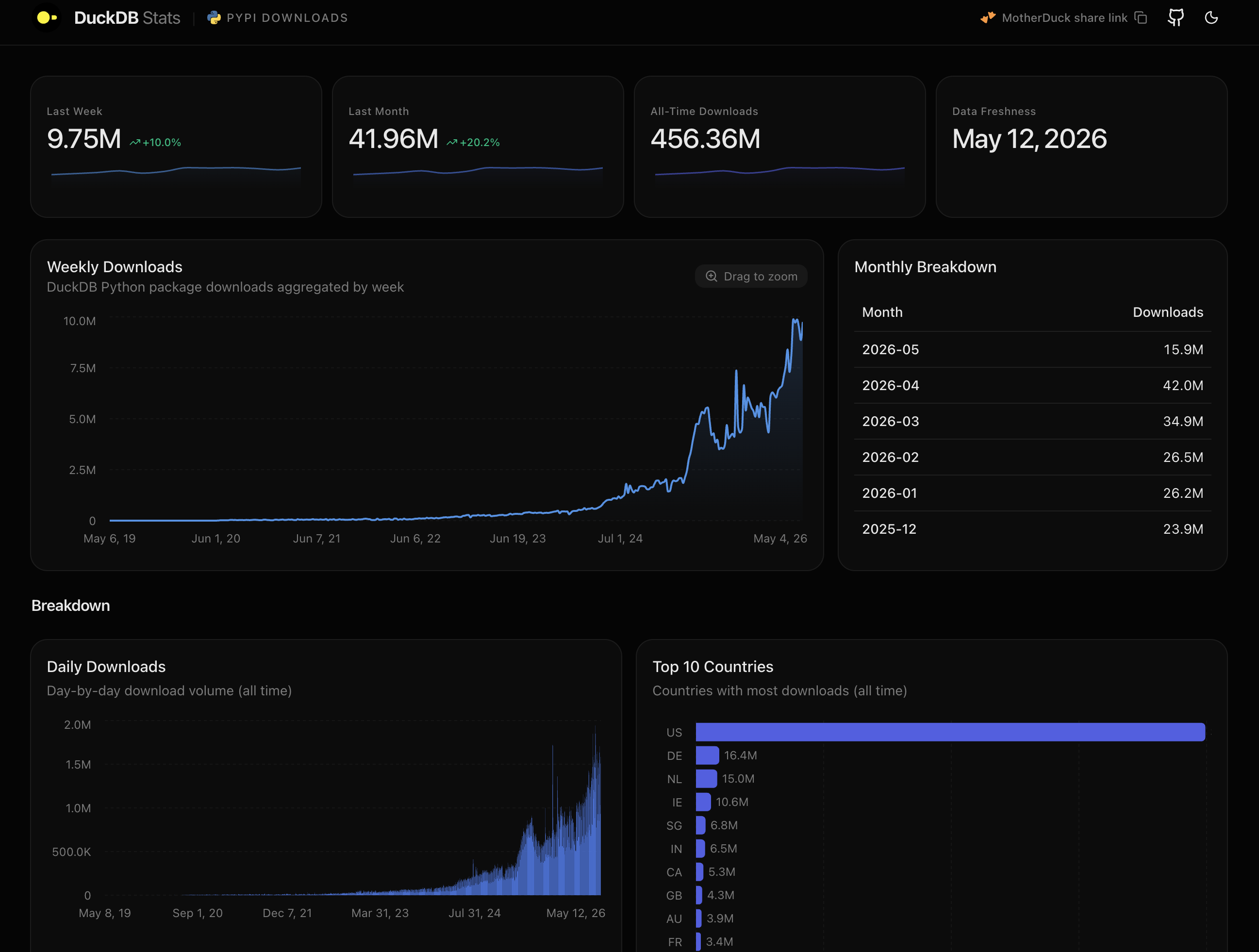
The project is a monorepo composed of series in 3 parts :
- Ingestion, under
ingestionfolder (YouTube video, Blog) - transformation, under
transformfolder (YouTube video, Blog) - Visualization, under
dashboardfolder (YouTube video, Blog)
⚠️ This project has undergone significant changes since the tutorials were recorded.
To follow along with the original tutorial content, please check out thefeat/tutorial-archivebranch.
You can also refer to the CHANGELOG.md for a complete list of updates.
High level architecture
flowchart LR
    subgraph SRC["SOURCE"]
        PYPI[("PyPI<br/>public dataset")]
        BQ[("BigQuery")]
        PYPI --> BQ
    end

    subgraph EXTRACT["EXTRACT — ingestion/"]
        ING["Python + DuckDB<br/>bigquery_scan<br/>(filter pushdown)"]
    end

    subgraph TRANSFORM["TRANSFORM — transform/"]
        DBT["dbt + DuckDB<br/>(SQL models)"]
    end

    subgraph STORE["STORAGE"]
        MD[("MotherDuck")]
        S3[("AWS S3<br/>(optional)")]
    end

    subgraph LOAD["LOAD — dashboard/"]
        NEXT["Next.js + TypeScript<br/>Tailwind + shadcn/ui<br/>Recharts · @duckdb/node-api"]
    end

    BQ ==> ING ==> MD
    MD ==> DBT
    DBT ==> MD
    DBT -.-> S3
    MD ==> NEXT
Development
Setup
The project requires :
- Python 3.12
- uv for python packages.
- Node.js (only for the visualization part)
There's also two devcontainers definitions for VSCode : one for Python, and one for NodeJS.
Finally a Makefile is available to run common tasks.
Env & credentials
A .env file is required to run the project. You can copy env.template and fill the required values.
DATABASE_NAME=duckdb_stats # MotherDuck database name
GCP_PROJECT=my-gcp-project # GCP project used as the billing project for bigquery_scan
START_DATE=2023-04-01 # start date of the data to ingest
END_DATE=2023-04-03 # end date of the data to ingest
PYPI_PROJECT=duckdb # pypi project to ingest
GOOGLE_APPLICATION_CREDENTIALS=/path/to/my/creds # path to GCP credentials
motherduck_token=123123 # MotherDuck token (required)
TIMESTAMP_COLUMN=timestamp # timestamp column name
TRANSFORM_S3_PATH_OUTPUT=s3://my-output-bucket/ # optional: dbt export target on S3
AWS_PROFILE=default # only used by the `aws-sso-creds` helper
Ingestion
The pipeline reads from the public PyPI BigQuery dataset using the DuckDB BigQuery community extension (bigquery_scan with filter pushdown via the Storage Read API) and writes directly to MotherDuck. SQL-based data quality checks (null-rate thresholds on timestamp and project) run after each load.
Requirements
- GCP account with access to the
bigquery-public-data.pypidataset (used as the billing project) - MotherDuck account and token
Run
Once you fill your .env file, do the following :
make install: to install the dependenciesmake pypi-ingest: to run the ingestion pipelinemake pypi-ingest-test: run the unit tests located in/ingestion/tests
Transformation
The transform layer is a dbt project (dbt-duckdb) that reads the raw pypi_file_downloads table produced by the ingestion step and builds the downstream models consumed by the dashboard.
Requirements
- MotherDuck account and token — default source (
DBT_DATA_SOURCE=motherduck) and dbtprodtarget. - The dbt
devtarget writes to a local DuckDB file at/tmp/dbt.duckdb— no MotherDuck connection needed for local iteration on transformed models. - Optional: an S3 bucket if you want dbt to also export partitioned parquet via
TRANSFORM_S3_PATH_OUTPUT(theexternal_sourcedata source). For the tutorial flow, a public sample is available ats3://us-prd-motherduck-open-datasets/pypi/sample_tutorial/pypi_file_downloads/*/*/*.parquet.
Run
Make sure motherduck_token is set in your .env, then:
make install: install the dependenciesmake pypi-transform START_DATE=2023-04-05 END_DATE=2023-04-07 DBT_TARGET=dev: run dbt against the local DuckDB filemake pypi-transform START_DATE=2023-04-05 END_DATE=2023-04-07 DBT_TARGET=prod: run dbt against MotherDuckmake pypi-transform-test: run the dbt tests under/transform/pypi_metrics/tests
Visualization - Dashboard
The dashboard is a Next.js (App Router) app written in TypeScript, styled with Tailwind CSS and shadcn/ui, and rendering charts with Recharts. It queries MotherDuck directly from the server via @duckdb/node-api, reading the transformed data produced by the dbt pipeline. It is deployable on Vercel.
Accessing the shared MotherDuck database
You can use the public MotherDuck shared database (data for the duckdb pypi project). Create a free MotherDuck account and run the following ATTACH in your DuckDB client (Python, CLI, etc.):
ATTACH 'md:_share/duckdb_stats/1eb684bf-faff-4860-8e7d-92af4ff9a410'
Running the dashboard
You need Node.js installed. In the dashboard folder:
- Set
MOTHERDUCK_TOKENin your environment (the server uses it to connect to MotherDuck). npm installto install dependencies.npm run devto start the local dev server on http://localhost:3000.