
Qdrant Multi-Node Cluster





Scalable vector database deployment for efficient similarity search across multiple nodes
📖 Overview
This project demonstrates a scalable, distributed deployment of Qdrant, a high-performance vector database. It showcases how to set up multiple Qdrant nodes in a clustered configuration, enabling efficient vector search operations with high availability and performance.
Qdrant is designed for enterprise-grade vector similarity search, supporting a wide range of use cases:
- Semantic text search: Find documents with similar meaning, not just keywords
- Image similarity: Locate visually similar images
- Recommendation systems: Suggest products, content, or services
- Anomaly detection: Identify outliers in vector spaces
- Chatbot knowledge base: Power semantic retrieval for AI assistants
✨ Key Features
- 🔄 Scalable Multi-Node Architecture: Deploy 3+ Qdrant nodes that work as a unified cluster
- 📊 Dynamic Sharding: Distribute vector data across nodes with customizable sharding strategies
- 🏠 High Availability: Built-in replication for fault tolerance and continuous operation
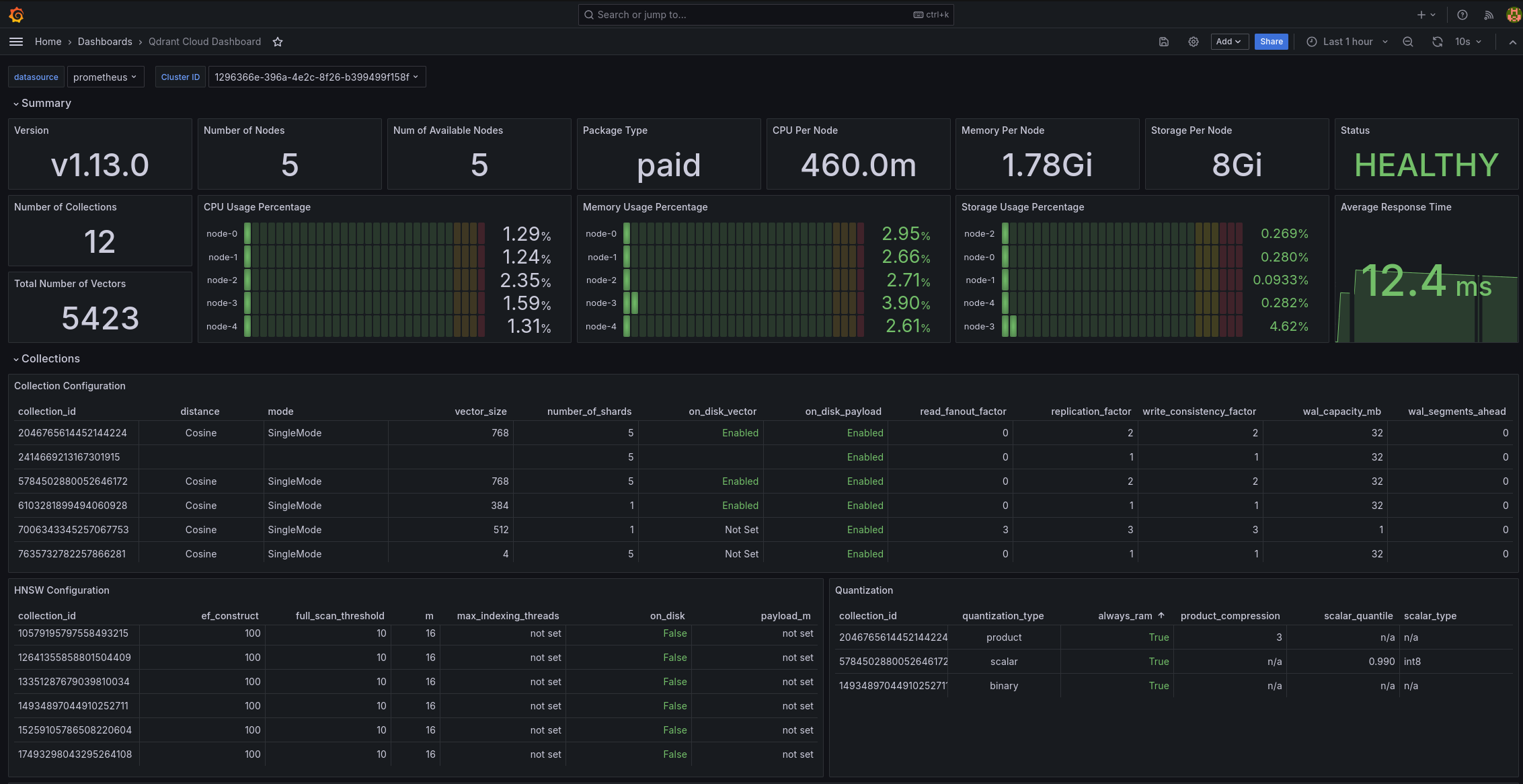
- 📈 Monitoring Stack: Integrated Prometheus and Grafana for real-time metrics visualization
- 🐍 Python Client Integration: Comprehensive demo application showing cluster interaction
- 🐳 Docker-Based Deployment: Simple setup using Docker Compose
- 🔧 Detailed Configuration: Extensive options for tuning and optimizing performance
🚀 Quick Start
Prerequisites
- Docker and Docker Compose
- Python 3.8+
- Git
Installation
# Clone the repository
git clone https://github.com/Mohitkr95/qdrant-multi-node-cluster.git
cd qdrant-multi-node-cluster

# Install the package and dependencies
pip install -e .
Deploy the Cluster
# Start the Qdrant cluster with Prometheus and Grafana
cd deployments/docker
docker-compose up -d
Run the Demo
# Run the demonstration
python src/run_demo.py

# Or with custom parameters
python src/run_demo.py --host localhost --port 6333 --points 2000
Access Services
- Qdrant API: http://localhost:6333
- Prometheus: http://localhost:9090
- Grafana: http://localhost:3000 (default login: admin/admin)
📋 Documentation
Comprehensive documentation is available in the docs directory:
- Getting Started Guide
- Architecture Overview
- Configuration Guide
- API Reference
- Performance Tuning
- Troubleshooting
🛠️ Project Structure
qdrant-multi-node-cluster/
├── config/                    # Configuration files
│   ├── grafana.json           # Grafana dashboard configuration
│   └── prometheus.yml         # Prometheus configuration
├── deployments/               # Deployment files
│   └── docker/                # Docker-related files
│       └── docker-compose.yml # Docker Compose configuration
├── docs/                      # Documentation
│   ├── api/                   # API documentation
│   ├── guides/                # User guides
│   └── images/                # Documentation images
├── src/                       # Source code
│   ├── qdrant_demo/           # Main package
│   │   ├── config/            # Configuration settings
│   │   ├── core/              # Core functionality
│   │   └── utils/             # Utility functions
│   └── run_demo.py            # Main entry point
├── tests/                     # Test files
├── LICENSE                    # MIT License
├── Makefile                   # Development commands
├── README.md                  # Project overview
├── requirements.txt           # Python dependencies
└── setup.py                   # Package setup file
📊 Monitoring and Visualization
This project integrates Prometheus for metrics collection and Grafana for visualization, providing real-time insights into your Qdrant cluster's performance.
🔍 Advanced Configuration
Sharding Configuration
Customize sharding to distribute data efficiently:
# In settings.py
SHARD_NUMBER = 4  # Default shard count
Vector Parameters
Configure vector dimensions and distance metrics:
# In cluster_demo.py
client.create_collection(
    collection_name=self.collection_name,
    vectors_config=models.VectorParams(
        size=self.vector_size,  # 768 by default
        distance=models.Distance.COSINE
    ),
    # ...other parameters
)
Adding More Nodes
Extend the cluster by adding more nodes in docker-compose.yml:
qdrant_node4:
  image: qdrant/qdrant:v1.6.1
  volumes:
    - ./data/node4:/qdrant/storage
  depends_on:
    - qdrant_node1
  environment:
    QDRANT__CLUSTER__ENABLED: "true"
  command: "./qdrant --bootstrap http://qdrant_node1:6335 --uri http://qdrant_node4:6335"
🧪 Testing
Run the test suite:
# Run all tests
make test

# Or directly with Python
python -m unittest discover -s tests
🤝 Contributing
Contributions are welcome! See our Contributing Guide for details on how to get started.
- Fork the repository
- Create a feature branch (
git checkout -b feature/amazing-feature) - Commit your changes (
git commit -m 'Add amazing feature') - Push to the branch (
git push origin feature/amazing-feature) - Open a Pull Request
📜 License
This project is licensed under the MIT License - see the LICENSE file for details.
👏 Acknowledgments
- Qdrant for the excellent vector database
- Prometheus and Grafana for monitoring capabilities
- All contributors who help improve this project
📧 Contact
Mohit Kumar - @Mohitkr95
Project Link: https://github.com/Mohitkr95/qdrant-multi-node-cluster