

QoreDB
One app for all your databases.
The fast, open-source database client built with Rust. Connect to 12 native drivers from a single, beautiful interface. Local-first: your data stays yours.




Website · Download · Docs · Roadmap · Discord
5,000+ downloads · 12 database drivers · Two releases a month · Used in production by indie devs and startups.
Why QoreDB?
DBeaver, pgAdmin, phpMyAdmin do the job — but they feel slow, dated, and full of dialogs from another era. QoreDB is what we wished existed: a tool you actually enjoy opening every morning.
| ⚡ Native performance | Rust + Tauri. No Electron tax — small binary, instant startup, low memory. ~25% faster on real workloads than the previous baseline (Apple Silicon). |
| 🔒 Local-first & secure | Credentials in your OS keychain (Argon2). Dev/Staging/Prod guards, dangerous query detection, read-only mode. Nothing leaves your machine by default. |
| 🧩 SQL + NoSQL, unified | One UI for PostgreSQL, MySQL, SQL Server, SQLite, DuckDB, CockroachDB, MongoDB and Redis — plus first-class support for Supabase, Neon and TimescaleDB. |
| 📓 Notebooks built-in | Executable SQL/Mongo + Markdown documents with parameters, charts and Git-diffable .qnb files. |
| 🛡️ Safety-first | Universal Query Interceptor, audit logging, sandbox mode with migration generation. Production damage is harder to do by accident. |
| 🤝 Open core | Apache 2.0 core, readable and auditable. Premium add-ons under BUSL-1.1 — never at the expense of the open-source experience. |
Supported databases













Screenshots
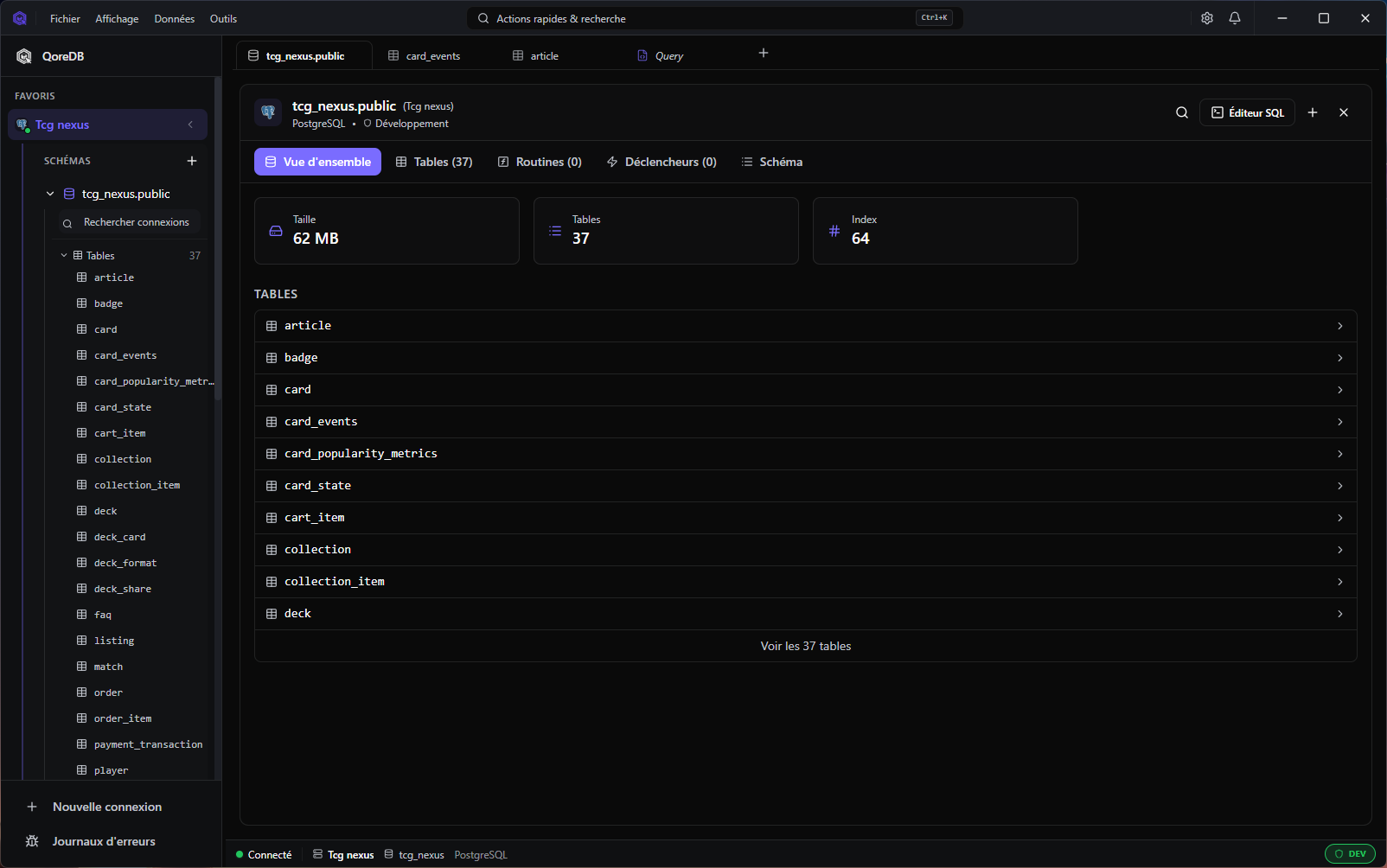 Database browser — multi-connection sidebar, table preview, breadcrumbs. |
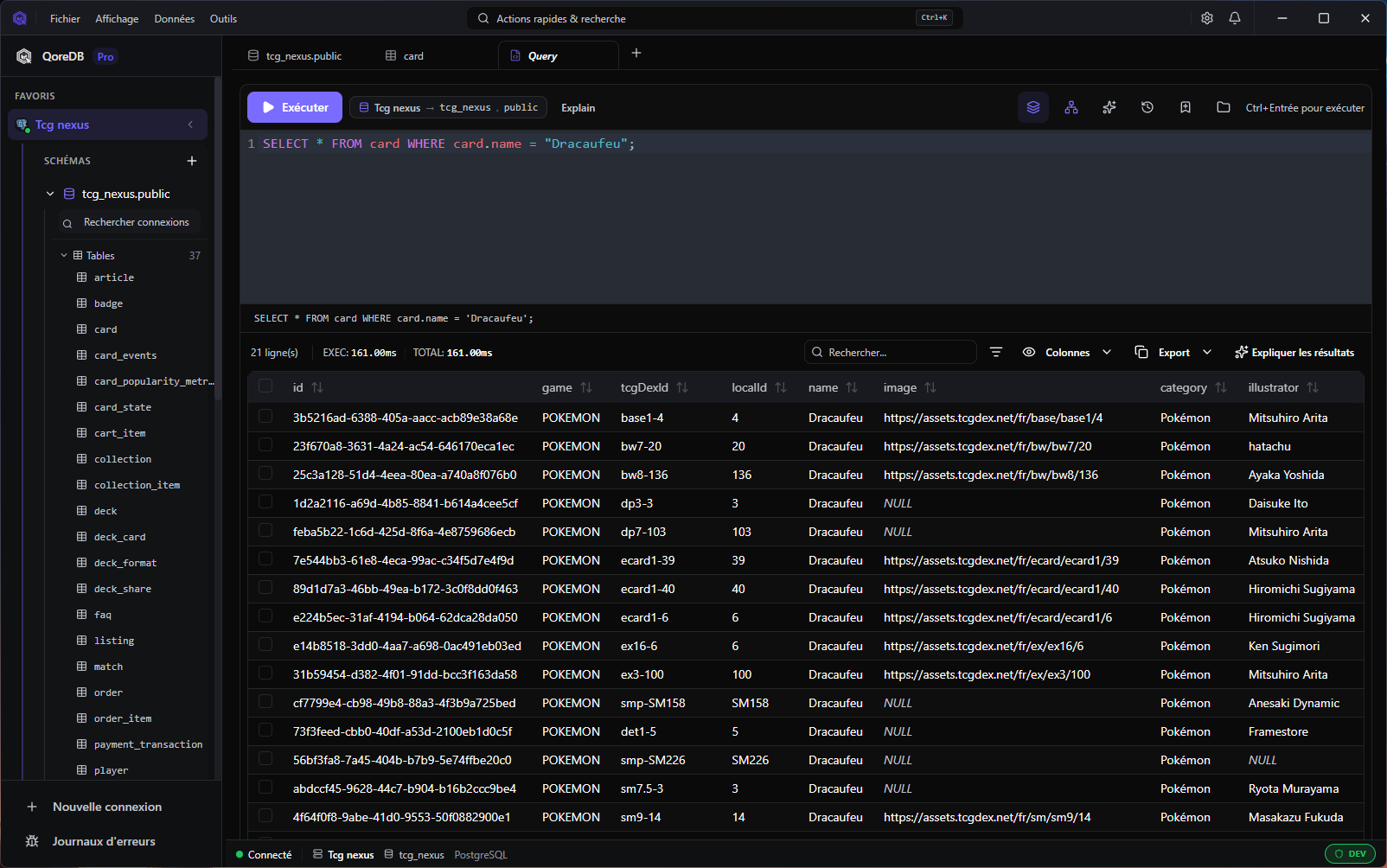
SQL editor — autocomplete, formatting, multi-statement execution, virtualized result grid. |
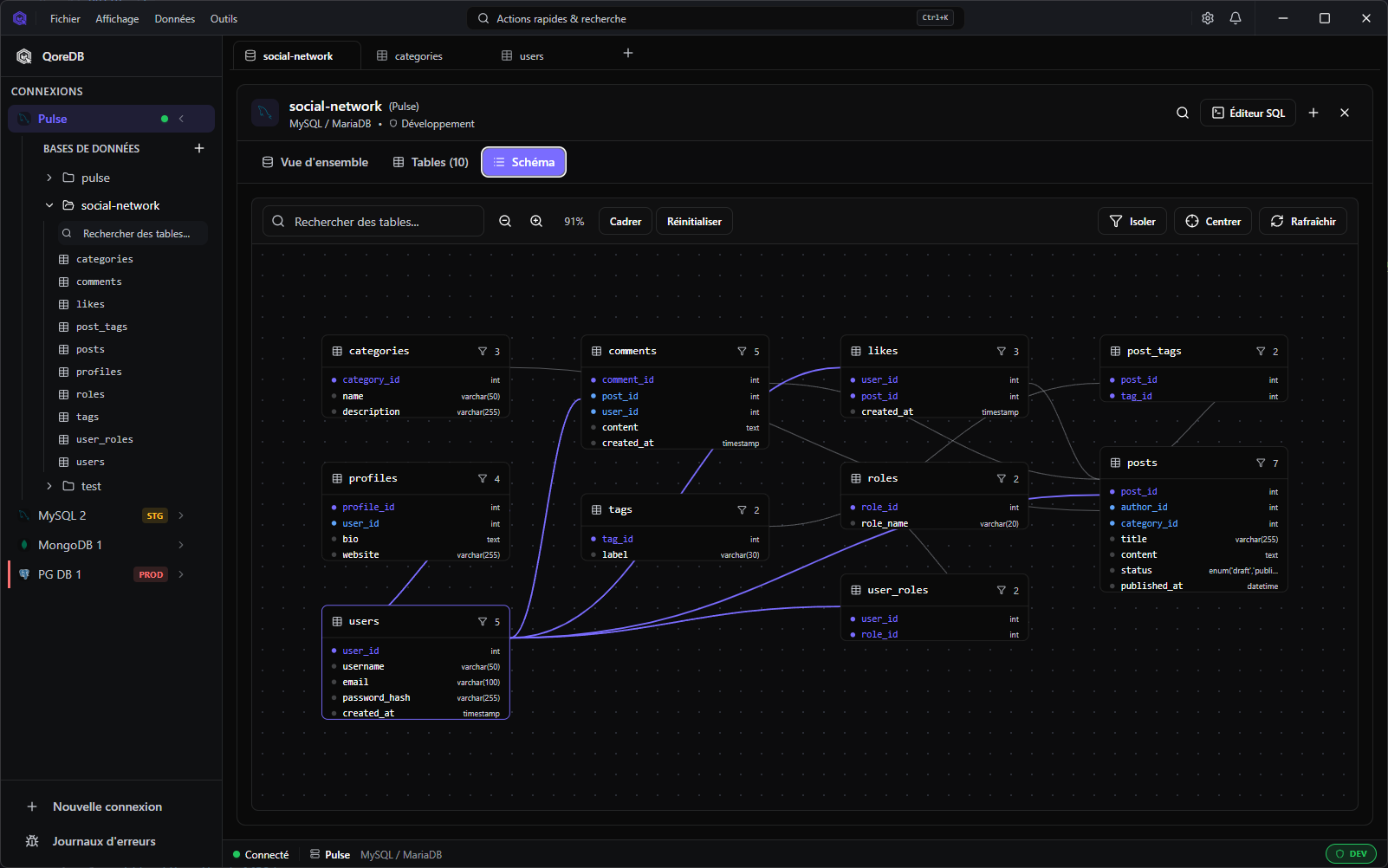 ER diagram — interactive schema graph with isolate/focus workflows. |
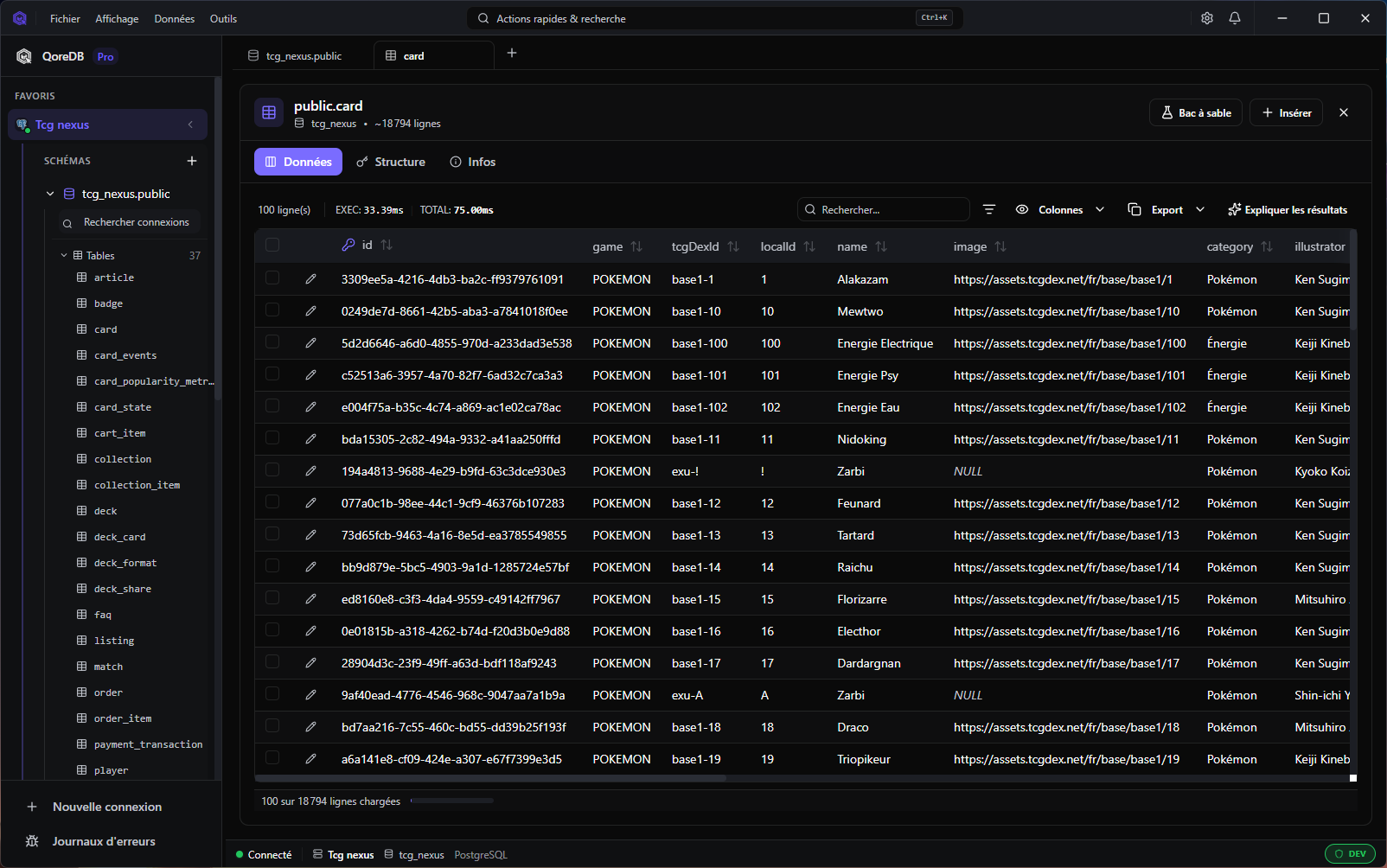 Data grid — virtualization, column pinning, advanced filters, inline editing. |
Features
Query & schema
- SQL editor — Syntax highlighting, formatting, snippets, multi-statement execution
- MongoDB editor — Autocomplete (collections, methods, operators), real-time JSON linter, aggregation pipeline validation with stage classification and examples
- QoreQuery — Type-safe multi-dialect query builder (JOINs, subqueries, aggregates, CAST, COALESCE, LIKE/ILIKE) targeting PostgreSQL, MySQL, SQLite, DuckDB and SQL Server
- Query library — Folders, tags, JSON import/export, reusable queries
- ER diagram — Interactive schema graph with isolate/focus workflows [Pro]
- Visual DDL editor — Full CREATE and ALTER TABLE from the UI: columns, foreign keys, indexes, check constraints with live driver-specific SQL preview
- Explain Plan visualization — Interactive execution plan tree with cost highlighting (PostgreSQL, MySQL, SQL Server)
- Visual data diff — Side-by-side comparison of table/query results [Pro]
- Global full-text search — Search values across all tables and columns
- Foreign key peek + virtual relations — Navigation even without native FK constraints
- Routines, procedures, triggers & events — List, create and edit stored objects with SQL templates
Data operations
- High-performance data grid — Virtualization, server-side filtering/sorting, pagination, infinite scroll, column pinning
- Advanced column filters —
contains,regex,greater than,betweenand more across every driver - Inline editing — Edit rows directly in SQL and NoSQL datasets
- Bulk edit — Multi-row column updates from the grid with live SQL preview (≤ 5 rows in Core, more in Pro)
- Time Travel — Browse the history of any row with a visual timeline, diff between any two points, preview Rollback SQL before reverting [Pro]
- Blob/binary viewer — Hex / base64 / image preview (PNG, JPEG, GIF, SVG, BMP, ICO) with copy-as-data-URI
- CSV import — Automatic separator/encoding detection, column mapping, preview before import
- Transaction management — Toggle autocommit, explicit Commit/Rollback, active transaction indicator
- Export pipeline — CSV, JSON, SQL, HTML, self-contained HTML (+ XLSX/Parquet in Pro)
- Cross-database federation — Query and join across active connections via DuckDB
- Sandbox mode — Isolated local changes with migration generation
- Backup & restore — Visual wrappers around
pg_dump,mysqldump,mongodumpandsqlite3 .dump, with streaming logs, cancel mid-run and tool-path overrides - Query result cache — Recent table navigation served instantly from a local cache, auto-invalidated when you change data through QoreDB
- Plugin system — Install declarative plugins contributing SQL snippet packs, connection templates and color themes — no code execution
Data quality & integration
- Data Contracts — Declarative YAML assertions (12 rule types: NOT NULL %, regex, range, unique, FK integrity, custom SQL) executed as generated SQL, with a health dashboard, notebook cell and post-mutation alert hook [Pro]
- Instant Data API — Expose saved queries as read-only REST endpoints on
127.0.0.1, with Bearer auth, rate limiting, OpenAPI 3.1 generation and one-shot token regeneration [Pro]
Notebooks
- Executable documents mixing SQL/Mongo and Markdown cells, connected to a live database
- Parameterized variables (
$customer_id,{{date_from}}) with typed inputs - Run All / Run From Here with stop-on-error
- Inter-cell references and Chart cells (bar, line, pie, scatter) [Pro]
- Import from
.sql/.md, export to Markdown or standalone HTML .qnbfile format, Git-diffable
MongoDB & Redis
- MongoDB — Bulk write/find, aggregation pipeline validation, regex and text search, native index management UI
- Redis — Create, edit and delete keys and values across all Redis types from the UI, with Lua script evaluation
Security & reliability
- Secure vault — Native OS keychain storage (Argon2) + optional app lock
- SSH tunneling — Native OpenSSH client with proxy jump support
- SQL Server Windows authentication — NTLM (username/password) and SSPI/Kerberos (integrated, no credentials)
- Environment safety — Dev/Staging/Prod guards, dangerous query detection, read-only mode
- Query rate limiting — Per-connection guardrail against accidental runaway query loops, plus a filesystem capability allow-list
- Universal Query Interceptor — Central hooks for safety, audit and profiling
- Audit logging — Sensitive content redaction in logs, stable SHA-256 query fingerprint per entry, JSONL/CSV export from the full retained trail
- Connection resilience — Automatic reconnection, health monitoring, smart keep-alive
- Background job manager — Async execution for long-running tasks with error recovery
User experience
- Workspaces — Group connections, queries, notebooks and history per project
- Multi-tab workspace — Drag-and-drop reorder, pinned tabs, persistent context across connection switches
- Tab groups — Tabs grouped by connection, collapsible, per-tab context menu
- Session restore — Tabs and their state persist on app restart
- Global search —
Cmd/Ctrl + Kacross connections, history, commands, library - Breadcrumb navigation —
Connection > Database > Schema > Tableclickable path - Dark / light theme
- Customizable keyboard shortcuts — Every binding editable from Settings, click-to-rebind, conflict detection, cross-OS chords, reset per shortcut or globally
- 9 languages — English, French, Spanish, German, Portuguese (BR), Russian, Japanese, Korean, Chinese (Simplified)
AI assistant [Pro]
- Contextual query generation and error correction
- Schema-aware suggestions
- Bring your own key (OpenAI, Anthropic, …)
Performance
- ~25% faster on real workloads (Apple Silicon) thanks to per-column decoders, MessagePack streaming between Rust and the frontend, batch streaming, expanded LRU caches, and the
mimallocallocator - Lazy loading — heavy frontend modules load on demand for faster startup
How QoreDB compares
| QoreDB | DBeaver | TablePlus | pgAdmin | |
|---|---|---|---|---|
| Open source core | ✅ Apache 2.0 | ⚪ Community | ❌ No | ✅ Yes |
| Multi-database (SQL + NoSQL) | ✅ 12 drivers | ✅ Yes | ⚪ Limited | ❌ PG only |
| Native performance | ✅ Rust/Tauri | ❌ Java/Swing | ✅ Native | ❌ Web-based |
| Local-first / no cloud | ✅ Yes | ✅ Yes | ✅ Yes | ✅ Yes |
| Encrypted credential vault | ✅ Argon2 | ⚪ Basic | ✅ Keychain | ❌ No |
| Production safety guards | ✅ Yes | ❌ No | ⚪ Partial | ❌ No |
| Sandbox mode + migrations | ✅ Pro | ❌ No | ❌ No | ❌ No |
| Full-text search (all tables) | ✅ Yes | ❌ No | ❌ No | ❌ No |
| Interactive ER diagram | ✅ Yes | ✅ Yes | ❌ No | ⚪ Partial |
| Cross-database federation | ✅ Pro | ❌ No | ❌ No | ❌ No |
| AI query assistant | ✅ BYOK | ❌ No | ❌ No | ❌ No |
| Modern, fast UI | ✅ Yes | ❌ Dated | ✅ Yes | ❌ No |
| Maturity / ecosystem | ⚪ New | ✅ 15+ years | ⚪ Established | ✅ 20+ years |
| Price (personal use) | Free / Pro | Free / $199 | $89 | Free |
We're young but moving fast — see the public roadmap.
Installation
Download
Grab the latest release for your platform from the Releases page or qoredb.com/download.
| Platform | Format |
|---|---|
| macOS | .dmg (Apple Silicon & Intel) |
| Windows | .msi / .exe |
| Linux | .deb / .AppImage |
Arch Linux (AUR)
yay -S qoredb-bin
Build from source
Prerequisites: Node.js 18+, pnpm, Rust 1.70+, Tauri system dependencies.
git clone https://github.com/QoreDB/QoreDB.git
cd QoreDB
pnpm install
pnpm tauri dev      # development
pnpm tauri build    # production
Ubuntu / Debian system packages
sudo apt-get update
sudo apt-get install -y \
  pkg-config \
  libglib2.0-dev \
  libgtk-3-dev \
  libwebkit2gtk-4.1-dev \
  libayatana-appindicator3-dev \
  librsvg2-dev
Quick start
- Launch QoreDB
- Add a connection — click
+in the sidebar, or paste a DSN - Connect — pick the connection in the sidebar
- Explore — browse databases, tables, run queries or open a notebook
Keyboard shortcuts
| Shortcut | Action |
|---|---|
Cmd/Ctrl + K |
Global search |
Cmd/Ctrl + N |
New query tab |
Cmd/Ctrl + W |
Close current tab |
Cmd/Ctrl + Enter |
Execute query |
Cmd/Ctrl + S |
Save |
Cmd/Ctrl + , |
Settings |
Development
Frontend: React 19 · TypeScript 5.9 · Vite 8 · Tailwind CSS 4 · Radix UI · CodeMirror 6 · TanStack Table · i18next Backend: Rust 2021 · Tauri 2.10 · Tokio · SQLx (PostgreSQL, MySQL, SQLite) · Tiberius + bb8 (SQL Server) · MongoDB & Redis native drivers · DuckDB (embedded analytics + federation)
pnpm tauri dev              # run app in dev mode (hot reload)
pnpm tauri build            # build production app
pnpm lint:fix               # lint + auto-fix
pnpm format:write           # format code
pnpm test                   # run Rust tests
docker-compose up -d        # start dev databases
For project structure, architecture notes and contribution workflow, see CONTRIBUTING.md and doc/.
Roadmap & community
- 🗺️ Public roadmap — what's shipped, what's next
- 📝 Changelog — release notes on GitHub
- 💬 Discord — get help, share feedback
- 🐛 Issues — report bugs or request features
- 💼 LinkedIn — follow project updates
Contributing
Contributions are welcome! Please read CONTRIBUTING.md before opening a PR. In short:
- Fork the repo and create a feature branch
- Run
pnpm lint:fixandpnpm testbefore pushing - Add the SPDX license header to new files (
Apache-2.0for core,BUSL-1.1for premium) - Open a PR — we'll review, suggest changes, and ship it
Security issues should be reported privately — see SECURITY.md.
License
QoreDB is open core:
- Core files — Apache 2.0
- Premium files (ER diagram, data diff, profiling, time travel, …) — Business Source License 1.1
The boundary is documented in CLAUDE.md and via SPDX headers in every source file.
Acknowledgments
Built on the shoulders of giants: Tauri · CodeMirror · Radix UI · Tailwind CSS · SQLx · DuckDB · TanStack Table · i18next
If QoreDB makes your day a little better, a ⭐ on GitHub goes a long way.