
Qwen Gate



Disclaimer: This project is for educational and study purposes. It provides access to Qwen models via
chat.qwen.aibrowser automation. Not affiliated with Alibaba Group or Qwen. Users must comply withchat.qwen.ai's terms of service.
Quick Start
curl -sSL https://raw.githubusercontent.com/youssefvdel/qwen-gate/main/install.sh | bash
cd qwen-gate
qg
Then open http://localhost:26405/dashboard to add accounts and start using the API.
Features
- Free Qwen Models — Use Qwen 3.7-Max, Qwen 3-Max, Qwen 3-Plus, and more for free in your existing tools. Point Claude Code, OpenCode, Qwen Code, Cursor, or any OpenAI-compatible client at Qwen Gate and use Qwen models without paying per-token.
- OpenAI-Compatible API — Drop-in replacement for
/v1/chat/completionsand/v1/models. Works with existing OpenAI SDKs, curl, or any HTTP client. - Multi-Account Rotation — Configure multiple Qwen accounts (3+ recommended). Requests are distributed via round-robin with automatic failover and cooldown tracking — cooldown limits become a non-issue.
- Session Pooling — Browser sessions are pooled, reused, and autoscaled under load. No per-request login overhead.
- Tool Calling — Full OpenAI-style function calling with JSON Schema validation and spam guards.
- Streaming SSE — Server-Sent Events with heartbeat keep-alive and content filter integrity maintained across stream boundaries.
- Content Filter Pipeline — Strips thinking tags and filters internal artifacts from model output.
- Web Dashboard — Real-time monitoring with 5 pages: overview, request log, account manager, network debug, and settings.
- Stealth Browser Automation — Uses CloakBrowser with anti-detection patches to maintain session integrity.
- No Build Step — TypeScript executed directly via
tsx. Run from source with no compilation needed.
Installation
One-Command Install (Linux / macOS)
curl -sSL https://raw.githubusercontent.com/youssefvdel/qwen-gate/main/install.sh | bash
This clones the repo, installs dependencies, creates config.json, and symlinks the qg / qwengate / qwen-gate CLI commands.
Windows Install
Open PowerShell (as administrator) and run:
powershell -ExecutionPolicy Bypass -c "curl.exe -sSL https://raw.githubusercontent.com/youssefvdel/qwen-gate/main/install.ps1 | iex"
Or clone manually:
git clone https://github.com/youssefvdel/qwen-gate.git
cd qwen-gate
copy config.example.jsonc config.json
npm install
Then run qg to start the server.
Manual Install
git clone https://github.com/youssefvdel/qwen-gate.git
cd qwen-gate
cp config.example.jsonc config.json
npm install
Start the Server
qg
Or:
npm start
The server starts on http://localhost:26405.
Add Accounts
⚠️ Best practice: Use 3+ accounts for round-robin rotation to bypass cooldown limits. Do not use your personal Qwen account — create dedicated accounts.
- Open http://localhost:26405/dashboard/accounts
- Enter your Qwen email and password
- Click Add Account — the gateway handles login and session persistence
Usage
Use with Any OpenAI-Compatible Client
Qwen Gate works with any tool that speaks OpenAI's API: Claude Code, OpenCode, Qwen Code, Cursor, standard OpenAI SDKs (Python, Node.js, curl), and anything else using the /v1/chat/completions format — just point it at http://localhost:26405/v1.
Tip: Use
model: "qwen3.7-max"for the latest Qwen model. Available models:qwen3-max,qwen3.7-max,qwen3-plus,qwen-turbo,qwen3.
Chat Completion
curl -X POST http://localhost:26405/v1/chat/completions \
  -H "Content-Type: application/json" \
  -H "Authorization: Bearer your-api-key" \
  -d '{
    "model": "qwen3-max",
    "messages": [{"role": "user", "content": "Hello!"}]
  }'
Streaming
Set "stream": true for SSE:
curl -X POST http://localhost:26405/v1/chat/completions \
  -H "Content-Type: application/json" \
  -H "Authorization: Bearer your-api-key" \
  -d '{"model": "qwen3-max", "stream": true, "messages": [{"role": "user", "content": "Count to 5"}]}'
Tool Calling
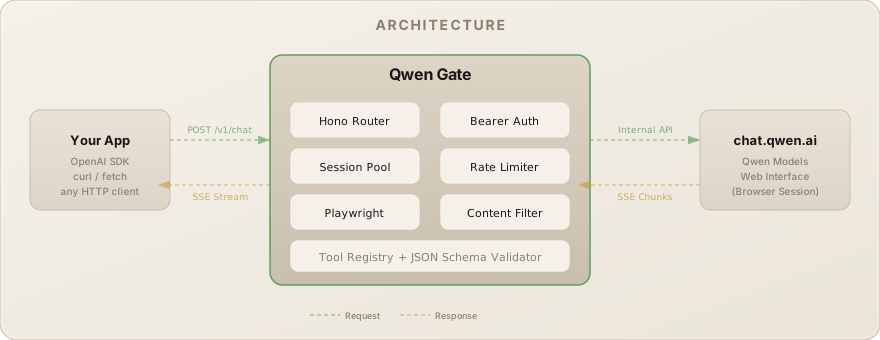
How it works: Qwen doesn't natively support tool calling — it outputs tool calls as JSON text in its response. The gateway parses that text and converts it into OpenAI-compatible tool call objects. It's not perfect, but it works for most use cases.
curl -X POST http://localhost:26405/v1/chat/completions \
  -H "Content-Type: application/json" \
  -H "Authorization: Bearer your-api-key" \
  -d '{
    "model": "qwen3-max",
    "messages": [{"role": "user", "content": "Weather in Paris?"}],
    "tools": [{
      "type": "function",
      "function": {
        "name": "get_weather",
        "parameters": {
          "type": "object",
          "properties": {"city": {"type": "string"}},
          "required": ["city"]
        }
      }
    }]
  }'
Configuration
All settings in config.json. Key options:
| Key | Default | Description |
|---|---|---|
PORT |
"26405" |
Server port |
API_KEY |
"" |
Bearer token for API auth (empty = no auth) |
BROWSER |
"chromium" |
Browser engine: chromium, firefox, webkit |
TOOL_CALLING |
"true" |
Enable tool call parsing |
CLEAN_OUTPUT |
"true" |
Strip internal artifacts from responses |
ECHO_DETECTOR |
"true" |
Detect tool-result echo leaks |
SAVE_REQUEST_LOGS |
"false" |
Save per-request logs to disk |
OPEN_DASHBOARD_ON_START |
"false" |
Auto-open dashboard in browser |
RATE_LIMIT_COOLDOWN_MS |
"120000" |
Cooldown after rate limit (2 min) |
RETRY_MAX_ATTEMPTS |
"3" |
Max retry attempts |
Full reference: docs/API.md and config.example.jsonc.
Architecture
Web Dashboard
Accessible at http://localhost:26405/dashboard.
| Page | Path | Purpose |
|---|---|---|
| Overview | /dashboard |
KPIs, model health, system logs, session pool status |
| Logs | /dashboard/logs |
Real-time request log with expandable entry details |
| Accounts | /dashboard/accounts |
Add/remove Qwen accounts, view auth status |
| Network | /dashboard/network |
Outbound API call inspector |
| Settings | /dashboard/settings |
Live config editor (changes apply instantly) |
CLI
Three binary aliases: qg, qwengate, qwen-gate.
Usage: qg [command] [options]

Commands:
  start          Start the API server (default)
  update         Pull latest code and reinstall dependencies
  restart        Restart the running server
  status         Check if the server is running
  help           Show help message

Options:
  --port <n>     Override port
  --browser <e>  Browser engine: chromium, firefox, chrome, edge
  --host <addr>  Bind address

Account management is done via the web dashboard → Accounts page.
Updating
Via CLI (easiest)
qg update
This runs git pull --ff-only && npm install. Then restart the server:
qg restart
Manual
git pull && npm install && qg restart
Re-run the installer
# Linux / macOS
curl -sSL https://raw.githubusercontent.com/youssefvdel/qwen-gate/main/install.sh | bash

# Windows (PowerShell)
powershell -ExecutionPolicy Bypass -c "curl.exe -sSL https://raw.githubusercontent.com/youssefvdel/qwen-gate/main/install.ps1 | iex"
The server checks for new GitHub releases on startup and logs a warning in the dashboard when an update is available.
Project Structure
src/
├── cli.ts                   CLI entry (qg command parser)
├── index.tsx                Hono server, routing, middleware
├── routes/                  API route handlers
│   ├── chat.ts              Chat completions dispatch
│   ├── chatStreaming.ts     Streaming SSE logic
│   ├── chatNonStreaming.ts  Non-streaming responses
│   ├── accounts.ts          Account CRUD API
│   ├── config.ts            Config read/write API
│   └── dashboard/           Web dashboard (vanilla HTML/JS)
├── services/                Business logic
│   ├── auth.ts              Auth orchestration
│   ├── accountManager.ts    Account CRUD, round-robin rotation
│   ├── sessionPool.ts       Session pool with autoscaling
│   ├── playwright.ts        Browser init & management
│   ├── qwenModels.ts        Model fetching & mapping
│   ├── modelRouter.ts       Model routing & fallback
│   ├── networkDebug.ts      Outbound call capture
│   ├── logStore.ts          In-memory log store + SSE
│   └── configService.ts     Config loader
├── tools/                   Tool calling system
│   ├── registry.ts          Tool registry
│   ├── parser.ts            Tool call parsing
│   ├── guard.ts             Spam/abuse guard
│   └── schema.ts            JSON Schema validation
├── utils/                   Shared utilities
│   ├── xmlStripper.ts       XML/tool call artifact removal
│   ├── contentFilter.ts     Streaming content filter
│   ├── retry.ts             Exponential backoff
│   └── logger.ts            Structured logger
└── middleware/
    └── rateLimit.ts         Token bucket rate limiter
Testing
npm test
Uses the node:test runner. Covers content filtering, tool-call parsing, echo detection, and spam guard behavior.
Documentation
| Document | Description |
|---|---|
| Architecture | System design, component breakdown, data flow |
| API Reference | Full endpoint documentation |
| Deployment | Production deployment guide |
| Development | Contributing, testing, code conventions |
Star History
License
MIT — see LICENSE.